Review, resolve, and finalize the converted schema
The conversion report tells you what converted automatically, but the Schema Review pane is where the substantive migration work continues. This unit covers how to read and triage review tasks, resolve them using GitHub Copilot agent mode or manual edits, navigate the output artifacts, plan for unsupported objects, and apply final best practices before deploying the converted schema.
Understand review tasks
A review task is a flagged item that requires your judgment before the converted schema goes to production. The tool creates review tasks when:
- It detects a behavioral difference between Oracle and PostgreSQL that has more than one valid resolution, for example,
NUMBER(p,s)precision mapping, or how empty strings map to NULL - The converted DDL compiled against the scratch schema, but the behavior may not be identical to the Oracle source
- Complex PL/SQL logic was converted using a fallback pattern that you should verify
- The object represents a partial conversion where manual completion is needed
Review tasks aren't conversion failures. They're the mechanism through which the tool delegates judgment to you. Many tasks are reminders to verify behavior differences rather than indicators that an object is broken.
Navigate the Schema Review pane
The Schema Review pane in VS Code is the primary interface for triaging and resolving review tasks. It offers two views:
- Grouped view: Tasks grouped by behavioral category, such as Numeric Semantics, Date/Time Behavior, Empty String / NULL, NLS / Collation, and DBMS_OUTPUT. Each group shows the total number of tasks, pending items, and blocked items. Use this view to plan remediation by theme and identify which behavioral areas represent the most work.
- Tasks view: Individual tasks with filters for Status (Pending / Resolved), Priority, Object Type, and Schema. Use this view to triage, prioritize, and resolve tasks one by one.
Switch between Pending and Resolved to track progress.
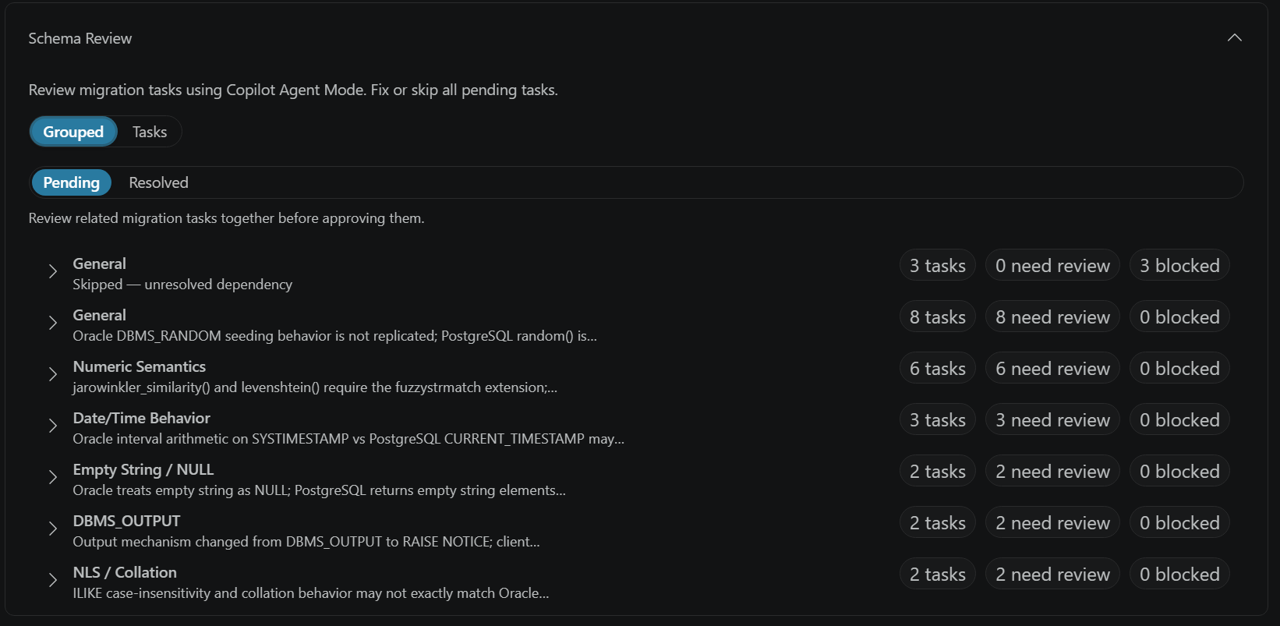
Prioritize by criticality level
Every review task carries a criticality level that maps to a priority:
| Criticality | Priority | When to resolve |
|---|---|---|
| Mandatory | High | Resolve before deployment. The converted object isn't ready for production use until you address this task. |
| Recommended | Medium | Resolve before promoting the schema to production. The object can deploy, but the behavior should be validated against the Oracle source. |
| Optional | Low | Resolve when convenient. The task highlights a minor difference or improvement opportunity. |
Work through Mandatory tasks first, then Recommended, then Optional.
Resolve a task
There are two ways to resolve a review task.
Resolve with GitHub Copilot agent mode
- In the Schema Review pane, select a task to open its details.
- Select Run Task. This launches GitHub Copilot agent mode in VS Code and loads the source DDL, the generated PostgreSQL DDL, and the task evidence as context.
- Review Copilot's proposed fix.
- Accept the fix (or modify it) and apply it to the generated
.sqlfile. - Connect to the scratch database from VS Code and run the updated
.sqlfile to validate the fix. - Select Resolve to mark the task complete.
Resolve manually
- Open the generated
.sqlfile for the object. Files are organized underpostgres_ddl/<schema>/<object_type>/in the session folder. - Edit the file in VS Code.
- Connect to the scratch database and run the updated file to validate the fix.
- Select Resolve in the Schema Review pane.
Important
Resolving a review task updates the .sql file in postgres_ddl/, but the change is not automatically applied to the scratch database. Connect to the scratch database from VS Code and run the updated .sql file to validate the fix before marking the task as resolved.
Validation matters as much when you let AI help resolve a task, because the review step introduces its own risk.
Important
The same AI that converts schema objects can also assist with reviewing those objects through GitHub Copilot agent mode. AI systems can occasionally confirm their own mistakes. Independently validate all converted objects and review-task resolutions before deploying to production. Never rely solely on AI-generated or AI-reviewed output to confirm production readiness.
Locate the output artifacts
The session folder under artifacts/oracle/_migration/convert/sessions/<session-id>/ contains the primary conversion output for a run. Know which file to open first:
| Artifact | Purpose | Primary audience |
|---|---|---|
reports/customer_summary.md |
Overall readiness decision, conversion status, next actions | Start here; share with project sponsors |
reports/technical_conversion_report.md |
Detailed per-object status for DBAs and migration engineers | Technical deep-dive and audit |
reports/review_tasks.md |
Offline copy of review tasks for reference | Offline reference; resolve from the Schema Review pane |
postgres_ddl/<schema>/<object_type>/ |
One .sql file per converted object |
Edit and revalidate individual objects |
deploy.sql |
Consolidated deployment script in dependency order | Final deployment to the production target |
Open reports/customer_summary.md first. It gives you the overall readiness decision and points you to the relevant reports and SQL files. For deployment, use deploy.sql, which contains the full schema in the correct dependency order.
Plan around limitations
Certain Oracle objects are outside the conversion tool's supported scope. The tool doesn't extract or convert these categories, so they don't appear as review tasks or in the converted DDL. The extraction phase records them in excluded_objects.csv and unsupported_types.csv. Review those files to plan how to handle each object before you run the conversion.
Categories of unsupported objects include:
- System schemas:
SYS,SYSTEM,XDB,MDSYS,CTXSYS,WMSYS, and other Oracle built-in schemas - Specialized table types: index clusters, hash clusters, external tables, hybrid partitioned tables, and blockchain tables
- Specialized index types: bitmap indexes, bitmap join indexes, global partitioned indexes
- Certain views: flashback queries (
AS OF TIMESTAMP,AS OF SCN), editioning views, materialized view logs, and refresh groups - System event triggers:
LOGON,LOGOFF,STARTUP,SHUTDOWN,SERVERERRORtriggers - Java in the database: Java stored procedures, Java sources, and classes, external libraries
- Wrapped PL/SQL: packages, procedures, functions, and type bodies stored in obfuscated form using Oracle's
wraputility orDBMS_DDL.WRAP. Provide unwrapped source to the tool. - Advanced
DBMS_SCHEDULERfeatures: file watchers, event-based jobs, programs, chains, job classes, credentials, windows, and groups. Simple time-based jobs map topg_cron. - Oracle Advanced Queuing (AQ): replatform to an Azure messaging service such as Azure Service Bus
- OLAP and analytic objects: analytic views, attribute dimensions, hierarchies, OLAP dimensions
- Database links: recreate using
postgres_fdwororacle_fdw, or refactor to application-level connections - Storage, security, and administration objects: application contexts, directory objects, fine-grained auditing, and unified audit policies, Information Lifecycle Management (ILM) policies, Resource Manager objects, SQL Translation profiles, and Workspace Manager
For each unsupported object you identify, decide in advance whether to recreate the functionality natively in PostgreSQL, replatform it to an Azure service, or drop it from the migration scope.
Apply best practices before deployment
Align scratch and production: Validate against the same PostgreSQL major version you plan to deploy to, and install the same extensions and search_path on the production target. Otherwise, deploy.sql fails wherever converted code calls extension functions such as those from orafce.
Rerun when inputs change: The conversion is repeatable. Rerun it when you allow-list a missing extension, bring another schemas into scope, fix a source Oracle object, or increase Microsoft Foundry TPM capacity. Compare the new report against the previous one to confirm the change had the intended effect. Because the model can express the same logic in more than one valid way, expect minor textual differences between runs even when the schema is unchanged; keep your first run's output as the reference for audit comparisons.
Size Foundry capacity correctly: Run one conversion project at a time so concurrent runs don't compete for the same Microsoft Foundry quota, and provision enough TPM for your schema's size and PL/SQL complexity.
Independently validate all output: Run the generated DDL in a nonproduction environment, execute converted procedures and functions with representative test data, and verify that business logic and result sets match the Oracle source. The tool's scratch-schema validation confirms syntax and dependency order, not the semantic equivalence of business logic.
Preserve conversion artifacts: Save the generated postgres_ddl/ folder and all session reports as the audit artifact for the migration project and the baseline for diff comparisons if you rerun the conversion. Store these artifacts in your team's source control or document-management system.
Review your limitations inventory: Before starting the Contoso Retail conversion, identify which unsupported object categories apply to the inventory management schema. For each one, document your remediation path, whether to recreate, replatform, or drop, before opening the Migration Wizard. A documented plan up front prevents late-stage surprises.