Secure your networks with Azure Firewall Manager
- 5 minutes
If you manage multiple firewalls, it's often difficult to keep the firewall rules in sync. Central IT teams need a way to define base firewall policies and enforce them across multiple business units. At the same time, DevOps teams want to create their own local derived firewall policies that are implemented across organizations.
Azure Firewall Manager helps solve these problems. Azure Firewall Manager provides centralized configuration and management across multiple Azure Firewall instances. Azure Firewall Manager lets you create one or more firewall policies and rapidly apply them to multiple firewalls.
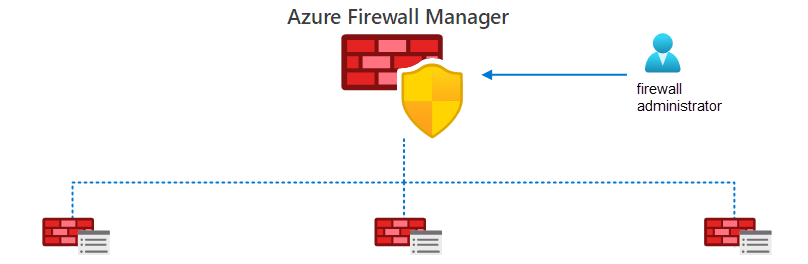
Firewall Manager can provide security management for secured virtual hubs and hub virtual networks.
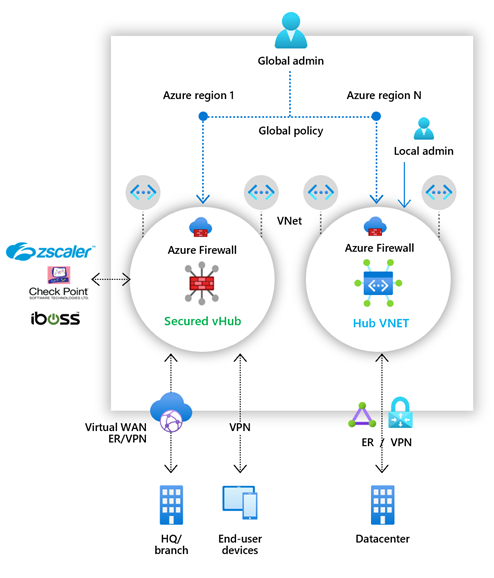
Secured Virtual Hub. A Microsoft-managed resource that enables you to easily create hub and spoke architectures. When you associate policies, you're using a secured virtual hub. The underlying resource is a virtual WAN hub.
Hub Virtual Network. A standard Azure virtual network that you create and manage. When you associate firewall policies with this type of hub, you're creating a hub virtual network. This architecture's underlying resource is a virtual network.
Azure Firewall Manager features
If your organization has multiple Azure Firewall instances, you benefit from centralizing these configurations. Firewall Manager enables you to:
Span multiple Azure subscriptions.
Span different Azure regions.
Implement hub and spoke architectures to provide for traffic governance and protection.
Azure Firewall Manager decision criteria
Administrators who protect multiple Azure virtual networks use rules to control traffic throughout their perimeter networks. As a virtual network infrastructure grows, it can become more complex to manage. Administrators benefit from using Firewall Manager to centralize configuration of Azure Firewall rules and settings. Here are some factors that help you decide whether Firewall Manager can benefit your organization.
| Criteria | Analysis |
|---|---|
| Complexity | A key question if you're considering Firewall Manager is "How complex are my organization's firewall and security requirements?" If you have a simple virtual-network structure with limited firewalls, you probably don't need Firewall Manager. |
| Need for centralized management | The next question to ask is "Will I benefit from a more centralized approach to managing my virtual networks and firewalls?" If the answer is yes, consider implementing Firewall Manager. |
| Number of virtual networks | Do you have several virtual networks with many distinct Azure Firewalls? Firewall Manager could benefit your organization. Conversely, do you have only a few virtual networks? Firewall Manager might not be beneficial for you. |
Tip
Learn more about Azure Firewall in the Introduction to Azure Firewall Manager module.