Decide where business logic and data live
Unit 2 sorts the equipment-provisioning requirements into what fits out-of-the-box and what needs custom work, and leaves the external inventory check as the clearest example of the latter. Knowing that a requirement needs custom logic is only half the decision. Now you work through where that logic should run, and which Dataverse table or connector approach fits the data behind it. You also decide when a rule-based method serves you better than an agentic one.
Match logic placement to how the result must behave
Power Platform gives you five places to put business logic, and each one trades off differently on speed, transaction safety, and reuse.
| Option | How it runs | Best for | Watch for |
|---|---|---|---|
| Power Fx / client-side | Evaluates live in the app as the user interacts with it | The fastest feedback and simple data access scenarios | App-specific unless packaged into a reusable component; no transaction guarantee |
| Business rules | Declarative conditions and actions; run on the server only when the scope is Entity, while form scopes run only in model-driven app forms | Simple, fast-changing validations, especially in model-driven apps | Limited to the actions the designer supports, and canvas apps don't support every action; not suited to multistep logic |
| Dataverse plug-ins | Run inside the Dataverse transaction that creates, updates, or deletes a row | Centralized logic that every app, flow, and API endpoint must respect, especially when a failure needs to roll back the change | Must stay short and efficient; not designed for long-running work |
| Power Automate cloud flows | Trigger asynchronously, outside the Dataverse transaction | Complex sequences that call multiple connectors without blocking the app | Steps aren't transactional by default, so a mid-flow failure needs its own compensation logic |
| External/cloud services (for example, Azure Functions) | Called from a plug-in or a connector | Heavy compute, specialized processing, or reaching a system with no first-party connector | Adds a network hop and another component to secure and monitor |
Apply that spectrum to the two requirements unit 2 left open. Eligibility validation checks a role, a tenure value, and a remaining allowance against a request. Those checks are simple, fast-changing comparisons that apply the same way regardless of which app or flow creates the request.
That's exactly the profile a business rule handles. With its scope set to Entity, it runs on the server rather than only in model-driven app forms. It suits model-driven apps best, because canvas apps don't support every business-rule action, and it needs no custom code to maintain.
The inventory check behaves differently depending on when the result has to matter. Suppose the request can't proceed until the stock count is known. A failed check then has to block the save and tell the user to pick a different device. In that case, place that call in a plug-in: it runs inside the same transaction that creates the Request record, so it can roll back the change and report the error straight back to the user.
If the check instead runs after the request already exists, and approval or fulfillment picks up the result later, a Power Automate cloud flow fits better: it calls the external service asynchronously, chains the stock confirmation with a notification step, and never blocks the app. Either way, the inventory service has no first-party connector. The call itself likely goes through a custom connector or a direct call to an external service such as an Azure Function.
Learn more about working with flows in a canvas app.
Choose the right table or connector for the data
The four tables behind the equipment-provisioning solution, Employee, Device, Request, and Allowance, hold data that's native to the solution, that relates across tables, and that apps query together. That's exactly what standard tables are built for: strong consistency, relational modeling, and transactional capability across tables during plug-in execution. But not every data requirement fits that model, and the inventory check is a useful contrast.
| Approach | Use when | Scenario fit |
|---|---|---|
| Standard tables | Data is native to the solution and needs relational modeling, joins, and transactional consistency | Employee, Device, Request, and Allowance |
| Virtual tables | Data lives in an external system of record and should appear as Dataverse rows without duplicating it | Device inventory counts that the external service owns, surfaced as rows for reporting or relating to the Device table |
| Elastic tables | Data volume is large, unstructured, or spiky, and needs high-throughput, horizontally scaling ingest | A high-volume device telemetry or audit log, not the core four-table model |
| Connectors | You need to call an external system at the moment of need, without storing or owning its data in Dataverse at all | A real-time stock check against the inventory service at request time |
Virtual tables and connectors solve a similar problem through different mechanisms, so the distinction matters. A virtual table makes externally sourced data behave like a regular Dataverse row: it can appear in views, participate in relationships, and get queried alongside Device records, even though Dataverse never stores a copy of it. Virtual tables are organization-owned and don't support Dataverse row-level security, so you implement security for that data in the external source.
A connector, by contrast, doesn't create a row at all. It calls the external system when you need an answer. That fits a point-in-time stock confirmation better than a continuously browsable inventory list.
Elastic tables solve a third, unrelated problem: they exist for workloads with large, fast-growing, or semi-structured data, such as telemetry or audit trails, not for a modest four-table relational model like this one. None of the four tables in this scenario calls for an elastic table, and forcing one in here adds schema flexibility the solution doesn't need.
Learn more about virtual tables and elastic tables.
Decide between deterministic and agentic logic
Every option covered so far, business rules, plug-ins, and classic Power Automate flows, is deterministic: you write explicit rules, you fix the sequencing, and the same input always produces the same, explainable output. That predictability is valuable precisely because it's auditable; anyone reviewing the solution can trace exactly why a given request passed or failed.
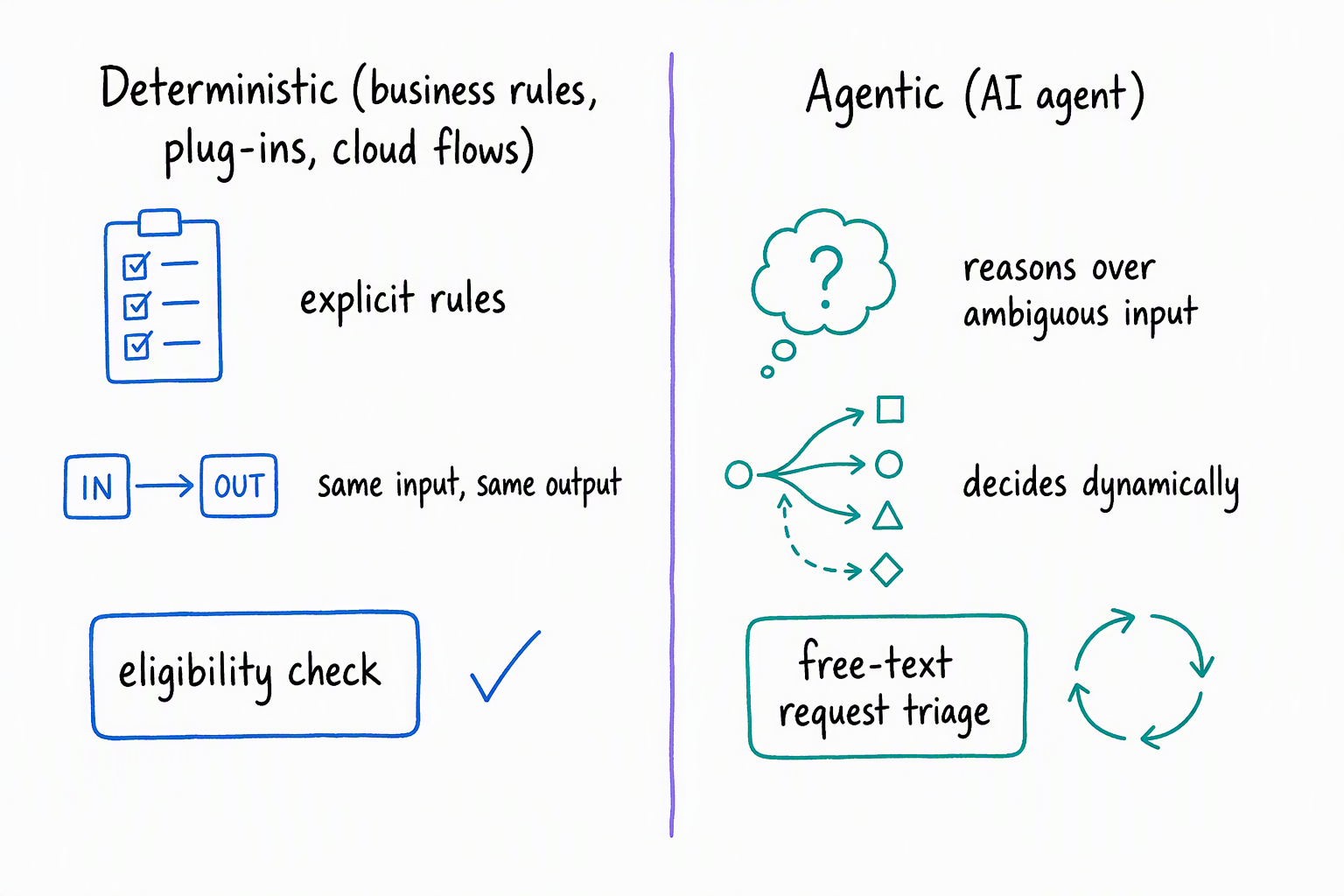
An agentic approach works differently. Instead of following a fixed rule, an AI agent reasons over ambiguous or loosely structured input and decides a course of action dynamically. That flexibility helps when the input doesn't arrive in a clean, predictable shape. But it comes at the cost of the same predictability and explainability that makes deterministic logic easy to audit.
Weigh that trade-off against the equipment-provisioning scenario directly. Checking whether an employee is eligible for a request compares clear numeric and status values: role, tenure, and remaining allowance. There's no ambiguity to reason over, so keeping that check deterministic, as a business rule or plug-in, gives you a result you can explain and audit every time.
Compare that with a request submitted as free text, something like "my laptop screen keeps flickering, I think I need a replacement." Routing that description to the correct device category involves interpreting varied phrasing, which is a reasonable candidate for an agentic approach layered in front of the deterministic checks that follow.
The guidance holds both ways: don't force a deterministic pattern onto a genuinely ambiguous problem, and don't hand a non-deterministic agent a decision that must stay consistent, explainable, and auditable, such as a compliance-sensitive approval.
Reflect: Suppose the solution also needs to flag a request for manager review whenever the requested device costs more than 20 percent above the employee's remaining allowance. Before reading further, decide: where does that logic run, which table or connector approach holds the data it checks, and is it deterministic or agentic?
Work through it against the same three decisions. The logic compares two numeric values, a device cost and a remaining allowance, and only changes whether the request proceeds to review, so it fits the same placement as eligibility: a business rule if the check only needs to run on the form, or a plug-in if every creation path, including direct API calls, must respect it.
The data behind it, Allowance and Device, already lives in standard tables, so no virtual table, elastic table, or connector enters the picture. The comparison itself is a fixed percentage threshold against known values, which makes it deterministic by nature. There's no ambiguous input to reason over. An agentic approach here would add unpredictability without adding value.
With logic placement, data approach, and deterministic-versus-agentic choices settled for this component, the next unit turns to a different layer of the same architecture: designing authentication, authorization, and row-level security for each of these tables and flows. The unit after that returns to the front end, working through how people and agents actually interact with what you've built.