Design connectors, MCP servers, and integrations
Request intake and eligibility enforcement now live entirely inside Dataverse, validated the moment an employee submits a request. This unit extends that foundation outward, connecting the solution to the external depot system that tracks device stock. It also connects to the AI agents that increasingly mediate how people query that data.
Wrap the external depot system in a custom connector
The depot system that tracks device stock sits entirely outside Dataverse, and it exposes its own REST API for checking availability and reserving units. A custom connector wraps that external API as a first-class connector. It's the same kind of building block as any of the prebuilt connectors available to Power Automate, Power Apps, Copilot Studio, and Azure Logic Apps.
You define the connector's operations, its authentication (such as an API key or OAuth2), and its policies once. Every maker who builds against that connector then reuses the same definition, instead of hand-writing HTTP calls in each flow or app.
For the equipment-provisioning solution, you design a custom connector around two operations: "check availability," which queries whether a given device model is in stock at the depot, and "reserve device," which places a hold once a coordinator approves a request. A cloud flow you design in the next unit calls the reserve operation. A canvas app or Copilot Studio agent could call the availability operation directly. Both share one authentication setup and one set of operation definitions.
The plug-in from the previous unit is a different case. Because it runs as server-side code rather than as a maker-authored flow or app, it calls the depot API directly over HTTP, rather than through the connector object model. The connector's value here is standardizing the low-code surfaces, not replacing every server-side call.
Learn more about custom connectors.
Give an agent conversational access to Dataverse with an MCP server
A custom connector solves integration with a system that has its own, well-defined API operations. A different problem shows up when you want an AI agent to answer open-ended questions about data that already lives in Dataverse. The Model Context Protocol (MCP) is an open protocol that lets large language model applications, including Copilot Studio agents, discover and call tools and data sources.
You don't need to predefine every possible query in advance. Dataverse can act as an MCP server, exposing its tables to any MCP-aware client so an agent can query and act on that data conversationally.
Consider a coordinator who asks an agent, "what's the status of my laptop request?" Building a dedicated connector action for that one question doesn't scale. Neither does building another for "how many requests are pending this month," and another for every other phrasing an employee might use. Exposing the Request table through a Dataverse MCP server instead lets the agent interpret the question, query the table it needs, and respond. No new action is needed for every query shape.
The decision between the two options comes down to what you're connecting to. Reach for a custom connector when you're integrating with an external system that has its own API and a defined, finite set of operations. Reach for an MCP server when you want an agent to flexibly explore and act on Dataverse data itself.
Since December 15, 2025, Dataverse MCP tools are billed when accessed by agents built outside Copilot Studio, unless a qualifying Dynamics 365 Premium or Microsoft 365 Copilot license applies. Cost becomes part of the connector-versus-MCP decision too.
Learn more about connecting to Dataverse with Model Context Protocol.
Choose a stable entry point for inbound updates from the depot system
Availability information doesn't only flow out to the depot system, it also needs to flow back in. When a device that was "in repair" becomes "available" again, the depot system needs a way to push that status change into Dataverse so the solution reflects current stock.
Dataverse gives you several inbound paths for this: calling the Dataverse Web API directly, routing the update through a custom connector and Power Automate, or exposing a custom API as a purpose-built, stable contract for the external caller.
Letting the depot system write directly to the Device table through the Web API is tempting, because it requires the least setup. But it also couples the external system to your table schema. And it bypasses any business logic you want applied to that update, such as logging the change or notifying a coordinator.
Designing a custom API instead, similar in spirit to the CheckEquipmentEligibility API from the previous unit, gives the depot system one stable message to call, with typed parameters you control. The implementation behind that contract stays free to change.
Guiding question: If the depot system's own API changes its field names next year, which design, direct table writes or a custom API, absorbs that change with less work on your side? What does that tell you about where to put the stable contract in any inbound integration?
Decide how an approved request reaches the depot system outbound
The reverse direction matters as much. When a coordinator approves a request, the depot system needs to reserve the device before a different request takes the last unit. Dataverse gives you several outbound paths for this moment. Options include a plug-in that calls the depot system's web service directly, or a Power Automate cloud flow. They also include a Dataverse webhook, or a message posted to Azure Service Bus or Event Grid through the plug-in registration tool.
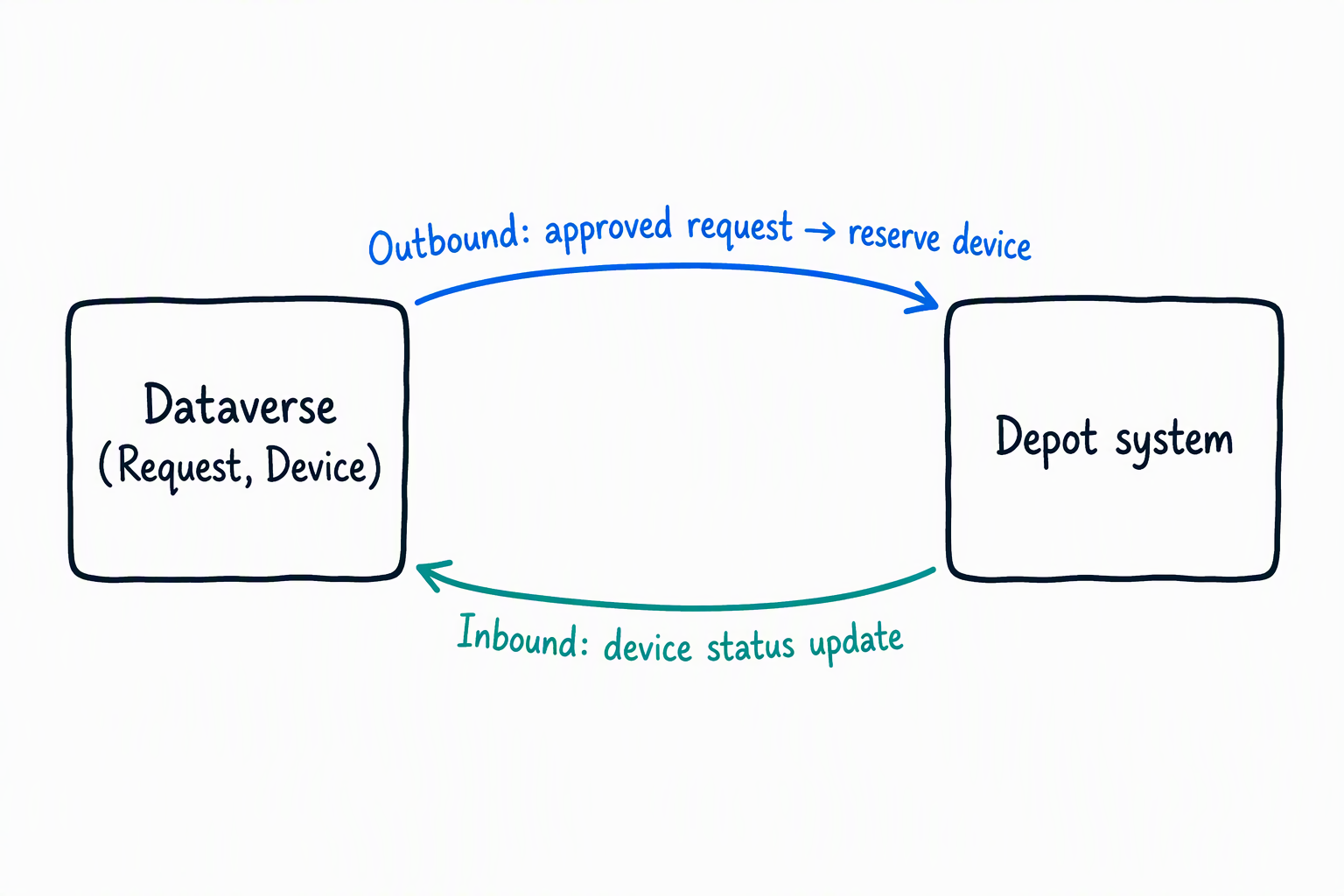
The asynchronous PostOperation plug-in you design in the previous unit is the simplest path: when a request moves to approved, the plug-in calls the depot system's reserve operation directly. That works well as long as the depot system responds quickly and reliably. Suppose the depot system is sometimes slow or briefly unavailable. That direct call ties up the plug-in's retry attempts. A failure after the retry limit lands in a failed system job that someone has to resolve manually.
Routing the same event through Azure Service Bus decouples the two systems: the plug-in posts the approval event to a queue and returns immediately, and a separate listener picks up the message whenever the depot system is ready. That resilience comes at a cost, since you now own a listener application and a queue to monitor. It earns its complexity only when the depot system's availability is genuinely unpredictable.
Match each integration pattern to the job it's built for
Four integration patterns, four different jobs. Use this table to transfer the decision points from this unit to a new scenario.
| Pattern | Direction | Best for | Pitfall to avoid |
|---|---|---|---|
| Custom connector | Power Platform → external system (and back) | Wrapping an external REST/SOAP API with defined operations for reuse across flows, apps, and agents | Rebuilding the same HTTP call logic separately in every flow or app |
| MCP server | AI agent ↔ Dataverse | Letting an agent flexibly query and act on Dataverse data without predefining every operation | Building a dedicated connector action for every possible natural-language question |
| Inbound path (custom API) | External system → Dataverse | Giving an external caller one stable, typed contract instead of direct table access | Letting an external system write directly to tables, coupling it to your schema |
| Outbound path (webhook/Service Bus) | Dataverse → external system | Notifying an external system of an event, synchronously or decoupled through a queue | Choosing a direct synchronous call when the external system's availability is unpredictable |
Connectors and integrations now carry data between Dataverse and the systems around it, in both directions and conversationally through an agent. The next unit builds on these connection points. It designs the cloud flow that calls the depot connector, the code app interface a coordinator uses, and the custom agent that puts the MCP server to work.