Define incident types
Before you create an incident type, identify the records that describe the job. For the annual HVAC inspection example, you need a work order category, a replacement filter, a labor service, inspection tasks, and the required technician certification.
An incident type brings these elements together:
- Default work order type: The general category of work.
- Products: Physical items or consumables planned for the job.
- Services: Labor or other service items.
- Service tasks: The steps the technician completes.
- Characteristics: Skills or certifications needed for the work.
- Resolutions: Standard ways to record how the work is resolved.
Choose a work order type
A work order type categorizes work, such as maintenance, inspection, or repair. An incident type adds the specific job details within that category. For example, Preventive maintenance is a work order type, while Annual HVAC inspection is an incident type.
In the Field Service app, go to Settings > Work Orders > Work Order Types to define work order types.
A work order requires a work order type. An incident type is optional unless the selected work order type has Incident Required set to Yes. With that setting, the Primary Incident Type field is required.
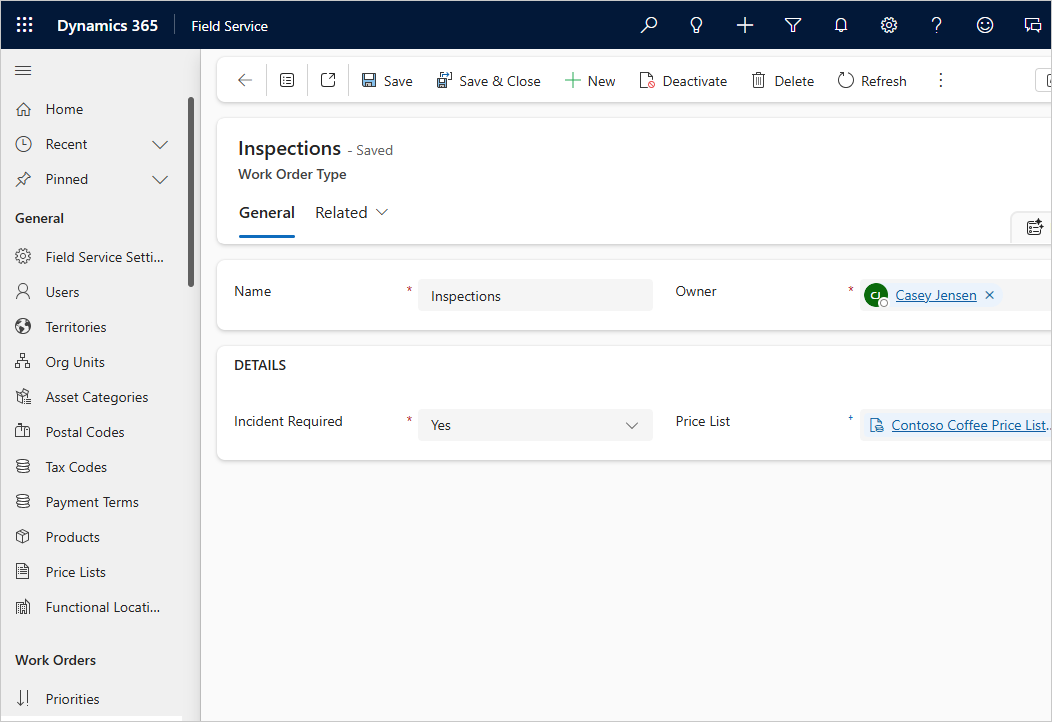
You can associate a default work order type with an incident type and a default price list with the work order type. This relationship helps populate the work order's category and pricing context when you select the incident type.
For example, the annual inspection uses the Preventive maintenance work order type and its associated price list. The incident type supplies the job details; the work order type supplies the broader category and default pricing context.
Prepare products and services
Products and services must exist in the product catalog before you add them to the incident type. The Field Service Product Type distinguishes the items:
- Inventory: Physical products with inventory quantities tracked in Field Service.
- Non-Inventory: Products whose inventory quantities aren't tracked.
- Service: Service items, such as technician labor.
For the HVAC visit, the replacement filter is a product and the maintenance labor is a service. Add the expected product quantity and service duration to the incident type. These are planned details, not confirmation of the parts used or labor performed on a particular visit.
Define service tasks and inspections
A service represents labor or another service item, such as preventive maintenance labor. A service task describes a step the technician completes, such as recording inspection findings.
Service tasks provide the steps for completing a work order. You can add them directly to a work order or include them in an incident type so they're added with the rest of the job.
Create reusable service task types in Settings > Work Orders > Service Task Types. A service task type includes:
- Name: The task's name.
- Estimated Duration: The expected time to complete the task.
- Description: Instructions or other task details.
- Has Inspection: Whether the task uses an inspection template.
For example, create a Complete HVAC inspection service task type once and reuse it in relevant incident types. Set the duration for the task, then review that estimate when you add it to a particular incident type.
An inspection has a separate template lifecycle:
- An administrator creates and reviews an inspection template, then publishes it.
- On a service task type, the administrator sets Has Inspection to Yes and selects the published Inspection Template.
- You add that service task type to an incident type, or add a task using it directly to a work order.
- The technician completes the associated inspection on the work order service task, saves the responses, and records the task's completion and result.
- You review the saved responses in the work order context.
The inspection template defines the questions; the work order service task connects those questions to a specific visit. Setting Has Inspection alone doesn't define the checklist. You also need the published template association.
For setup and completion details, see Use inspections in work orders.
Specify skills and resolutions
Characteristics describe the skills or certifications required for a job. Associate the relevant characteristic with the incident type so it passes to the work order's scheduling requirements. For the HVAC example, use the certification required by your service organization.
Scheduling tools use requirement characteristics to help find suitable resources. Keep the required characteristics and the resources' recorded skills accurate; adding a characteristic to an incident type doesn't itself schedule a technician. For more information, see Specify characteristics for resources.
Resolutions record how work is resolved. You can associate relevant resolutions with an incident type so technicians can select an appropriate outcome on the work order. For example, Inspection completed describes an outcome, while HVAC service certification describes a resource qualification. Use resolutions for outcome reporting and characteristics for resource matching.