Lead qualification
After an account executive has determined the viability of a lead, the lead can either be qualified or disqualified. By qualifying leads, you indicate that they're considered viable potential sales and are ready to move to the next phase of the sales process. By disqualifying leads, you indicate that you won't be pursuing them as customers any longer.
Although a disqualified lead might not be a good fit with your organization right now, there might still be potential to do business with that client someday. A lead who is disqualified today can be reactivated and qualified later.
Disqualify a lead
Leads can be disqualified for multiple reasons. Here are some examples:
- The account executive couldn't connect with the lead within the timeframe that was required for a specific promotion.
- The lead isn't interested in the company's products or services.
- The lead needs a product or service that the company doesn't provide.
- There's a risk that doing business with the client might not be in the best interests of one or both parties.
You disqualify a lead from the lead record itself. On the Command bar, select Disqualify, and then, on the menu that appears, select a reason for the disqualification. Four default reasons are defined:
- Lost
- Can't Contact
- No Longer Interested
- Canceled
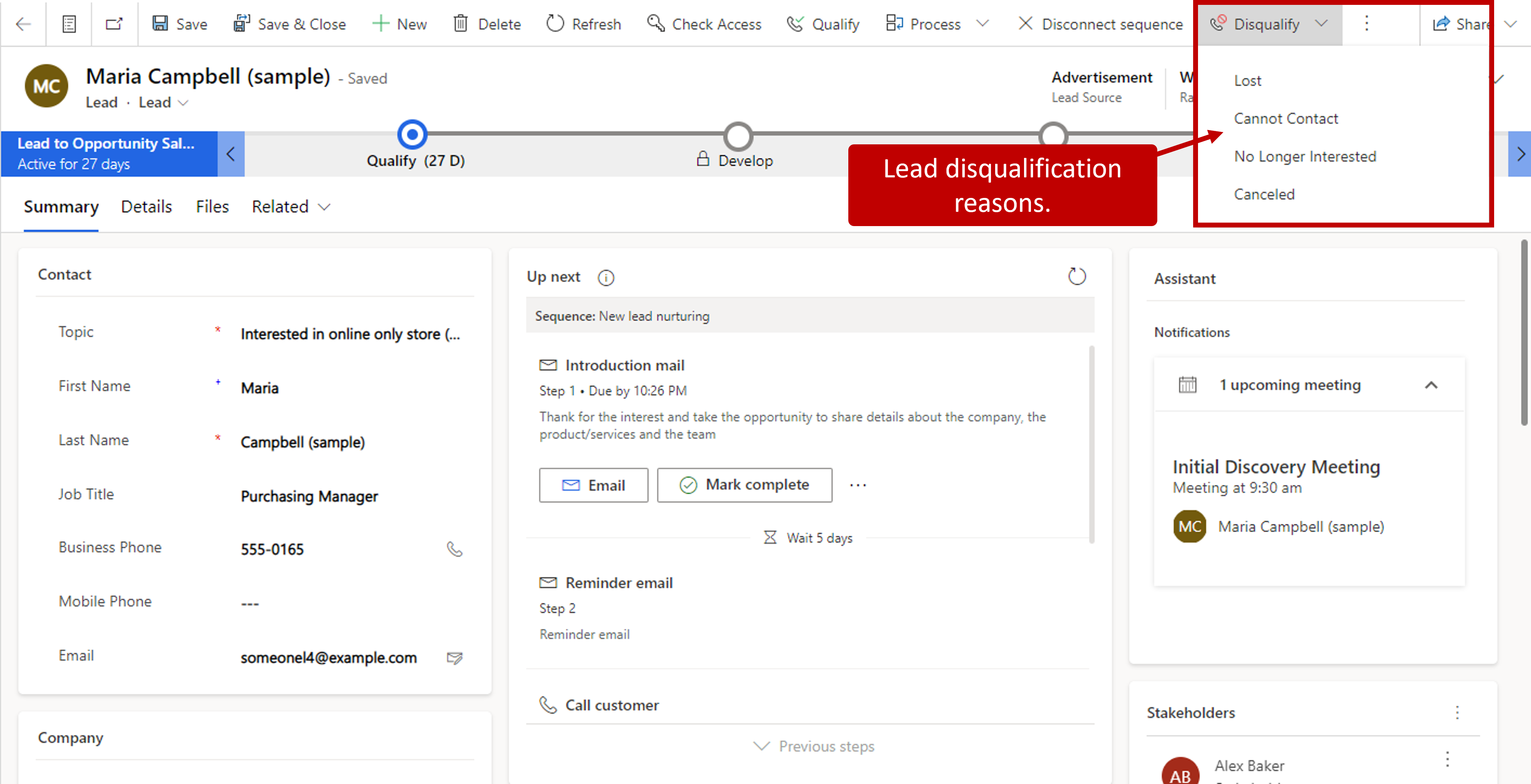
When a lead is disqualified, the record remains in Microsoft Dynamics 365, but it's moved to an inactive state. Records that are inactive can't be edited, but the information in them can be viewed. This behavior is by design. There are two reasons why records are inactivated instead of deleted:
- Ensure that there's a historical record of the lead.
- Keeps the lead available for reactivated later, if necessary.
For example, leads might be disqualified for the current marketing promotion because they aren't interested in the products that are part of that promotion. But because they do own some products that your organization offers, there will probably be other opportunities for doing business with them. By disqualifying the leads instead of deleting their record completely, you retain them for future reactivation.
Reactivate a lead
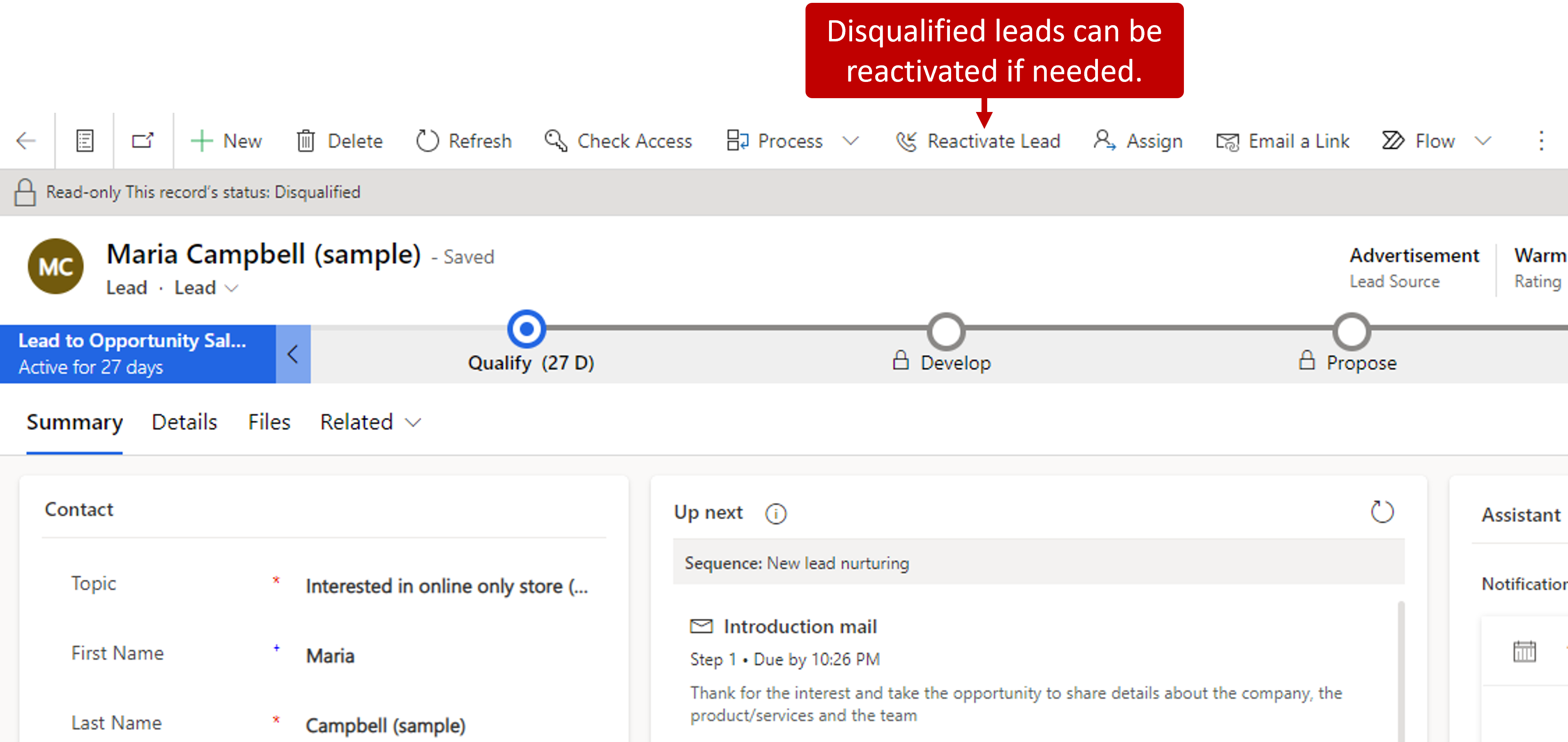
Occasionally, a lead that was previously disqualified might have to be reactivated. This might occur when, for example, someone who wasn't previously interested in your organization's products or services is now interested. In the Closed Leads view in the Sales Hub app, you can view any leads that have been disqualified. To reactivate a closed lead, open the lead record, and select Reactivate Lead. The lead is reopened and appears in the My Open Leads view of the original owner of the lead. The owner of the lead then can work the lead as if it's a new lead that was assigned to them.
Qualify a lead
After a lead meets the qualification criteria that the organization set for advancement to the next phase of the sales process, it's ready to be qualified as an opportunity. To qualify leads, select Qualify on the command bar in the lead record. The lead is closed, and a corresponding opportunity record is created and linked to the lead record. The details of the opportunity are automatically filled in based on the values that were captured in the lead.
Unlike lead records, opportunity records in Dynamics 365 must be associated with a customer record. A customer can either be an individual or an organization.
- Organizations are stored in Dynamics 365 as account records.
- Individuals are stored in Dynamics 365 as contact records.
A contact record can be a standalone record, or it can be associated with an organization. For example, an organization that sells primarily to businesses might create a contact record for Jenny, who is a purchasing agent for an organization. In this case, Jenny's contact record will also be associated with the organization's account record. An organization that sells primarily to individuals might use just contacts in Dynamics 365 to represent the individuals that they sell to. In this case, Jenny might have only a standalone contact record.
To support both scenarios, the Potential customer column in the opportunity record can be set to either an account record or a contact record. If the lead is associated with an existing customer, the existing customer that's defined for the lead will be used as the customer for the opportunity. If the lead is a brand-new customer, an account and/or contact record must exist for the lead before an opportunity can be created. To help with this process, Dynamics 365 can create more records that can be associated with an opportunity.
The following image describes the records that Dynamics 365 creates, depending on whether you specify an existing account record or contact record when you convert the lead.
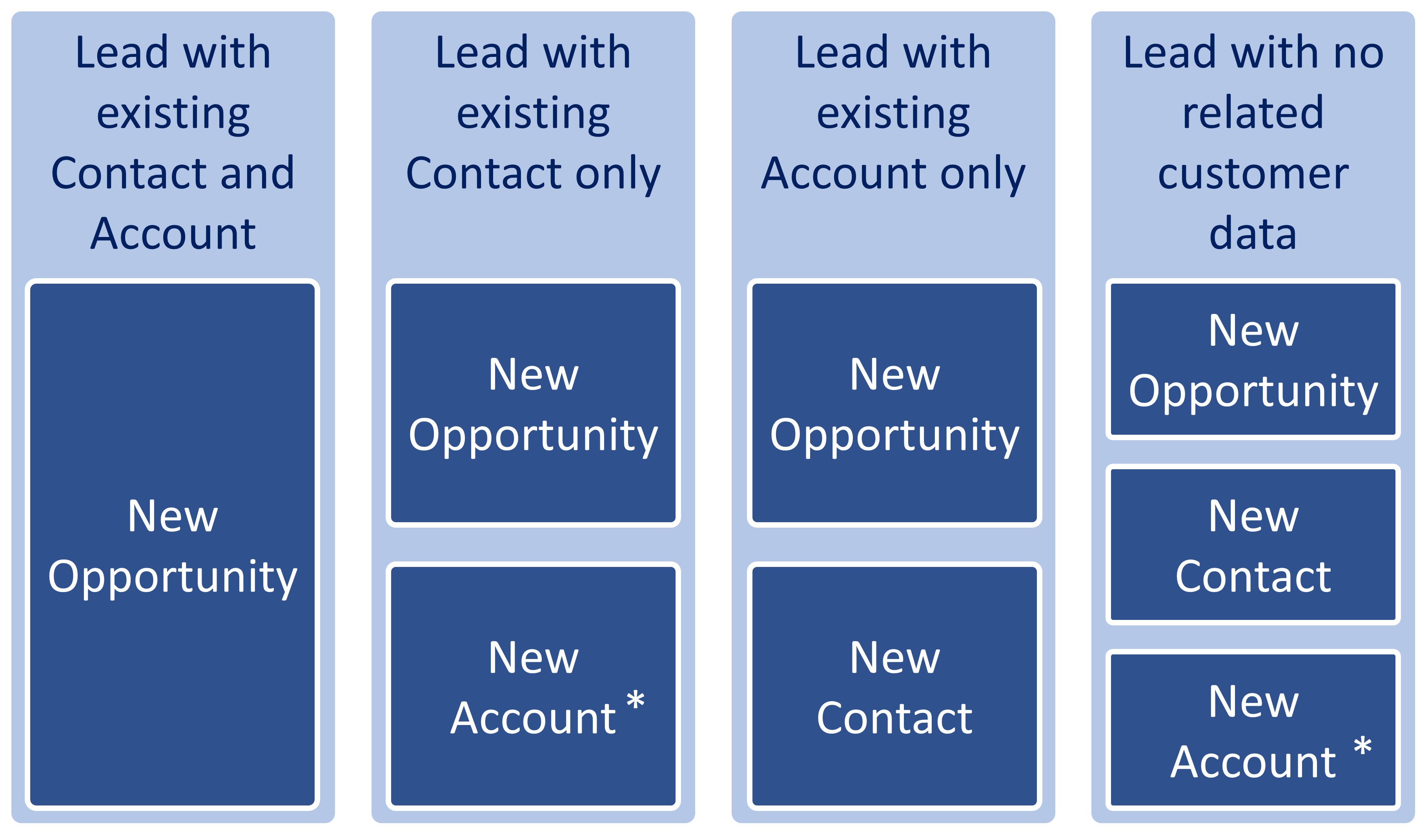
A new account record is created only if the Company column in the lead record is set.
The following values on the Lead page control the outcome of the qualification process:
- Title: This value becomes the title of the opportunity that's created.
- Name: If this value is entered, it becomes the full name of the new contact.
- Company: This value becomes the name of the newly created account using the company name.
Other data, like the customer's budget from the lead, is mapped to the new opportunity.
When an opportunity record is created from a lead, a relationship with the lead record is established and remains with the opportunity.
The following image describes an example of a lead qualification lifecycle.
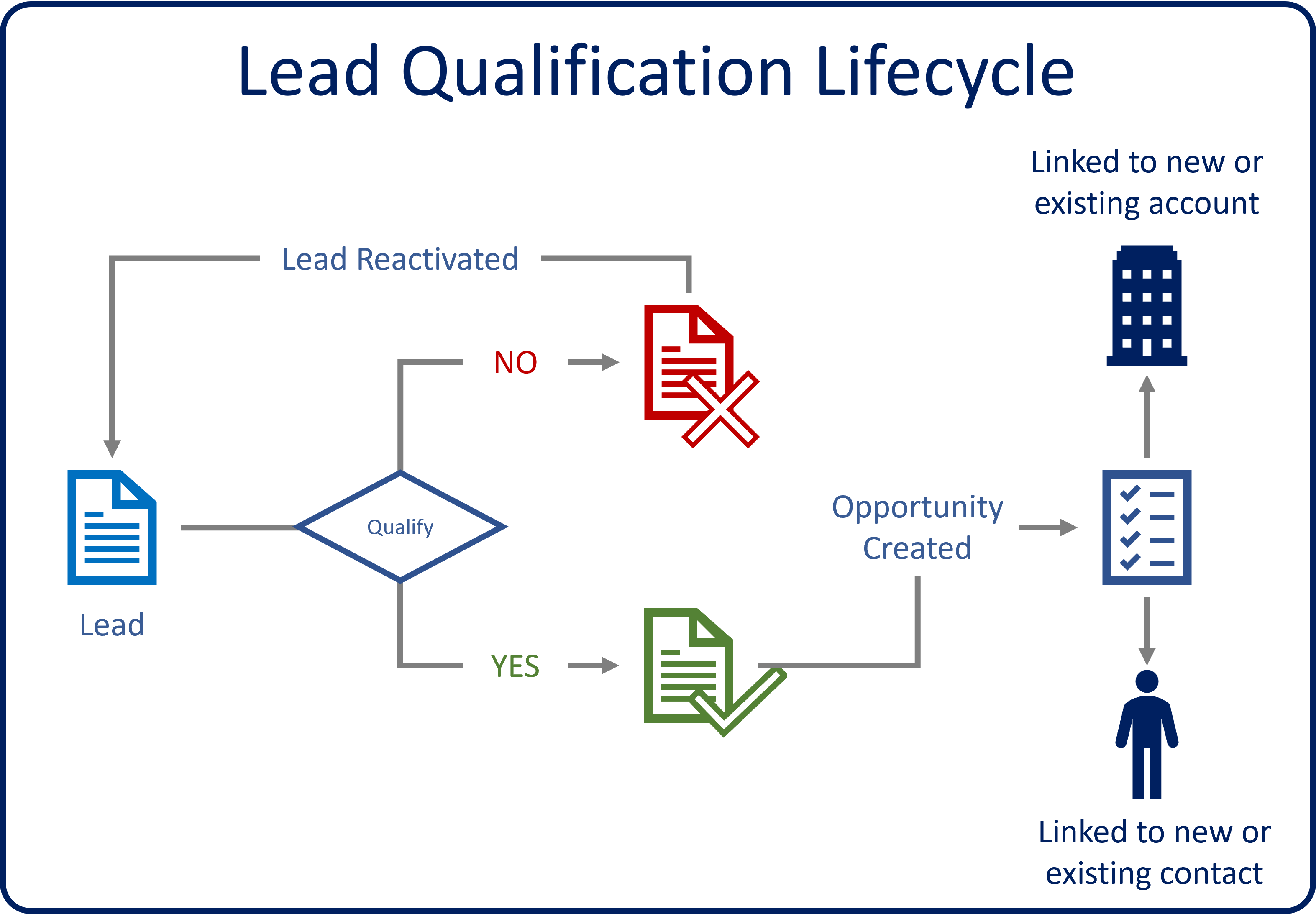
Because qualified leads remain in the application and are associated with the new opportunities, they can be accessed at any time by selecting the Qualify phase in the opportunity's business process flow (BPF). The record for the qualified lead is opened and shows all the relevant information.
For more about qualifying and disqualifying leads, see Qualify a lead and convert it to an opportunity (Sales and Sales Hub).