Default Template dropdown
The Default Template dropdown in PowerScribe One is a tool in the Report Editor that lets you replace the active AutoText template for the current study.
How the dropdown works
- The system can automatically load a default AutoText when you open a report, based on:
- Procedure codes
- User or site-level configuration
- Reporting preferences
- The Default Template dropdown displays:
- The current default template, shown as selected
- Other relevant templates that are associated with the same procedure
- The available options reflect the procedure context of the current study.
How templates appear in the dropdown
AutoText that apply to the specific exam appear in the dropdown. For details about assigning procedure codes, see AutoText categorization basics.
Key system behavior
- Selecting a new template from the dropdown:
- Replaces the existing template and all report content
- Applies immediately in the Report Editor
- The dropdown reflects procedure relevance:
- Only templates tied to the procedure appear
- Default templates depend on AutoText procedure code assignment
Procedural guidance
Use the Default Template dropdown when you need to change the report structure.
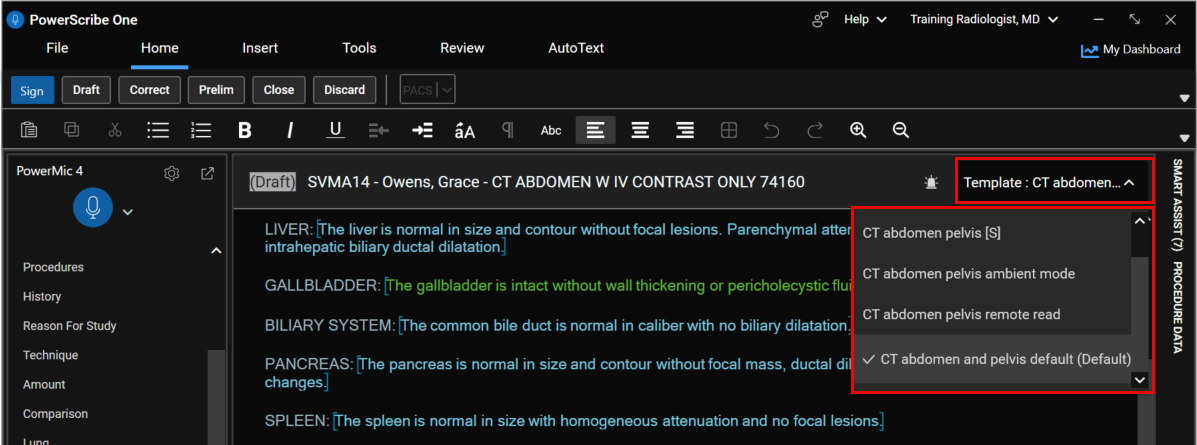
- Open a report in the Report Editor.
- Locate the Default Template dropdown in the upper-right area of the screen.
- Review the currently selected template.
- The default template is automatically selected when the report opens, if configured.
- Select the dropdown to view available templates.
- Only templates that are relevant to the current procedure are shown.
- Choose a different template from the list.
Decision point
- If you need to maintain existing content:
- Do not use the dropdown.
- Use an insert method instead.
- If you need a different full report structure:
- Use the dropdown to replace the template.
Confirm the replacement if a prompt appears.
- A confirmation dialog might appear if content already exists in the report.
Best practices
- Use the dropdown early in the workflow before adding custom dictation.
- Verify the procedure context before selecting a new template.
- Align template selection with standardization guidelines to reduce rework.
- Avoid switching templates late in documentation unless necessary because it replaces all content.
Applied scenario
You open a CT chest with contrast study and the system automatically loads a default template based on the procedure code.
After reviewing the study, you determine that a pulmonary embolism-specific template is more appropriate.
You:
- Locate the Default Template dropdown.
- Select the pulmonary embolism-specific template from the list of relevant templates.
- Confirm the replacement.
The system replaces the current report structure with the selected template so you can continue with the correct documentation format.
Accessibility and usability notes
- The dropdown displays only procedure-relevant options, which reduces cognitive load.
- The selected template is clearly indicated to support quick recognition.
- Use early selection to minimize rework and avoid accidental content loss.
- Confirmation dialogs help prevent unintended replacement when content exists.
- Consistent template naming improves discoverability and workflow efficiency.