What is Recall (preview)?
Recall (preview) helps you quickly find things you’ve seen or worked on before on your PC, without disrupting your workflow. It makes it easier to pick up where you left off, whether you’re working or creating, and it’s designed with your security and privacy in mind.
Recall (preview) is a Copilot+ PC feature that captures and organizes snapshots of what you’ve previously seen on your device, making it easier to rediscover content later. Snapshots are processed and stored locally on the device, giving users control over their data.
Instead of searching for a file name or trying to remember where something was saved, you can describe what you remember—such as:
- “Document with onboarding checklist”
- “Website with pricing comparison”
- “Presentation I reviewed yesterday”
Recall (preview) uses these descriptions to bring up relevant snapshots so you can return directly to the content. Unlike traditional search, it’s designed to work the way real people remember information—it focuses on what you recall, rather than relying on file names and storage locations.
How Recall (preview) works
- Recall (preview) captures snapshots of on-screen activity over time
- Snapshots are stored locally on the device and processed on-device
- You can search snapshots using natural language
- Results are presented visually, helping you quickly recognize and return to content
Note
Recall (preview) is available on supported Copilot+ PCs. This feature is in preview and remains under active development, with functionality, performance, and security characteristics subject to change; it isn’t fully supported for production workloads yet.
As a preview feature, it might change over time, and availability varies by device, region, and updates. Recall also requires sufficient available storage to save snapshots, and capture might pause automatically if device storage is low.
How Recall (preview) handles your data
Recall (preview) is designed to give users visibility and control over their activity.
- You choose whether Recall (preview) is turned on Recall (preview) is optional and must be enabled before it begins saving snapshots. If it isn’t enabled, no snapshots are captured.
- Snapshots are stored locally on your device and processed on-device Recall (preview) processes and stores snapshots directly on your Copilot+ PC. This means your data stays on your device rather than being sent to external services.
- You can control what’s captured You can exclude specific apps or websites from being included in snapshots, helping ensure sensitive content isn’t recorded.
- You can pause, manage, or delete snapshots at any time You can temporarily pause snapshot capture, turn it off completely, or delete snapshots—either all at once or from a specific timeframe.
- You control how long data is retained You can set limits for how long snapshots are saved or how much storage they can use. Older snapshots are automatically removed when limits are reached.
- Access is protected Opening Recall (preview) and changing settings requires confirmation using Windows Hello, helping ensure only the signed-in user can view or manage snapshots.
You can manage these settings in Settings > Privacy & security > Recall & snapshots, where you can delete snapshots, adjust storage limits, and control how long snapshots are retained.
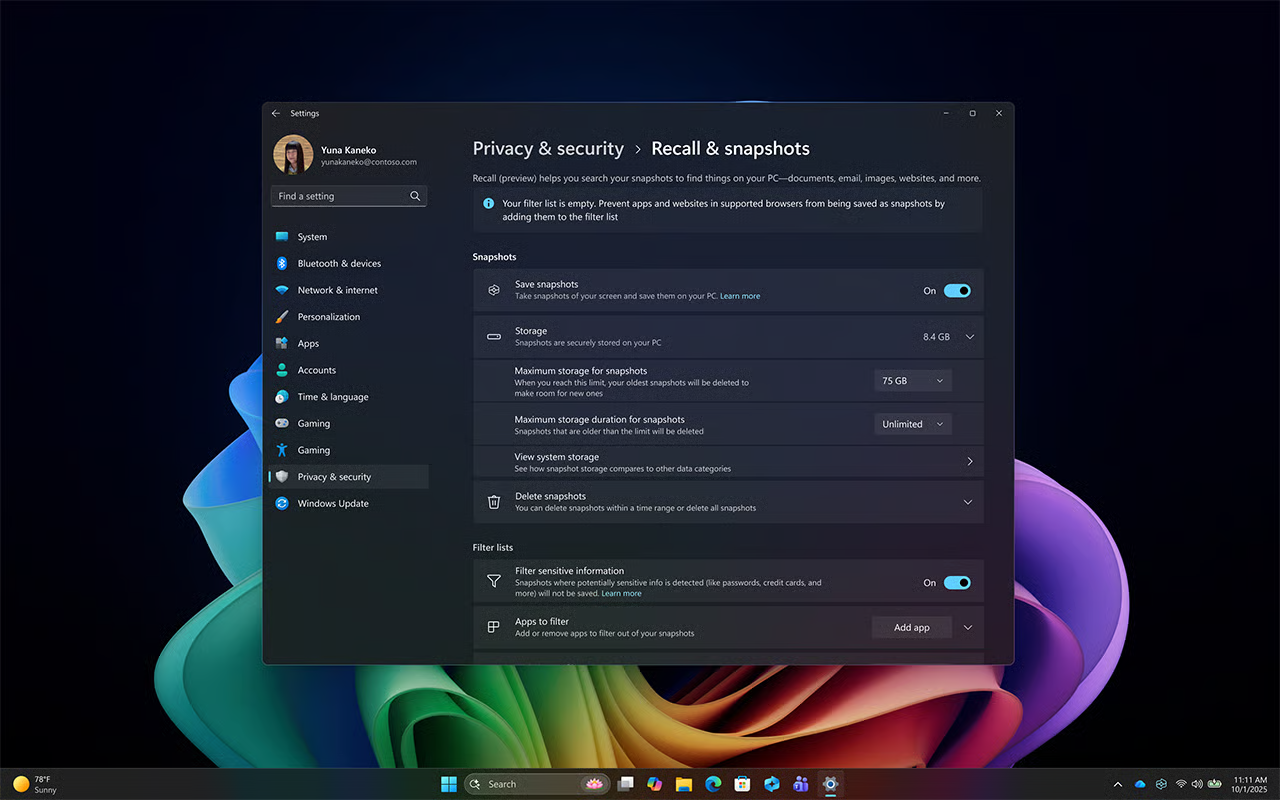
This image shows where users can manage Recall (preview) settings such as storage, filtering, and snapshot controls.
Note
Recall (preview) focuses on visual snapshots of on-screen activity and doesn’t record audio or continuous video.
Filtering apps, websites, and sensitive information
You can also filter what Recall (preview) captures to better protect sensitive content. Website filtering is supported in common browsers such as Microsoft Edge and other Chromium-based browsers.
- Exclude apps and websites Filter out apps or websites that you don’t want included in snapshots.
- Sensitive information filtering (enabled by default) This setting helps prevent snapshots from being saved when potentially sensitive information is detected, such as passwords or credit card details.
These controls help ensure Recall (preview) reflects your workflow while giving you control over what is captured, stored, and accessible.
Recall (preview) might be managed or limited by your organization, depending on policies and device configuration. In managed environments, IT administrators can configure how Recall (preview) is used and what content is captured.
Note
An Enterprise license is required for some policy-enabled management controls.
To learn more about privacy and control for Recall (preview), check out Privacy and control over your Recall experience.
Built-in security
The security protecting your Recall (preview) content is the same for any content you have on your device. Microsoft provides many built-in security features from the chip to the cloud to protect Recall (preview) content alongside other files and apps on your Windows device.
Secured-core PC: All Copilot+ PCs are Secured-core PCs, which provide advanced security protections built into the hardware and operating system. These protections help defend against firmware and operating system-level threats, helping keep data—including Recall (preview) content—secure. Learn more about Secured-core PCs.
Microsoft Pluton security processor: Included by default on many Copilot+ PCs, the Pluton security processor helps protect sensitive data by integrating security directly into the CPU. Learn more about Microsoft Pluton security processors.
Windows Hello Enhanced Sign-in Security (ESS): Supported Copilot+ PCs include Windows Hello Enhanced Sign-in Security, which enables secure sign-in using biometric authentication or a device-specific PIN. This helps ensure that only the signed-in user can access Recall (preview) content. Learn more about Windows Hello Enhanced Sign-in Security.
These capabilities give customers full control over how data is captured, stored, protected, and managed—helping ensure a secure and privacy-focused experience from end to end.