Synchronize data by using the UpsertRequest message
The previous unit leaves you with an active alternate key on the Device table, so your code can already find a record using nothing but the vendor's own device code. What it doesn't yet solve is the uncertainty baked into every inbound message from the vendor's inventory service.
When a device availability update arrives, your code can't tell in advance whether that device already exists as a record in Dataverse. This unit resolves that gap with the Upsert message, which combines create and update logic into the single call the integration needs.
Collapse retrieve-then-decide into a single call
Without Upsert, handling an inbound device update forces a two-step dance. First, retrieve the record by its vendor device code to check whether it exists. Then, decide whether to call Create or Update based on the result. That extra retrieve isn't merely more code. It's a second round trip for every message the vendor's feed sends. It's also a design that has to branch on an outcome before it even knows what to do with the data.
An UpsertRequest removes the branch. You still identify the record by its alternate key, but you hand Dataverse the data once. The server then decides, internally, whether that data represents a new Device record or an update to an existing one. The vendor's feed doesn't need to track Dataverse state at all; it only needs to send the device code and the current status.
That convenience carries a cost worth weighing. Upsert has a measurable performance penalty compared to a plain Create, because the server still performs a lookup before it commits to either path.
Sometimes a part of your integration already knows for certain that a record doesn't exist, for example a one-time bulk load of brand-new devices. In that case, reach for Create directly instead. Reserve Upsert for the genuine create-or-update uncertainty the vendor feed represents, not as a default for every write.
Trace what the server decides on your behalf
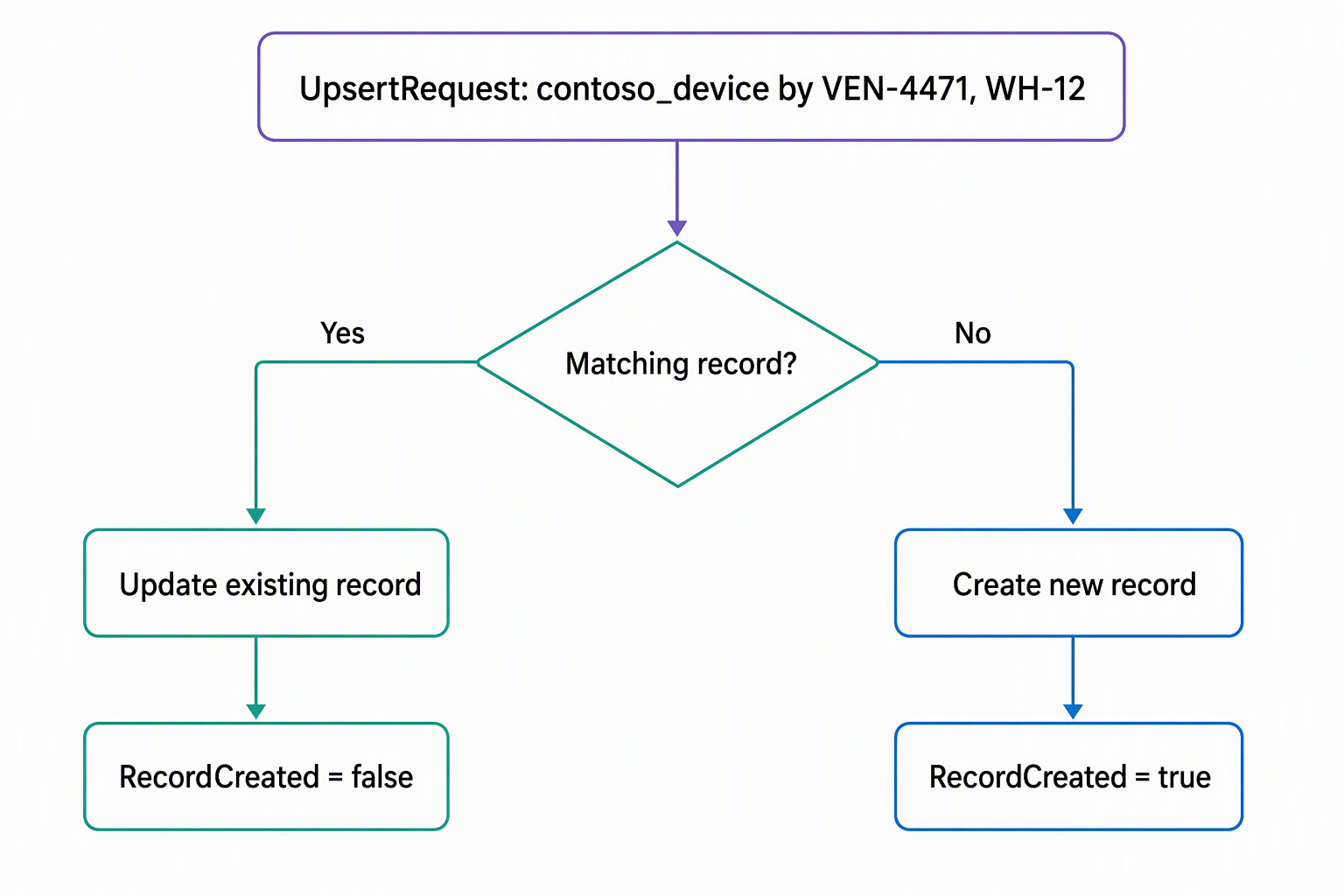
Understanding what Upsert does under the hood makes the rest of this unit easier to reason about, especially when something doesn't behave as expected. When an UpsertRequest for the Device table reaches the server, Dataverse first tries to find an existing record using the key values you supplied. Those are the same vendor device code and warehouse code from the previous unit.
If a matching record exists, Dataverse performs an Update against it, and the response's UpsertResponse.RecordCreated property comes back false. If no matching record exists, Dataverse performs a Create instead, folding the key values into the new record's data as needed. RecordCreated comes back true in that case.
Either way, you get back the same kind of response object; the only thing that changes is that one property. That property is exactly how your code finds out, after the fact, which branch actually ran.
Keep alternate key values out of the data payload
One detail trips up almost everyone the first time they compose an Upsert request. Don't put the alternate key column values in the data you're saving. Put them only in the key reference itself: the URL for the Web API or KeyAttributes for the SDK.
The reasoning differs between the two outcomes, and getting it wrong on create carries a real risk. If the record already exists, the server discards whatever key values you put in the body. That's because changing the value you used to identify a record, in the same call that identifies it, isn't something Dataverse allows.
If the record doesn't exist, though, Dataverse doesn't discard anything. Instead, it uses whatever key values you supplied in the body to create the new record. That holds true even if those values differ from the key reference.
For example, a request to PATCH .../contoso_devices(contoso_vendordevicecode='VEN-4471',contoso_warehousecode='WH-12') identifies the target record using VEN-4471. But if the body of that same request includes "contoso_vendordevicecode": "VEN-9999", and no record matches VEN-4471, Dataverse creates a new record. That new record is keyed to VEN-9999, not VEN-4471. The body's value wins, silently, with no error to flag the mismatch.
Important
Don't include contoso_vendordevicecode or contoso_warehousecode in the data payload you send with Upsert. Supply them only through the key reference. On update, the server discards whatever values you put in the body. On create, though, a mismatch between the body and the reference means Dataverse keys the new record to the body's value, not the reference's value.
Control the branch from the Web API
The Web API reuses the exact key-reference URL syntax from the previous unit, but issues it as a PATCH instead of a GET:
PATCH [Organization URI]/api/data/v9.2/contoso_devices(contoso_vendordevicecode='VEN-4471',contoso_warehousecode='WH-12') HTTP/1.1
Content-Type: application/json

{
  "contoso_devicestatus": 1
}
By default, this behaves as a true upsert. Dataverse creates the record if the key doesn't match anything, or updates it if it does. Either way, you get back an identical 204 No Content response. That's fine when you don't care which branch ran, but two headers let you narrow the behavior when you do:
If-Match: *turns the request into an update-only call. If no record matches the key, Dataverse returns404 Not Foundinstead of silently creating one.If-None-Match: *turns the request into a create-only call. If a matching record already exists, Dataverse returns412 Precondition Failedinstead of performing an update.
If you need to know which branch ran without constraining which one is allowed, add Prefer: return=representation to the request. The response status becomes 201 Created for a new record or 200 OK for an updated one, instead of the same 204 either way.
Branch on the result from the SDK
The SDK path builds directly on the alternate-key Entity constructor from the previous unit. You set the data attributes exactly as you would for a Create or Update, then wrap the entity in an UpsertRequest:
Entity device = new Entity("contoso_device", keys);
device["contoso_devicestatus"] = new OptionSetValue(1); // Available

var upsertRequest = new UpsertRequest { Target = device };
var upsertResponse = (UpsertResponse)service.Execute(upsertRequest);

if (upsertResponse.RecordCreated)
{
    // a new Device record was created for this vendor device code
}
else
{
    // an existing Device record was updated
}
Checking RecordCreated gives your integration a clean place to log which outcome happened. It can also trigger follow-up logic that only applies to new devices, like notifying a provisioning queue.
Watch for different behavior on elastic tables
Everything described so far assumes the Device table is a standard table, which it is in this scenario. If you ever work with an elastic table instead, be aware that Upsert behaves differently there. It applies the data directly without triggering separate Create or Update events. Because of that, any logic that depends on those events firing needs to live inside the Upsert path itself, rather than assuming it runs elsewhere.
Learn more about Upsert behavior on elastic tables.