Note
Access to this page requires authorization. You can try signing in or changing directories.
Access to this page requires authorization. You can try changing directories.
The Visual Studio Subscriptions Admin Portal for Volume Licensing customers has two roles, similar to the Primary/Notices Contact and Subscriptions Manager roles that previously existed in the Volume Licensing Service Center (VLSC).
Super admins: When you initially set up an organization, the Primary or Notices Contact becomes a super admin by default. The Primary or Notices Contact can assign more super admins or admins. A super admin can add and remove other admins and subscribers. For security, if the system has more than two super admins, a super admin can delete all but the last two. In addition to assigning admins and managing subscribers, super admins can set global preferences for agreements.
Admins: Only super admins can assign new admins and add them to agreements. Admins can manage subscribers only in the agreements that a super admin assigns to them.
Watch a demonstration about how to manage admins.
Assigning admins
To assign new admins:
Sign in to the Visual Studio Subscriptions portal by using an email address that's listed as a super admin on the agreement through which you purchased the subscriptions.
Select the tab labeled Manage Administrators.
Select Add.
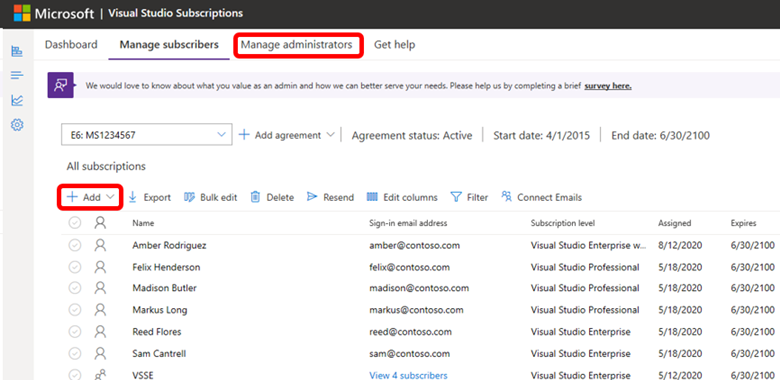
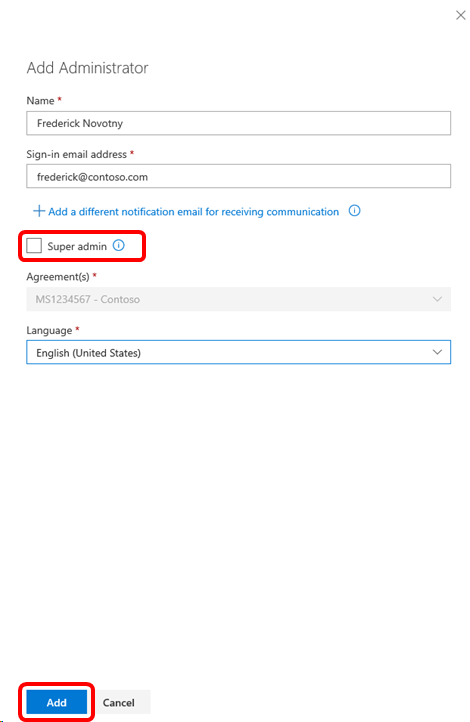
Complete the form with the new admin's information.
Note
If you want this admin to be able to assign more admins, select the Super Admin box.
After you select Add, the new admin receives an email inviting them to sign in to the portal.
Resources
Visual Studio administration and subscriptions support
See also
- Visual Studio documentation
- Azure DevOps documentation
- Azure documentation
- Microsoft 365 documentation
Next steps
- Learn how to assign subscriptions
- Learn more about the full range of subscription benefits
- Set agreement preferences