Note
Access to this page requires authorization. You can try signing in or changing directories.
Access to this page requires authorization. You can try changing directories.
This article compares the local experience of running language models across common Windows 365 Cloud PC SKUs. It helps admins choose the right Cloud PC size for users who want to run models locally with tools such as AI Dev Gallery from the Microsoft Store and Microsoft Foundry Local, available through the Foundry Toolkit for Visual Studio Code.
AI Dev Gallery makes it easy to run models directly on a Cloud PC. Text and reasoning models run through Foundry Local and image generation can be used when available. Because inference happens locally, prompts and outputs stay on the device, there are no per-token API charges, and teams can use models from multiple vendors without depending on a single cloud model provider.
Comparison methodology
This comparison doesn't emphasize raw benchmark scores or hardware specifications. Instead, it focuses on the local AI experience each Cloud PC SKU can support:
- Whether compact language models can run interactively.
- Whether mid-size models are practical for daily work.
- Whether larger reasoning and coding models are available.
- Whether GPU-based image generation is possible.
- Whether the SKU supports a broad range of local text, reasoning, coding, and creative workflows.
The results reflect AI Dev Gallery model coverage and practical usability across CPU, GPU, and ONNX execution paths. Actual performance can vary based on model choice, quantization, prompt length, concurrency, background agents, and other software running on the Cloud PC.
Relative local AI experience
| Cloud PC SKU | Local AI experience | What users gain at this tier |
|---|---|---|
| 4 vCPU | Platform validation | Although limited 0.5B-model scenarios are possible, this size isn't recommended or supported for local AI use. |
| 8 vCPU | Entry text assistant | Supports practical CPU-only use of compact and some mid-size text models for translation, summarization, and lightweight coding assistance. |
| GPU Select | First GPU-assisted experience | Adds basic GPU acceleration and entry-level image generation, while still relying on CPU paths for most models. |
| 16 vCPU | Expand CPU text workload | Extends CPU-only local AI to larger reasoning and coding models, including selected optimized model paths, but doesn't support image generation. |
| 32 vCPU | Broad CPU model coverage | Supports the broadest CPU-only text model coverage and works well when a GPU is unnecessary, though the largest models may still feel less interactive. |
| GPU Standard | Mainstream local AI | Becomes the practical starting point for users who want GPU-accelerated text models and useful image-generation workflows. |
| GPU Super | Advanced local AI | Expands GPU support for larger text models and more capable image-generation workflows, making it a strong fit for power users and creative teams. |
| GPU Max | Complete local AI workstation | Provides the most complete local AI experience, including some 32B reasoning and coding models, some demanding FP16 image generation and vision workloads, and full creative demos. |
Interpreting the tiers
The 8 vCPU Cloud PC is a common starting point for local language model use. It works well for lightweight chat, summarization, drafting, and simple coding tasks with compact models.
Moving to 16-vCPU shifts the experience toward larger CPU-based reasoning and coding workflows. Users can run more capable models locally, though the experience remains mainly text-focused rather than multimodal.
The 32-vCPU tier further expands CPU-only model coverage. It's a strong fit for organizations that want local text AI without GPU-backed workloads, but it doesn't provide the image-generation or higher-interactivity benefits of GPU SKUs.
GPU Select introduces the first meaningful GPU-assisted local AI experience. It supports small-model acceleration and basic creative exploration, though larger language models may still depend on CPU execution or remain impractical.
GPU Standard is the first tier that feels like a mainstream local AI environment. It supports a broader mix of text and image workflows and better suits users who expect local AI to be part of their regular workday.
GPU Super is built for more demanding local AI users. It expands the practical range of larger models and creative workloads, making it a strong fit for developers, analysts, designers, and teams that need stronger local inference without moving to the highest tier.
GPU Max delivers the most complete local AI experience. It's the right choice for advanced coding, high-quality reasoning, large-model demos, creative generation, and scenarios that require the broadest model compatibility with the fewest compromises.
Choosing the Cloud PC SKU for your users
For lightweight private chat and summarization, start with 8 vCPU. For larger CPU-only language models, choose 16 vCPU or 32 vCPU. For image generation or a more responsive local AI experience, choose a GPU SKU.
For most users who rely on local AI as a daily productivity tool, GPU Standard is the practical baseline. Choose GPU Super for advanced users who need broader model coverage and stronger creative workflows. Choose GPU Max when the goal is to run the largest local models, demonstrate the full Local AI experience, or support high-end reasoning, coding, and image-generation scenarios.
This article examines the relative experience of running language and image models locally across the most common Cloud PC sizes. This information can help Windows 365 admins decide on the right Cloud PC size for users whose day-to-day workload includes private, on-device AI.
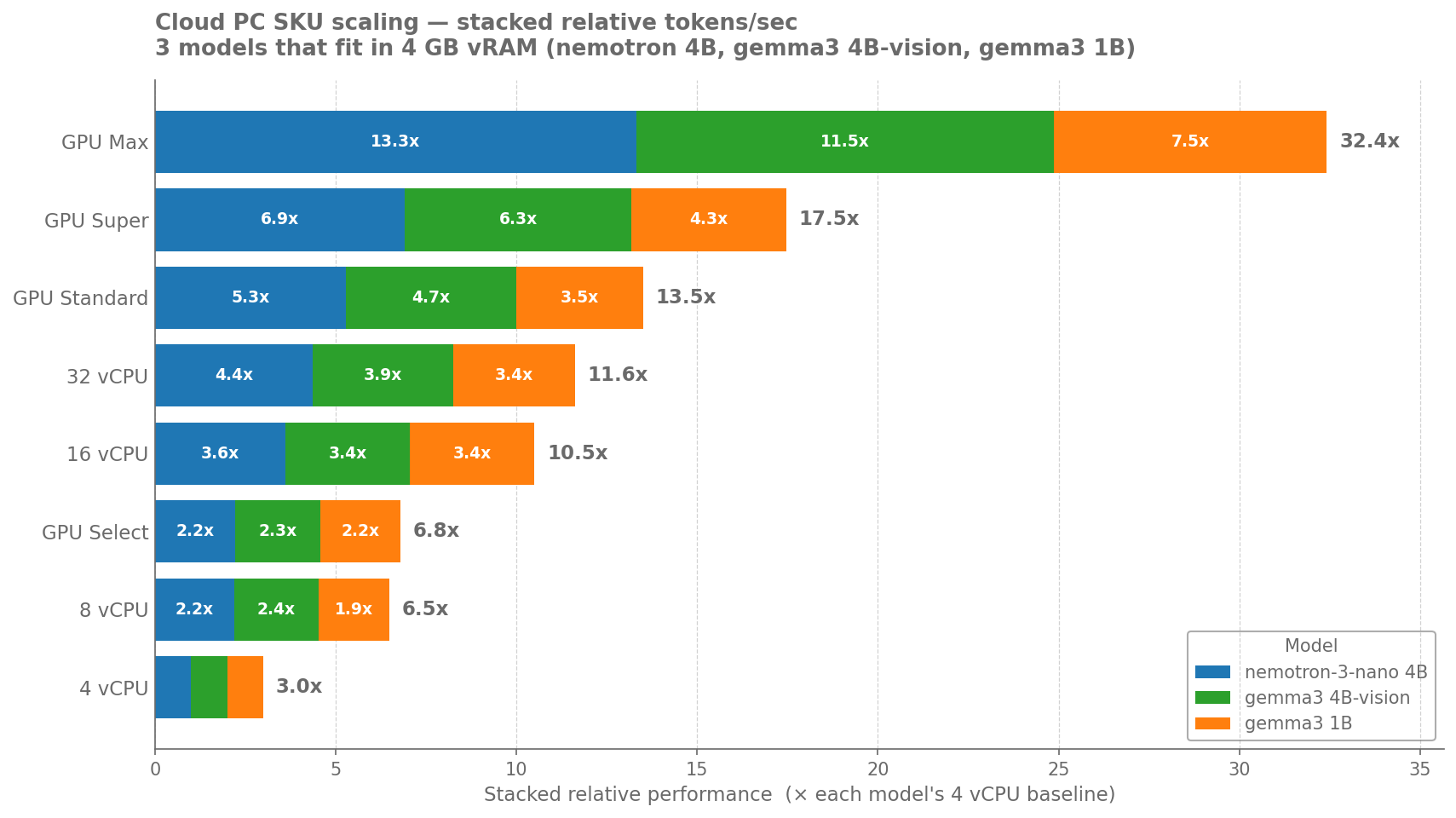
Figure 1 - Models successfully tested per SKU relative to each other
As Microsoft Cloud technology improves, Cloud PCs continue to improve as well. Windows 365 development includes change management and update testing to make sure that Cloud PCs consistently support improvements in availability, performance, and the end user experience. The result is that the experience of running local AI on each size also improves over time, without you having to track or adopt those changes yourselves.
Test methodology
The comparisons reflect two things at once:
The breadth of the model library each Cloud PC size can practically host — from small chat assistants up through large reasoning and coding models, plus image-generation models for the GPU sizes.
The responsiveness of those models in a typical interactive session — the kind of back-and-forth a knowledge worker would have with a chat or coding assistant, or a creative would have with an image generator.
The same set of prompts and the same models were used across every size. Workloads included general chat, summarization of long documents, code generation, multi-step reasoning, and text-to-image generation. Tests approximate a single primary user running AI side by side with everyday productivity apps such as Microsoft Edge and Microsoft 365.
These tests don't factor in customer-specific third-party agents, additional concurrent users, or unusually large prompts, all of which carry their own resource demands and can change the experience.
It can be valuable for you to do your own testing with the specific models and workloads your users care about. Use the results of your tests to determine the right choice for your users. For more information, see the Planning guide for Windows 365.
Test results
A common starting point for users new to local AI is 8 vCPU for small models. Compact chat assistants and short-document summarization become responsive enough for everyday use, and a noticeably larger slice of the model library becomes available — including general-purpose chat, lightweight coding helpers, and entry-level reasoning models. This is the first size where local AI starts to feel usable rather than experimental.
The GPU Select size keeps the focus on smaller models but moves them off the CPU. The same compact assistants that 8 vCPU could run now respond noticeably faster, and — importantly — this is the first size where image generation is available at all, since the CPU-only sizes can't host image models in any usable form.
16 vCPU widens the language-model catalog further. Mid-sized reasoning and coding models that don't fit comfortably on smaller sizes can now load, and Microsoft-optimized small models gain access to an accelerated path that improves their responsiveness. Mixed workloads that combine writing, code, and longer documents feel meaningfully smoother here than on 8 vCPU.
32 vCPU offers the broadest reach available without a dedicated GPU. It can host the same library as 16 vCPU plus many larger reasoning and coding models that 16 vCPU can't fit, and it tolerates longer prompts and larger context windows. For text-only AI work, this is a comfortable plateau.
GPU Standard is where the experience changes character. Mid-sized chat and reasoning models that strain the CPU-only sizes become snappy, and a meaningful portion of the image-generation library — including high-resolution photorealistic models — becomes practical. For users who blend everyday chat, coding, and occasional image creation, this is the first size that feels like a complete AI workstation rather than a starter set.
GPU Super broadens the catalog further still. It runs nearly the entire text-model library, including large reasoning and coding models, and it adds higher-quality image-generation variants that GPU Standard can't hold. For most teams, this is the size at which on-device AI shifts from "a useful add-on" to "a primary working surface."
GPU Max is the only size that runs the complete model catalog — every text model from the smallest assistants up to the largest open frontier-class models, and every image-generation variant up to the highest-quality reference models. It's the right choice for users whose principal workload is producing, reasoning over, or generating imagery with the most capable models, and it's the only size where the largest open language models and the highest-fidelity image models are usable at all.
In summary, each step up the size ladder does two things at once: it unlocks more of the model library, and it makes the models that several sizes share feel progressively more responsive. The smallest sizes can demonstrate local AI; the middle sizes make day-to-day AI workflows comfortable; the GPU sizes turn local AI into a primary tool — with each GPU tier covering a noticeably wider catalog than the one below it.
Choosing the Cloud PC size for AI workloads
If you'd like more help in choosing a Cloud PC size for users who run AI models locally, check out these resources:
The Find the right Windows 365 Cloud PC for your business online questionnaire recommends Cloud PC sizes based on a few questions.
The Cloud PC size recommendations (Enterprise) and Windows 365 Business sizing options articles suggest workloads for various sizes.
The Configure your Windows 365 Cloud PC page lets you choose a Cloud PC and review supported workloads before you purchase.
As a quick rule of thumb:
Light experimentation with small assistants → 8 vCPU.
Everyday private chat, summarization, drafting, and light coding help → 16 vCPU or GPU Select.
Mixed text and image work, mid-sized reasoning models, longer documents → GPU Standard or GPU Super.
Frontier-class reasoning, large coding models, and professional image generation → GPU Max.
What if I chose the wrong size for a user's Cloud PC?
If it turns out the Cloud PC size you chose isn't keeping up with the user's AI workload you can remotely change the size to a larger configuration. For more information, see Resize an Enterprise Cloud PC and Resize a Business Cloud PC.