Note
Access to this page requires authorization. You can try signing in or changing directories.
Access to this page requires authorization. You can try changing directories.
The Active Directory Domain Services (AD DS) tier model is a security architecture that separates administrative identities, workstations, and managed assets into trust tiers. It prevents cyberattackers who compromise an end-user device from stealing higher-privilege credentials and escalating up to the identity control plane. This logical tiering approach is rooted in identity privileges, rather than physical network segmentation, though the two approaches are complementary.
This article explains how the tier model groups assets into Tier 0, Tier 1, and Tier 2, how privileged access workstations (PAWs) enforce tier boundaries, and how to adopt the model in your environment.
How the tier model fits with the Enterprise Access Model
The model applies integrity-focused security principles similar to the Biba model: lower-trust systems must not influence higher-trust systems. The same migration approach recommended by the Mitigating Pass-the-Hash (PtH) Attacks white papers (v1 and v2) reinforces this approach. These papers formalize the risk of credential theft and lateral movement in Active Directory and inform the design of tiered administration, PAWs, and credential isolation controls.
The Enterprise Access Model (EAM) provides a broader framework for securing access across on-premises systems, multiple clouds, user access, and application access paths. The AD DS tier model is a component of the EAM as a key method for preventing unauthorized privilege escalation and enforcing administrative hierarchy for AD DS and closely related dependencies.
To download the model and review deployment guidance, see the Active Directory Tier Model repository and the deployment documentation site.
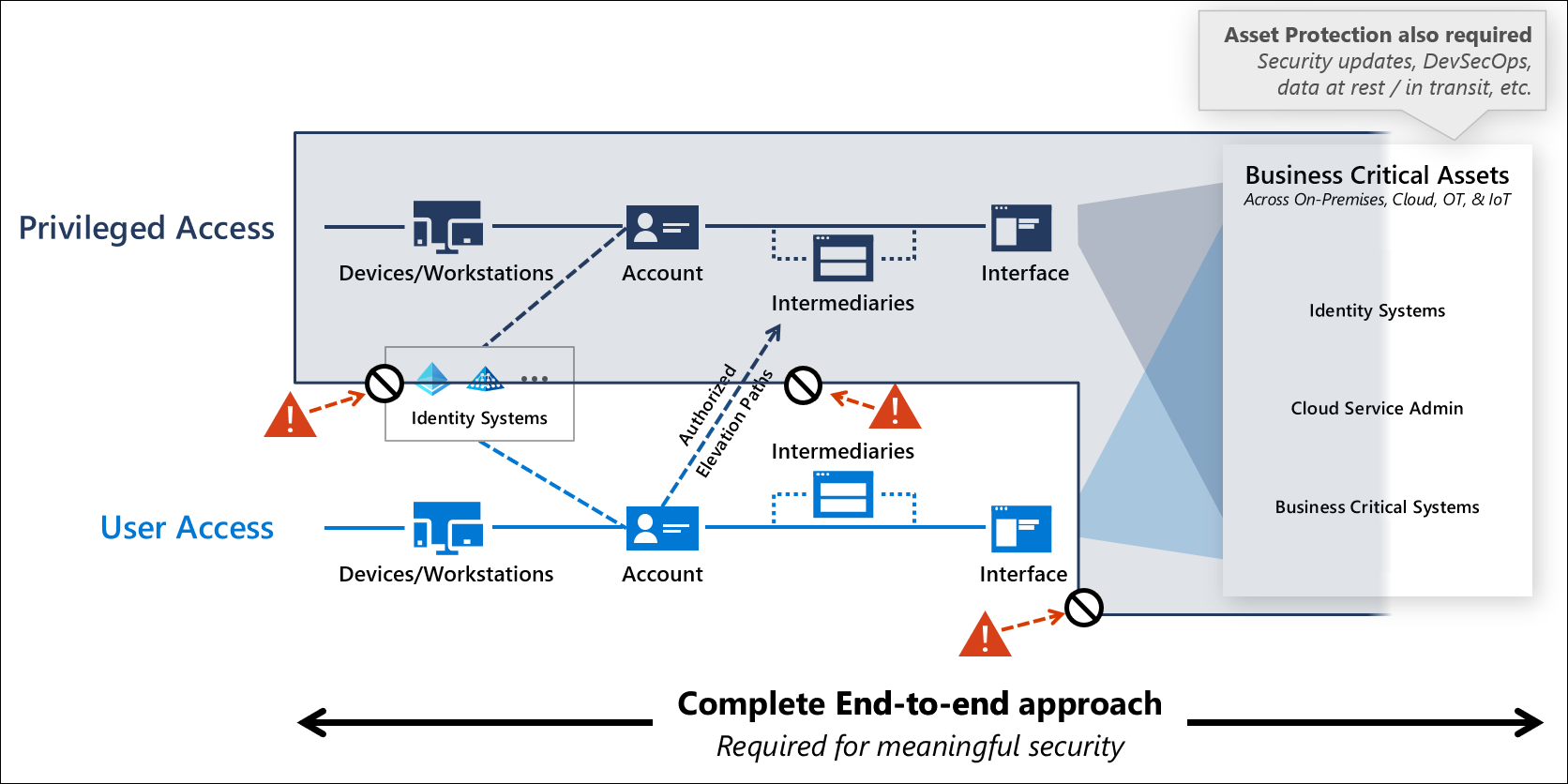
The diagram shows two horizontal planes. The upper privileged access plane contains devices and workstations, an account, intermediaries, and an interface that reach into a shaded zone of identity systems and business-critical assets across on-premises, cloud, OT, and IoT. The lower user access plane contains the same four elements for everyday work. Dashed arrows mark authorized elevation paths from the user access plane up to the privileged access plane. Red warning icons and prohibition symbols block unauthorized paths from user devices to identity systems, from user accounts to privileged intermediaries, and from user interfaces to business-critical systems. A callout labeled Asset Protection wraps the whole model, listing security updates, DevSecOps, and data protection at rest and in transit. A caption beneath reads "Complete end-to-end approach required for meaningful security."
Trust boundaries for tiered administration
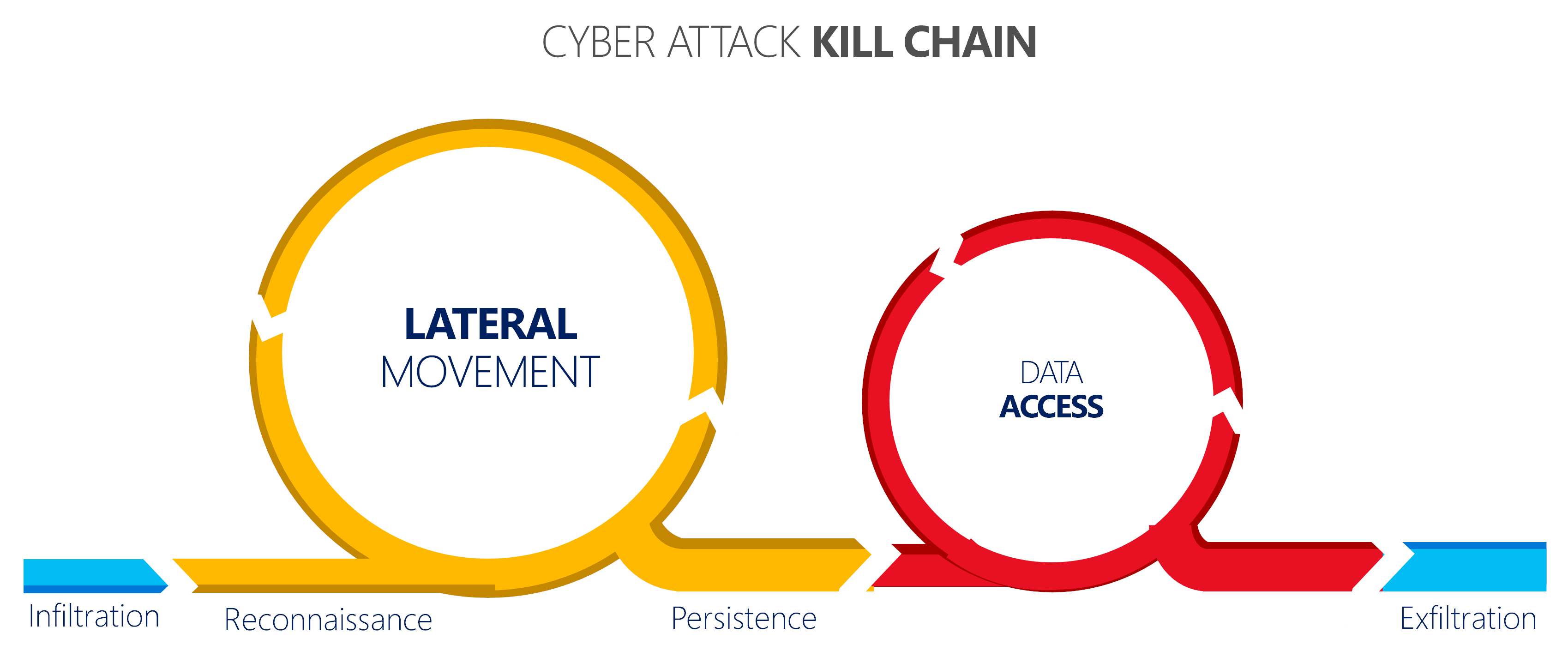
The AD DS tier model assumes cyberattackers commonly target end-user endpoints that have internet access, email, and other communication channels. Cyberattackers frequently compromise or use social engineering to gain access to these endpoints. After a cyberattacker steals credentials, they follow a cyberattack kill chain: infiltration, reconnaissance, lateral movement, persistence, data access, and exfiltration.
The AD DS tier model prevents this kill chain by ensuring administrators never use higher-tier credentials on lower-tier systems, whether inside or outside the tier model organizational unit (OU) structure.
Tier 0, Tier 1, and Tier 2 resources in the AD DS tier model
The AD DS tier model groups identities, systems, and applications into three tiers based on their scope of control over the environment. The following table summarizes the scope, example assets, and required privileged access workstation (PAW) for each tier.
| Tier | Scope | Example assets | Required PAW |
|---|---|---|---|
| Tier 0 | Identity control plane | Domain controllers, AD FS, AD CS, Microsoft Entra Connect, Tier 0 admin accounts and groups | Tier 0 PAW |
| Tier 1 | Enterprise servers and applications | Member servers, Exchange Server, SharePoint Server, SQL Server, line-of-business (LOB) applications, server admin accounts | Tier 1 PAW |
| Tier 2 | End-user devices and accounts | End-user workstations, help desk admin accounts, end-user account admin roles | Tier 2 PAW |
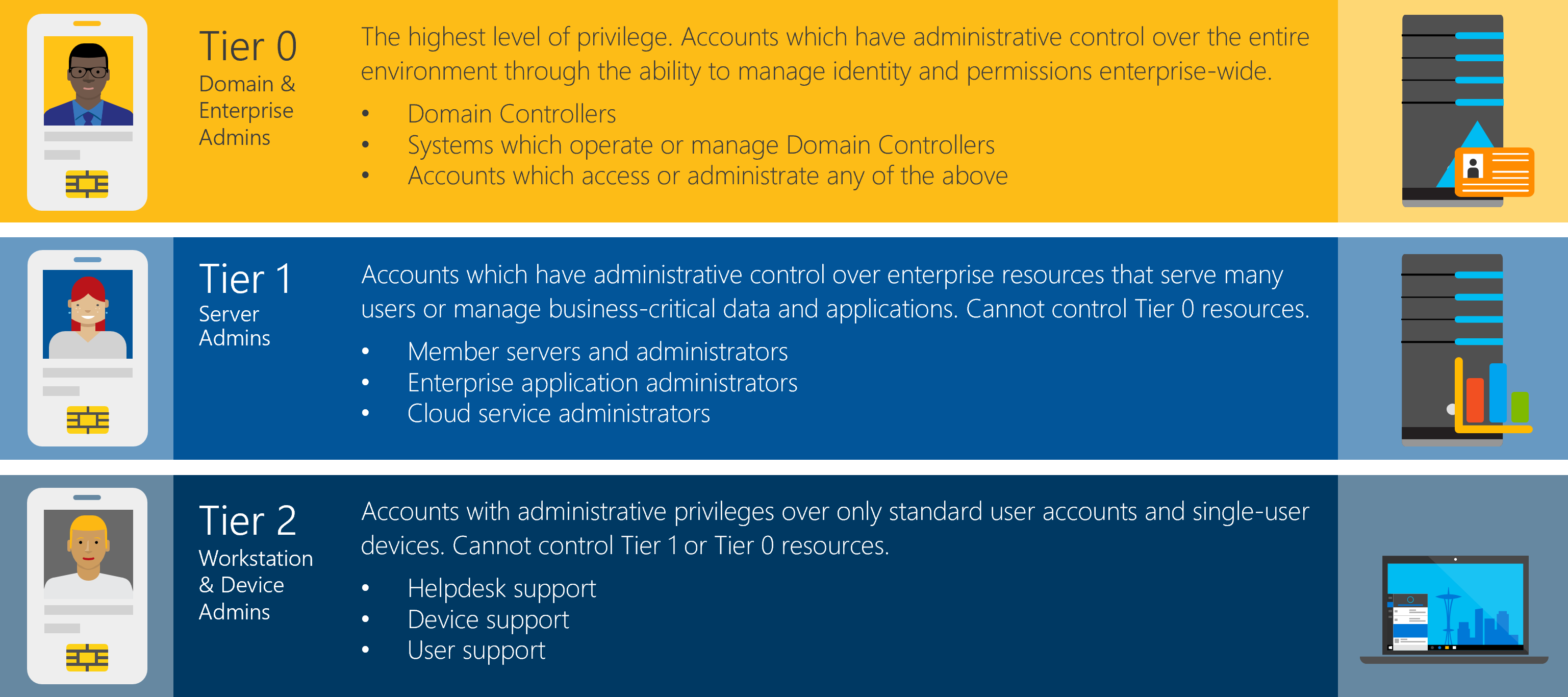
The diagram shows three stacked tiers. Tier 0, Domain and Enterprise Admins, has the highest level of privilege and administrative control over the entire environment through the ability to manage identity and permissions enterprise-wide. It covers domain controllers, systems that operate or manage domain controllers, and accounts that access or administer any of those systems. Tier 1, Server Admins, has administrative control over enterprise resources that serve many users or hold business-critical data and applications but can't control Tier 0 resources. It covers member servers and their administrators, enterprise application administrators, and cloud service administrators. Tier 2, Workstation and Device Admins, has administrative privileges over only standard user accounts and single-user devices and can't control Tier 1 or Tier 0 resources. It covers helpdesk support, device support, and user support roles.
Tier model design principles
Apply these principles when you decide whether an asset, account, or solution belongs in a particular tier:
- Least privilege within each tier. Even within Tier 0, not every account needs Domain Admins rights. Scope permissions to the minimum required for each role.
- No shared credentials across tiers. An account, service account, or group must operate in a single tier. Reusing credentials across tiers collapses the trust boundary.
- No line-of-business workloads in Tier 0. Application servers, business apps, and general-purpose workloads belong in Tier 1, even when an AD admin owns them.
- Separation of duties. Keep operators, approvers, and auditors as distinct roles, especially in Tier 0. Avoid concentrating all privileged functions in a single team.
- Containment, not perimeter, is the boundary. Network segmentation supports the model but doesn't replace it. The credential and the keyboard define the tier, not the IP address.
Common anti-patterns to avoid
These patterns frequently appear when teams adopt the AD DS tier model. Each pattern collapses the protections the model is designed to provide:
- Collapsing everything into Tier 0. Treating all infrastructure or every server as Tier 0 dilutes Tier 0 and increases the attack surface of the identity control plane.
- Daily work with Domain Admins. Administrators who use Domain Admins-equivalent accounts for routine tasks expose the highest-privilege credentials to lower-tier workstations.
- Monitoring, backup, or EDR agents with Domain Admins rights. Agents that run with Tier 0 rights on Tier 1 or Tier 2 hosts create credential exposure paths into the identity control plane.
- Shared service accounts across tiers. A service account used on both Tier 0 and Tier 1 servers turns every Tier 1 server into a Tier 0 credential exposure point.
- Treating jump servers as a separate tier. A jump server inherits the trust level of any credential that touches it. A jump server used to reach domain controllers is a Tier 0 asset.
Tier 0 - Identity control plane
Tier 0 contains assets and identities that directly or indirectly control the directory service and enterprise-wide permissions:
- Tier 0 administrative accounts and groups, including built-in Active Directory groups such as Backup Operators and Server Operators.
- AD DS domain controllers and core directory service components.
- Identity services such as Microsoft Entra Connect, Microsoft Entra application proxy, Active Directory Federation Services (AD FS), and Active Directory Certificate Services (AD CS).
- Systems that operate or manage Tier 0 identity systems, including backup, monitoring, patching, hypervisor, antivirus, and endpoint detection and response (EDR) solutions, or any agent with direct operating system-level or AD-object-level control.
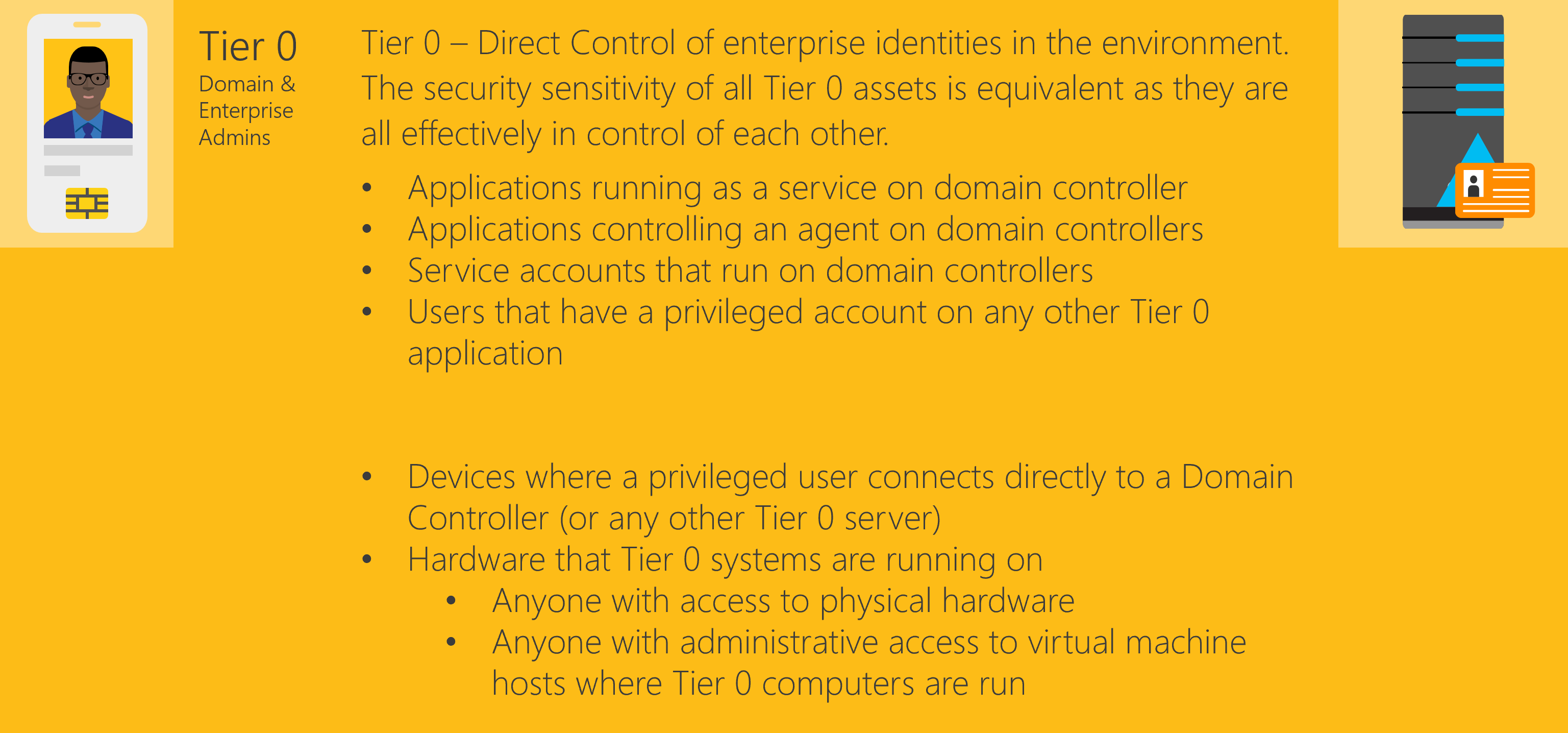
The diagram explains that Tier 0 represents direct control of enterprise identities and that the security sensitivity of all Tier 0 assets is equivalent because they are all effectively in control of each other. The first group lists Tier 0 software and identity assets: applications running as a service on a domain controller, applications controlling an agent on domain controllers, service accounts that run on domain controllers, and users that have a privileged account on any other Tier 0 application. The second group lists Tier 0 hardware and access assets: devices where a privileged user connects directly to a domain controller or any other Tier 0 server, the hardware that Tier 0 systems run on, anyone with access to that physical hardware, and anyone with administrative access to virtual machine hosts where Tier 0 computers run.
Tier 1 - Enterprise server and application management
Tier 1 contains member servers and the identities that manage them:
- Member servers and server administrator roles.
- IT infrastructure management (ITIM) solutions that control Tier 1 servers.
- Microsoft server applications such as Exchange Server, SharePoint Server, and SQL Server.
- Third-party server solutions.
- LOB applications.
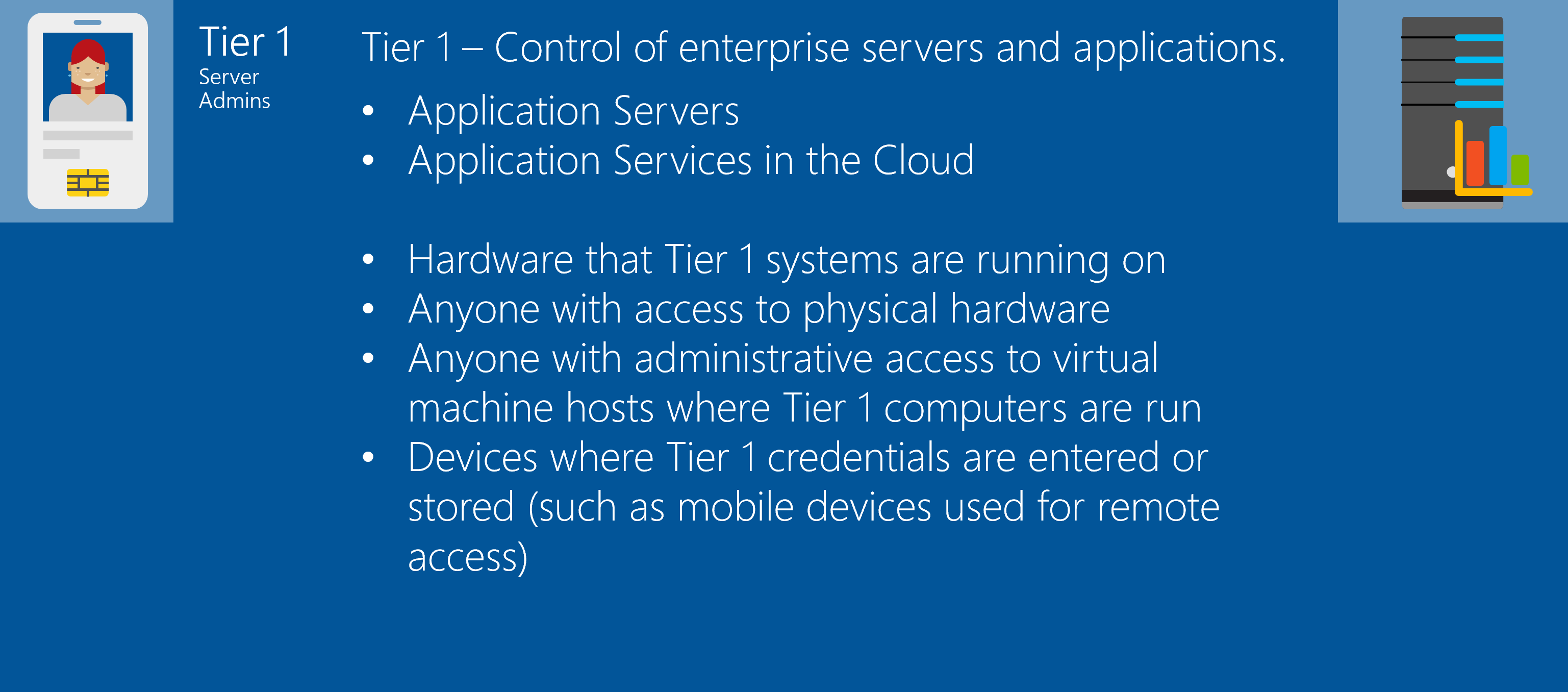
The diagram explains that Tier 1 represents control of enterprise servers and applications. The first group lists Tier 1 workload assets: application servers and application services in the cloud. The second group lists Tier 1 hardware and access assets: the hardware that Tier 1 systems run on, anyone with access to that physical hardware, anyone with administrative access to virtual machine hosts where Tier 1 computers run, and devices where Tier 1 credentials are entered or stored, such as mobile devices used for remote access.
Tier 2 - End-user account and device support
Tier 2 contains the identities that manage end-user devices and accounts, including help desk and device support roles, end-user device administrator roles, and end-user account administrator roles.
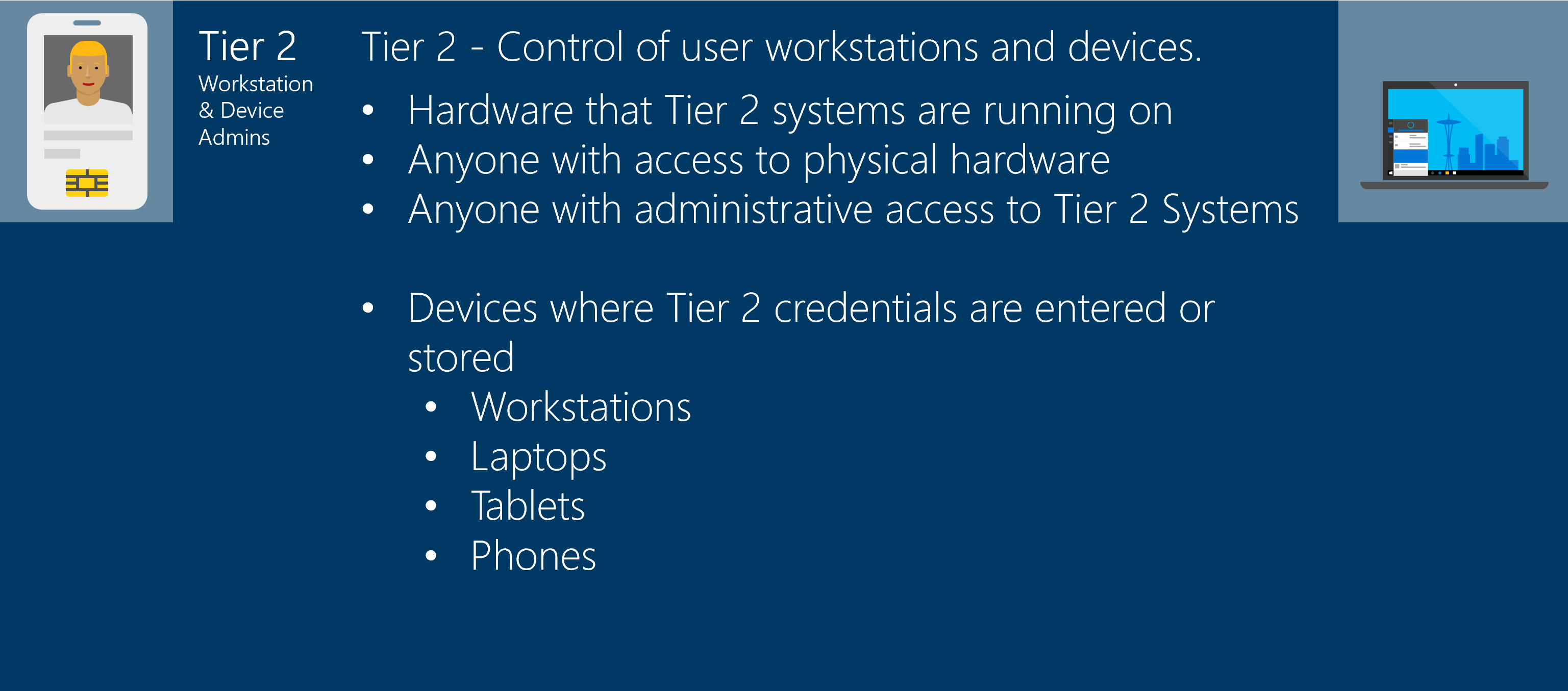
The diagram explains that Tier 2 represents control of user workstations and devices. It lists Tier 2 hardware and access assets: the hardware that Tier 2 systems run on, anyone with access to that physical hardware, and anyone with administrative access to Tier 2 systems. It also lists the devices where Tier 2 credentials are entered or stored, including workstations, laptops, tablets, and phones.
Privileged access workstations (PAWs) required for each tier
The AD DS tier model only works when you start from a trusted administrative workstation that matches the tier you're administering: a Tier 0 PAW for Tier 0 assets, a Tier 1 PAW for Tier 1, and a Tier 2 PAW for Tier 2. For cloud-based management of privileged landing zones, use a Privileged Access Workstation for Cloud Services Management (PAWCSM) that matches the target privileged scope.
If a tier administrator signs in to an untrusted end-user workstation or a workstation from the wrong tier, higher-tier credentials are exposed to a lower untrusted environment. This exposure collapses the containment boundary that the AD DS tier model relies on. Trust starts at the first physical keyboard used to sign in.
For more information, see Privileged Access Workstations overview.
Use a PAW to access Tier 0 assets
Starting from a Tier 0 PAW, you might need to make multiple hops or use different solutions before reaching the Tier 0 endpoint. Network complexity sometimes requires Tier 0 jump servers to simplify firewall rules. Vaulting solutions provide approval workflows and just-in-time (JIT) access to privileged accounts.
The core principle is that the clean trusted physical keyboard is the starting point, and any intermediate hops or solutions stay within the same tier as the target endpoint.
Clean trusted physical keyboard
The clean trusted physical keyboard is the workstation where you physically sign in to begin a privileged session. For the AD DS tier model to hold, that workstation must:
- Be hardened and dedicated to administrative use for a specific tier.
- Remain free of productivity workloads such as email, web browsing, and unmanaged software.
- Match the tier of the target asset. A Tier 0 session must originate from a Tier 0 PAW, never from a Tier 2 device that you also use for daily work.
- Have verified supply chain provenance and physical security controls. A compromised PAW can expose credentials and break the model.
- Be used exclusively for administrative tasks. Using a PAW for non-administrative work increases the risk of compromise.
If you type higher-tier credentials on a lower-tier workstation, you immediately expose those credentials to that lower-trust environment. The keyboard, not the destination, sets the effective trust level of the session.
Reach-back model
The reach-back model describes how a session that originates on a clean PAW reaches a higher-tier endpoint without lowering the trust of the session. The session is initiated from a PAW that matches the destination tier, through approved JIT elevation or credential vaulting solutions. Lower-tier workstations never initiate sessions to higher-tier endpoints by using higher-tier credentials.
Any intermediate jump server, bastion host, or remote-management gateway inherits the trust level of every credential that touches it. A jump server used to reach a domain controller is therefore a Tier 0 asset, even if the network places it in a perimeter segment. This containment prevents pass-the-hash and pass-the-ticket attacks from escalating across tiers, even when attackers compromise individual lower-tier devices.
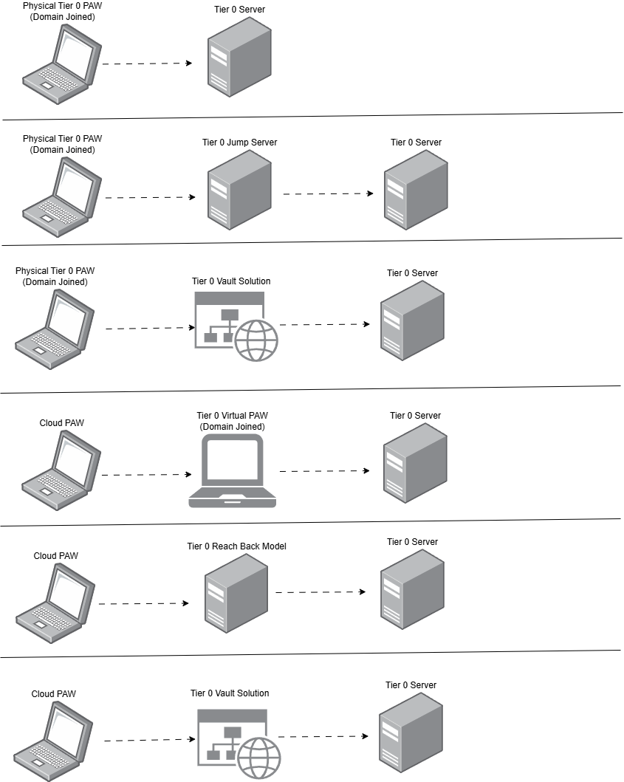
The diagram shows six access paths from a privileged access workstation (PAW) to a Tier 0 server, arranged as rows. The first three rows start from a domain-joined physical Tier 0 PAW: row one connects the PAW directly to the Tier 0 server, row two connects through a Tier 0 jump server before reaching the Tier 0 server, and row three connects through a Tier 0 vault solution before reaching the Tier 0 server. The last three rows start from a cloud PAW: row four connects through a domain-joined Tier 0 virtual PAW before reaching the Tier 0 server, row five connects through a Tier 0 reach-back model before reaching the Tier 0 server, and row six connects through a Tier 0 vault solution before reaching the Tier 0 server.
Keep Tier 0 tightly scoped
Tier 0 is the most sensitive tier in the AD DS tier model. Keep it as small as possible. Every additional account, server, or application in Tier 0 expands the attack surface of the identity control plane.
Best practices for keeping Tier 0 small
- Minimize the number of human Tier 0 administrators. A common target is fewer than five people with Domain Admins-equivalent access, and no Domain Admins service accounts.
- Minimize Tier 0 servers to what's required for identity control and recovery.
- Not all Tier 0 accounts need to be members of Domain Admins. Apply least privilege within Tier 0.
- Avoid bringing non-Tier 0 solutions, such as LOB applications, into Tier 0.
- Recognize that keeping Tier 0 small often shifts responsibilities across teams:
- Central Active Directory teams might own backup validation and recovery readiness.
- Tier 1 specialists provide support without expanding Tier 0.
- Security teams move from Domain Admins membership to auditing roles that align with least privilege.
Migrate servers and management solutions into Tier 1
Focus on migrating solutions and identities that manage member servers:
- Start with solutions that manage all of Tier 1, such as backup, monitoring, patching, and hypervisors.
- Identify overused and over-permissioned service accounts, and split them to reduce blast radius.
- Treat Tier 1 migration as an analysis, planning, and security improvement exercise. Don't treat it as just moving objects between OUs.
Migrate end-user devices and identity lifecycle into Tier 2
Migrating Tier 2 assets focuses on end-user device management and identity lifecycle:
- Understand the current identity lifecycle in the business, including joiner, mover, and leaver workflows.
- Understand how you domain-join, manage, and retire end-user devices.
- Migrate to cloud-managed devices where possible.
- Identify application dependencies on specific OUs. For example, hardcoded OU paths can cause failures after migration.
Adopt the AD DS tier model
The technical deployment of the AD DS tier model is often fast and can be done in minutes after running the deployment scripts. Organizational alignment, roles and responsibilities, and process updates take longer and are important factors for long-term success.
Follow these high-level steps to adopt the AD DS tier model:
- Align on scope and sponsorship. Define the boundaries, owners, and expected impact with leadership.
- Inventory and classify assets. Identify Tier 0 equivalents and Tier 1 high-value assets.
- Design the operating model. Define administrative personas, PAWs, and operational workflows.
- Implement structure and controls. Create the required OUs, groups, group policies, and access restrictions.
- Pilot and migrate in phases, starting with Tier 0, then Tier 1, then Tier 2.
- Validate continuously. Monitor for drift, audit privileged activity, and detect tier violations.
Post-deployment hardening activities for the AD DS tier model
After you deploy the AD DS tier model, complete the following activities to harden and operationalize the environment:
- Confirm additional security hardening requirements, such as Security Hardening Framework (SHF) baselines and the Standard Operating Environment (SOE).
- Plan cleanup of obsolete legacy group policies.
- Deploy "clean keyboard" solutions: on-premises PAWs for Tier 0 and Tier 1, and cloud PAWs (PAWCSM) for cloud-based privileged management.
- Harden AD DS and domain controller operating systems.
- Identify Tier 0 equivalent servers and migrate them.
- Onboard Tier 1 high-value assets into the model.