Note
Access to this page requires authorization. You can try signing in or changing directories.
Access to this page requires authorization. You can try changing directories.
Overview
Historical report is the primary analytics report in Microsoft Monetize, offering comprehensive data across a wide range of dimensions and metrics. It consolidates more than ten legacy report types, including Network Analytics, Seller Brand Review, and Seller Fill and Delivery. It reduces the number of report types a user needs to interact with, providing features to improve usability such as categorization of dimensions and metrics and comprehensive search capabilities.
Historical report is built from two datasets accessible through a single interface, with dimension and metric incompatibilities surfaced during selection. The expanded range of options provides a more detailed view of data across multiple aspects of delivery and inventory, with additional reportable dimension combinations, such as placement and device. The Historical report includes most of the data available in the legacy reporting system.
Note
This report is GA and includes data starting from October 10, 2024. Planned updates will extend its functionality to align with the Network Analytics, Seller Fill and Delivery, and Video Analytics reports. Additional , metrics, and adjustment data will be introduced in future updates.
Timing of Report Events
The Historical report enables metrics to be attributed to the hour of the originating ad request, rather than the time when each subsequent event occurs. This ensures consistency when calculating rates for events that may occur hours after the initial ad call, such as video impressions, native impressions, and conversions.
Example
In the example below, a video ad request has a 6-hour TTL, and its related events occur over several hours:
| Event | Event Time |
|---|---|
| Ad Request | 08:00 |
| Impression | 10:00 |
| Post-View Conversion | 11:00 |
In the Historical report, all these events are attributed back to the 08:00 hour when the ad request was made.
Historical Report View
| Hour | Ad Requests | Imps | Post-View Conversions | Fill Rate | Conversion Rate |
|---|---|---|---|---|---|
| 08:00 | 1 | 1 | 1 | 100% | 100% |
Differences Compared to Legacy Reports
Legacy reports attribute events to the actual event time. Using the same example, the legacy reporting view would look like this:
| Hour | Ad Requests | Imps | Post-View Conversions | Fill Rate | Conversion Rate |
|---|---|---|---|---|---|
| 08:00 | 1 | 0 | 0 | 0% | 0% |
| 10:00 | 0 | 1 | 0 | 0% | 0% |
| 11:00 | 0 | 0 | 1 | 0% | 0% |
Because timestamps are handled differently, metric counts will not match exactly between Historical reports and legacy reports when viewed at the day or hour level. This difference is expected and reflects the underlying attribution logic.
Report mappings
Delivery Analytics and Inventory Analytics reports are consolidated into a single Historical report builder experience. This integration streamlines reporting workflows and provides expanded insights into performance and inventory that provides:
- Consolidated reporting for comprehensive performance analysis
- Broader coverage of metrics and dimensions
| Legacy Report Name | Mapped Report Name | API Name |
|---|---|---|
| Delivery Analytics | Historical Report | monetize_creative_brand_analytics |
| Inventory Analytics | Historical Report | monetize_supply_analytics |
Note
Coverage of dimensions and metrics is in progress. Additional fields are being added to support the deprecation of legacy report types.
Legacy reports
Legacy reports will no longer receive Microsoft Monetize data starting early 2026. Historical data will remain accessible based on each report’s standard retention period or 2 years 6 months, whichever is shorter, with some specific dimensions in the report having shorter retentions of 99 days or 14 months, mirroring retention of equivalent fields in relevant Legacy reports. These new report types automatically include data for all impression types except for 7=RTB (a buying transaction on supply from another seat to your own) for Microsoft Monetize sellers.
Note
- Communication will be provided in advance to support the transition process.
- Reporting for Microsoft Invest and External SSPs is not included in these datasets.
Legacy report types
Network report types
The reports consolidate Delivery and Inventory analytics, streamlining data access. The table below maps the consolidated reports to their legacy counterparts and API names:
| UI Report Name | API Report Name |
|---|---|
| Network Analytics | network_analytics |
| Seller Brand Review | seller_brand_review |
| Seller Brand Review Hourly (alpha) | seller_brand_review_hourly (alpha) |
| Seller Fill and Delivery Network | seller_fill_and_delivery_network |
| Seller Site Domain | seller_site_domain |
| Site Domain Performance | network_site_domain_performance |
| Device Analytics | network_device_analytics |
| Carrier Analytics | network_carrier_analytics |
| Prebid Server Analytics | prebid_server_analytics |
| Audio Analytics | audio_analytics_network |
Advertiser or Publisher report types
| UI Report Name | API Report Name |
|---|---|
| Advertiser Analytics | advertiser_analytics |
| Site Domain Performance | site_domain_performance |
| Publisher Analytics | network_publisher_analytics |
| Not Available | publisher_brand_review |
| Seller Fill and Delivery Publisher | seller_fill_and_delivery_publisher |
Historical report creation
The Historical report enables streamlined report creation. Users can select from various Dimensions, Metrics, and Filters to customize their reports.
Understanding the ad request to impression funnel
The Historical Report, starting 12 November 2025, includes metrics that help analyze the impression request funnel and troubleshoot integrations.
These metrics were previously available in the Seller Fill and Delivery report. They are now exposed with more granular dimensions and filters to support deeper analysis.
Note
Non-transactional metrics such as Ad Requests, Ad Responses, and Filtered Requests are provided for directional troubleshooting only and must not be used for billing or financial reconciliation.
Ad request flow
The following diagram illustrates how an ad request progresses through Microsoft Monetize, from receipt to final outcome.
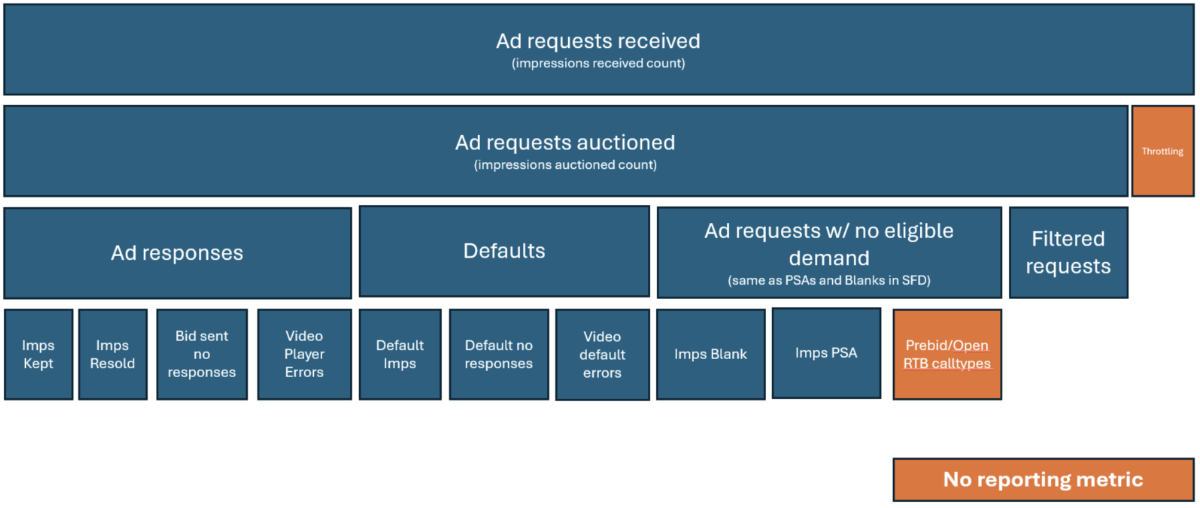
Ad request lifecycle
Ad requests received
Ad Requests Received counts the total number of unique impressions sent to Microsoft Monetize.
- Each impression is counted individually.
- This count is independent of message structure. For example, if multiple impressions are included in a single OpenRTB request, each impression is counted separately.
- This metric supports a limited set of dimensions and is not reportable with certain dimensions, such as Operating System.
Ad requests auctioned
Ad Requests Auctioned counts impressions that were submitted to the auction process.
- Impressions are counted using the same methodology as Ad Requests Received.
- Only impressions that enter the auction are included.
Filtering
The first step of the auction process evaluates inventory quality.
- If an impression is filtered before bidding, it is counted as a Filtered Request.
- Filtered requests are logged with a filtered request reason.
- Filtered requests do not proceed to bidding.
Ad responses
If the auction results in at least one eligible bid from managed or third-party demand, an Ad Response is counted.
Impressions sold
Impressions are considered sold when an impression tracker is received within the TTL (time to live) for the creative media type.
Impressions can be:
- Kept impressions (managed demand)
- Resold impressions (third-party demand)
Video player errors
Video Player Errors are counted when a video error is reported after the auction completes.
Note
This metric may not align with the Seller Fill and Delivery report due to updates in processing logic.
Default impressions and no responses
If the impression returned is a default creative, it is counted separately, including:
- Default impressions
- Default no responses (non-video)
- Video default no responses
If an impression tracker is not received within the TTL, the outcome is counted as Bid Sent No Responses.
This behavior applies to both standard and default creatives.
No eligible demand
When no managed, programmatic, or default demand is eligible, the request is counted as Ad Requests No Eligible Demand.
- Blank impressions are recorded for specific integrations (for example,
/UT). - Blank impressions are not recorded for integrations where a downstream auction is expected (for example, Prebid).
- PSAs are recorded when no eligible demand exists and PSAs are enabled for the placement.
Metrics
| UI name | API field | Description |
|---|---|---|
| Ad Requests Received | ad_requests |
Total count of unique impressions sent to Microsoft Monetize |
| Ad Requests Auctioned | ad_requests_auctioned |
Total count of unique impressions evaluated for auction |
| Filtered Requests | filtered_requests |
Total count of auctioned requests filtered pre-bid for inventory quality |
| Ad Requests No Eligible Demand | ad_requests_no_creative |
Total count of requests with no eligible managed, programmatic, or default demand |
| Ad Responses | ad_responses_total |
Total count of auctions with at least one eligible bid |
| Video Ad Responses | ad_responses |
Total count of auctions with at least one eligible video bid |
| Bid Sent No Responses | bid_sent_no_responses |
Bid responses returned but where the creative ultimately did not render |
| Default No Responses | defaults_no_responses |
Requests where a default creative was sent but no response was received |
| Video Default Errors | video_default_errors |
Errors reported when a default video creative should have served |
| Video Player Errors | video_player_errors |
Errors reported after VAST XML delivery (maximum 1 per auction) |
| Response Rate | response_rate |
Total ad responses ÷ (Ad Requests − Filtered Requests) |
| Win Rate | win_rate |
(Kept + Resold impressions) ÷ Total Ad Responses |
| Fill Rate | fill_rate |
(Kept + Resold impressions) ÷ Ad Requests Auctioned |
| Ad Request RPM | ad_request_rpm |
Seller revenue per 1,000 auctioned ad requests |
Bid sent no responses: common scenarios
This metric typically occurs when Microsoft Advertising returns a bid, but the creative does not render. Common scenarios include:
- An external system (for example, Prebid or a waterfall-based ad server) selects a different bid.
- The user leaves the page before the impression tracker fires.
- Lazy loading prevents the ad from rendering.
- A video ad is requested but never plays.
Dimensions available only for transacted impressions
For the following metrics:
- Ad Requests Received
- Ad Requests Auctioned
- Filtered Requests
- Bid Sent No Responses
The dimensions listed below are not reportable and only populate when an impression is transacted:
- Viewability metrics
- Browser
- Creative
- Brand
- Carrier
- Deal Type
- Curator
- Audit Status
Time frame and data retention
Time ranges
The report_interval field in the JSON request can be set to one of the following:
customcurrent_hourlast_hourtodayyesterdaylast_48_hourslast_2_dayslast_7_dayslast_14_dayslast_30_daysmonth_to_datemonth_to_yesterday
Data retention period
Note
To run a report for a custom time frame, set the start_date and end_date fields in your report request. For more details about these fields, see Report Service. For reports with a start date before the hourly-to-daily cutoff, UTC is enforced.
- Hourly data: Data is retained for the last 100 days.
- Cumulative data: Data is retained for up to 2 years and 2 months.
- Current maximum data availability: Data is retained for 90 days (planned extensions forthcoming).
Intervals
Intervals determine how your data is grouped together into rows in the report response. The following is a complete list of intervals available for reports. However, all intervals are not available for every report.
- Hourly: Data is grouped by the hour.
- Daily: Data is grouped by the day.
- Monthly: Data is grouped by the month.
- Cumulative: Data is covered by an entire selected period.
Filters
Filters allow you to limit displayed data by specific dimensions. Available filters include:
- Advertiser name
- Publisher name
- Impression type
Dimensions
Warning
Some Dimensions, such as Device Make and Creative, cannot be used together. An info message will indicate unavailable combinations.
| Column | Type | Filter? | Description | |
|---|---|---|---|---|
advertiser |
string | No | The advertiser that bought the impression. This will be an object owned by the seller and will be populated for a managed bought or deal v2 impression. | |
advertiser_id |
int | Yes | The ID of the advertiser that bought the impression. This will be an object owned by the seller and will be populated for a managed bought or deal v2 impression. | |
advertiser_name |
string | No | The name of the advertiser that bought the impression. This will be an object owned by the seller and will be populated for a managed bought or deal v2 impression. | |
bidder |
int | No | The Bidder object (in most cases this is a DSP). | |
bidder_id |
int | Yes | The ID of the Xandr Bidder object (in most cases this is a DSP). | |
bidder_name |
int | No | The name of the Xandr Bidder object (in most cases this is a DSP). | |
billing_period_id |
int | Yes | The ID of the Billing Period | |
billing_period.booked_imps_budget_daily |
int | No | The daily impression budget of the insertion order's billing period. | |
billing_period.booked_imps_budget_lifetime |
int | No | The lifetime impression budget of the insertion order's billing period. | |
billing_period.start_date |
datetime | No | The earliest date of the insertion order's billing period. Note: Alpha-Beta Notice: This field or feature is part of functionality currently in either Alpha or Beta phase. It is therefore subject to change. | |
billing_period.end_date |
datetime | No | The last date of the insertion order's billing period. Note: Alpha-Beta Notice: This field or feature is part of functionality currently in either Alpha or Beta phase. It is therefore subject to change. | |
billing_period.external_code |
int | No | The custom code for the billing period. | |
buyer_member |
string | No | The name with ID in brackets of the Xandr buyer member that purchased the impression | |
buyer_member_id |
int | Yes | The ID of the Xandr buyer member that purchased the impression | |
buyer_member_name |
string | No | The Name of the Xandr buyer member that purchased the impression | |
buyer_seat |
string | No | The seat for the Bidder. This enables reporting on sub-seats for bidders that do not have buyer_member_id breakouts. |
|
buyer_seat_id |
int | Yes | The ID of the seat for the Bidder. This enables reporting on sub-seats for bidders that do not have buyer_member_id breakouts. |
|
buyer_seat_name |
string | No | The name of the seat for the Bidder. This enables reporting on sub-seats for bidders that do not have buyer_member_id breakouts. | |
buyer_seat_code |
string | No | The custom buyer seat ID (submitted by DSP) which was used to bid on the impression | |
flight_id |
int | No | The ID of the line item flight under which the impression was purchased. | |
flight_booked_impressions_budget_daily |
int | No | The daily impression budget for the line item's flight. | |
flight_booked_impressions_budget_lifetime |
int | No | The lifetime impression budget for the line item's flight. | |
flight_start_date |
datetime | No | The start date of the line item's flight. | |
flight_end_date |
datetime | No | The end date of the line item's flight. | |
insertion_order |
string | Yes | The insertion order that bought the impression. This will be an object owned by the seller and will be populated for a managed bought or deal v2 impression. | |
insertion_order_id |
int | No | The insertion order ID that bought the impression. This will be an object owned by the seller and will be populated for a managed bought or deal v2 impression. | |
insertion_order_name |
string | No | The insertion order name that bought the impression. This will be an object owned by the seller and will be populated for a managed bought or deal v2 impression. | |
insertion_order.billing_code |
string | No | The billing code associated with the insertion order (if there is one). | |
insertion_order.end_date |
datetime | No | The end date of the insertion order (for legacy insertion orders). | |
insertion_order.start_date |
datetime | No | The start date of the insertion order (for legacy insertion orders). | |
insertion_order.state |
string | No | The state of the insertion order (e.g., active, inactive). | |
insertion_order.type |
int | Yes | The type of insertion order associated with the impression (e.g. Legacy, Seamless). | |
line_item |
string | No | The line item order that bought the impression. This will be an object owned by the seller and will be populated for a managed bought or deal v2 impression. | |
line_item_id |
int | Yes | The line item ID that bought the impression. This will be an object owned by the seller and will be populated for a managed bought or deal v2 impression. | |
line_item_name |
string | No | The line item name that bought the impression. This will be an object owned by the seller and will be populated for a managed bought or deal v2 impression. | |
line_item.comments |
string | No | Any comments that have been entered for this line item. | |
line_item.start_date |
datetime | No | The start date of the line item. | |
line_item.end_date |
datetime | No | The end date of the line item. | |
line_item.status |
string | No | The state of the line item (e.g., active, inactive). | |
line_item_code |
string | No | The optional external code applied to the line item. | |
li_priority |
string | Yes | The bidding priority for a line item that targets direct inventory. For more information, see Bidding Priority in the UI Documentation. Possible values: 1 - 20, where 20 is the highest priority. | |
li_subtype |
string | Yes | The line item subtype (e.g., Augmented, Deal, Guaranteed). | |
li_subtype_id |
int | No | The line item subtype ID. | |
li_subtype_name |
string | No | The line item subtype name. | |
salesrep_for_line_item |
string | Yes | A custom reporting label field containing the sales representative. You may only select one reporting label per report. | |
trafficker_for_line_item |
string | Yes | A custom reporting label field containing the trafficker. You may only select one reporting label per report. | |
type_for_line_item |
string | Yes | A custom reporting label field used to list the line item type (e.g., Retargeting LI). This is not the same as the Type attribute described above. You may only select one reporting label per report. | |
insertion_order_type |
string | Yes | A custom reporting label field used to list the insertion order type (e.g., Branding IO). This is not the same as the Type attribute described above. You may only select one reporting label per report. | |
insertion_order.sales_rep_label |
string | Yes | A customer reporting label field used to list the sales representative associated with the insertion order. You may only select one reporting label per report. | |
insertion_order.trafficker_label |
string | Yes | A customer reporting label field used to list the trafficker associated with the insertion order. You may only select one reporting label per report. | |
placement |
string | No | The Xandr Placement for the impression. | |
placement_id |
int | Yes | The ID of the Xandr Placement for the impression. | |
placement_name |
string | No | The name of the Xandr Placement for the impression. | |
placement.code |
string | No | The code of the Xandr Placement for the impression. | |
placement.code2 |
string | No | The code of the Xandr Placement for the impression. | |
placement.code3 |
string | No | The code of the Xandr Placement for the impression. | |
plmt_grp |
string | No | Xandr Placement Group for the impression. | |
plmt_grp_id |
int | Yes | The ID of the Xandr Placement Group for the impression. | |
plmt_grp.name |
string | No | The name of the Xandr Placement Group for the impression. | |
plmt_grp.code |
string | No | The code of the Xandr Placement Group for the impression. | |
publisher |
string | No | The Xandr Publisher for the impression. | |
publisher_id |
int | Yes | The ID of the Xandr Publisher for the impression. | |
publisher_name |
string | No | The name of the Xandr Publisher for the impression. | |
brand |
string | No | The Brand as determined by the Xandr creative audit or self assigned for managed traffic | |
brand_id |
int | Yes | The ID for the Brand as determined by the Xandr creative audit or self assigned for managed traffic | |
brand_name |
string | No | The name for the Brand as determined by the Xandr creative audit or self assigned for managed traffic | |
brand_category_id |
int | Yes | The parent category ID for the creative's assigned brand | |
brand_category_name |
string | No | The parent category name for the creative's assigned brand | |
creative |
string | No | Creative that served. It will only be populated for managed impressions. | |
creative_id |
int | Yes | The Xandr ID for the creative that served. | |
creative_name |
string | No | The Xandr name for the creative that served. The name will only be populated for managed impressions. | |
creative_code |
string | No | The code of the creative. | |
creative_type |
string | No | The media type of the creative that transacted | |
creative_type_id |
int | No | The media type ID of the creative that transacted | |
size |
string | Yes | For display creatives, this is the creative width x height in pixels | |
domains_exposed_id |
int | No | Whether this inventory's domains are exposed for targeting by buyers. Allowed values: "Exposed", "Not exposed" | |
domains_exposed |
int | No | Whether this inventory's domains are exposed for targeting by buyers. Allowed values: "Exposed", "Not exposed" | |
exposed_for_resale |
string | No | Viewability profile, used by sellers to expose/hide their content_categories info to buyers | |
exposed_for_resale_id |
int | No | Viewability profile, used by sellers to expose/hide their publisher info to buyers | |
allowed_media_types_bitmap_name |
string | No | An array of the permitted media types for the impression | |
audit_type |
string | No | The type of audit performed on the domain where the impression occurred. | |
audit_type_id |
int | Yes | The ID of the type of audit performed on the domain where the impression occurred. | |
audit_type_name |
string | No | The name of the type of audit performed on the domain where the impression occurred. | |
browser |
string | No | The Name and ID of the browser in which the impression was served. To retrieve a complete list of browser IDs and names, use the Browser Service. | |
browser_id |
int | Yes | The ID of the browser in which the impression was served. To retrieve a complete list of browser IDs and names, use the Browser Service. | |
content_category |
string | No | The ID and name of the universal content category associated with the audited domain. | |
content_category_id |
int | Yes | The ID of the universal content category associated with the audited domain. | |
content_category_name |
string | No | The name of the universal content category associated with the audited domain. | |
fold_position |
string | No | The fold position, i.e. where on the page the placement is located. For allowed values, see fold_position_id. | |
fold_position_id |
int | Yes | The ID of the fold position, i.e. where on the page the placement is located. Possible values for impressions: 0 = "unknown", 1 = "above", 2 = "below". | |
supply_type_id |
int | Yes | The ID of the type of inventory. | |
supply_type_name |
string | No | The type of inventory. Possible values: "web", "mobile_web", "mobile_app", "facebook_sidebar". | |
prebid_server_eligible |
int | Yes | Yes if PSP was eligible to bid into the auction for the impression. | |
prebid_server_eligible_name |
string | No | Yes if PSP was eligible to bid into the auction for the impression. | |
ssp |
string | No | When the transaction is bought by PSP (bidder_id=443) this field will show the individual SSP that transacted. Otherwise, the SSP will be recorded as Monetize. | |
ssp_id |
int | No | When the transaction is bought by PSP (bidder_id=443) this field will show the individual SSP that transacted. Otherwise, the SSP will be recorded as Monetize. | |
ssp_name |
string | No | When the transaction is bought by PSP (bidder_id=443) this field will show the individual SSP that transacted. Otherwise, the SSP will be recorded as Monetize. | |
deal |
string | No | The name and ID of the affected deal. | |
deal_id |
int | Yes | The ID of the deal. | |
deal_name |
string | No | The name of the affected deal. | |
deal_type |
string | Yes | Possible values: Open Auction (1), Private Auction (2), First Look (3), Programmatic Guaranteed (4), Curated (5 - only relevant for Curators). | |
revenue_type |
string | No | For managed line items, this is the basis on which the booked revenue gets recorded for the Seller. | |
revenue_type_id |
int | Yes | The basis on which the advertiser has agreed to pay you for the impression. | |
carrier |
string | No | The carrier for the device on which the impression was served. | |
carrier_id |
int | Yes | The ID of the carrier for the device on which the impression was served. | |
carrier_name |
string | No | The name of the carrier for the device on which the impression was served. | |
device_make |
string | No | The device manufacturer | |
device_make_id |
int | Yes | The ID of the device make on which the impression was served. The make is generally the manufacturer of the device (i.e., Apple). | |
device_make_name |
string | No | The name of the device make on which the impression was served. The make is generally the manufacturer of the device (i.e., Apple). To retrieve a complete list of device make IDs and names, use the Device Make Service. | |
device_model |
string | No | The ID and name of the device model on which the impression was served. The model is generally the specific product (i.e., IPhone). | |
device_model_id |
int | Yes | The ID of the device model on which the impression was served. The model is generally the specific product (i.e., IPhone). | |
device_model_name |
string | No | The name of the device model on which the impression was served. The model is generally the specific product (i.e., IPhone). | |
device_type |
string | No | The device type the impression originated from. 0=Unknown, 1=PC, 2=Phone, 3=Tablet, 4=TV, 5=Game Console, 6=Media Player, 7=Set top box | |
device_type_id |
int | Yes | The ID of the device type the impression originated from. 0=Unknown, 1=PC, 2=Phone, 3=Tablet, 4=TV, 5=Game Console, 6=Media Player, 7=Set top box | |
operating_system |
string | No | The name of the operating system of the device followed by the ID (Microsoft Advertising format). | |
operating_system_id |
int | Yes | The ID of the operating system of the device. | |
operating_system_name |
string | No | The name of the operating system of the device. | |
operating_system_family |
string | No | The name of the operating system family (e.g., Android, Microsoft Windows) of the device followed by the ID (Microsoft Advertising format). | |
operating_system_family_id |
int | Yes | The ID of the operating system family associated with the device the impression was served on. | |
operating_system_family_name |
string | No | The name of the operating system family associated with the device the impression was served on. | |
curator_member |
string | No | The ID of the curator that was present in the transaction | |
curator_member_id |
int | Yes | The ID of the curator that was present in the transaction | |
curator_member_name |
string | No | The name of the curator that was present in the transaction | |
is_curated |
boolean | Yes | Yes if the transaction occurred via a curator | |
demand_channel |
string | No | The type of demand that bought the impression. Possible values: Managed (imp_type=5), PSP (bidder_id=443), Standard Deal, Priority Deal, PG Deal, Curation (curator_member_id > 0) and Open Exchange (imp_type=6). | |
demand_channel_id |
int | Yes | The type of demand that bought the impression. Possible values: Managed (imp_type=5), PSP (bidder_id=443), Standard Deal, Priority Deal, PG Deal, Curation (curator_member_id > 0) and Open Exchange (imp_type=6). | |
demand_channel_name |
string | No | The type of demand that bought the impression. Possible values: Managed (imp_type=5), PSP (bidder_id=443), Standard Deal, Priority Deal, PG Deal, Curation (curator_member_id > 0) and Open Exchange (imp_type=6). | |
imp_type |
string | No | The type of transaction. (1=blank, 2=PSA, 3=Default Error, 4=default, 5=kept, 6=resold, 7=RTB, 8=PSA Error, 9=External Impression, 10=External Click, 11=Insertion) | |
imp_type_id |
int | Yes | The type of transaction. (1=blank, 2=PSA, 3=Default Error, 4=default, 5=kept, 6=resold, 7=RTB, 8=PSA Error, 9=External Impression, 10=External Click, 11=Insertion) | |
call_type |
string | Yes | The Impbus handler the impression originated from | |
sdk_version |
string | No | The version of the Xandr SDK (AST or Mobile SDK) used to generate the ad request. | |
mobile_application |
string | No | Domain / App | The application the bundle on the ad request was mapped to |
mobile_application_id |
int | No | Domain / App | The ID for the application the bundle on the ad request was mapped to |
mobile_application_name |
string | No | Domain / App | The name for the application the bundle on the ad request was mapped to |
site_domain |
string | No | Domain / App | The domain detected for the ad request |
geo_country |
string | Yes | Geography | The country/region 2 digit code in which the impression took place. For impression requests for which Xandr received no indication that the ad was rendered (i.e., non-transacted), country/region information is not provided. Country/region information is detected by the IP address of the user. Note: Some discrepancies are normal with external data sources due to differences between country/region detection methods. |
geo_country_name |
string | No | The country/region name in which the impression took place. For impression requests for which Xandr received no indication that the ad was rendered (i.e., non-transacted), country/region information is not provided. Country/region information is detected by | |
day |
date | No | The day of the Auction | |
hour |
date | No | The hour of the auction. Note: For impressions older than 100 days, the day will be returned rather than the hour. | |
month |
date | No | The month of the auction | |
filtered_request_reason |
string | No | The reason why the impression request was filtered out by Xandr's inventory quality controls and the auction was not held. Possible reasons are: "Invalid Domain" (1), "Invalid IP" (2), "Suspected Domain Detection Tampering" (3, 4, 5), "Unknown" (6, 7), “White Ops: General IVT” (17) - consists of traffic identified through routine means of filtration, executed through application of lists or with other standardized parameter checks, “White Ops: Sophisticated IVT” (18) - consists of more difficult to detect situations that require advanced analytics, multi-point corroboration/coordination, significant human intervention, etc., to analyze and identify, "Valid Impression" (0) is also a valid filtered request reason, but in that case, an auction was held and it was not filtered. | |
filtered_request_reason_id |
int | No | The reason why the impression request was filtered out by Xandr's inventory quality controls and the auction was not held. Possible reasons are: "Invalid Domain" (1), "Invalid IP" (2), "Suspected Domain Detection Tampering" (3, 4, 5), "Unknown" (6, 7), “White Ops: General IVT” (17) - consists of traffic identified through routine means of filtration, executed through application of lists or with other standardized parameter checks, “White Ops: Sophisticated IVT” (18) - consists of more difficult to detect situations that require advanced analytics, multi-point corroboration/coordination, significant human intervention, etc., to analyze and identify, "Valid Impression" (0) is also a valid filtered request reason, but in that case, an auction was held and it was not filtered. | |
supply_chain_node_count |
Int | Y | The number of nodes in the Ad Request SCHAIN. | |
supply_chain_is_complete |
String | Y | Indicates whether the SCHAIN is marked as complete on the Ad Request. | |
is_gpid_present |
String | Y | Indicates whether a Global Placement ID (GPID) was present on the impression. Note: This field is a reporting-only characteristic and does not affect the value of GPID at auction time. It is supported for Impressions metrics only. A subset of ad requests that do not result in a transacted impression are not GPID-reportable. As a result, using this field together with Ad Request or Response metrics may not accurately reflect true GPID coverage and is not recommended. |
Metrics
Note
Adjustment revenue is not currently reportable. Revenue metrics may have minor discrepancies due to varying aggregation levels.
| Column | Type | Description |
|---|---|---|
imps |
int | The number of impressions recorded, of any imp_type. N.B. For some call_types such as /OpenRTB2 and /prebid blank impressions are not recorded as imps, as typically there is a further auction when Xandr returns bids, and it would not be known if the final impression blanked, or Xandr lost in the final auction. |
sold_network_rpm |
double | The revenue per 1000 impressions that were not blanks, defaults or errors. |
total_revenue_ecpm |
money | The total revenue per 1000 impressions. |
revenue |
money | The total net revenue. |
imps_blank |
int | The total number of impressions in which a blank creative served. |
imps_default |
int | The total number of impressions in which a default creative served because there were no valid bids. |
imps_default_error |
int | The total number of impressions in which a default creative served due to a timeout issue. |
imps_kept |
int | The total number of impressions in which one of your managed advertisers served a creative. |
imps_resold |
int | The total number of impressions sold to a third-party buyer. |
imps_primary_creative |
int | The number of page-level roadblocks that served the master creative. Note: Alpha-Beta Notice: This field or feature is part of functionality currently in either Alpha or Beta phase. It is therefore subject to change. |
imps_psa |
int | The total number of impressions in which a public service announcement served because no other creative was eligible. |
imps_psa_error |
int | The total number of impressions in which a public service announcement served due to timeout issue. |
seller_revenue |
money | The net revenue resultant from a 3rd party buyer (to the seller) |
booked_revenue |
money | The net revenue applied on the Line Item that won the impression. |
clicks |
int | The number of clicks recorded. Clicks are deduplicated by auction (so maximum 1 click per unique auction) and have a 6 hour TTL to be recorded. Clicks can be measured for display impresisons bought by Xandr Invest and for Video and Native creatives from all buyers. |
total_revenue_ecpc |
money | The total revenue per click. |
cost |
money | The cost to purchase 3rd party inventory via a Line Item |
cpm |
money | The cost per 1000 impressions. |
starts |
int | The number of start events received by Xandr, maximum 1 per auction. |
25_pcts |
int | The number of first quartile events received by Xandr, maximum 1 per auction. |
50_pcts |
int | The number of second quartile events received by Xandr, maximum 1 per auction. |
75_pcts |
int | The number of third quartile events received by Xandr, maximum 1 per auction. |
completions |
int | The number of completion events received by Xandr, maximum 1 per auction. |
errors |
int | The number of error events received by Xandr, maximum 1 per auction. |
skips |
int | The number of skip events received by Xandr, maximum 1 per auction. |
start_rate |
double | video_starts / imps |
video_25_pct_completion_rate |
double | video_25_pcts / video_starts |
video_50_pct_completion_rate |
double | video_50_pcts / video_starts |
video_75_pct_completion_rate |
double | video_75_pcts / video_starts |
video_skip_rate |
double | video_skips / video_starts |
started_video_completion_rate |
double | Video completions per load (video_completions / video_starts) |
revenue_per_video_complete |
double | The revenue per video completion. |
view_measured_imps |
int | The total number of impressions that were measured for viewability |
imps_viewed |
int | The total number of impressions that were measured as viewable by the Xandr viewability script |
view_measurement_rate |
double | The percentage of impressions measured for viewability out of the total number of impressions. (View Measured Imps / Imps) |
view_rate |
double | The percentage of impressions that were viewable out of the total number of impressions measured for viewability. (Viewed Imps / View Measured Imps) |
total_revenue_vcpm |
money | The total revenue per 1000 viewable impressions. |
ad_requests |
int | The number of unique auctions Xandr considered for auction, before any filtration was applied. N.B. One ad call may contain multiple tags. In such a scenario we would count an ad request for every tag within the ad request message. |
filtered_requests |
int | The number of unique auctions that Xandr filtered due to inventory quality checks |
external_click |
int | Clicks as recorded by the external clicktracker. |
external_impression |
int | Imps as recorded by the external impression tracker. |
total_revenue_ecpa |
money | The total revenue per acquisition. |
ad_requests |
Total count of unique impressions sent to Microsoft Monetize | |
ad_requests_auctioned |
Total count of unique impressions evaluated for auction | |
filtered_requests |
Total count of auctioned requests filtered pre-bid for inventory quality | |
ad_requests_no_creative |
Total count of requests with no eligible managed, programmatic, or default demand | |
ad_responses_total |
Total count of auctions with at least one eligible bid | |
ad_responses |
Total count of auctions with at least one eligible video bid | |
bid_sent_no_responses |
Bid responses returned but where the creative ultimately did not render | |
defaults_no_responses |
Requests where a default creative was sent but no response was received | |
video_default_errors |
Errors reported when a default video creative should have served | |
video_player_errors |
Errors reported after VAST XML delivery (maximum 1 per auction) | |
response_rate |
Total ad responses ÷ (Ad Requests − Filtered Requests) | |
win_rate |
(Kept + Resold impressions) ÷ Total Ad Responses | |
fill_rate |
(Kept + Resold impressions) ÷ Ad Requests Auctioned | |
ad_request_rpm |
Seller revenue per 1,000 auctioned ad requests |
Examples
Create the JSON-formatted report request
The JSON file should include the report_type monetize_supply_analytics or monetize_creative_brand_analytics, as well as the columns (dimensions and metrics) and report_interval that you want to retrieve. You can also filter for specific dimensions, define granularity (year, month, day), and specify the format in which the data should be returned (csv, excel, or html). For a full explanation of fields that can be included in the JSON file, see the [Report Service[(report-service.md)].
$ cat monetize_supply_analytics.json
{
    "report": {
        "report_type": "monetize_supply_analytics",
        "columns": ["hour", "seller_member_name", "buyer_member_name", "advertiser_name", "publisher_name", "imps", "clicks"],
        "report_interval": "last_48_hours",
        "format": "csv"
    }
}
POST the request to the Reporting service
$ curl -b cookies -X POST -d @ monetize_supply_analytics 'https://api.appnexus.com/report'
{
   "response": {
      "status": "OK",
      "report_id": "097f59fc3ab7d02c5d60db42081d9b69"
   }
}
GET the report status from the Report service
After submitting a report request, use the GET method to check the status.
Example request
Make a GET call with the Report ID to retrieve the status of the report. Continue making this GET call until the execution_status is ready. Then use the report-download service to save the report data to a file, as described in the next step.
$ curl -b cookies 'https://api.appnexus.com/report?id=097f59fc3ab7d02c5d60db42081d9b69'

{

   "response":{
      "status":"OK",
      "report":{
         "name":null,
         "created_on":"2010-05-25 19:19:53",
         "json_request":"{\"report\":{\"report_type\":\"monetize_supply_analytics\",\"columns\":[\"hour\",\"seller_member_name\",
            \"buyer_member_name\",\"advertiser_name\",\"publisher_name\",\"imps\",\"clicks\"],
            \"row_per\":[\"hour\",\"seller_member_id\",\"buyer_member_id\",\"advertiser_id\",\"publisher_id\"],
            \"report_interval\":\"last_48_hours\"}}",
         "url": "report-download?id=b97897a7864dd8f34e7457226c7af592"
      },
      "execution_status":"ready"
   }
}
GET the report data from the Report download service
To download the report data to a file, make another GET call with the Report ID, but this time to the report-download service. You can find the service and Report ID in the url field of the previous GET response. When identifying the file that you want to save to, be sure to use the file extension of the format that you specified in your initial POST.
Note
If an error occurs during download, the response header will include an HTTP error code and message. Use -i or -v in your call to expose the response header.
curl -b cookies 'https://api.appnexus.com/report-download?id=b97897a7864dd8f34e7457226c7af592' > /tmp/monetize_supply_analytics.csv
Tip
There is a limit of 100,000 rows per report when you download them as XLSX and Excel file.