Note
Access to this page requires authorization. You can try signing in or changing directories.
Access to this page requires authorization. You can try changing directories.
This article compares the account and organizational structure of Azure with that of Amazon Web Services (AWS).
For links to articles that compare other AWS and Azure services and a complete service mapping between AWS and Azure, see Azure for AWS professionals.
Managing account hierarchy
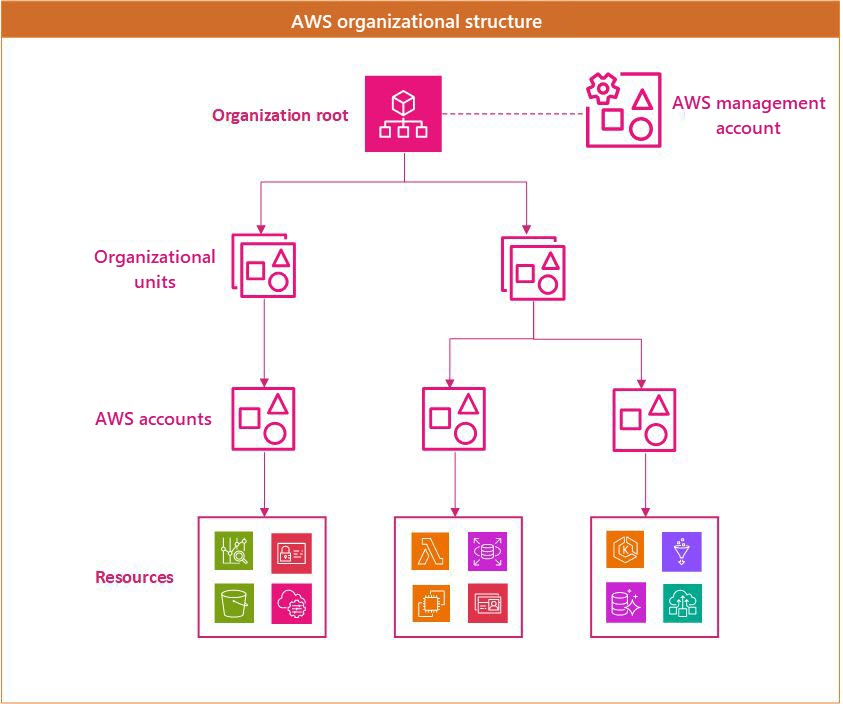
A typical AWS environment uses an organizational structure like the one in the following diagram. There's an organization root and optionally a dedicated AWS management account. Under the root are organizational units that can be used to apply different policies to different accounts. AWS resources often use an AWS account as a logical and billing boundary.
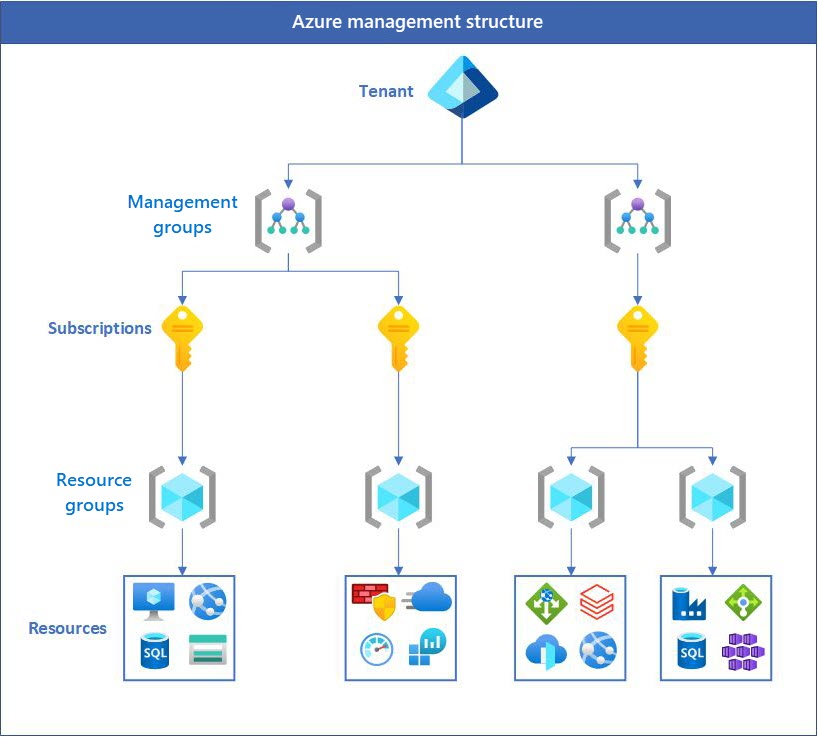
An Azure structure looks similar, but, rather than a dedicated management account, it provides administrative permissions on the tenant. This design eliminates the need for an entire account just for management. Unlike AWS, Azure uses resource groups as a fundamental unit. Resources must be assigned to resource groups, and permissions can be applied at the resource-group level.
AWS management account vs. Azure tenant
In Azure, when you create an Azure account, a Microsoft Entra tenant is created. You can manage your users, groups, and applications in this tenant. Azure subscriptions are created under the tenant. A Microsoft Entra tenant provides identity and access management. It helps ensure that authenticated and authorized users can access only the resources for which they have permissions.
AWS accounts vs. Azure subscriptions
In Azure, the equivalent of an AWS account is the Azure subscription. Azure subscriptions are logical units of Azure services that are linked to an Azure account in a Microsoft Entra tenant. Each subscription is linked to a billing account and provides the boundary within which resources are created, managed, and billed. Subscriptions are important to understanding cost allocation and adhering to budget limits. They help you ensure that every service used is tracked and billed correctly. Azure subscriptions, like AWS accounts, also act as boundaries for resource quotas and limits. Some resource quotas are adjustable, but others aren't.
Cross-account resource access in AWS enables resources from one AWS account to be accessed or managed by another AWS account. AWS also has Identity and Access Management (IAM) roles and resource-based policies for accessing resources across accounts. In Azure, you can grant access to users and services in different subscriptions by using Azure role-based access control (Azure RBAC), which is applied at different scopes (management group, subscription, resource group, or individual resources).
AWS OUs vs. Azure management groups
In Azure, the equivalent of AWS organizational units (OUs) is management groups. Both are used to organize and manage cloud resources at a high level across multiple accounts or subscriptions. You can use Azure management groups to efficiently manage access, policies, and compliance for Azure subscriptions. The governance conditions applied at the management-group level cascade to all associated subscriptions via inheritance.
Important facts about management groups and subscriptions:
A single Microsoft Entra tenant supports as many as 10,000 management groups.
A management group hierarchy supports up to six management group levels below the root management group.
Each management group and subscription can have only one parent.
Each management group can have multiple children.
All subscriptions and management groups are within a single hierarchy in each Microsoft Entra tenant.
The number of subscriptions per management group is unlimited.
The root management group is the top-level management group that's associated with each Microsoft Entra tenant. All management groups and subscriptions roll up to the root management group. This design enables you to implement global policies and Azure role assignments at the tenant level.
Service control policies vs. Azure Policy
The primary goal of service control policies (SCPs) in AWS is to centrally define the maximum available permissions for IAM users and roles across member accounts in an AWS Organization. SCPs are attached to the organization root, organizational units (OUs), or individual member accounts, and don't apply to the management account. SCPs never grant permissions by themselves; they act as guardrails that filter what identity-based or resource-based policies can ultimately allow.
In Azure, permission boundaries are implemented through Azure RBAC assignments and Azure Policy, which can be applied at the management group, subscription, resource group, or individual resource scope.
Comparison of the structure and ownership of AWS accounts with Azure subscriptions
An Azure account represents a billing relationship, and Azure subscriptions help you organize access to Azure resources. Access to an Azure subscription is managed through two complementary systems:
- Billing roles, which manage the billing relationship and are defined by your billing account type (Microsoft Customer Agreement, Enterprise Agreement, or Microsoft Online Services Program). The primary billing role is the billing account administrator (historically called Account Administrator), who can create and cancel subscriptions, update payment methods, and transfer billing ownership.
- Azure role-based access control (Azure RBAC), which manages access to Azure resources. Microsoft recommends Azure RBAC for all resource access management. Common built-in roles include Owner, Contributor, and Reader, which can be assigned at the management group, subscription, resource group, or resource scope.
Important
The classic subscription administrator roles (Service Administrator and Co-Administrator) were retired on August 31, 2024, along with Azure Service Manager and Azure classic resources. If any subscription still has active classic administrator assignments, convert them to Azure RBAC immediately. For more information, see Azure classic subscription administrators.
Under the subscription level, user roles and individual permissions can also be assigned to specific resources, similarly to how permissions are granted to IAM users and groups in AWS. In Azure, user accounts are either personal Microsoft accounts (such as Outlook.com, Hotmail, or Xbox identities) or work or school accounts managed through Microsoft Entra ID.
Like AWS accounts, subscriptions have default service quotas and limits. For a full list of these limits, see Azure subscription and service limits, quotas, and constraints. These limits can be increased up to the maximum by filing a support request in the management portal.
Contributors
This article is maintained by Microsoft. It was originally written by the following contributors.
Principal author:
- Srinivasaro Thumala | Senior Customer Engineer
Other contributor:
- Adam Cerini | Director, Partner Technology Strategist
- Juan Carlos Osorio | Senior CSA AI & Apps
To see non-public LinkedIn profiles, sign in to LinkedIn.
Next steps
- Azure roles, Microsoft Entra roles, and classic subscription administrator roles
- Add or change Azure subscription administrators
- Download or view your Azure billing invoice