Note
Access to this page requires authorization. You can try signing in or changing directories.
Access to this page requires authorization. You can try changing directories.
This article describes features of Azure Cosmos DB that you can use for multitenant systems. It provides guidance and examples about how to use Azure Cosmos DB in a multitenant solution.
Multitenancy requirements
When you plan a multitenant solution, you must meet two key requirements:
Ensure security and performance isolation between tenants. As the provider, you must meet security requirements and ensure that each tenant meets performance requirements.
Maintain a low cost for each tenant. As the provider, you must ensure that the cost to run the application remains sustainable as it scales.
These two requirements often conflict and require you to prioritize one over the other. The guidance in this article helps you understand these trade-offs and make informed decisions when you design your multitenant solution.
Isolation models
Determine the level of isolation that you need between your tenants. For most solutions, we recommend that you use one of the following strategies, depending on your workload:
Business-to-consumer (B2C) software as a service (SaaS) solutions typically use a partition key for each tenant. One example of this type of solution is a conversational chatbot application that stores user chat history in Azure Cosmos DB.
Business-to-business (B2B) SaaS solutions typically use a database account for each tenant. One example of this type of solution is a content management system (CMS) that enterprises buy to publish digital content.
To choose the most appropriate isolation model, consider your business model and the tenants' requirements. For example, in B2C models, a business sells a product or service directly to an individual customer. Strong security and performance isolation for each individual customer typically isn't required. For the highest cost efficiency, these applications can store data for all tenants in the same container, and partition keys provide logical isolation.
However, in B2B models, providers sell different SKUs that correspond to different performance levels, service-level agreement (SLA) guarantees, or isolation requirements. Providers want to give their customers the option to manage their own encryption keys, also known as cross-tenant or customer-managed keys. For these applications, use a separate database account for each tenant so that you can tune and guarantee performance for each customer. When you use separate database accounts, you can also provide customer-managed keys. This feature is only available at the Azure Cosmos DB database-account level.
Partition-key-per-tenant model
In a partition-key-per-tenant model, the same Azure Cosmos DB container stores all data for your tenants by using a partition key like /TenantId. The tenants share the container's throughput.
Note
A request unit (RU) is a logical abstraction of the cost of a database operation or query. Typically, you provision a defined number of request units per second (RU/s) for your workload, which is called throughput.
Benefits
- Simplified management: You place all tenants in one container that the tenant ID partitions. This approach creates only one billable resource that provisions and shares RU/s among multiple tenants. This model is easier to manage because only one RU/s setting affects cost for the entire multitenant workload.
Trade-offs and considerations
Resource contention: Shared throughput (RU/s) across tenants in the same container can cause contention during peak usage. This contention can create noisy neighbor problems and performance challenges if your tenants have high or overlapping workloads. Use this isolation model for workloads that don't need guaranteed RU/s on a single tenant and can share throughput.
Limited isolation: This approach provides logical isolation, not physical isolation. Use this isolation model for workloads that don't need guaranteed performance for each tenant or customer-managed keys for each tenant.
Less flexibility: If you isolate tenants by partition key, you can't customize account-level features like geo-replication, point-in-time restore, and customer-managed keys for each tenant.
Azure Cosmos DB features for multitenancy
Azure Cosmos DB provides several features that help you optimize performance and manage costs for multitenant solutions. These features address common challenges like noisy neighbor problems and help you store data efficiently and query across tenants.
Throughput control
The following features help control the noisy neighbor problem when you use a partition key to isolate tenants or have multiple workloads that use the same shared container.
| Feature | Description |
|---|---|
| Burst capacity | Take advantage of the container's unused capacity in the last five minutes to cover future spikes. |
| Priority-based execution | Specify high or low priority at a per-request level. When throughput contention occurs at the container level, high-priority requests are prioritized. Use this feature when multiple workloads have different performance requirements, such as a batch job versus an API that serves real-time user requests. |
| Throughput buckets (preview) | Assign a specific percentage of RU/s that a set of requests can consume. For example, specify that requests from a batch job can only consume up to 10% of the container's total RU/s, but a critical user-facing API can consume up to 100% of the container's total RU/s. |
| Throughput redistribution (preview) | Use this API to assign more RU/s to hot physical partitions. |
Hierarchical partition keys
For read-heavy workloads in which you typically query by tenant, we recommend using hierarchical partition keys to achieve the following benefits:
Unlimited storage for each tenant: Set
/TenantIdas your first-level key and a high-cardinality field like/idas your second-level key to guarantee that each tenant has unlimited storage. You might have another hierarchy in your workload. For example, you might need to store data for each user in each tenant. In this scenario, set/TenantIdas your first-level key,/UserIdas your second-level key, and/idas your third-level key to guarantee unlimited storage for each user in a tenant.Note
Features in Azure Cosmos DB, like stored procedures and atomic batch transactions, are only available at the full logical partition-key level. If you use hierarchical partition keys and partition by
/idas your last-level key, you can't run stored procedures or do an atomic batch transaction at partial levels.For example, if you partition by
/TenantId,/UserId, and/id, you can't run a stored procedure or do an atomic batch transaction by specifying only the/TenantIdor only the/TenantIdand/UserId. If you need to use these features, don't set/idas your last-level key.Efficient queries: Queries that specify
/TenantIdor both/TenantIdand/UserIdare efficiently routed only to the subset of physical partitions that contains the relevant data, which avoids a full fan-out query. If the container has 1,000 physical partitions, but a specific/TenantIdvalue is only on 5 physical partitions, the query is routed to the smaller number of relevant physical partitions.
Use hierarchical partition keys when you have high cardinality of values and uniform distribution of request volumes for your first-level keys. In a multitenant setting, you should have many tenants, ideally in the order of hundreds to thousands of tenants or more, and your tenants should have a similar usage pattern.
A hot partition and possible degraded performance might occur in the following scenarios:
You work with few tenants.
You work with a skewed workload in which a single tenant consistently consumes exponentially more RU/s than your other tenants, even when you use hierarchical partition keys.
Don't use hierarchical partition keys for workloads in which you don't have high cardinality for each tenant or when you need to optimize for write performance. In these scenarios, we recommend using synthetic partition keys or partitioning only by /id. These approaches let you spread writes evenly across all physical partitions.
You can construct a synthetic key in a way that optimizes for some queries. For example, a TenantId_UserId synthetic key slightly reduces the even distribution of data across all partitions, but it lets you efficiently query for a specific user in a tenant when you specify the full partition key. Query optimization is the main advantage of using a synthetic key instead of /id.
However, if your workload optimizes for write throughput, queries might not be relevant. You can partition by only /id to simplify your workload.
If you work with a few large tenants that consistently need higher request volumes than other tenants, consider isolating those tenants into their own database accounts. Keep the remaining tenants in a shared container.
Database-account-per-tenant model
In the database-account-per-tenant model, each tenant's data is stored in its own Azure Cosmos DB database account. Within each account, multiple containers for different workloads or microservices access data for a tenant. Each container has dedicated throughput (RU/s).
Benefits
High isolation: This approach avoids contention or noisy neighbor problems because each tenant's data is in its own dedicated Azure Cosmos DB account. Each container within the account has dedicated RU/s.
Custom SLAs: Each tenant has its own account, so you can provide specific tailored resources, customer-facing SLAs, and guarantees because you can tune the resources in each tenant's database account independently to meet its performance needs.
Enhanced security: This approach allows customer-managed keys at the database-account level, so the provider can offer customer-managed keys for each tenant. If customer-managed keys are required, you must use database-account-per-tenant isolation.
Flexibility: You can turn on account-level features like geo-replication, point-in-time restore, and customer-managed keys at a per-tenant (database account) level as needed.
Trade-offs and considerations
More accounts to manage: This approach can be more complex because you have multiple Azure Cosmos DB accounts that each represent a tenant or customer. However, you can use Azure Cosmos DB fleets to simplify account management by sharing throughput (RU/s) across multiple database accounts. You can also use fleet analytics to monitor your usage at scale.
Cross-tenant query limitations: All tenants are in different accounts, so applications that query multiple tenants require multiple calls within the application's logic. Typically, these cross-tenant queries aren't part of the core transactional workload that provides the service to each tenant. Instead, they're part of an analytical workload that helps the provider understand broader trends and usage across different tenants or customers. For these use cases, use mirroring in Microsoft Fabric.
Azure Cosmos DB features for multitenancy
Azure Cosmos DB fleet pools: Fleet pools help customers who build multitenant applications manage, monitor, and optimize their fleet of database accounts. Within a fleet, you can organize your tenants, or database accounts, into logical groupings called fleetspaces. You can also set up an optional pool of throughput (RU/s) that all database accounts in the fleetspace can share. This approach helps optimize costs.
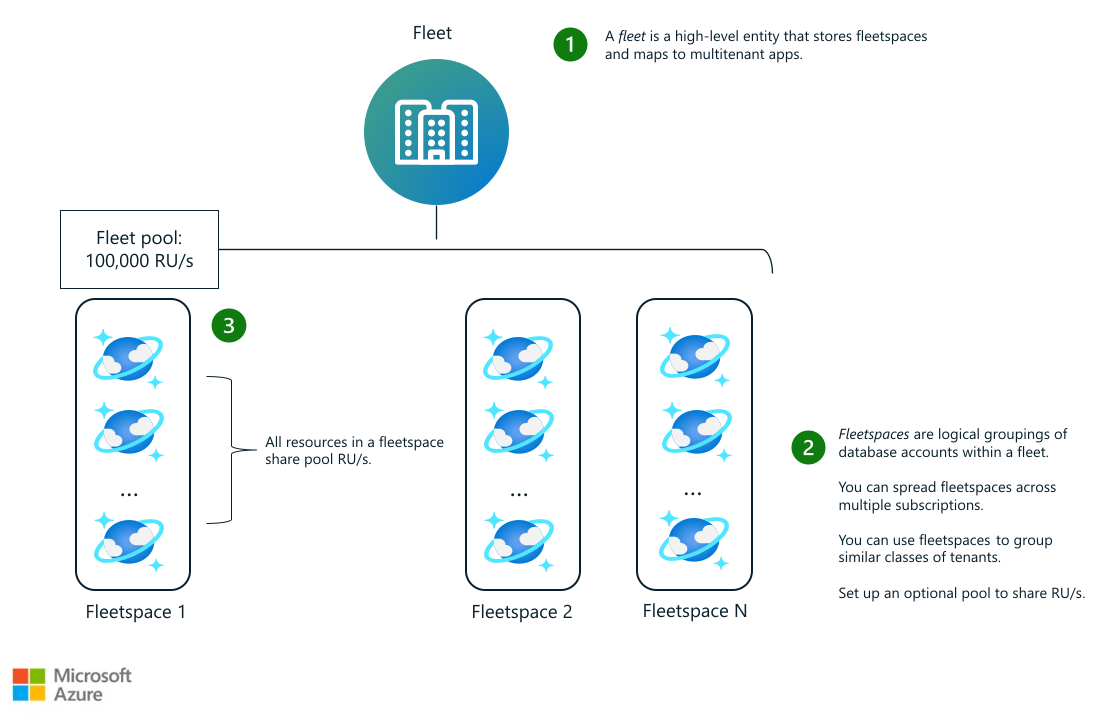
Many providers create a fleet for each region that they operate in and further separate the tenants into fleetspaces based on tenant performance requirements, or class of tenant.
For example, for their East US 2 fleet, a provider might create one fleetspace for accounts that belong to tenants who use a free trial because they require fewer pool RU/s. The provider creates another fleetspace for accounts that belong to tenants who sign an enterprise agreement because they require more RU/s.
These pools let you share RU/s across multiple accounts, even if they span different subscriptions and resource groups within a fleet. The resources in each account retain their own dedicated RU/s, and pools allow accounts to automatically use extra RU/s from the shared pool when needed. This approach helps you avoid overprovisioning.
Rather than provisioning every tenant's containers for peak RU/s, which can be expensive, you can set a typical RU/s-per-container value and use the pool's shared capacity to handle spikes.
Protection against noisy neighbors: By design, any throughput provisioned on a container is dedicated and guaranteed to always be available to that container. Other containers can't use dedicated RU/s. A container that needs more throughput can use RU/s only from the shared pool.
Autoscaling: Pools can always scale automatically, and you can set up the pool to automatically scale between a minimum and maximum number of RU/s. Pool RU/s have the same unit price as the regular RU/s that you provision on a container, so shifting usage to a shared pool helps you save costs.
Analytics: Turn on Azure Cosmos DB fleet analytics for your fleet to monitor usage and track historical trends across tenants.
Fleet analytics streams usage and cost data for every database account, database, and container within the fleet to either Fabric or to an Azure Storage account, so you can do long-term analysis of accounts within your fleet. Use this data to track trends like which accounts are most active, how resources scale over time, and the most recent rotation of access keys. You can also use raw telemetry data to write custom queries or build Power BI dashboards to analyze your tenants' usage data.
Security features: The account-per-tenant model provides increased data access security isolation via Azure role-based access control (RBAC). This model is also the only option that provides tenant-level security isolation through customer-managed keys.
Custom configuration: You can set the location of the database account according to the tenant's requirements. You can also tune the configuration of Azure Cosmos DB features, such as geo-replication and customer-managed encryption keys, to suit each tenant's requirements.
When you use a dedicated Azure Cosmos DB account for each tenant, consider the maximum number of Azure Cosmos DB accounts per Azure subscription.
Summary of recommended isolation models
| Workload need | Partition-key-per-tenant model | Database-account-per-tenant model |
|---|---|---|
| Cost efficiency | Optimize one container RU/s for the workload. | Optimize cost by sharing RU/s within a fleet pool. |
| New tenant creation latency | Immediate | Immediate, if you create empty database accounts that have just-in-time (JIT) assignments to new tenants |
| Tenant data deletion | Use the delete-by-partition-key feature to delete all data for the tenant. | Delete the database account when the tenant leaves. |
| Data access security isolation | You need to implement isolation within the application. | RBAC |
| Geo-replication | Per-tenant geo-replication isn't possible. | Each database account can have custom regions configured. |
| Noisy neighbor prevention | No | Yes |
| Encryption key | Same for all tenants | Customer-managed key for each tenant |
| Throughput requirements | More than 0 RUs per tenant | More than 100 RUs per tenant |
| Queries across tenants | The container acts as a boundary for queries. | Use mirroring in Fabric for analytical queries. |
| Example use case | B2C apps | Premium or enterprise offer for B2B apps |
Isolation models not recommended
We recommend the partition-key-per-tenant and database-account-per-tenant isolation models for most multitenant scenarios. Isolation by container or database is possible, but these approaches typically have trade-offs that the recommended isolation models address more effectively.
Container-per-tenant model
You can provision dedicated containers that each have their own RU/s for each tenant and place them in an Azure Cosmos DB database account. Each database account can only contain a limited number of containers, so you might need multiple accounts to hold data for all tenants. You need to keep track of which database account contains data for each customer, which adds complexity to your application.
Azure Cosmos DB also limits the throughput for metadata operations and number of databases or containers for each account. Metadata operations include reading the list of databases or containers in an account and reading and updating container settings. Because of these limits, we don't recommend this model. If a single account has several tenants, the volume of metadata operations increases and might not scale effectively. This model might also require you to manage multiple accounts to balance many tenants, which increases the complexity of your multitenant solution.
You can use the container-per-tenant model to achieve performance isolation for each tenant by setting up dedicated RU/s at the container level. You can also enhance security by using Azure RBAC. But the container-per-tenant model doesn't support customer-managed keys. Customer-managed keys are only available at the database-account level.
If you have many containers in a database account and you need to use Azure Cosmos DB data plane RBAC to assign a role to each container, you might encounter limits on the number of role assignments per account.
If you need performance isolation or customer-managed keys, consider using the database-account-per-tenant model and fleet pools to optimize cost for each tenant. If you don't need these features, consider using the partition-key-per-tenant model.
Database-per-tenant model
You can provision databases for each tenant and place them in the same database account. Like the container-per-tenant model, you might need multiple database accounts to hold data for all tenants and custom application logic to keep track of which database account a tenant belongs to.
You can use the database-per-tenant model to achieve performance isolation for each tenant by setting up shared RU/s at the database level or dedicated RU/s for each container. You can also enhance security by using Azure RBAC. But the database-per-tenant model doesn't support customer-managed keys. We also don't typically recommend shared RU/s at the database level for high-traffic workloads because the performance for each container in the database isn't guaranteed.
If you need performance isolation or customer-managed keys, consider using the database-account-per-tenant model and fleet pools to optimize cost for each tenant. If you don't need these features, consider using the partition-key-per-tenant model.
Like the container-per-tenant model, we don't recommend this model because of the Azure Cosmos DB limits on throughput for metadata operations and number of databases or containers for each account.
Azure Cosmos DB features that support multitenancy
Use the following Azure Cosmos DB features in your multitenant solution.
Partitioning
Use partitions with your Azure Cosmos DB containers to create containers that multiple tenants share. Typically, you use the tenant identifier as a partition key, but you might also consider using multiple partition keys for a single tenant. A well-planned partitioning strategy effectively implements the Sharding pattern. When you have large containers, Azure Cosmos DB spreads your tenants across multiple physical nodes to achieve a high degree of scale.
Consider using hierarchical partition keys to improve the performance of your multitenant solution. Use hierarchical partition keys to create a partition key that includes multiple values. For example, you might use a key that includes the tenant ID as a first-level key and a high-cardinality field like /id for the next level to guarantee unlimited storage for each tenant. Or you can specify a hierarchical partition key that includes a property that queries frequently use. This approach helps you avoid cross-partition queries. Use hierarchical partition keys to scale beyond the logical partition limit of 20 GB per partition-key value and limit expensive fan-out queries. Hierarchical partition keys work best when you have a high cardinality of tenants and need to optimize for a read-heavy workload.
For more information, see the following resources:
Fleet pools
Use fleet pools, a feature of Azure Cosmos DB fleets, to get the benefits of performance and security isolation that come with the database-account-per-tenant model. You can optimize costs by sharing RU/s across multiple accounts in the same pool. Group similar types of tenants into the same fleet pool and set up the pool to automatically scale between a minimum and maximum number of RU/s.
The containers in each account retain dedicated RU/s, but when they're in a pool, they automatically use extra RU/s from the shared pool when needed. This approach helps you avoid overprovisioning. Rather than provisioning every tenant's containers for peak RU/s, which can be expensive, you can set a typical RU/s per-container value and use the pool's shared capacity to handle spikes. To protect against noisy neighbors, any throughput provisioned on a container is dedicated and guaranteed to always be available to that container. If a container needs more throughput, it can use RU/s from the shared pool.
For more information, see the following resources:
Fleet analytics (preview)
Use fleet analytics, a feature of Azure Cosmos DB fleets, to analyze long-term trends in the database accounts in your fleet. Fleet analytics delivers performance, usage, and cost data as open-source Apache Delta Lake tables in Azure Data Lake Storage and Microsoft OneLake at an hourly cadence.
Use this data to track trends like which accounts are most active, how resources scale over time, which database accounts or tenants have the highest cost, and the most recent rotation of access keys. You can also use the data to write custom queries or build Power BI dashboards to analyze your fleet.
RU management
The Azure Cosmos DB pricing model is based on the number of RU/s that you provision or consume. Azure Cosmos DB provides several options to provision throughput. In a multitenant environment, your selection affects the performance and price of your Azure Cosmos DB resources.
For tenants that require guaranteed performance and security isolation, we recommend that you isolate tenants by database account, allocate dedicated RU/s to the tenant, and use fleet pools to handle extra capacity needs. For tenants that have less-stringent requirements, we recommend that you isolate tenants by partition key. Use this model to share RU/s among your tenants and optimize the cost for each tenant.
Azure Cosmos DB also provides a serverless tier, which suits workloads that have intermittent or unpredictable traffic.
Note
When you plan your Azure Cosmos DB configuration, consider the service quotas and limits.
To monitor and manage the costs associated with each tenant, remember that every operation that uses the Azure Cosmos DB API includes the RUs consumed. You can use this information to aggregate and compare the actual RUs that each tenant consumes. You can then identify tenants that have different performance characteristics. If a few tenants have significantly higher performance or isolation requirements, consider isolating them into their own account, with dedicated container RU/s. You can use a container partitioned by tenant ID to store data for the remaining tenants.
Resource governance features
Explore features that can help control the noisy neighbor problem when you use a partition key to isolate tenants.
| Feature | Description |
|---|---|
| Burst capacity | Take advantage of the container's unused capacity in the last five minutes to cover future spikes. |
| Priority-based execution | Specify high or low priority at a per-request level. When throughput contention occurs at the container level, high-priority requests are prioritized. Use this feature when multiple workloads have different performance requirements, such as a batch job versus an API that serves real-time user requests. |
| Throughput buckets (preview) | Assign a specific percentage of RU/s that a set of requests can consume. For example, specify that requests from a batch job can only consume up to 10% of the container's total RU/s, but a critical user-facing API can consume up to 100% of the container's total RU/s. |
| Throughput redistribution (preview) | Use this API to assign more RU/s to hot physical partitions. |
For more information, see the following resources:
- Provisioned throughput
- Automatically scale throughput
- Measure the RU charge of a request
- Azure Cosmos DB service quotas
Customer-managed keys
Some tenants might need to use their own encryption keys. Azure Cosmos DB provides a customer-managed key feature. You apply this feature only at the level of an Azure Cosmos DB account. If tenants require their own encryption keys, you must use dedicated Azure Cosmos DB accounts to deploy the tenants.
For more information, see Set up customer-managed keys for your Azure Cosmos DB account by using Azure Key Vault.
Contributors
Microsoft maintains this article. The following contributors wrote this article.
Principal authors:
- Tara Bhatia | Program Manager
- Paul Burpo | Principal Customer Engineer, FastTrack for Azure
- Deborah Chen | Principal Program Manager
- John Downs | Principal Software Engineer, Azure Patterns & Practices
- Sergiy Smyrnov | Principal Program Manager, Azure Cosmos DB
Other contributors:
- Mark Brown | Principal PM Manager, Azure Cosmos DB
- Vic Perdana | Cloud Solution Architect, Azure ISV
- Theo van Kraay | Senior Program Manager, Azure Cosmos DB
- Arsen Vladimirskiy | Principal Customer Engineer, FastTrack for Azure
- Thomas Weiss | Principal Program Manager
To see nonpublic LinkedIn profiles, sign in to LinkedIn.
Next steps
To learn more about multitenancy and Azure Cosmos DB, watch the following videos:
Design scalable data layers for multitenant apps with Azure Cosmos DB: A session at Build 2025 that walks you through how to design for multitenancy on Azure Cosmos DB. Learn best practices from a real-world independent software vendor.
Multitenant applications with Azure Cosmos DB: A session at Build 2019 that covers performance isolation, cost management, consistency, latency, availability trade-offs, and security patterns for multitenant applications.
Build a multitenant SaaS on Azure Cosmos DB and Azure: A real-world case study about how Whally, a multitenant SaaS startup, builds a modern platform from scratch on Azure Cosmos DB and Azure. Whally makes design and implementation decisions that relate to partitioning, data modeling, secure multitenancy, performance, and real-time streaming from change feed to SignalR. All these solutions use ASP.NET Core on Azure App Service.
Related resources
To review other Azure Cosmos DB architectural scenarios, see the following articles: