TextPatternRange.Move(TextUnit, Int32) Método
Definición
Importante
Parte de la información hace referencia a la versión preliminar del producto, que puede haberse modificado sustancialmente antes de lanzar la versión definitiva. Microsoft no otorga ninguna garantía, explícita o implícita, con respecto a la información proporcionada aquí.
Mueve el intervalo de texto el número especificado de unidades de texto.
public:
 int Move(System::Windows::Automation::Text::TextUnit unit, int count);
public int Move(System.Windows.Automation.Text.TextUnit unit, int count);member this.Move : System.Windows.Automation.Text.TextUnit * int -> intPublic Function Move (unit As TextUnit, count As Integer) As IntegerParámetros
- unit
- TextUnit
Límite de unidad de texto.
- count
- Int32
Número de unidades de texto que se van a mover. Un valor positivo mueve el intervalo de texto hacia delante, un valor negativo mueve el intervalo de texto hacia atrás y 0 no tiene ningún efecto.
Devoluciones
Número de unidades que realmente se mueven. Puede ser menor que el número solicitado si cualquiera de los nuevos puntos de conexión de intervalo de texto es mayor o menor que los DocumentRange puntos de conexión.
Ejemplos
/// -------------------------------------------------------------------
/// <summary>
/// Starts the target application and returns the AutomationElement
/// obtained from the targets window handle.
/// </summary>
/// <param name="exe">
/// The target application.
/// </param>
/// <param name="filename">
/// The text file to be opened in the target application
/// </param>
/// <returns>
/// An AutomationElement representing the target application.
/// </returns>
/// -------------------------------------------------------------------
private AutomationElement StartTarget(string exe, string filename)
{
    // Start text editor and load with a text file.
    Process p = Process.Start(exe, filename);

    // targetApp --> the root AutomationElement.
    AutomationElement targetApp =
        AutomationElement.FromHandle(p.MainWindowHandle);

    return targetApp;
}
''' -------------------------------------------------------------------
''' <summary>
''' Starts the target application and returns the AutomationElement
''' obtained from the targets window handle.
''' </summary>
''' <param name="exe">
''' The target application.
''' </param>
''' <param name="filename">
''' The text file to be opened in the target application
''' </param>
''' <returns>
''' An AutomationElement representing the target application.
''' </returns>
''' -------------------------------------------------------------------
Private Function StartTarget( _
ByVal exe As String, ByVal filename As String) As AutomationElement
    ' Start text editor and load with a text file.
    Dim p As Process = Process.Start(exe, filename)

    ' targetApp --> the root AutomationElement.
    Dim targetApp As AutomationElement
    targetApp = AutomationElement.FromHandle(p.MainWindowHandle)

    Return targetApp
End Function
/// -------------------------------------------------------------------
/// <summary>
/// Obtain the text control of interest from the target application.
/// </summary>
/// <param name="targetApp">
/// The target application.
/// </param>
/// <returns>
/// An AutomationElement that represents a text provider..
/// </returns>
/// -------------------------------------------------------------------
private AutomationElement GetTextElement(AutomationElement targetApp)
{
    // The control type we're looking for; in this case 'Document'
    PropertyCondition cond1 =
        new PropertyCondition(
        AutomationElement.ControlTypeProperty,
        ControlType.Document);

    // The control pattern of interest; in this case 'TextPattern'.
    PropertyCondition cond2 =
        new PropertyCondition(
        AutomationElement.IsTextPatternAvailableProperty,
        true);

    AndCondition textCondition = new AndCondition(cond1, cond2);

    AutomationElement targetTextElement =
        targetApp.FindFirst(TreeScope.Descendants, textCondition);

    // If targetText is null then a suitable text control was not found.
    return targetTextElement;
}
''' -------------------------------------------------------------------
''' <summary>
''' Obtain the text control of interest from the target application.
''' </summary>
''' <param name="targetApp">
''' The target application.
''' </param>
''' <returns>
''' An AutomationElement. representing a text control.
''' </returns>
''' -------------------------------------------------------------------
Private Function GetTextElement(ByVal targetApp As AutomationElement) As AutomationElement
    ' The control type we're looking for; in this case 'Document'
    Dim cond1 As PropertyCondition = _
        New PropertyCondition( _
        AutomationElement.ControlTypeProperty, _
        ControlType.Document)

    ' The control pattern of interest; in this case 'TextPattern'.
    Dim cond2 As PropertyCondition = _
        New PropertyCondition( _
        AutomationElement.IsTextPatternAvailableProperty, _
        True)

    Dim textCondition As AndCondition = New AndCondition(cond1, cond2)

    Dim targetTextElement As AutomationElement = _
        targetApp.FindFirst(TreeScope.Descendants, textCondition)

    ' If targetText is null then a suitable text control was not found.
    Return targetTextElement
End Function
/// -------------------------------------------------------------------
/// <summary>
/// Moves a text range a specified number of text units. The text range
/// is the current selection.
/// </summary>
/// <param name="targetTextElement">
/// The AutomationElment that represents a text control.
/// </param>
/// <param name="textUnit">
/// The text unit value.
/// </param>
/// <param name="units">
/// The number of text units to move.
/// </param>
/// <param name="direction">
/// Direction to move the text range. Valid values are -1, 0, 1.
/// </param>
/// <returns>
/// The number of text units actually moved. This can be less than the
/// number requested if either of the new text range endpoints is
/// greater than or less than the DocumentRange endpoints.
/// </returns>
/// <remarks>
/// Moving the text range does not modify the text source in any way.
/// Only the text range starting and ending endpoints are modified.
/// </remarks>
/// -------------------------------------------------------------------
private Int32 MoveSelection(
    AutomationElement targetTextElement,
    TextUnit textUnit,
    int units,
    int direction)
{
    TextPattern textPattern =
        targetTextElement.GetCurrentPattern(TextPattern.Pattern)
        as TextPattern;

    if (textPattern == null)
    {
        // Target control doesn't support TextPattern.
        return -1;
    }

    TextPatternRange[] currentSelection = textPattern.GetSelection();

    if (currentSelection.Length > 1)
    {
        // For this example, we cannot move more than one text range.
        return -1;
    }

    return currentSelection[0].Move(textUnit, Math.Sign(direction) * units);
}
''' -------------------------------------------------------------------
''' <summary>
''' Moves a text range a specified number of text units.
''' </summary>
''' <param name="targetTextElement">
''' The AutomationElement that represents a text control.
''' </param>
''' <param name="textUnit">
''' The text unit value.
''' </param>
''' <param name="units">
''' The number of text units to move.
''' </param>
''' <param name="direction">
''' Direction to move the text range. Valid values are -1, 0, 1.
''' </param>
''' <returns>
''' The number of text units actually moved. This can be less than the
''' number requested if either of the new text range endpoints is
''' greater than or less than the DocumentRange endpoints.
''' </returns>
''' <remarks>
''' Moving the text range does not modify the text source in any way.
''' Only the text range starting and ending endpoints are modified.
''' </remarks>
''' -------------------------------------------------------------------
Private Function MoveSelection( _
    ByVal targetTextElement As AutomationElement, _
    ByVal textUnit As TextUnit, _
    ByVal units As Integer, _
    ByVal direction As Integer) As Integer

    Dim textPattern As TextPattern = _
    DirectCast( _
    targetTextElement.GetCurrentPattern(textPattern.Pattern), _
    TextPattern)

    If (textPattern Is Nothing) Then
        ' Target control doesn't support TextPattern.
        Return -1
    End If

    Dim currentSelection As TextPatternRange() = _
    textPattern.GetSelection()

    If (currentSelection.Length > 1) Then
        ' For this example, we cannot move more than one text range.
        Return -1
    End If

    Return currentSelection(0).Move(textUnit, Math.Sign(direction) * units)
End Function
Comentarios
Cuando es necesario recorrer el contenido de un intervalo de texto, una serie de pasos están implicados en segundo plano para que el Move método se ejecute correctamente.
El intervalo de texto se normaliza; es decir, el intervalo de texto se contrae a un intervalo degenerado en el Start punto de conexión, lo que hace que el End punto de conexión sea superfluo. Este paso es necesario para quitar la ambigüedad en situaciones en las que un intervalo de texto abarca los límites
unit; por ejemplo, "{The U}RL https://www.microsoft.com/ is embedded in text" donde "{" y "}" son los puntos de conexión del intervalo de texto.El intervalo resultante se desplaza hacia atrás en el DocumentRange hasta el principio del límite solicitado
unit.El intervalo resultante se mueve hacia delante o hacia atrás en DocumentRange , en función del número solicitado de límites
unit.A continuación, el intervalo se expande desde un estado de intervalo degenerado moviendo el extremo End en función de un límite
unitsolicitado.
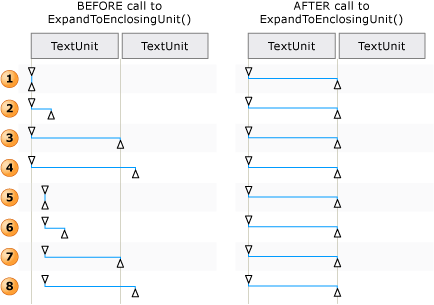 Ejemplos de cómo se ajusta un intervalo de texto para Move() y ExpandToEnclosingUnit()
El contenido textual (o texto interno) de un contenedor de texto y un objeto incrustado, como un hipervínculo o una celda de tabla, se expone como un único flujo de texto continuo en la vista de control y en la vista de contenido del árbol de automatización de la interfaz de usuario; se omiten los límites de objeto. Si un cliente de Automatización de la interfaz de usuario está recuperando el texto con el fin de recitar, interpretar o analizar de alguna manera, el intervalo de texto debe comprobarse para casos especiales, como una tabla con contenido textual u otros objetos incrustados. Para ello, se puede llamar GetChildren a para obtener un AutomationElement para cada objeto incrustado y, a continuación, llamar RangeFromChild a para obtener un intervalo de texto para cada elemento; esto se realiza de forma recursiva hasta que se haya recuperado todo el contenido textual.
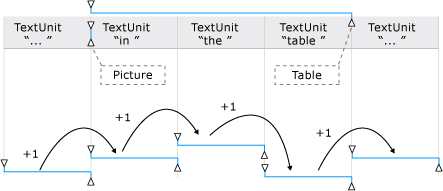
Move respeta el texto oculto y visible. El cliente Automatización de la interfaz de usuario puede comprobar el IsHiddenAttribute para ver la visibilidad del texto.
Move se aplaza a la siguiente mayor TextUnit compatibilidad si el control no admite el elemento especificado TextUnit .
El orden, de la unidad más pequeña a la más grande, se muestra a continuación.
Note
El texto no se modifica de ninguna manera, ya que el intervalo de texto solo abarca una parte diferente del texto.