Nota:
El acceso a esta página requiere autorización. Puede intentar iniciar sesión o cambiar directorios.
El acceso a esta página requiere autorización. Puede intentar cambiar los directorios.
Las plataformas Copilot Studio y Dynamics 365 for Customer Service difieren ligeramente en la forma en que admiten mensajes de medios enriquecidos según el canal y el tipo de mensaje de medios enriquecidos. En este artículo se describe cómo puede admitir mensajes multimedia enriquecidos en Copilot Studio.
Recuperar JSON del agente para Apple Messages for Business
- En el mapa del sitio del Centro de administración de Copilot Service, seleccione Productividad en Experiencia de soporte técnico.
- En la página Productividad , seleccione Administrar para mensajes enriquecidos.
- En la lista de todos los mensajes de lista disponibles, selecciona un mensaje enriquecido que quieras enviar a la conversación.
- Para los mensajes enriquecidos de Apple Messages for Business, use la API Microsoft.Omnichannel.sendMessageToConversation para enviar archivos JSON.
Recuperar JSON de agente para formularios de chat en vivo, JSON personalizado de chat en vivo y respuestas sugeridas de WhatsApp
En el mapa del sitio del Centro de administración de Copilot Service, seleccione Productividad en Experiencia de soporte técnico.
En la página Productividad , seleccione Administrar para mensajes enriquecidos.
Busque el mensaje de rich media que desea que envíe un agente y, si tiene JSON disponible, aparecerá en la columna JSON para Copilot Studio . Seleccione Ver JSON y el tipo de canal específico para copiar el JSON.
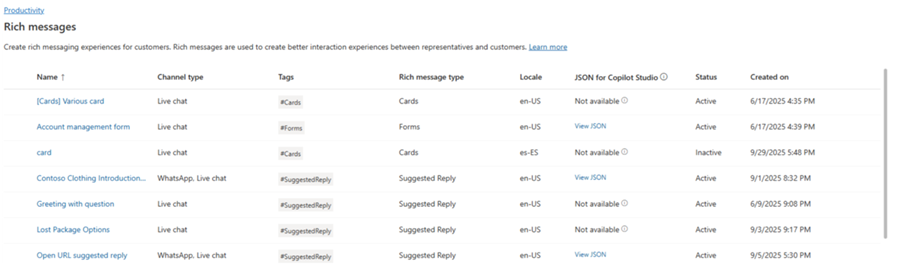
Para las plantillas de medios enriquecidos de Live Chat y WhatsApp, puede pegar el JSON directamente en un nodo de tarjeta adaptable en Copilot Studio.
Ejemplos JSON de mensajes enriquecidos para Apple Messages for Business
En esta sección se incluyen ejemplos de JSON para los tipos de mensajes enriquecidos disponibles en el canal Apple Messages for Business en la Plataforma omnicanal para Customer Service. Más información: Administrar mensajes enriquecidos
Nota:
No puede enviar mensajes enriquecidos de tipo Forms a las conversaciones.
Apple Pay
let applePayJSON = // <copy_and_paste_details_content>
applePayJSON.survey = { Questions: JSON.parse(applePayJSON.survey)[0].Questions, Answers: JSON.parse(applePayJSON.survey)[1].Answers };
applePayJSON.survey.Answers.AppleMessagesforBusinessJSON = JSON.parse(applePayJSON.survey.Answers.AppleMessagesforBusinessJSON);
applePayJSON.survey.Answers.AppleMessagesforBusinessJSON = JSON.stringify(applePayJSON.survey.Answers.AppleMessagesforBusinessJSON);
applePayJSON.survey = JSON.stringify(applePayJSON.survey);

// Can now send this payload using the API
Microsoft.Omnichannel.sendMessageToConversation(applePayJSON, false);

// Or take the JSON elsewhere for use in bringing your own logic
copy(applePayJSON);
Autenticación
let authJSON = // <copy_and_paste_details_content>
authJSON.survey = { Questions: JSON.parse(authJSON.survey)[0].Questions, Answers: JSON.parse(authJSON.survey)[1].Answers };
authJSON.survey = JSON.stringify(authJSON.survey);

// Can now send this payload using the API
Microsoft.Omnichannel.sendMessageToConversation(authJSON, false);

// Or take the JSON elsewhere for use in bringing your own logic
copy(authJSON);
JSON personalizado (aplicación de iMessage)
let customJSON = // <copy_and_paste_details_content>
customJSON.survey = { Questions: JSON.parse(customJSON.survey)[0].Questions, Answers: JSON.parse(customJSON.survey)[1].Answers };
customJSON.survey.Answers.AppleMessagesforBusinessJSON = JSON.parse(customJSON.survey.Answers.AppleMessagesforBusinessJSON);
customJSON.survey.Answers.AppleMessagesforBusinessJSON = JSON.stringify(customJSON.survey.Answers.AppleMessagesforBusinessJSON);
customJSON.survey = JSON.stringify(customJSON.survey);

// Can now send this payload using the API
Microsoft.Omnichannel.sendMessageToConversation(customJSON, false);

// Or take the JSON elsewhere for use in bringing your own logic
copy(customJSON);
Selector de listas
listPickerJSON = // <copy_and_paste_details_content>
listPickerJSON.survey = { Questions: JSON.parse(lpFromDetails.survey)[0].Questions, Answers: JSON.parse(listPickerJSON.survey)[1].Answers };
listPickerJSON.survey = JSON.stringify(listPickerJSON.survey);

// Can now send this payload using the API
Microsoft.Omnichannel.sendMessageToConversation(listPickerJSON, false);

// Or take the JSON elsewhere for use in bringing your own logic
copy(listPickerJSON);
Respuesta sugerida
suggestedReplyJSON = // <copy_and_paste_details_content>
suggestedReplyJSON.survey = { Questions: JSON.parse(suggestedReplyJSON.survey)[0].Questions, Answers: JSON.parse(suggestedReplyJSON.survey)[1].Answers };
suggestedReplyJSON.survey = JSON.stringify(suggestedReplyJSON.survey);

// Can now send this payload using the API
Microsoft.Omnichannel.sendMessageToConversation(suggestedReplyJSON, false);

// Or take the JSON elsewhere for use in bringing your own logic
copy(suggestedReplyJSON);
Selector de hora
timePickerJSON = // <copy_and_paste_details_content>
timePickerJSON.survey = { Questions: JSON.parse(timePickerJSON.survey)[0].Questions, Answers: JSON.parse(timePickerJSON.survey)[1].Answers };
timePickerJSON.survey = JSON.stringify(timePickerJSON.survey);

// Can now send this payload using the API
Microsoft.Omnichannel.sendMessageToConversation(timePickerJSON, false);

// Or take the JSON elsewhere for use in bringing your own logic
copy(timePickerJSON);
Enlace enriquecido de video
videoRichLinkJSON = // <copy_and_paste_details_content>
videoRichLinkJSON.survey = { Questions: JSON.parse(videoRichLinkJSON.survey)[0].Questions, Answers: JSON.parse(videoRichLinkJSON.survey)[1].Answers };
timePickerJSON.survey = JSON.stringify(videoRichLinkJSON.survey);

// Can now send this payload using the API
Microsoft.Omnichannel.sendMessageToConversation(videoRichLinkJSON, false);

// Or take the JSON elsewhere for use in bringing your own logic
copy(videoRichLinkJSON);
Enlace enriquecido del sitio web
websiteRichLinkJSON = // <copy_and_paste_details_content>
websiteRichLinkJSON.survey = { Questions: JSON.parse(websiteRichLinkJSON.survey)[0].Questions, Answers: JSON.parse(websiteRichLinkJSON.survey)[1].Answers };
timePickerJSON.survey = JSON.stringify(websiteRichLinkJSON.survey);

// Can now send this payload using the API
Microsoft.Omnichannel.sendMessageToConversation(websiteRichLinkJSON, false);

// Or take the JSON elsewhere for use in bringing your own logic
copy(websiteRichLinkJSON);
Configurar agentes para enviar respuestas sugeridas de chat en vivo y tarjetas/carruseles
Copilot Studio admite respuestas sugeridas y tarjetas básicas listas para usar. Obtenga más información en Enviar un mensaje: Microsoft Copilot Studio.
Nota:
Copilot Studio se refiere a las respuestas sugeridas como respuestas rápidas.
Información relacionada
Referencia de la API de JavaScript del SDK de chat en vivo
Referencia de la API de JavaScript omnicanal
enviarMensajeToConversación