Märkus.
Juurdepääs sellele lehele nõuab autoriseerimist. Võite proovida sisse logida või kausta vahetada.
Juurdepääs sellele lehele nõuab autoriseerimist. Võite proovida kausta vahetada.
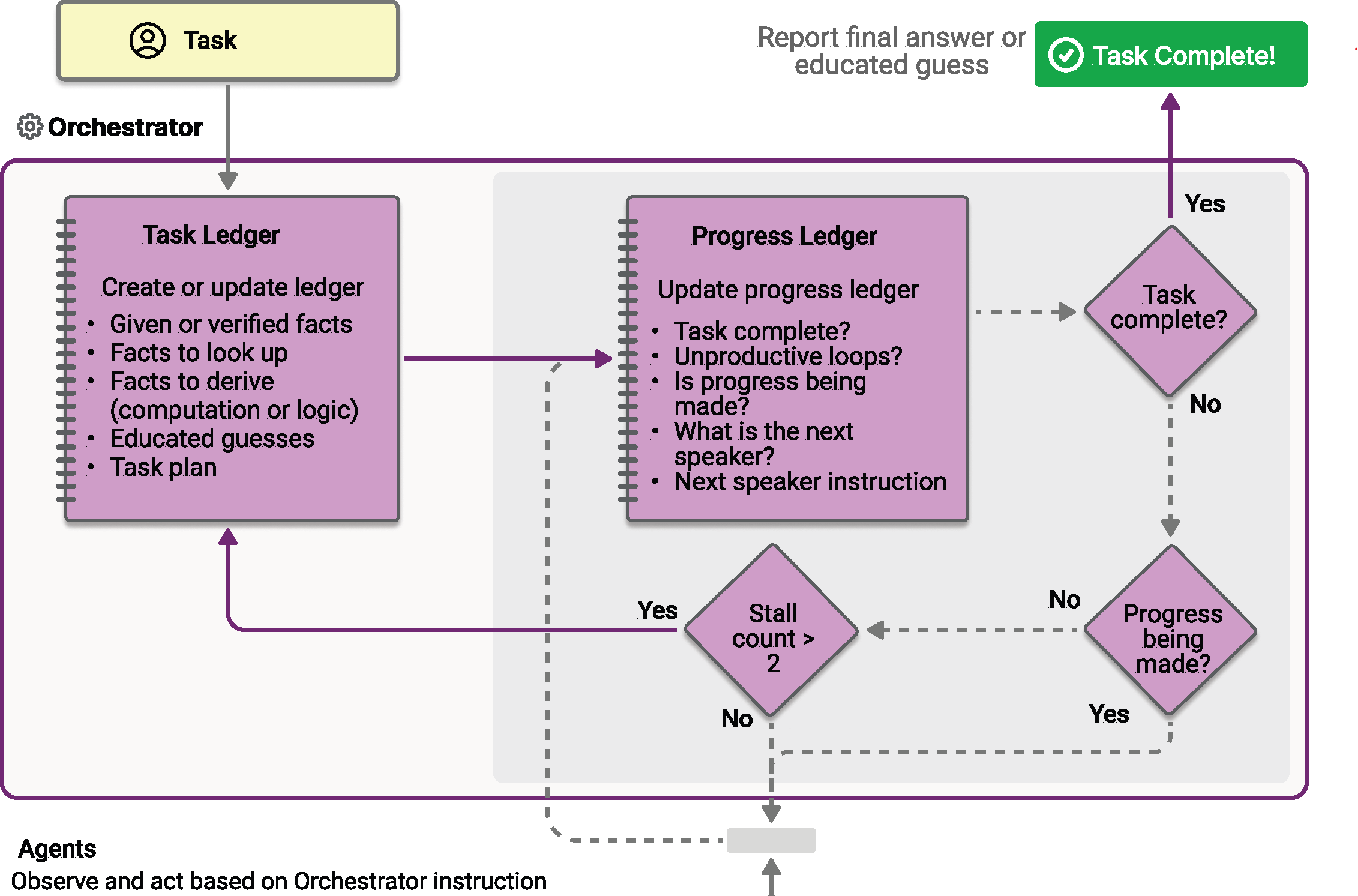
Magentic orchestration is designed based on the Magentic-One system invented by AutoGen. It is a flexible, general-purpose multi-agent pattern designed for complex, open-ended tasks that require dynamic collaboration. In this pattern, a dedicated Magentic manager coordinates a team of specialized agents, selecting which agent should act next based on the evolving context, task progress, and agent capabilities.
The Magentic manager maintains a shared context, tracks progress, and adapts the workflow in real time. This enables the system to break down complex problems, delegate subtasks, and iteratively refine solutions through agent collaboration. The orchestration is especially well-suited for scenarios where the solution path is not known in advance and might require multiple rounds of reasoning, research, and computation.
Tip
The Magentic orchestration has the same architecture as the Group Chat orchestration pattern, with a very powerful manager that uses planning to coordinate agent collaboration. If your scenario requires simpler coordination without complex planning, consider using the Group Chat pattern instead.
Note
In the Magentic-One paper, 4 highly specialized agents are designed to solve a very specific set of tasks. In the Magentic orchestration in Agent Framework, you can define your own specialized agents to suit your specific application needs. However, it is untested how well the Magentic orchestration will perform outside of the original Magentic-One design.
What You'll Learn
- How to set up a Magentic manager to coordinate multiple specialized agents
- How to handle streaming events with
WorkflowEvent - How to implement human-in-the-loop plan review
- How to track agent collaboration and progress through complex tasks
Define Your Specialized Agents
In Magentic orchestration, you define specialized agents that the manager can dynamically select based on task requirements:
#pragma warning disable MAAIW001  // Magentic types are experimental
#pragma warning disable OPENAI001 // HostedCodeInterpreterTool is experimental

using Azure.AI.Projects;
using Azure.Identity;
using Microsoft.Agents.AI;
using Microsoft.Agents.AI.Workflows;
using Microsoft.Agents.AI.Workflows.Specialized.Magentic;
using Microsoft.Extensions.AI;

string endpoint = Environment.GetEnvironmentVariable("AZURE_AI_PROJECT_ENDPOINT")
    ?? throw new InvalidOperationException("AZURE_AI_PROJECT_ENDPOINT is not set.");
string deploymentName = Environment.GetEnvironmentVariable("AZURE_AI_MODEL_DEPLOYMENT_NAME") ?? "gpt-5.4-mini";

AIProjectClient projectClient = new(new Uri(endpoint), new DefaultAzureCredential());

AIAgent researcherAgent = projectClient.AsAIAgent(
    deploymentName,
    name: "ResearcherAgent",
    description: "Specialist in research and information gathering.",
    instructions: "You are a researcher. Find relevant information without doing additional computation or quantitative analysis.");

AIAgent coderAgent = projectClient.AsAIAgent(
    deploymentName,
    name: "CoderAgent",
    description: "A helpful assistant that writes and executes code to analyze data.",
    instructions: "You solve quantitative questions by writing and running code. Show the analysis and the computation process clearly.",
    tools: [new HostedCodeInterpreterTool()]);

AIAgent managerAgent = projectClient.AsAIAgent(
    deploymentName,
    name: "MagenticManager",
    description: "Orchestrator that coordinates the research and coding workflow.",
    instructions: "You coordinate the team to complete complex tasks efficiently.");
import os

from agent_framework import Agent
from agent_framework.foundry import FoundryChatClient
from azure.identity import AzureCliCredential

client = FoundryChatClient(
    project_endpoint=os.environ["FOUNDRY_PROJECT_ENDPOINT"],
    model=os.environ["FOUNDRY_MODEL"],
    credential=AzureCliCredential(),
)

researcher_agent = Agent(
    name="ResearcherAgent",
    description="Specialist in research and information gathering",
    instructions=(
        "You are a Researcher. You find information without additional computation or quantitative analysis."
    ),
    client=client,
)

coder_agent = Agent(
    name="CoderAgent",
    description="A helpful assistant that writes and executes code to process and analyze data.",
    instructions="You solve questions using code. Please provide detailed analysis and computation process.",
    client=client,
    tools=client.get_code_interpreter_tool(),
)

# Create a manager agent for orchestration
manager_agent = Agent(
    name="MagenticManager",
    description="Orchestrator that coordinates the research and coding workflow",
    instructions="You coordinate a team to complete complex tasks efficiently.",
    client=client,
)
Build the Magentic Workflow
Use the Magentic workflow builder to configure the workflow with a manager and a set of participants. The builder also exposes the inner-loop limits (max coordination rounds, max consecutive stalls before replanning, max plan resets) and a flag for human-in-the-loop plan review.
Workflow workflow = new MagenticWorkflowBuilder(managerAgent)
    .AddParticipants([researcherAgent, coderAgent])
    .WithName("Magentic Orchestration Workflow")
    .WithDescription("Coordinates a researcher and coder to solve a complex analytical task.")
    .RequirePlanSignoff(false)
    .WithMaxRounds(10)
    .WithMaxStalls(3)
    .WithMaxResets(2)
    .Build();
from agent_framework.orchestrations import MagenticBuilder

workflow = MagenticBuilder(
    participants=[researcher_agent, coder_agent],
    intermediate_output_from=[researcher_agent, coder_agent],
    manager_agent=manager_agent,
    max_round_count=10,
    max_stall_count=3,
    max_reset_count=2,
).build()
Tip
A standard manager is implemented based on the Magentic-One design, with fixed prompts taken from the original paper. You can customize the manager's behavior by passing in your own prompts via the MagenticBuilder constructor parameters. To further customize the manager, you can also implement your own manager by subclassing the MagenticManagerBase class.
Intermediate Outputs
Note
This section currently applies to the Python pivot only.
Passing intermediate_output_from=[...] to MagenticBuilder designates specific participants as intermediate output sources. Their yield_output calls emit "intermediate" events, while the manager's final synthesized answer remains an "output" (terminal) event. Without this parameter (the default), only the manager's terminal AgentResponse surfaces.
This is particularly useful for Magentic workflows because:
- Tasks are often long-running with many rounds of agent collaboration
- You can display each agent's contribution in real-time as the workflow progresses in streaming mode
- It provides visibility into the intermediate reasoning steps of the workflow
Run the Workflow with Event Streaming
Execute a complex task and handle events for streaming output and orchestration updates. The terminal workflow output contains the manager's synthesized final answer.
const string TaskPrompt =
    "I am preparing a report on the energy efficiency of different machine learning model architectures. " +
    "Compare the estimated training and inference energy consumption of ResNet-50, BERT-base, and GPT-2 " +
    "on standard datasets (for example, ImageNet for ResNet, GLUE for BERT, WebText for GPT-2). " +
    "Then, estimate the CO2 emissions associated with each, assuming training on an Azure Standard_NC6s_v3 " +
    "VM for 24 hours. Provide tables for clarity, and recommend the most energy-efficient model " +
    "per task type (image classification, text classification, and text generation).";

await using StreamingRun run = await InProcessExecution.RunStreamingAsync(
    workflow,
    new List<ChatMessage> { new(ChatRole.User, TaskPrompt) });

await run.TrySendMessageAsync(new TurnToken(emitEvents: true));

string? lastResponseId = null;
WorkflowOutputEvent? finalOutput = null;

await foreach (WorkflowEvent workflowEvent in run.WatchStreamAsync())
{
    switch (workflowEvent)
    {
        case AgentResponseUpdateEvent updateEvent:
            // Stream per-participant deltas. Group by ResponseId / MessageId / ExecutorId so
            // each new contiguous response prints its executor header once.
            string responseId = updateEvent.Update.ResponseId
                ?? updateEvent.Update.MessageId
                ?? updateEvent.ExecutorId;
            if (!string.Equals(responseId, lastResponseId, StringComparison.Ordinal))
            {
                if (lastResponseId is not null)
                {
                    Console.WriteLine();
                }
                Console.Write($"- {updateEvent.ExecutorId}: ");
                lastResponseId = responseId;
            }
            Console.Write(updateEvent.Update.Text);
            break;

        case MagenticPlanCreatedEvent planCreated:
            Console.WriteLine($"\n[Magentic Initial Plan]\n{planCreated.FullTaskLedger.Text}");
            break;

        case MagenticReplannedEvent replanned:
            Console.WriteLine($"\n[Magentic Replanned]\n{replanned.FullTaskLedger.Text}");
            break;

        case MagenticProgressLedgerUpdatedEvent progressUpdated:
            MagenticProgressLedger ledger = progressUpdated.ProgressLedger;
            Console.WriteLine(
                $"\n[Magentic Progress Ledger] satisfied={ledger.IsRequestSatisfied}, " +
                $"inLoop={ledger.IsInLoop}, progressing={ledger.IsProgressBeingMade}, " +
                $"nextSpeaker={ledger.NextSpeaker}, instruction={ledger.InstructionOrQuestion}");
            break;

        case WorkflowOutputEvent outputEvent when outputEvent.Is<List<ChatMessage>>():
            finalOutput = outputEvent;
            break;

        case WorkflowErrorEvent workflowError:
            Console.Error.WriteLine(workflowError.Exception?.ToString() ?? "Unknown workflow error.");
            break;

        case ExecutorFailedEvent executorFailed:
            Console.Error.WriteLine(
                $"Executor '{executorFailed.ExecutorId}' failed: " +
                (executorFailed.Data?.ToString() ?? "unknown error"));
            break;
    }
}

if (finalOutput?.As<List<ChatMessage>>() is { } transcript)
{
    Console.WriteLine("\n\n=== Final Conversation Transcript ===\n");
    foreach (ChatMessage message in transcript)
    {
        Console.WriteLine($"{message.AuthorName ?? message.Role.ToString()}: {message.Text}");
    }
}
import json
import asyncio
from typing import cast

from agent_framework import (
    AgentResponse,
    AgentResponseUpdate,
    Message,
    WorkflowEvent,
)
from agent_framework.orchestrations import MagenticProgressLedger

task = (
    "I am preparing a report on the energy efficiency of different machine learning model architectures. "
    "Compare the estimated training and inference energy consumption of ResNet-50, BERT-base, and GPT-2 "
    "on standard datasets (for example, ImageNet for ResNet, GLUE for BERT, WebText for GPT-2). "
    "Then, estimate the CO2 emissions associated with each, assuming training on an Azure Standard_NC6s_v3 "
    "VM for 24 hours. Provide tables for clarity, and recommend the most energy-efficient model "
    "per task type (image classification, text classification, and text generation)."
)

# Keep track of the last executor to format output nicely in streaming mode
last_message_id: str | None = None
final_response: AgentResponse | None = None
async for event in workflow.run(task, stream=True):
    if event.type == "output" and isinstance(event.data, AgentResponseUpdate):
        message_id = event.data.message_id
        if message_id != last_message_id:
            if last_message_id is not None:
                print("\n")
            print(f"- {event.executor_id}:", end=" ", flush=True)
            last_message_id = message_id
        print(event.data, end="", flush=True)

    elif event.type == "magentic_orchestrator":
        print(f"\n[Magentic Orchestrator Event] Type: {event.data.event_type.name}")
        if isinstance(event.data.content, Message):
            print(f"Please review the plan:\n{event.data.content.text}")
        elif isinstance(event.data.content, MagenticProgressLedger):
            print(f"Please review progress ledger:\n{json.dumps(event.data.content.to_dict(), indent=2)}")
        else:
            print(f"Unknown data type in MagenticOrchestratorEvent: {type(event.data.content)}")

        # Block to allow user to read the plan/progress before continuing
        # Note: this is for demonstration only and is not the recommended way to handle human interaction.
        # Please refer to `with_plan_review` for proper human interaction during planning phases.
        await asyncio.get_event_loop().run_in_executor(None, input, "Press Enter to continue...")

    elif event.type == "output" and isinstance(event.data, AgentResponse):
        final_response = event.data

# The output of the Magentic workflow is an AgentResponse with the manager's final answer
if final_response:
    output = final_response.messages[-1].text if final_response.messages else ""
    print(output)
Magentic surfaces three orchestrator events that mark planning and progress milestones:
- Initial plan created — the manager has produced the initial task plan.
- Replanned — a new plan was produced, either because of stall detection or because a human revised the plan via plan review.
- Progress ledger updated — emitted once per coordination round; carries the current progress ledger (whether the request is satisfied, whether the team is in a loop, whether progress is being made, the next speaker, and the instruction to send to them).
In Python these are carried inside a single MagenticOrchestratorEvent whose event_type enum distinguishes PLAN_CREATED, REPLANNED, and PROGRESS_LEDGER_UPDATED. In .NET they are emitted as three distinct types — MagenticPlanCreatedEvent, MagenticReplannedEvent, and MagenticProgressLedgerUpdatedEvent — all of which derive from MagenticOrchestratorEvent.
Advanced: Human-in-the-Loop Plan Review
Enable human-in-the-loop (HITL) to allow users to review and approve the manager's proposed plan before execution. This is useful for ensuring that the plan aligns with user expectations and requirements.
There are two options for plan review:
- Revise: The user provides feedback to revise the plan, which triggers the manager to replan based on the feedback.
- Approve: The user approves the plan as-is, allowing the workflow to proceed.
Enable plan review when building the Magentic workflow. The defaults differ between languages: in Python, plan review is off by default (enable_plan_review=False) and you opt in explicitly; in .NET, plan review is on by default (RequirePlanSignoff defaults to true), and the basic example earlier in this page opted out so it could run end-to-end without interaction. The code below shows how to opt in and handle the resulting review requests.
Plan review pauses are surfaced through the workflow's request/response mechanism with MagenticPlanReviewRequest data. You handle these in the event stream and resume the workflow with a MagenticPlanReviewResponse once the human has approved or revised the plan.
Tip
Learn more about requests and responses in the Requests and Responses guide.
Workflow workflow = new MagenticWorkflowBuilder(managerAgent)
    .AddParticipants([researcherAgent, coderAgent])
    .RequirePlanSignoff(true)
    .WithMaxRounds(10)
    .WithMaxStalls(1)
    .WithMaxResets(2)
    .Build();

CheckpointManager checkpointManager = CheckpointManager.CreateInMemory();
InProcessExecutionEnvironment environment = ExecutionEnvironment.InProcess_Lockstep
    .ToWorkflowExecutionEnvironment()
    .WithCheckpointing(checkpointManager);

await using StreamingRun run = await environment.OpenStreamingAsync(workflow);
await run.TrySendMessageAsync(new List<ChatMessage> { new(ChatRole.User, TaskPrompt) });
await run.TrySendMessageAsync(new TurnToken(emitEvents: true));

ExternalRequest? pendingRequest = null;
CheckpointInfo? lastCheckpoint = null;
WorkflowOutputEvent? finalOutput = null;

async Task<WorkflowOutputEvent?> DrainAsync(StreamingRun activeRun)
{
    WorkflowOutputEvent? output = null;
    await foreach (WorkflowEvent evt in activeRun.WatchStreamAsync(blockOnPendingRequest: false))
    {
        switch (evt)
        {
            case AgentResponseUpdateEvent updateEvent:
                Console.Write(updateEvent.Update.Text);
                break;
            case RequestInfoEvent requestInfo
                when requestInfo.Request.Data.As<MagenticPlanReviewRequest>() is not null:
                pendingRequest = requestInfo.Request;
                break;
            case SuperStepCompletedEvent stepCompleted:
                lastCheckpoint = stepCompleted.CompletionInfo?.Checkpoint ?? lastCheckpoint;
                break;
            case WorkflowOutputEvent outputEvent when outputEvent.Is<List<ChatMessage>>():
                output = outputEvent;
                break;
        }
    }
    return output;
}

finalOutput = await DrainAsync(run);

// Loop until the workflow finishes or the user accepts a plan that runs to completion.
while (finalOutput is null && pendingRequest is not null)
{
    MagenticPlanReviewRequest reviewRequest = pendingRequest.Data.As<MagenticPlanReviewRequest>()!;

    Console.WriteLine("\n\n[Magentic Plan Review Request]");
    if (reviewRequest.CurrentProgress is { } progress)
    {
        Console.WriteLine(
            $"Current progress: satisfied={progress.IsRequestSatisfied}, " +
            $"inLoop={progress.IsInLoop}, progressing={progress.IsProgressBeingMade}");
    }
    if (reviewRequest.IsStalled)
    {
        Console.WriteLine("(Replan triggered by stall detection.)");
    }
    Console.WriteLine($"Proposed plan:\n{reviewRequest.Plan.Text}\n");
    Console.Write("Press Enter to approve, or type feedback to request a revision: ");

    string reply = Console.ReadLine() ?? string.Empty;
    MagenticPlanReviewResponse reviewResponse = string.IsNullOrWhiteSpace(reply)
        ? reviewRequest.Approve()
        : reviewRequest.Revise(reply);

    ExternalResponse response = pendingRequest.CreateResponse(reviewResponse);
    pendingRequest = null;

    await using StreamingRun resumed = await environment.ResumeStreamingAsync(workflow, lastCheckpoint!);
    await resumed.SendResponseAsync(response);
    finalOutput = await DrainAsync(resumed);
}

if (finalOutput?.As<List<ChatMessage>>() is { } transcript)
{
    Console.WriteLine("\n\n=== Final Conversation Transcript ===\n");
    foreach (ChatMessage message in transcript)
    {
        Console.WriteLine($"{message.AuthorName ?? message.Role.ToString()}: {message.Text}");
    }
}
import json
import asyncio
from typing import cast

from agent_framework import (
    AgentResponseUpdate,
    Agent,
    Message,
    WorkflowEvent,
)
from agent_framework.orchestrations import (
    MagenticBuilder,
    MagenticPlanReviewRequest,
    MagenticPlanReviewResponse,
)

workflow = MagenticBuilder(
    participants=[researcher_agent, coder_agent],
    intermediate_output_from=[researcher_agent, coder_agent],
    enable_plan_review=True,
    manager_agent=manager_agent,
    max_round_count=10,
    max_stall_count=1,
    max_reset_count=2,
).build()

pending_request: WorkflowEvent | None = None
pending_responses: dict[str, MagenticPlanReviewResponse] | None = None
final_response: AgentResponse | None = None

while not final_response:
    if pending_responses is not None:
        stream = workflow.run(stream=True, responses=pending_responses)
    else:
        stream = workflow.run(task, stream=True)

    last_message_id: str | None = None
    async for event in stream:
        if event.type == "output" and isinstance(event.data, AgentResponseUpdate):
            message_id = event.data.message_id
            if message_id != last_message_id:
                if last_message_id is not None:
                    print("\n")
                print(f"- {event.executor_id}:", end=" ", flush=True)
                last_message_id = message_id
            print(event.data, end="", flush=True)

        elif event.type == "request_info" and event.request_type is MagenticPlanReviewRequest:
            pending_request = event

        elif event.type == "output" and isinstance(event.data, AgentResponse):
            final_response = event.data

    pending_responses = None

    # Handle plan review request if any
    if pending_request is not None:
        event_data = cast(MagenticPlanReviewRequest, pending_request.data)

        print("\n\n[Magentic Plan Review Request]")
        if event_data.current_progress is not None:
            print("Current Progress Ledger:")
            print(json.dumps(event_data.current_progress.to_dict(), indent=2))
            print()
        print(f"Proposed Plan:\n{event_data.plan.text}\n")
        print("Please provide your feedback (press Enter to approve):")

        reply = await asyncio.get_event_loop().run_in_executor(None, input, "> ")
        if reply.strip() == "":
            print("Plan approved.\n")
            pending_responses = {pending_request.request_id: event_data.approve()}
        else:
            print("Plan revised by human.\n")
            pending_responses = {pending_request.request_id: event_data.revise(reply)}
        pending_request = None
A MagenticPlanReviewRequest carries the proposed plan, the current progress ledger (null / None on the initial review and populated on stall-triggered replans), and a flag indicating whether the replan was triggered by stall detection. Build the response by calling either approve() to accept the plan as-is, or revise(...) with feedback to ask the manager to replan.
Key Concepts
- Dynamic Coordination: The Magentic manager dynamically selects which agent should act next based on the evolving context.
- Terminal Output: The terminal workflow output carries the manager's synthesized final answer (an
AgentResponsein Python; aWorkflowOutputEventwith aList<ChatMessage>payload in .NET). - Orchestrator Events: Plan-created, replanned, and progress-ledger-updated milestones are surfaced through
MagenticOrchestratorEvent(one event with anevent_typeenum in Python; three derived types in .NET). Per-participant streaming deltas are delivered through the framework's standard agent-response update events. - Iterative Refinement: The system can break down complex problems and iteratively refine solutions through multiple rounds.
- Progress Tracking & Stall Detection: The progress ledger tracks whether the request is satisfied, whether the team is in a loop, and whether progress is being made. Consecutive non-progressing rounds increment a stall counter, and exceeding the configured maximum triggers an automatic reset and replan.
- Flexible Collaboration: Agents can be called multiple times in any order as determined by the manager.
- Human Oversight: Optional human-in-the-loop plan review via
MagenticPlanReviewRequest/MagenticPlanReviewResponse. - Intermediate Outputs (Python only, for now): Designate participants whose
yield_outputcalls should surface as"intermediate"events alongside the manager's terminal output.
Workflow Execution Flow
The Magentic orchestration follows this execution pattern:
- Planning Phase: The manager analyzes the task and creates an initial plan
- Optional Plan Review: If enabled, humans can review and approve/modify the plan
- Agent Selection: The manager selects the most appropriate agent for each subtask
- Execution: The selected agent executes their portion of the task
- Progress Assessment: The manager evaluates progress and updates the plan
- Stall Detection: If progress stalls, auto-replan with an optional human review process
- Iteration: Steps 3-6 repeat until the task is complete or limits are reached
- Final Synthesis: The manager synthesizes all agent outputs into a final result
Complete Example
See complete samples in the Agent Framework Samples repository.
See complete samples in the Agent Framework Samples repository.