Märkus.
Juurdepääs sellele lehele nõuab autoriseerimist. Võite proovida sisse logida või kausta vahetada.
Juurdepääs sellele lehele nõuab autoriseerimist. Võite proovida kausta vahetada.
Important
Private network gateway is in Private Preview. To request access, contact your Azure Databricks account team.
Note
Private network gateway is an enterprise feature. It is not billed during Private Preview, but Azure Databricks will charge for it in the future.
A private network gateway connects Azure Databricks serverless compute to one or more resources in your VNet through a single managed gateway.
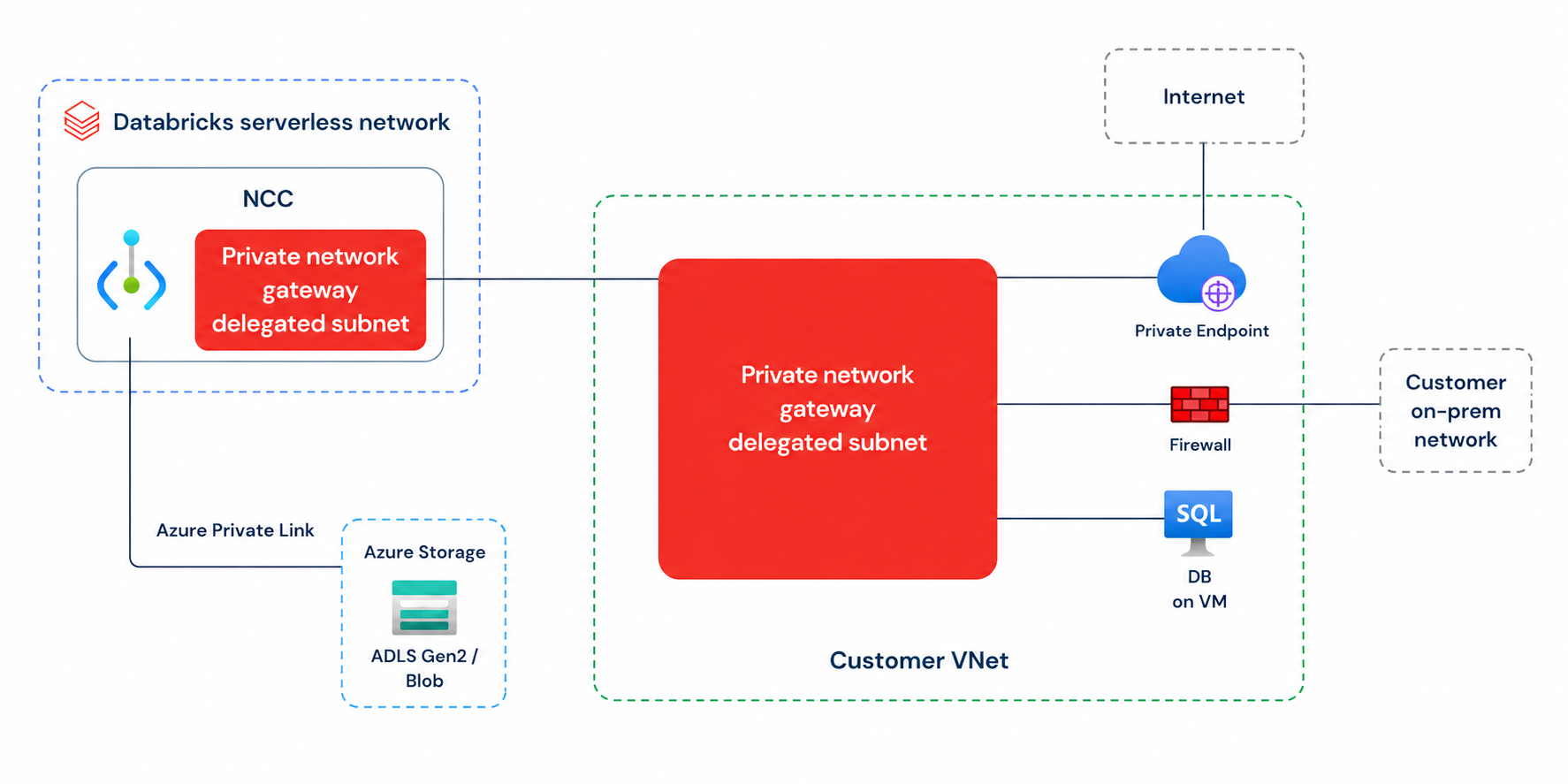
After you delegate one subnet in your VNet to Azure Databricks, your serverless environment can reach the resources that subnet can, including networks transitively connected to your VNet such as on-premises systems over ExpressRoute or a VPN.
Databricks recommends creating a new subnet dedicated to the private network gateway and delegating it to Azure Databricks. Make sure the subnet has downstream connectivity to all the resource targets you intend to reach through the gateway.
A private network gateway complements Private Link rather than replacing it:
- Use a Private Link private endpoint rule for a direct, private connection to a specific cloud-managed resource, such as object storage.
- Use a private network gateway to reach resources in your VNet or a connected network, or to route serverless egress through your own firewall or a dedicated egress path.
To set up a private network gateway, see Configure a private network gateway.
Overview
A private network gateway addresses several serverless connectivity needs with a single setup:
- Broad connectivity without per-resource onboarding. Reach many resources in your VNet, or on-premises systems over a connected ExpressRoute or VPN, without configuring a separate private endpoint for each resource.
- Egress through your own security appliances. Route serverless egress through your own firewall or network security appliance, such as Palo Alto or your cloud provider's firewall service, for content inspection before traffic leaves your network.
- Stable, identifiable source IP addresses. Send serverless egress from your own set of IP addresses, so downstream systems can identify the traffic at the network layer. This is useful for secure allowlisting in multi-tenant environments.
You can also use a private network gateway to control how serverless compute reaches the internet:
- Firewall serverless internet access through your own security appliances.
- Reach the internet from your own dedicated set of IP addresses.
How it works
When you create a private network gateway, Azure Databricks injects the gateway into the subnet you delegated to Microsoft.Databricks/workspaces in your VNet. Serverless traffic to the destinations you configure flows through the gateway into your VNet and onward to any network your VNet routes to, including transitively connected networks such as on-premises systems over ExpressRoute or a VPN.
Azure Databricks evaluates outbound serverless traffic against your configured network paths in priority order, using the first path that matches each connection's destination:
| Priority | Path | Applies to |
|---|---|---|
| 1 | Private endpoint rules (Private Link) | Traffic to a specific cloud-managed resource that has a private endpoint rule. |
| 2 | AWS: gateway endpoints for Amazon S3 and DynamoDB. Azure: service endpoints. | Traffic that matches those endpoints, which stays on the cloud provider's backbone and can't be overridden by the gateway. |
| 3 | Private network gateway | The destinations you configure in SPECIFIC_DESTINATIONS mode, or all remaining egress in ALL_TRAFFIC mode. |
| 4 | Default Azure Databricks serverless egress | All other outbound traffic. |
Azure service endpoints only reach public-facing Azure PaaS resources. They don't cover private-only resources. Blob storage always routes through the Azure service endpoint path and can't be overridden by a private network gateway.
A private network gateway works with your existing serverless networking as follows:
- Reuses your existing NCC: A private network gateway reuses your existing network connectivity configuration (NCC) rather than introducing a new object model. An NCC is an account-level object that manages serverless networking. After you create a private network gateway inside an NCC and attach that NCC to your workspaces, the serverless products in those workspaces can use the gateway automatically.
- Egress controls allow gateway destinations automatically: When you configure a private network gateway in
SPECIFIC_DESTINATIONSmode, Azure Databricks automatically allows the destinations you specify in your serverless egress control. You don't need to add them to your network policy separately. This mirrors how domains added as Private Link entries for a network load balancer are implicitly allowlisted. If your private network gateway is inALL_TRAFFICmode, however, you must explicitly add all the destinations you intend to connect to through the gateway to your egress network policy. For more information, see What is serverless egress control?. - Private endpoint rules take precedence: If a private endpoint rule exists for a specific resource, traffic to that resource always uses the private endpoint rather than the private network gateway, even in
ALL_TRAFFICmode.
Note
A private network gateway connects to resources in your VNet and transitively connected networks. It does not connect to cloud-managed services that are reached through gateway VPC endpoints.
Traffic modes
A gateway routes traffic in one of two modes, set by traffic_mode when you create it.
SPECIFIC_DESTINATIONS. Routes only the DNS names you list indestinationsthrough the gateway. All other traffic follows existing routing rules. This mode is recommended for most use cases because it gives fine-grained control without affecting unrelated traffic.ALL_TRAFFIC. Routes all outbound traffic from serverless compute through the gateway, except traffic that matches a more specific route such as Private Link. Use this mode when you need all egress to pass through your own firewall or security appliance.
Destination suffix matching is supported for SPECIFIC_DESTINATIONS mode: for example, specifying mydb.contoso.com also matches sub.mydb.contoso.com.
Limitations
The following limitations apply during Private Preview:
- The gateway and its subnet must be in the same region as the NCC.
- You configure the gateway only through the account REST API. There is no UI or Terraform support.
- A gateway connects to resources in your VNet and transitively connected networks. It does not connect to cloud-hosted services, such as Azure Data Lake Storage, that use service endpoints.
- A gateway supports serverless Azure Databricks Runtime products.
- An NCC supports at most two gateways. A gateway supports at most two DNS resolvers and at most 100 destinations.