Märkus.
Juurdepääs sellele lehele nõuab autoriseerimist. Võite proovida sisse logida või kausta vahetada.
Juurdepääs sellele lehele nõuab autoriseerimist. Võite proovida kausta vahetada.
Haystack is an open-source framework from deepset for building production LLM applications as composable pipelines of small @component classes — embedders, retrievers, prompt builders, generators, and answer builders. This how-to shows how to run Haystack 2.x against Azure DocumentDB by writing a small custom retriever that runs cosmosSearch and plugging it into a standard RAG pipeline.
What is Haystack?
Haystack 2.x is component-based. Each component is a Python class decorated with @component that exposes a typed run() method. You wire components into a Pipeline by declaring connections between named outputs and inputs. Common building blocks include:
- Embedders —
OpenAITextEmbedder,OpenAIDocumentEmbedder, and equivalents for Azure OpenAI and Hugging Face. - Retrievers — pull
Documentobjects out of a store given a query or query embedding. - Builders and generators —
PromptBuilderrenders a Jinja template;OpenAIGeneratorcalls an LLM. - Pipeline — orchestrates the run, fan-out, and fan-in.
There's no first-party Haystack store for Azure DocumentDB. You add a thin custom retriever component that runs cosmosSearch and emits standard haystack.Document objects, and the rest of the Haystack ecosystem works unchanged.
Haystack Azure DocumentDB integration
Azure DocumentDB pairs well with Haystack for the following reasons:
- One store for source data and vectors. Native vector indexing lives alongside document data, enabling RAG and similarity search without introducing a separate vector store. Source content, metadata, and embeddings stay in the same collection.
- MongoDB-compatible drivers and integrations. Azure DocumentDB exposes the MongoDB wire protocol, so
pymongoworks against your cluster directly. MongoDB drivers and tools work without application-level rewrites, simplifying migration in common scenarios. - Pre-filter inside vector search. Pass a Mongo filter expression to
cosmosSearch.filterto narrow candidates inside the kNN stage instead of post-filtering, which preserves top-k recall. - DiskANN, HNSW, and IVF indexes. Pick the algorithm that matches your dataset size and recall/latency budget.
Get started: install dependencies
Install Haystack and the MongoDB driver. Copy your Connection string value from the Azure portal for your DocumentDB cluster and store it as DOCUMENTDB_URI.
pip install haystack-ai pymongo
Note
Haystack 2.x is Python-only. If you're building a TypeScript app, use the mongodb driver and run vector queries with the $search + cosmosSearch aggregation pipeline shown in Vector search in Azure DocumentDB.
Connect to Azure DocumentDB and create a DiskANN vector index
Haystack doesn't manage the vector index. Create it directly with PyMongo using cosmosSearchOptions. The cell is idempotent — re-running it skips creation if an index by the same name already exists.
import os
from pymongo import MongoClient

DB_NAME = "haystack_db"
COLLECTION_NAME = "documents"
VECTOR_INDEX_NAME = "vector-diskann"
EMBEDDING_DIMS = 1536  # text-embedding-3-small

client = MongoClient(os.environ["DOCUMENTDB_URI"], appname="haystack-sample")
collection = client[DB_NAME][COLLECTION_NAME]

existing = {idx["name"] for idx in collection.list_indexes()}
if VECTOR_INDEX_NAME not in existing:
    collection.create_index(
        [("embedding", "cosmosSearch")],
        name=VECTOR_INDEX_NAME,
        cosmosSearchOptions={
            "kind": "vector-diskann",
            "dimensions": EMBEDDING_DIMS,
            "similarity": "COS",
            "maxDegree": 32,
            "lBuild": 50,
        },
    )
For HNSW or IVF, change kind to vector-hnsw or vector-ivf and adjust the algorithm-specific options (for example, m and efConstruction for HNSW, numLists for IVF).
Embed documents and write them to DocumentDB
Use Haystack's OpenAIDocumentEmbedder to compute vectors, then bulk-insert the documents through PyMongo. The embedding field is what cosmosSearch indexes.
from haystack import Document
from haystack.components.embedders import OpenAIDocumentEmbedder

passages = [
    Document(
        content=(
            "Azure DocumentDB is a fully managed, MongoDB-compatible database "
            "that supports vector search through the cosmosSearch operator with "
            "DiskANN, HNSW, and IVF index types."
        ),
        meta={"title": "Azure DocumentDB overview", "category": "product"},
    ),
    Document(
        content=(
            "DiskANN is the recommended vector index in Azure DocumentDB for "
            "production workloads. Tune lBuild at index creation time and lSearch "
            "at query time to trade off recall for latency."
        ),
        meta={"title": "DiskANN vector index", "category": "vector-search"},
    ),
    Document(
        content=(
            "Reuse a single MongoClient instance per process when connecting to "
            "Azure DocumentDB. Increase maxPoolSize for high-concurrency workloads."
        ),
        meta={"title": "Connection best practices", "category": "ops"},
    ),
]

doc_embedder = OpenAIDocumentEmbedder(model="text-embedding-3-small")
embedded = doc_embedder.run(documents=passages)["documents"]

collection.insert_many(
    {
        "_id": d.id,
        "content": d.content,
        "embedding": d.embedding,
        "meta": d.meta,
    }
    for d in embedded
)
For real workloads, replace the literal passages list with Haystack converters such as PyPDFToDocument, MarkdownToDocument, or HTMLToDocument, followed by a DocumentSplitter.
Build a custom retriever component
Define a Haystack @component that takes a query embedding and runs $search with cosmosSearch. The component emits haystack.Document objects, which the rest of the Haystack pipeline consumes unchanged.
from typing import Any, List, Optional

from haystack import component, Document
from pymongo.collection import Collection


@component
class DocumentDBEmbeddingRetriever:
    """Haystack retriever that runs cosmosSearch against an Azure DocumentDB collection."""

    def __init__(
        self,
        collection: Collection,
        embedding_field: str = "embedding",
        content_field: str = "content",
        top_k: int = 5,
    ):
        self._collection = collection
        self._embedding_field = embedding_field
        self._content_field = content_field
        self._top_k = top_k

    @component.output_types(documents=List[Document])
    def run(
        self,
        query_embedding: List[float],
        top_k: Optional[int] = None,
        filters: Optional[dict] = None,
    ) -> dict:
        cosmos_search: dict[str, Any] = {
            "path": self._embedding_field,
            "vector": query_embedding,
            "k": top_k or self._top_k,
        }
        if filters:
            cosmos_search["filter"] = filters

        pipeline = [
            {"$search": {"cosmosSearch": cosmos_search}},
            {
                "$project": {
                    "_id": 1,
                    self._content_field: 1,
                    "meta": 1,
                    "score": {"$meta": "searchScore"},
                }
            },
        ]

        documents = [
            Document(
                id=str(hit["_id"]),
                content=hit.get(self._content_field, ""),
                meta=hit.get("meta", {}),
                score=hit.get("score"),
            )
            for hit in self._collection.aggregate(pipeline)
        ]
        return {"documents": documents}
To use a metadata pre-filter, pass filters={"meta.category": {"$eq": "ops"}} to run(). Make sure the metadata path you filter on is included in your DiskANN index's vectorSearchOptions.filter list.
Wire up the RAG pipeline
Connect a text embedder, the custom retriever, a prompt builder, and an OpenAI generator into a single Haystack Pipeline.
from haystack import Pipeline
from haystack.components.builders import PromptBuilder
from haystack.components.embedders import OpenAITextEmbedder
from haystack.components.generators import OpenAIGenerator

PROMPT_TEMPLATE = """
Use the following Azure DocumentDB documentation passages to answer the question.
If the answer is not contained in the passages, say so honestly.

Passages:
{% for doc in documents %}
[{{ doc.meta.title }}] {{ doc.content }}
{% endfor %}

Question: {{ question }}
Answer:
"""

rag = Pipeline()
rag.add_component("text_embedder", OpenAITextEmbedder(model="text-embedding-3-small"))
rag.add_component("retriever", DocumentDBEmbeddingRetriever(collection=collection, top_k=3))
rag.add_component(
    "prompt_builder",
    PromptBuilder(template=PROMPT_TEMPLATE, required_variables=["question"]),
)
rag.add_component("llm", OpenAIGenerator(model="gpt-4o-mini"))

rag.connect("text_embedder.embedding", "retriever.query_embedding")
rag.connect("retriever.documents", "prompt_builder.documents")
rag.connect("prompt_builder.prompt", "llm.prompt")
Ask a question
Run the pipeline. The query string is fed to both the embedder (to produce the search vector) and the prompt builder (to render the final question).
question = "Which vector index should I pick for a production workload with 500K vectors?"

result = rag.run(
    {
        "text_embedder": {"text": question},
        "prompt_builder": {"question": question},
    }
)

print(result["llm"]["replies"][0])
To inspect the chunks the LLM grounded its answer on, run the retriever directly:
qvec = OpenAITextEmbedder(model="text-embedding-3-small").run(text=question)["embedding"]
hits = DocumentDBEmbeddingRetriever(collection=collection, top_k=3).run(query_embedding=qvec)["documents"]
for d in hits:
    print(f"[{d.meta.get('title')}] (score={d.score:.3f})")
View and manage data in Visual Studio Code
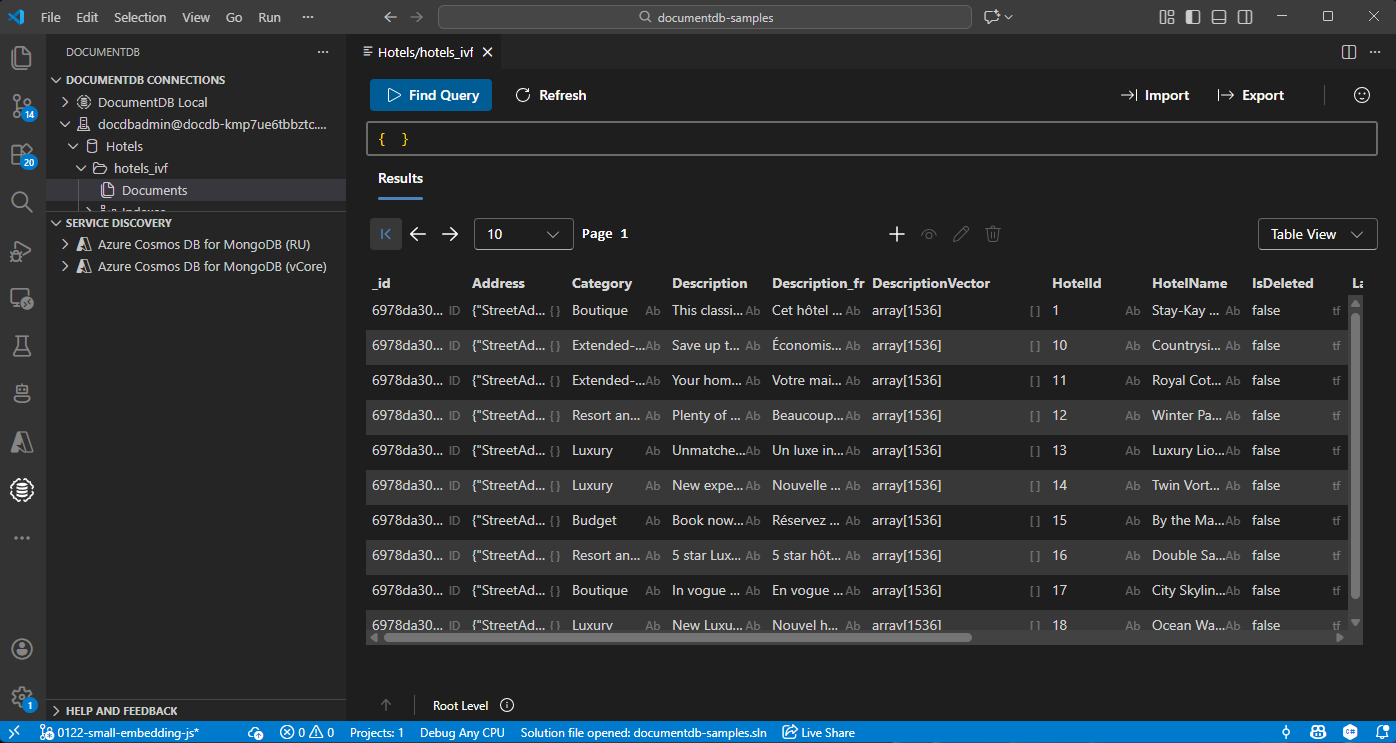
You can browse the persisted documents, embeddings, and vector indexes without leaving your editor.
Install the Azure DocumentDB extension for Visual Studio Code.
Connect to your Azure DocumentDB cluster from the DocumentDB Connections view by using the same connection string you set as
DOCUMENTDB_URI.Expand the
haystack_db.documentscollection to view documents, run find queries, and inspect the DiskANN vector index.