Märkus.
Juurdepääs sellele lehele nõuab autoriseerimist. Võite proovida sisse logida või kausta vahetada.
Juurdepääs sellele lehele nõuab autoriseerimist. Võite proovida kausta vahetada.
New to Agent 365?
First, choose your integration option. If built-in integration or registry sync provides the capabilities you need, you don't need to add the SDK just to register your agent. For Google Vertex AI and Amazon Bedrock agents, see Register Google Vertex AI and Amazon Bedrock agents.
If your agent needs code-level integration, choose a path based on your starting point and the result you want:
| Your starting point | Start here | First result | Before you begin |
|---|---|---|---|
| You have an agent and want AI-assisted onboarding. | Quickstart: Connect an existing agent to Agent 365, using Agent 365 Skills. | Register the agent, add the capabilities you choose, and validate the integration. | Review the supported stacks, coding assistants, tenant access, roles, and licensing requirements. |
| You have an agent and want to run CLI commands yourself. | Set up an agent blueprint. | Create the blueprint that defines your agent's identity and permissions. | Review the CLI, tenant role, and Azure subscription requirements, then use Agent identity to choose the identity model. |
| You want to learn with a sample project rather than change your own agent. | Choose a sample in Python, Node.js, or .NET. | Configure a sample and get a first response in Agents Playground. | Review the selected quickstart or sample README prerequisites, including runtime, model access, and authentication setup. |
For the sample path, the catalog links to the Python + Microsoft Agent Framework, Node.js + LangChain, and Node.js + Claude Agent SDK quickstarts, plus a .NET sample. Choose your language in the catalog to see the available frameworks.
Note
A local response isn't proof that live Microsoft 365 tools, notifications, or telemetry work. For tenant-backed capabilities, review the tenant, consent, and licensing requirements and the testing authentication setup.
Agent 365 SDK
Use the Agent 365 SDK to extend agents built using any agent SDK or platform with identity, notifications, security, and governed access to Microsoft 365 data. Use Microsoft OpenTelemetry for observability.
Tip
Looking for pre-built agents? See ecosystem partner agents available in Agent 365 for agents that are pre-integrated at launch.
Agents have unique identities. People invoke them using common gestures (such as @mentions) in apps that enterprise users typically operate in (such as Teams, Word, Outlook, and more). They demonstrate observable behaviors that build trust, take auditable actions, and do so via secure access to tools and data.
With the Agent 365 SDK, agents can:
- Use Entra-backed Agent Identity with their own user resources like mailbox for secure authentication and controlled access to tools and data.
- Receive and respond to notifications from Teams, Outlook, Word comments, and emails—just like a human participant in Microsoft 365 apps.
- Gain full observability via Open Telemetry, enabling audited, traceable agent interactions, inference events, and tool usage.
- Invoke governed Model Context Protocol (MCP) servers to access Microsoft 365 workloads (for example, Mail, Calendar, SharePoint, Teams) under admin control.
- Function within an IT‑approved blueprint system, ensuring each agent instance inherits compliance, governance, and security policies.
Review the Agent 365 SDK overview.
Agent 365 CLI
Agent 365 CLI is the command-line backbone for Agent 365 throughout the agent development lifecycle - automating setup, identity, configuration, MCP integration, publishing, and Azure deployment for enterprise-ready agents.
With the Agent 365 CLI, developers can:
- Create agent blueprints and all supporting resources required by them.
- Manage out-of-box and custom Work IQ tools, permissions, and tooling for agents.
- Deploy agent code to Azure.
- Publish agent application packages to Microsoft admin center.
- Clean up agent blueprints, identities, and other Azure resources created by the CLI.
Learn more about the Agent 365 CLI
Agent 365 Agent Development lifecycle
Agent 365 works with agents built on any agent SDK or platform. This includes low‑code platforms like Copilot Studio and Azure AI Foundry. It also supports pro‑code options such as Microsoft Agent Framework, Microsoft Agents SDK, OpenAI Agents SDK, Claude Code SDK, and LangChain SDK. Agent 365 also works with agent code hosted on any endpoint, be it Azure, Amazon Web Services (AWS), Google Cloud Platform (GCP), or any other cloud provider.
The existing-agent quickstart covers registration, selected capabilities, and validation. Deployment, publishing, and cleanup have separate guides. Continue with the phases that apply to your scenario:
| Phase | Guide |
|---|---|
| Validate the integration before deployment. | Agent 365 SDK validation checklist and Test your agent. |
| Deploy your agent code. | Azure, AWS, or Google Cloud Platform. |
| Package and publish the agent. | Publish agent to Microsoft admin center. |
| Create and verify a deployed agent instance. | Create agent instances and test your deployed agent. |
| Remove resources you no longer need. | CLI cleanup reference, including granular cleanup and dry-run options. |
Agent 365 agent blueprint
Before working with instances of Agent 365 agents, it's helpful to understand what we mean by the blueprint of an Agent 365 agent. This comes from Microsoft Entra agent blueprint and is an IT-approved, pre-configured definition of an agent type, essentially the enterprise "template" from which compliant agents can be created. It defines the agent's capabilities, required Work IQ tool access, security and compliance constraints, audit requirements, lifecycle metadata, and any linked governance policy templates such as DLP, external access restrictions, or logging rules. When a blueprint is activated for use in a tenant, users can request their admins for new agent instances created from the agent blueprint in the Microsoft 365 admin center. Every agent instance inherits its blueprint's rules, ensuring consistent governance across mail, calendar, Teams, SharePoint access, and any other Microsoft 365 workloads the agent touches. This prevents shadow/rogue agents, enforces observability, and anchors each agent in a secure Entra-backed identity and permissions model.
How is the Agent 365 SDK different?
The Agent 365 SDK differs from agent frameworks like Microsoft Agent Framework or Microsoft Copilot Studio because it doesn't create or host agents. Instead, it enhances agents you already built, regardless of the underlying stack, by adding enterprise capabilities such as Entra-based Agent identity, governed Work IQ tool access, notifications through the Activity protocol, and agent ID-driven governance. Use Microsoft OpenTelemetry for observability.
Although very similar in name, it doesn't replace the Microsoft 365 Agents SDK and the functionality it provides for hosting, activity protocol, and identity. On the contrary, the Agent 365 SDK complements it by layering governance, compliance, and lifecycle controls on top of agents built with it or other platforms.
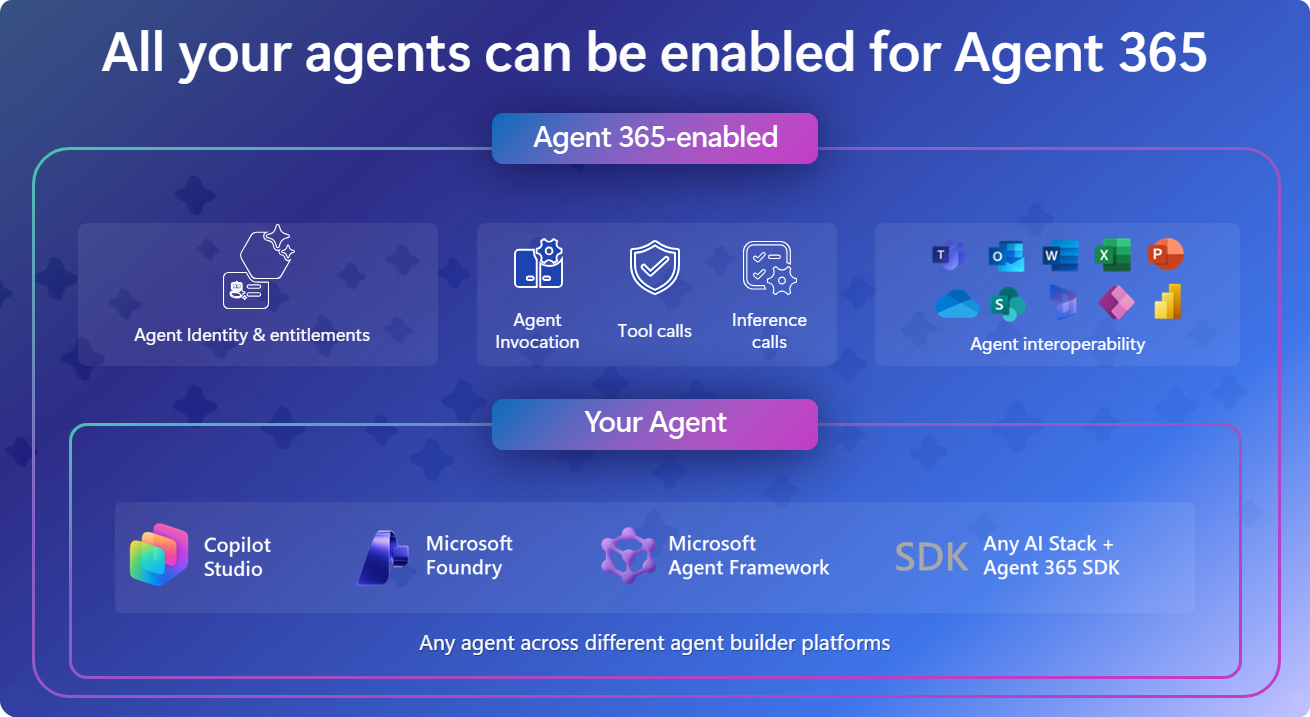
Agent 365 SDK and the agent ecosystem
This table summarizes the layered agent architecture, showing how the Agent 365 SDK adds enterprise capabilities above your agent logic and the LLM orchestrator runtime provided by your chosen framework.
| Layer | Role | Provided by |
|---|---|---|
| Enterprise capabilities | Identity, notifications, and tooling from the Agent 365 SDK; observability from Microsoft OpenTelemetry | Agent 365 SDK and Microsoft OpenTelemetry |
| Agent Logic | Prompts, workflows, reasoning | Your implementation in code |
| LLM Orchestrator Runtime | Model invocation and tool orchestration | Agent SDK/Framework of your choice |