Märkus.
Juurdepääs sellele lehele nõuab autoriseerimist. Võite proovida sisse logida või kausta vahetada.
Juurdepääs sellele lehele nõuab autoriseerimist. Võite proovida kausta vahetada.
Note
This article describes features used in agents or agent flows powered by the standard harness.
The agent canvas controls how the agent appears to users. You can customize the canvas in two ways:
Customize the default canvas by using JavaScript and CSS in your website. Use this option for simple changes.
Use a custom canvas based on the Bot Framework Web Chat canvas. This option requires development experience and supports full customization.
You can also combine the customized canvas with configuring an automatic conversation start.
You can change the agent name and icon in the portal.
After you publish an agent, users can interact with it through the Web Chat canvas.
Important
You can install and use the sample code included in this article only for use with Copilot Studio. The sample code is licensed "as is" and is excluded from any service level agreements or support services. You bear the risk of using it.
Microsoft gives no express warranties, guarantees, or conditions and excludes all implied warranties, including merchantability, fitness for a particular purpose, and non-infringement.
Change the agent name and icon
Important
- After you update the icon for an agent, it might take up to 24 hours for the new icon to appear everywhere.
- If your agent is connected to Omnichannel for Customer Service, the Display name property in the Azure portal registration defines its name.
- If your agent is meant to be published to Teams, review the requirements for icons in the Microsoft Teams developer documentation.
Go to the Overview page for your agent.
Select Edit next to Details.
Change the agent's name and icon as desired.
Select Save.
Customize the default canvas (simple)
Use JavaScript and CSS to adjust the default canvas.
First, configure where you're deploying your agent canvas.
Copy the sample HTML code into a file named
index.html. You can also use the HTML try-it editor.<!DOCTYPE html> <html lang="en"> <head> <meta charset="UTF-8" /> <meta name="viewport" content="width=device-width, initial-scale=1.0" /> <meta name="description" content="Contoso Web Chat Assistant" /> <title>Contoso Sample Web Chat Test</title> <script src="https://cdn.botframework.com/botframework-webchat/latest/webchat.js"></script> <script> let webChatInstance = null; let directLineUrl = null; // Replace with your token endpoint const tokenEndpoint = "<YOUR TOKEN ENDPOINT>"; const styleOptions = { "accent": "#0078D4", "autoScrollSnapOnPage": true, "autoScrollSnapOnPageOffset": 0, "avatarBorderRadius": "7%", "avatarSize": 31, "backgroundColor": "#e8e9eb", "botAvatarBackgroundColor": "#ffffff00", "botAvatarImage": "https://powercatexternal.blob.core.windows.net/creatorkit/Assets/ChatbotLogoBlue.png", "botAvatarInitials": "B", "bubbleAttachmentMaxWidth": 480, "bubbleAttachmentMinWidth": 250, "bubbleBackground": "#f0eded", "bubbleBorderColor": "#f5f5f5", "bubbleBorderRadius": 41, "bubbleBorderStyle": "solid", "bubbleBorderWidth": 1, "bubbleFromUserBackground": "#ebefff", "bubbleFromUserBorderColor": "#f5f5f5", "bubbleFromUserBorderRadius": 41, "bubbleFromUserBorderStyle": "solid", "bubbleFromUserBorderWidth": 1, "bubbleFromUserNubOffset": 0, "bubbleFromUserNubSize": 0, "bubbleFromUserTextColor": "#242424", "bubbleImageHeight": 10, "bubbleImageMaxHeight": 240, "bubbleImageMinHeight": 240, "bubbleMessageMaxWidth": 480, "bubbleMessageMinWidth": 120, "bubbleMinHeight": 50, "bubbleNubOffset": 0, "bubbleTextColor": "#242424", "emojiSet": true, "fontSizeSmall": "70%", "hideUploadButton": false, "messageActivityWordBreak": "break-word", "monospaceFont": "Consolas", "paddingRegular": 10, "paddingWide": 10, "primaryFont": null, "sendBoxBackground": "#e8e9eb", "sendBoxBorderTop": "solid 1px #808080", "sendBoxButtonColor": "#0078d4", "sendBoxButtonColorOnHover": "#006cbe", "sendBoxButtonShadeBorderRadius": 40, "sendBoxButtonShadeColorOnHover": "", "sendBoxHeight": 60, "sendBoxPlaceholderColor": "#171616", "sendBoxTextColor": "#2e2d2d", "showAvatarInGroup": "status", "spinnerAnimationHeight": 16, "spinnerAnimationPadding": 12, "spinnerAnimationWidth": 16, "subtleColor": "#000000FF", "suggestedActionBackgroundColor": "#006FC4FF", "suggestedActionBackgroundColorOnHover": "#0078D4", "suggestedActionBorderColor": "", "suggestedActionBorderRadius": 10, "suggestedActionBorderWidth": 1, "suggestedActionLayout": "flow", "suggestedActionTextColor": "#FFFFFFFF", "typingAnimationBackgroundImage": "url('https://wpamelia.com/wp-content/uploads/2018/11/ezgif-2-6d0b072c3d3f.gif')", "typingAnimationDuration": 5000, "typingAnimationHeight": 20, "typingAnimationWidth": 64, "userAvatarBackgroundColor": "#222222", "userAvatarImage": "https://avatars.githubusercontent.com/u/8174072?v=4&size=64", "userAvatarInitials": "U" }; const backgroundImage = ""; document.addEventListener('DOMContentLoaded', () => { const root = document.documentElement; root.style.setProperty('--primary-color', createGradient(styleOptions.accent)); root.style.setProperty('--header-textColor', styleOptions.suggestedActionTextColor); if (backgroundImage) { const webchatElement = document.getElementById('webchat'); webchatElement.style.backgroundImage = `url(${backgroundImage})`; webchatElement.style.backgroundSize = 'cover'; webchatElement.style.backgroundPosition = 'center'; webchatElement.style.backgroundRepeat = 'no-repeat'; const overlay = document.createElement('div'); overlay.className = 'webchat-overlay'; webchatElement.appendChild(overlay); } }); function createGradient(baseColor) { const r = parseInt(baseColor.slice(1, 3), 16); const g = parseInt(baseColor.slice(3, 5), 16); const b = parseInt(baseColor.slice(5, 7), 16); const lighterColor = `#${Math.min(255, r + 30).toString(16).padStart(2, '0')}${Math.min(255, g + 30).toString(16).padStart(2, '0')}${Math.min(255, b + 30).toString(16).padStart(2, '0')}`; const darkerColor = `#${Math.max(0, r - 30).toString(16).padStart(2, '0')}${Math.max(0, g - 30).toString(16).padStart(2, '0')}${Math.max(0, b - 30).toString(16).padStart(2, '0')}`; return `linear-gradient(135deg, ${lighterColor}, ${baseColor}, ${darkerColor})`; } const environmentEndPoint = tokenEndpoint.slice( 0, tokenEndpoint.indexOf("/powervirtualagents") ); const apiVersion = tokenEndpoint .slice(tokenEndpoint.indexOf("api-version")) .split("=")[1]; const regionalChannelSettingsURL = `${environmentEndPoint}/powervirtualagents/regionalchannelsettings?api-version=${apiVersion}`; function showChat() { const popup = document.getElementById("chatbot-popup"); const openButton = document.getElementById("open-chat"); popup.classList.add("visible"); openButton.classList.add("hidden"); } function hideChat() { const popup = document.getElementById("chatbot-popup"); const openButton = document.getElementById("open-chat"); popup.classList.remove("visible"); openButton.classList.remove("hidden"); } function createCustomStore() { return window.WebChat.createStore( {}, ({ dispatch }) => (next) => (action) => { if (action.type === "DIRECT_LINE/CONNECT_FULFILLED") { dispatch({ type: "DIRECT_LINE/POST_ACTIVITY", meta: { method: "keyboard" }, payload: { activity: { channelData: { postBack: true }, name: "startConversation", type: "event", }, }, }); } return next(action); } ); } async function restartConversation() { try { if (!directLineUrl) { console.error("DirectLine URL not initialized"); return; } const response = await fetch(tokenEndpoint); const conversationInfo = await response.json(); if (!conversationInfo.token) { throw new Error("Failed to get conversation token"); } const newDirectLine = window.WebChat.createDirectLine({ domain: `${directLineUrl}v3/directline`, token: conversationInfo.token, }); const webchatElement = document.getElementById("webchat"); webChatInstance = window.WebChat.renderWebChat( { directLine: newDirectLine, styleOptions, store: createCustomStore(), }, webchatElement ); } catch (err) { console.error("Failed to restart conversation:", err); } } async function initializeChat() { try { const response = await fetch(regionalChannelSettingsURL); const data = await response.json(); directLineUrl = data.channelUrlsById.directline; if (!directLineUrl) { throw new Error("Failed to get DirectLine URL"); } const conversationResponse = await fetch(tokenEndpoint); const conversationInfo = await conversationResponse.json(); if (!conversationInfo.token) { throw new Error("Failed to get conversation token"); } const directLine = window.WebChat.createDirectLine({ domain: `${directLineUrl}v3/directline`, token: conversationInfo.token, }); webChatInstance = window.WebChat.renderWebChat( { directLine, styleOptions, store: createCustomStore(), }, document.getElementById("webchat") ); } catch (err) { console.error("Failed to initialize chat:", err); } } initializeChat(); </script> <style> :root { --primary-gradient: var(--primary-color); --chat-width: 450px; --chat-height: 520px; --header-height: 56px; --border-radius: 16px; --transition-speed: 0.3s; } * { margin: 0; padding: 0; box-sizing: border-box; font-family: system-ui, -apple-system, BlinkMacSystemFont, "Segoe UI", Roboto, sans-serif; } body { min-height: 100vh; background-color: #f3f4f6; } #chatbot-popup { display: none; position: fixed; bottom: 32px; right: 32px; width: var(--chat-width); height: var(--chat-height); background: white; border-radius: var(--border-radius); box-shadow: 0 18px 40px -5px rgba(0, 0, 0, 0.2), 0 15px 20px -5px rgba(0, 0, 0, 0.1); overflow: hidden; opacity: 0; transform-origin: bottom right; transform: scale(0.95); transition: all var(--transition-speed) ease-in-out; z-index: 999; } #chatbot-popup.visible { display: block; opacity: 1; transform: scale(1); } #chatbot-header { background: var(--primary-color); padding: 16px 20px; height: var(--header-height); display: flex; justify-content: space-between; align-items: center; color: var(--header-textColor); } .header-title { display: flex; align-items: center; gap: 12px; font-size: 16px; font-weight: 500; } .header-buttons { display: flex; gap: 12px; align-items: center; } .icon-button { background: none; border: none; color: var(--header-textColor); cursor: pointer; padding: 8px; border-radius: 8px; display: flex; align-items: center; justify-content: center; transition: all 0.2s ease; } .icon-button:hover { color: var(--header-textColor); background: rgba(255, 255, 255, 0.1); } .icon-button:focus { outline: 2px solid rgba(255, 255, 255, 0.5); outline-offset: 2px; } #webchat { height: calc(100% - var(--header-height)); background-color: #f9fafb; position: relative; } .webchat-overlay { position: absolute; top: 0; left: 0; right: 0; bottom: 0; background: rgba(255, 255, 255, 0.85); pointer-events: none; z-index: 1; } #webchat > div { position: relative; z-index: 2; } #webchat .webchat__basic-transcript__content { white-space: pre-wrap !important; word-break: break-word !important; } #webchat .webchat__bubble__content { padding: 8px 12px !important; } #webchat .webchat__bubble { max-width: 85% !important; margin: 8px !important; } #webchat .webchat__basic-transcript__content ul, #webchat .webchat__basic-transcript__content ol, #webchat .webchat__bubble__content ul, #webchat .webchat__bubble__content ol { padding-left: 24px !important; margin: 8px 0 !important; list-style-position: outside !important; } #webchat .webchat__basic-transcript__content li, #webchat .webchat__bubble__content li { margin: 4px 0 !important; padding-left: 4px !important; } #open-chat { position: fixed; bottom: 32px; right: 32px; width: 64px; height: 64px; border-radius: 50%; background: var(--primary-gradient); border: none; cursor: pointer; display: flex; align-items: center; justify-content: center; box-shadow: 0 4px 6px -1px rgba(0, 0, 0, 0.1); transition: all var(--transition-speed) ease-in-out; z-index: 998; } #open-chat.hidden { opacity: 0; transform: scale(0.95) translateY(10px); pointer-events: none; } #open-chat:hover { transform: translateY(-4px); box-shadow: 0 10px 15px -3px rgba(0, 0, 0, 0.1); } #open-chat:focus { outline: 3px solid rgba(79, 70, 229, 0.5); outline-offset: 2px; } #open-chat svg { width: 28px; height: 28px; color: white; transition: transform 0.2s ease; } .main-content { max-width: 1200px; margin: 0 auto; padding: 48px 24px; } .main-content h1 { font-size: 36px; color: #111827; text-align: center; } .main-content p { font-size: 18px; color: #4b5563; line-height: 1.6; margin-bottom: 48px; text-align: center; max-width: 800px; margin-left: auto; margin-right: auto; } .content-grid { display: grid; grid-template-columns: repeat(2, 1fr); gap: 32px; margin-bottom: 32px; } .content-box { background: linear-gradient(135deg, #e6e6e6, #c4c4c4, #9f9f9f); padding: 32px; border-radius: 12px; box-shadow: 0 4px 6px -1px rgba(0, 0, 0, 0.1), 0 2px 4px -1px rgba(0, 0, 0, 0.06); min-height: 300px; display: flex; flex-direction: column; justify-content: center; align-items: center; text-align: center; position: relative; overflow: hidden; } .content-box::before { content: ''; position: absolute; top: 0; left: 0; right: 0; height: 4px; } .content-box.featured { grid-column: span 2; min-height: 350px; background: linear-gradient(135deg, #e6e6e6, #c4c4c4, #9f9f9f); color: #000000; } .content-box h2 { font-size: 24px; margin-bottom: 16px; position: relative; } .content-box p { font-size: 16px; color: #6b7280; margin-bottom: 0; } .content-box.featured p { color: #000000; } @media (max-width: 768px) { .content-grid { grid-template-columns: 1fr; } .content-box.featured { grid-column: span 1; } .main-content { padding: 24px 16px; } .main-content h1 { font-size: 28px; } #chatbot-popup { width: 100%; height: 100%; bottom: 0; right: 0; border-radius: 0; } } </style> </head> <body> <div class="main-content"> <h1>Header</h1> <p>Lorem ipsum dolor sit amet consectetur adipiscing elit. Quisque faucibus ex sapien vitae pellentesque sem placerat.</p> <div class="content-grid"> <div class="content-box featured"> <h2>Featured Content</h2> <p>Primary content area with custom styling and gradient background</p> </div> <div class="content-box"> <h2>Section One</h2> <p>Content box with minimal design</p> </div> <div class="content-box"> <h2>Section Two</h2> <p>Another content section with consistent styling</p> </div> </div> </div> <div id="chatbot-popup" role="complementary" aria-label="Chat Assistant"> <div id="chatbot-header"> <div class="header-title"> <svg class="chat-icon" width="24" height="24" viewBox="0 0 24 24" fill="none" stroke="currentColor" stroke-width="2" stroke-linecap="round" stroke-linejoin="round" aria-hidden="true" > <path d="M21 15a2 2 0 0 1-2 2H7l-4 4V5a2 2 0 0 1 2-2h14a2 2 0 0 1 2 2z" ></path> </svg> <span>Contoso Assistant</span> </div> <div class="header-buttons"> <button class="icon-button" id="restart-button" onclick="restartConversation()" aria-label="Restart Conversation" > <svg width="20" height="20" viewBox="0 0 24 24" fill="none" stroke="currentColor" stroke-width="2" stroke-linecap="round" stroke-linejoin="round" aria-hidden="true" > <path d="M3 12a9 9 0 1 0 9-9 9.75 9.75 0 0 0-6.74 2.74L3 8" ></path> <path d="M3 3v5h5"></path> </svg> </button> <button class="icon-button" id="close-button" onclick="hideChat()" aria-label="Close Chat" > <svg width="20" height="20" viewBox="0 0 24 24" fill="none" stroke="currentColor" stroke-width="2" stroke-linecap="round" stroke-linejoin="round" aria-hidden="true" > <line x1="18" y1="6" x2="6" y2="18"></line> <line x1="6" y1="6" x2="18" y2="18"></line> </svg> </button> </div> </div> <div id="webchat" role="main"></div> </div> <button id="open-chat" onclick="showChat()" aria-label="Open Chat Assistant" > <svg viewBox="0 0 24 24" fill="none" stroke="currentColor" stroke-width="2" stroke-linecap="round" stroke-linejoin="round" aria-hidden="true" > <path d="M21 15a2 2 0 0 1-2 2H7l-4 4V5a2 2 0 0 1 2-2h14a2 2 0 0 1 2 2z" ></path> </svg> </button> </body> </html>In
index.html, replace:const tokenEndpoint = "<YOUR TOKEN ENDPOINT>";with your token endpoint.
Open
index.htmlin a modern browser, such as Microsoft Edge.Test the agent.
If the agent doesn't respond:
- Make sure the agent is published.
- Verify the token endpoint value.
- Confirm the token endpoint appears after the
=, surrounded by double quotation marks".
Retrieve the token endpoint for your agent
To customize your canvas, whether it's the default canvas or a custom one you connect to, you need the token endpoint for your agent.
In Settings, select Channels.
Select Email.
Next to Token Endpoint, select Copy.
Customize the agent icon, background color, and name
Use the styleOptions object to configure predefined styles.
For more information on what you can customize and links to the defaultStyleOptions.js file, see Web Chat customization.
Change the agent icon
Update the
index.htmlfile with the following sample code:const styleOptions = { "accent": "#00809d", "botAvatarBackgroundColor": "#FFFFFF", "botAvatarImage": "https://learn.microsoft.com/azure/bot-service/v4sdk/media/logo_bot.svg", "botAvatarInitials": "BT", "userAvatarImage": "https://avatars.githubusercontent.com/u/661465", "userAvatarInitials": "U" };Replace both avatar images with your company images. If you don't have an image URL, use a Base64-encoded image string instead.
Change the background color
In
index.htmladd abackgroundColorelement to yourstyleOptionsdefinition:const styleOptions = { "backgroundColor": "lightgray", // ... };Change
backgroundColorto any color you want. Use standard CSS color names, RGB values, or HEX.
Change the agent name
Update the
<h1>header text in theindex.htmlfile with the following code:<body> <div id="banner"> <h1><img src="contoso-agent.png"> Contoso agent name</h1> </div> <!-- ... -->Change the text to whatever you want to call the agent. You can also insert an image, but you might need to style it to make it fit within the heading section.
Customize and host your chat canvas (advanced)
You can connect your Copilot Studio agent with a custom canvas that you host as a standalone web app. This option works best if you need to embed a customized iFrame across multiple web pages.
Note
Hosting a custom canvas requires software development. This guidance is intended for experienced IT professionals, such as IT admins or developers who have a good understanding of developer tools, utilities, and integrated development environments (IDEs).
Start with one of these samples custom-built to work with Copilot Studio:
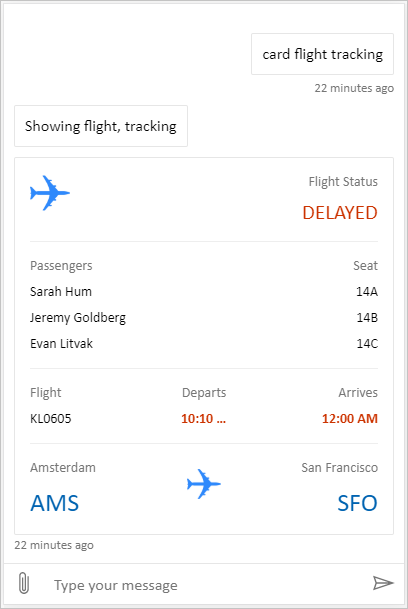
Full bundle is a custom canvas capable of showing all rich content from Copilot Studio. For example:
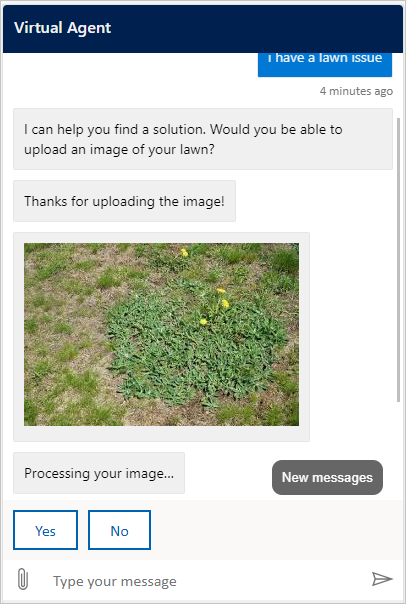
Location and file uploading is a custom canvas capable of getting a user's location and sending it to a Copilot Studio agent. For example:
Alternatively, try some other sample Web Chat canvases from Bot Framework.
As with the default canvas, you can use styleSetOptions to tweak the custom canvas. All customizable properties are listed in defaultStyleOptions.js. For more information on what you can customize, see Web Chat customization.
Support connection setup in a custom canvas
When an agent powered by the standard harness needs a user connection, the chat canvas receives a connection-required Adaptive Card. Your custom canvas must handle the card's Action.OpenUrlDialog action. Without this handling, selecting Connect doesn't open the focused connection window.
Open the connection window
- Register
Action.OpenUrlDialogin your Adaptive Cards renderer and read itsurlproperty. Accept only an absolutehttp://orhttps://URL. - Decide whether the destination origin is trusted before opening it. Trust only origins that you control or that your security team reviewed and allowlisted.
- Open the URL directly from the user's selection with
window.open(url, "_blank", "popup"). Opening the window from the user action reduces the chance that the browser blocks it. - For a trusted destination, in the
windowFeaturesargument ofwindow.open, omitnoopenerandnoreferrerso the connection window can return a result towindow.opener. For any other destination, usenoopener,noreferrerand don't accept a return message. - Retain the returned
Windowreference and the activity ID of the connection-required card. If the popup is blocked, or if the user closes it without a valid result, keep Continue or another recovery action available. Don't interpret window closure as successful connection setup.
The Adaptive Cards JavaScript SDK doesn't implement Action.OpenUrlDialog by default. Register the action through SerializationContext.actionRegistry, or handle the action directly in a renderer that you own. An Action.OpenUrl fallback can open the destination in clients that don't support the dialog action, but the fallback can't return a popup result.
Important
A connection window with access to window.opener can navigate or otherwise affect the chat page. Review the destination and its redirects with your web security team. Don't allow a trusted destination to redirect to an untrusted site while retaining opener access.
If you embed Bot Framework Web Chat, its Action.OpenUrlDialog handling opens the connection window. Same-origin windows are trusted by default. For a reviewed cross-origin destination, set styleOptions.callURLActionTrustedOrigin to the exact allowed origin. Separate multiple origins with commas. You can also set callURLActionPopupWindowHeight and callURLActionPopupWindowWidth. Don't add an origin that you haven't reviewed.
Continue after successful connection setup (preview)
[This section is prerelease documentation and is subject to change.]
Important
This article contains Microsoft Copilot Studio preview documentation and is subject to change.
Preview features aren't meant for production use and may have restricted functionality. These features are available before an official release so that you can get early access and provide feedback.
If you're building a production-ready agent, see Microsoft Copilot Studio Overview.
The trusted connection window can send a completion result to the chat page with window.opener.postMessage. Use the chat page's exact origin as the target origin, not *.
In the chat page:
If
window.openreturnednull, don't accept a message for that attempt. Otherwise, accept a message only whenevent.sourcematches the retained popup reference andevent.originmatches the expected origin.Validate that the message data has
type: "postback"and a value in the shape expected by your agent or runtime.The following example sends a message with text "hello-world" to the agent. It isn't visible in the chat UI.
{ "type": "postback", "value": { hello: "World!" } }The following example sends a message with JSON
{ hello: "World!" }to the agent.{ "type": "postback", "value": { hello: "World!" } }Send the accepted value through the Bot Framework postback mechanism. Use the retained activity ID as
replyToId; don't accept a reply activity ID from the popup.Accept at most one result for each popup. Remove the event listener and clear its timer after accepting a result, rejecting a malformed message from the trusted popup, detecting that the popup closed, or reaching the time limit. Web Chat uses a five-minute limit.
Coordinate with the agent or runtime to correlate the postback with the original connection-required interaction and resume that turn exactly once.
Browser messaging is best effort. Popup blockers, navigation, cross-origin opener policy, or a closed window can prevent automatic continuation. Keep Continue or another recovery path available, and don't interpret a missing message as success.
Deploy your customized canvas
To host your custom canvas, deploy all files to a web app.