Märkus.
Juurdepääs sellele lehele nõuab autoriseerimist. Võite proovida sisse logida või kausta vahetada.
Juurdepääs sellele lehele nõuab autoriseerimist. Võite proovida kausta vahetada.
This article provides resources for developers and information about the specific environment you're working with.
Sign in to Power Apps, and select your environment in the top-right corner.
Select the Settings button in the top-right corner, and select Developer resources.
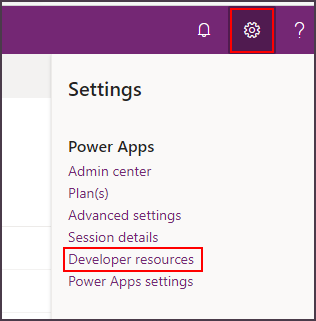
The following sections explain the information available on the developer resources page.
Unique identifiers
The first three pieces of information (Environment unique name, Environment ID, and Organization ID) are the unique identifiers that describe your environment and specific Microsoft Dataverse instance (organization).
You need this information when you connect through developer tooling or use Azure extensions with your instance. For more information, see Azure integration.
Connect your apps to Microsoft Dataverse instance
The next two pieces of information provide you with the APIs you need to connect to your Dataverse environment.
Web API endpoint
This is the URL for the Web API for your instance. The Web API is an OData v4 RESTful API. For more information, see Use the Dataverse Web API.
Discovery endpoint
This HTTP REST API provides connection information for the set of instances to which you have access. For more information, see Discover the URL for your organization.
Documentation
This section provides links for developers to find resources. The following resources are available:
| Link | Description |
|---|---|
| Developer center | The main entry point for documentation for developers. |
| Official NuGet feed | Discover NuGet packages to add SDK assemblies to your projects. |
| PowerShell Gallery feed | Discover PowerShell packages to make working with Dataverse easier. |
| Sample Code | A list of code samples available. |