Muistiinpano
Tämän sivun käyttö edellyttää valtuutusta. Voit yrittää kirjautua sisään tai vaihtaa hakemistoa.
Tämän sivun käyttö edellyttää valtuutusta. Voit yrittää vaihtaa hakemistoa.
This quickstart describes how to create a backup policy to protect Azure Database for PostgreSQL - Flexible Server to an Azure Backup Vault using Azure portal.
Azure Backup policy for Azure Database for PostgreSQL - Flexible Server defines how and when backups are created, the retention period for recovery points, and the rules for data protection and recovery.
Prerequisites
Before you create a backup policy for PostgreSQL - Flexible Server:
- Review the supported scenarios and known limitations of Azure Database for PostgreSQL Flexible server backup.
- Identify or create a Backup vault in the same region where you want to back up the Azure Database for PostgreSQL Server instance.
- Check that Azure Database for PostgreSQL Server is named in accordance with naming guidelines for Azure Backup. Learn about the naming conventions.
- Allow access permissions for PostgreSQL - Flexible Server. Learn about the access permissions.
Create a Backup policy
To create a Backup policy for Azure Database for PostgreSQL - Flexible Server, follow these steps:
Go to Resiliency > Protection policies, and then select + Create Policy > Create Backup Policy.
On the Start: Create Policy pane, select the Solution as Azure Backup, datasource type as Azure Database for PostgreSQL flexible servers, select the vault under which the policy should be created, and then select Continue.
On the Configure Backup pane, select the Backup policy tab.
On the Backup policy tab, select Create new under Backup policy.
On the Create Backup Policy pane, on the Basics tab, enter a name for the new policy in Policy name.
On the Schedule + retention tab, under Backup schedule, define the backup frequency as Weekly.
Note
The generally available v1 (
pg_dumpbased) solution supports only weekly frequencies. If you choose daily frequency, only the first backup operation of the week runs, and the subsequent backup jobs in the same week fail.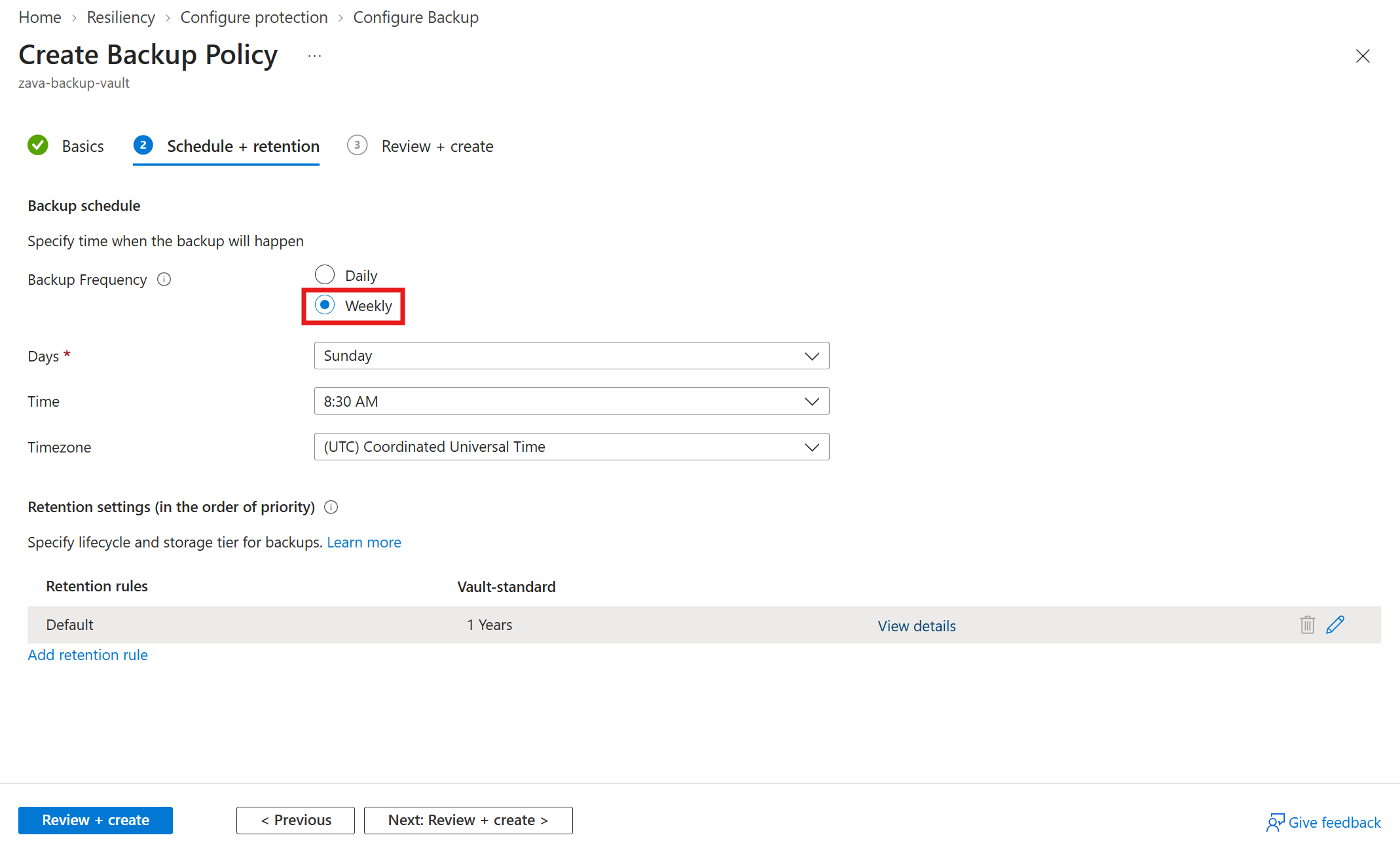
Tip
For daily backup schedules with a recovery point objective of one day, instead of one backup per week, try Azure Backup for PostgreSQL flexible server and elastic cluster (v2) which is in preview. The v2 solution takes physical backups from managed disk snapshots instead of logical (
pg_dumpbased) backups.Under Retention settings, select Add retention rule.
On the Add retention pane, define the retention period, and then select Add.
When you return to the Create Backup Policy pane, select Review + create.
Note
The retention rules are evaluated in a predetermined order of priority. The priority is the highest for the yearly rule, followed by the monthly rule, and then the weekly rule. Default retention settings apply when no other rules qualify. For example, the same recovery point might be the first successful backup taken every week as well as the first successful backup taken every month. However, because the monthly rule has higher priority than the weekly rule, the retention corresponding to the first successful backup taken every month applies.
Next steps
Configure backup for Azure Database for PostgreSQL - Flexible Server using Azure portal.