Muistiinpano
Tämän sivun käyttö edellyttää valtuutusta. Voit yrittää kirjautua sisään tai vaihtaa hakemistoa.
Tämän sivun käyttö edellyttää valtuutusta. Voit yrittää vaihtaa hakemistoa.
Azure NAT Gateway is a fully managed Network Address Translation (NAT) service that provides outbound internet connectivity for resources connected to your private virtual network. The service provides both source network address translation (SNAT) for outbound connections and destination network address translation (DNAT) for response packets to outbound-originated connections only. Because it sits on your critical network paths, Azure NAT Gateway is designed to be a highly resilient service.
When you use Azure, reliability is a shared responsibility. Microsoft provides a range of capabilities to support resiliency and recovery. You're responsible for understanding how those capabilities work within all of the services you use, and selecting the capabilities you need to meet your business objectives and uptime goals.
This article describes how you can make Azure NAT Gateway resilient to a variety of potential outages and problems, including transient faults and availability zone outages. It also highlights some key information about the Azure NAT Gateway service level agreement (SLA).
Important
When you consider the reliability of a NAT gateway, you also need to consider the reliability of your virtual machines (VMs), disks, other network infrastructure, and applications that run on your VMs. Improving the resiliency of the NAT gateway alone might have limited impact if the other components aren't equally resilient. Depending on your resiliency requirements, you might need to make configuration changes across multiple areas.
Production deployment recommendations
For production workloads, we recommend that you:
- Use the StandardV2 SKU, which automatically enables zone redundancy in supported regions.
Note
Review the Key limitations of StandardV2 NAT Gateway before using it, to ensure that your configuration is supported.
- Configure your NAT gateway with enough public IP addresses to handle your peak connection requirements, which reduces the likelihood of availability problems due to SNAT port exhaustion.
- Use StandardV2 SKU public IP addresses with StandardV2 NAT Gateway. Standard SKU public IP addresses aren't supported with StandardV2 NAT Gateway.
Reliability architecture overview
This section describes some of the important aspects of how the service works that are most relevant from a reliability perspective. The section introduces the logical architecture, which includes some of the resources and features that you deploy and use. It also discusses the physical architecture, which provides details on how the service works under the covers.
Logical architecture
A NAT gateway is a resource that you deploy. To use the NAT gateway as the default route for outbound internet traffic, you attach it to one or more subnets in your virtual network. You don't need to configure any custom routes or other routing configurations.
Physical architecture
Internally, a NAT gateway consists of one or more instances, which represent the underlying infrastructure required to operate the service.
Azure NAT Gateway implements a distributed architecture using software-defined networking to provide high reliability and scalability. The service operates across multiple fault domains, enabling it to survive multiple infrastructure component failures without service impact. Azure manages the underlying service operations, including distribution across fault domains and infrastructure redundancy.
For more information about Azure NAT Gateway architecture and redundancy, see Azure NAT Gateway resource.
Resilience to transient faults
Transient faults are short, intermittent failures in components. They occur frequently in a distributed environment like the cloud, and they're a normal part of operations. Transient faults correct themselves after a short period of time. It's important that your applications can handle transient faults, usually by retrying affected requests.
All cloud-hosted applications should follow the Azure transient fault handling guidance when they communicate with any cloud-hosted APIs, databases, and other components. For more information, see Recommendations for handling transient faults.
SNAT port exhaustion is a situation where applications make multiple independent connections to the same IP address and port, exhausting the SNAT ports available for the outbound IP address. SNAT port exhaustion can manifest as a transient fault in your application. To reduce the likelihood of transient faults related to network address translation, you should:
Minimize the likelihood of SNAT port exhaustion. Configure your applications to handle SNAT gracefully by implementing connection pooling and proper connection lifecycle management.
Deploy sufficient public IP addresses. A single NAT gateway supports multiple public IP addresses, and each public IP address provides a separate set of SNAT ports.
Monitor the NAT gateway's datapath availability metric. Use Azure Monitor to detect potential connectivity issues early. Set up alerts for connection failures and SNAT port exhaustion to proactively identify and address transient fault conditions before they impact your applications' outbound connectivity. To learn more, see What is Azure NAT Gateway metrics and alerts?.
Avoid setting high idle timeout values. Idle timeout values that are significantly higher than the default 4 minutes for NAT gateway connections can contribute to SNAT port exhaustion during high connection volumes.
For comprehensive guidance on connection management and troubleshooting Azure NAT Gateway-specific issues, see Troubleshoot Azure NAT Gateway connectivity.
Resilience to availability zone failures
Availability zones are physically separate groups of datacenters within an Azure region. When one zone fails, services can fail over to one of the remaining zones.
Azure NAT Gateway supports availability zones in both zone-redundant and zonal configurations:
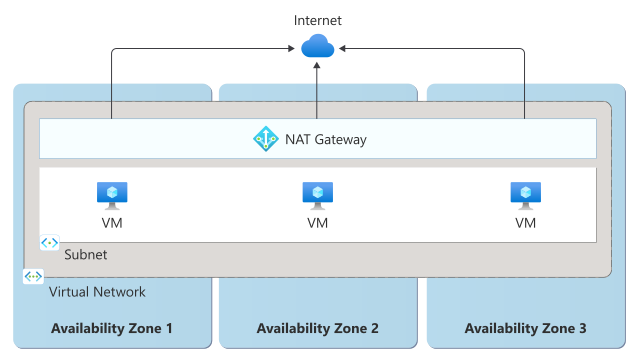
Zone-redundant: When you use the StandardV2 SKU of Azure NAT Gateway, zone redundancy is enabled automatically. Zone redundancy spreads NAT gateway's instances across all of the availability zones in the region. When you use a zone-redundant configuration, you can improve the resiliency and reliability of your production workloads.
Zonal: When you use the Standard (v1) SKU, you can optionally create a zonal configuration. A zonal NAT gateway is deployed into a single availability zone that you select. When NAT gateway is deployed to a specific zone, it provides outbound connectivity to the internet explicitly from that zone. Zonal public IP addresses from a different availability zone aren't allowed. All traffic from connected subnets is routed through the NAT gateway, even if that's in a different availability zone.
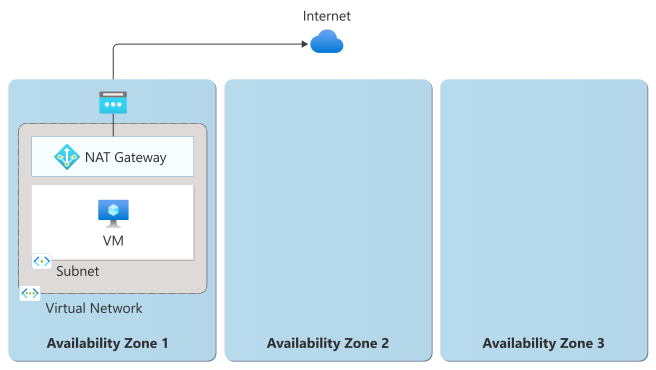
If a NAT gateway within an availability zone experiences an outage, all virtual machines in the connected subnets fail to connect to the internet, even if those VMs are in healthy availability zones.
Important
Pinning to a single availability zone is only recommended when cross-zone latency is too high for your needs and after you verify that the latency doesn't meet your requirements. By itself, a zonal resource doesn't provide resiliency to an availability zone outage. To improve the resiliency of a zonal resource, you need to explicitly deploy separate resources into multiple availability zones and configure traffic routing and failover. For more information, see Zonal resources and zone resiliency.
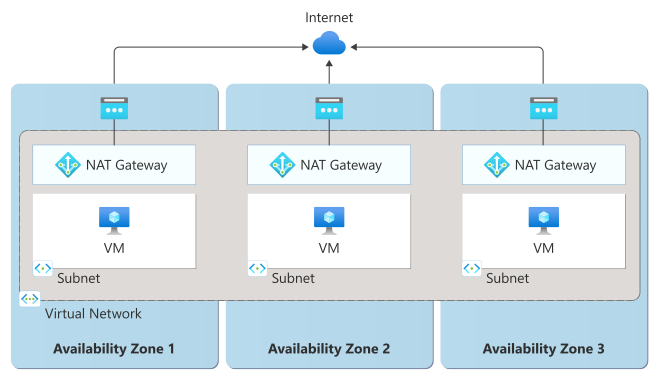
If you deploy virtual machines into several availability zones and need to use zonal NAT gateways, you can create zonal stacks in each availability zone. To create zonal stacks, you need to deploy:
- Multiple subnets: You create separate subnets for each availability zone rather than using one subnet that spans zones.
- Zonal NAT gateways: Each subnet gets its own NAT gateway that's deployed in the same availability zone as the subnet itself.
- Manual VM assignment: You explicitly place each virtual machine in both the correct availability zone and its corresponding subnet.
If you deploy a Standard (v1) NAT gateway and don't specify an availability zone, the NAT gateway is then nonzonal, which means Azure selects the availability zone. If any availability zone in the region has an outage, your NAT gateway might be affected. We don't recommend a nonzonal configuration because it doesn't provide protection against availability zone outages.
Requirements
Region support: Zone-redundant and zonal NAT gateways can be deployed into any region that supports availability zones.
SKU: To deploy a zone-redundant NAT gateway, you must use the StandardV2 SKU. To deploy a zonal NAT gateway, you must use the Standard SKU. We recommend using the StandardV2 SKU.
Public IP addresses: The requirements for public IP addresses attached to a NAT gateway depend on the SKU and deployment configuration:
NAT Gateway SKU Availability zone support type Public IP requirements StandardV2 Zone-redundant Must deploy with StandardV2 Public IP Standard Zonal Standard Public IP must be zone-redundant or zonal in the same zone as NAT gateway Standard Nonzonal Standard Public IP can be zone-redundant or zonal in any zone
Cost
There is no additional cost to use availability zone support for Azure NAT Gateway. For more information about pricing, see Azure NAT Gateway pricing.
Configure availability zone support
New resources: Deployment steps depend on which availability zone configuration you want to use for your NAT gateway.
Zone-redundant: To deploy a new zone-redundant NAT gateway using the StandardV2 SKU, see Create a Standard V2 Azure NAT Gateway.
Zonal: To deploy a new zonal NAT gateway using the Standard SKU, see Create a NAT gateway. When you create the NAT gateway, select its availability zone instead of selecting No zone.
Enable availability zone support: Azure NAT Gateway availability zone configuration can't be changed after deployment. To modify the availability zone configuration, you must deploy a new NAT gateway with the desired zone settings.
To upgrade from a Standard to StandardV2 NAT gateway, you must also create a new public IP address that uses the StandardV2 SKU.
Behavior when all zones are healthy
This section describes what to expect when NAT gateways are configured for availability zone support and all availability zones are operational.
Traffic routing between zones: The way traffic from your VM is routed through your NAT gateway depends on the availability zone configuration your NAT gateway uses.
Zone-redundant: Traffic can be routed through a NAT gateway instance within any availability zone.
Zonal: Each NAT gateway instance operates independently within its assigned availability zone. Outbound traffic from subnet resources is routed through the NAT gateway's zone, even if the VM is in a different zone.
Data replication between zones: Azure NAT Gateway doesn't perform data replication between zones as it's a stateless service for outbound connectivity. Each NAT gateway instance operates independently within its availability zone without requiring synchronization with instances in other zones.
Behavior during a zone failure
This section describes what to expect when a NAT gateway is configured for availability zone support and there's an availability zone outage.
Detection and response: Responsibility for detection and response depends on the availability zone configuration that your NAT gateway uses.
Zone-redundant: Azure NAT Gateway detects and responds to failures in an availability zone. You don't need to do anything to initiate an availability zone failover.
Zonal: You are responsible for implementing application-level failover to alternative connectivity methods or NAT gateways in other zones.
Notification: Microsoft doesn't automatically notify you when a zone is down. However, you can use Azure Resource Health to monitor for the health of an individual resource, and you can set up Resource Health alerts to notify you of problems. You can also use Azure Service Health to understand the overall health of the service, including any zone failures, and you can set up Service Health alerts to notify you of problems.
You can also use the NAT gateway's datapath availability metric to monitor the health of your NAT gateway. You can configure alerts on the datapath availability metric to detect connectivity issues.
Active requests: What happens to active requests depends on the availability zone configuration that your NAT gateway uses.
Zone-redundant: Any active outbound connections through instances in the faulty zone are dropped, and clients need to retry. Subsequent connection attempts flow through a NAT gateway instance in another availability zone.
Zonal: Active outbound connections through a failed zonal NAT gateway are lost. You must decide whether and how to re-establish connectivity through alternative connectivity paths. Applications should implement retry logic to handle connection failures.
If traffic is rerouted, because the outbound public IP address changes, any TCP sessions might need to be renegotiated.
Expected data loss: No data loss occurs because Azure NAT Gateway is a stateless service for outbound connectivity. Connection state is recreated when connections are re-established.
Expected downtime: The expected downtime depends on the availability zone configuration that your NAT gateway uses.
Zone-redundant: Existing connections from the failed zone may go down. Clients can retry connections immediately and requests will be routed to an instance in another zone. All remaining connections from healthy zones persist.
Zonal: Outbound connectivity is lost until the zone recovers, or until you reroute traffic through alternative connectivity methods or NAT gateways in other zones.
Traffic rerouting: The traffic rerouting behavior depends on the availability zone configuration that your NAT gateway uses.
Zone-redundant: New connection requests are routed through a NAT gateway instance in a healthy availability zone.
It's unlikely that virtual machines in the affected availability zone would still be operating. However, in the event of a partial zone failure that causes Azure NAT Gateway to be unavailable while virtual machines continue to operate, any outbound connections from virtual machines in the affected zone are routed through a NAT gateway instance in another zone.
Zonal: You are responsible for implementing any application-level failover, such as alternative connectivity methods or to NAT gateways in other zones.
Zone recovery
No manual intervention is required for failback operations because Azure NAT Gateway is a stateless service.
When an availability zone recovers, NAT gateway instances in that zone automatically become available for new outbound connections. Connections established through NAT gateway instances in other zones during the outage continue to use their current connectivity paths until the connections naturally terminate.
Test for zone failures
The options for testing for zone failures depend on the availability zone configuration that your instance uses.
Zone-redundant: The Azure NAT Gateway platform manages traffic routing, failover, and failback for zone-redundant NAT gateways. Because this feature is fully managed, you don't need to initiate anything or validate availability zone failure processes.
Zonal: You're responsible for preparing and testing failover plans in case a zone failure occurs.
Resilience to region-wide failures
Azure NAT Gateway is a single-region service that operates within the boundaries of a specific Azure region. The service doesn't provide native multi-region capabilities or automatic failover between regions. If a region becomes unavailable, NAT gateways in that region are also unavailable.
If you design a networking approach with multiple regions, you should deploy independent NAT gateways into each region.
Service-level agreement
The service-level agreement (SLA) for Azure services describes the expected availability of each service and the conditions that your solution must meet to achieve that availability expectation. For more information, see SLAs for online services.
Azure NAT Gateway is covered by the Azure VNet NAT SLA. The availability SLA only applies when you have two or more healthy VMs, and it excludes SNAT port exhaustion from downtime calculations.