Muistiinpano
Tämän sivun käyttö edellyttää valtuutusta. Voit yrittää kirjautua sisään tai vaihtaa hakemistoa.
Tämän sivun käyttö edellyttää valtuutusta. Voit yrittää vaihtaa hakemistoa.
Azure Managed Redis provides fully integrated and managed Redis Enterprise on Azure, offering high-performance in-memory data storage for applications. This service is built for enterprise workloads requiring ultra-low latency, high throughput, and advanced data structures.
When you use Azure, reliability is a shared responsibility. Microsoft provides a range of capabilities to support resiliency and recovery. You're responsible for understanding how those capabilities work within all of the services you use, and selecting the capabilities you need to meet your business objectives and uptime goals.
This article describes reliability in Azure Managed Redis, including resilience to transient faults, availability zone failures, and region-wide failures. The article also describes backup strategies and the service-level agreement (SLA).
Production deployment recommendations
To ensure high reliability for your production Azure Managed Redis instances, we recommend that you:
- Enable high availability, which deploys multiple nodes for your cache.
- Enable zone redundancy by deploying a highly available cache into a region with availability zones.
- Consider implementing active geo-replication for mission-critical workloads that require cross-region failover.
Reliability architecture overview
This section describes some of the important aspects of how the service works that are most relevant from a reliability perspective. The section introduces the logical architecture, which includes some of the resources and features that you deploy and use. It also discusses the physical architecture, which provides details on how the service works under the covers.
Logical architecture
Azure Managed Redis is built on Redis Enterprise and provides reliability through high availability configurations and replication capabilities.
You deploy an instance of Azure Managed Redis, which is also called a cache instance or a cache. Your client applications store and interact with data within the cache by using Redis APIs.
Physical architecture
There are two key concepts that you need to understand when planning resiliency for Azure Managed Redis: nodes and shards.
Nodes: Each cache instance consists of nodes, which are virtual machines (VMs). Each VM serves as an independent compute unit in the cluster. You don't see or manage the VMs directly. The platform automatically manages instance creation, health monitoring, and replacement of unhealthy instances. The set of VMs, taken together, is also called a cluster.
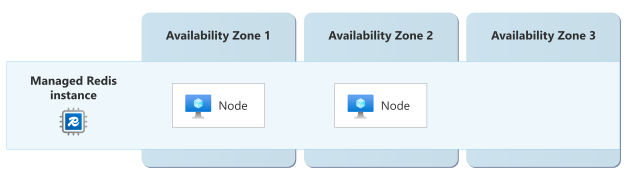
You can configure your instance for high availability. When you do so, Azure Managed Redis ensures that there are at least two nodes, and it replicates data between the nodes automatically. In regions with availability zones, the nodes are placed into different availability zones. For more information, see Resilience to availability zone failures.
The service abstracts the specific number of nodes used in each configuration to avoid complexity and ensure optimal configurations.
Shards: Each node runs multiple Redis server processes called shards, which manage a subset of your cache's data. When your cache is configured for high availability, shards are automatically distributed and replicated across nodes. You specify a cluster policy, which determines how shards are distributed across nodes.
For more information, see Azure Managed Redis architecture and Failover and patching for Azure Managed Redis.
Resilience to transient faults
Transient faults are short, intermittent failures in components. They occur frequently in a distributed environment like the cloud, and they're a normal part of operations. Transient faults correct themselves after a short period of time. It's important that your applications can handle transient faults, usually by retrying affected requests.
All cloud-hosted applications should follow the Azure transient fault handling guidance when they communicate with any cloud-hosted APIs, databases, and other components. For more information, see Recommendations for handling transient faults.
Follow these recommendations for managing transient faults when using Azure Managed Redis:
- Use SDK configurations that automatically retry when transient faults occur, and that use appropriate backoff and timeout periods. Consider using the Retry pattern and Circuit Breaker pattern in your applications.
- Design for cache-aside patterns where your application can continue operating with degraded performance when Redis is temporarily unavailable by falling back to the primary data store.
Resilience to availability zone failures
Availability zones are physically separate groups of datacenters within an Azure region. When one zone fails, services can fail over to one of the remaining zones.
Azure Managed Redis cache instances can be made zone-redundant, which automatically distributes the cache nodes across multiple availability zones within a region. Zone redundancy reduces the risk of data center or availability zone outages causing your cache to be unavailable.
To make a cache zone-redundant, you must deploy it into a supported region and enable high availability configuration. In regions without availability zones, the high availability configuration still creates at least two nodes but they aren't in separate zones.
The following diagram shows a zone-redundant cache with two nodes, each in a separate zone:
Requirements
Region support: Zone-redundant Azure Managed Redis caches can be deployed into any region that supports availability zones and where the service is available. For the most current list of regions that support availability zones, see Azure regions with availability zones. For the list of regions that support Azure Managed Redis, see Product availability by region.
High availability configuration: You must enable high availability configuration on your cache for it to be zone-redundant.
Tiers: All Azure Managed Redis tiers support availability zones.
Cost
Zone redundancy requires that your cache is configured for high availability, which deploys a minimum of two nodes for your cache. High availability configuration is billed at a higher rate than non-high availability configuration. For more information, see Azure Managed Redis pricing
Configure availability zone support
Create a new zone-redundant instance: When you create a new Azure Managed Redis instance, enable high availability configuration and deploy it into a region with availability zones. Then, it automatically includes zone redundancy by default. There's no need for you to perform any more configuration.
For detailed steps, see Quickstart: Create an Azure Managed Redis Instance.
Enable zone redundancy on an existing instance: To configure an existing Azure Managed Redis instance to be zone-redundant, ensure it's deployed in a region that supports availability zones, and enable high availability on the cache.
Disable zone redundancy: Zone redundancy can't be disabled on existing instances, because you can't disable high availability once it's enabled on a cache instance.
Capacity planning and management
During a zone-down event, your instance might have fewer resources available to serve your workload. If your instance is often under resource pressure and you need to prepare for availability zone failure, consider one of the following approaches:
Overprovision your instance: Overprovisioning involves selecting a higher performance tier than you might require. It allows your instance to tolerate some capacity loss and continue to function without degraded performance. For more information about the principle of overprovisioning, see Manage capacity by overprovisioning. To learn how to scale your instance, see Scale an Azure Managed Redis instance.
Use active geo-replication: You can deploy multiple instances in different regions, and configure active geo-replication to spread your load across those separate instances.
Behavior when all zones are healthy
This section describes what to expect when a managed Redis cache is zone-redundant and all availability zones are operational:
Traffic routing between zones: Shards are distributed across nodes based on your cluster policy. Your cluster policy also determines how traffic is routed to each node. Zone redundancy doesn't change how traffic is routed.
Data replication between zones: Shards are replicated across nodes automatically, and use asynchronous replication. Typically the replication lag between shards is measured in seconds, but that can vary depending on the cache's workload, with write-heavy and network-heavy scenarios typically seeing higher replication lag.
Behavior during a zone failure
This section describes what to expect when a managed Redis cache is zone-redundant and one or more availability zones are unavailable:
- Detection and response: Azure Managed Redis is responsible for detecting a failure in an availability zone. You don't need to do anything to initiate a zone failover.
- Notification: Microsoft doesn't automatically notify you when a zone is down. However, you can use Azure Service Health to understand the overall health of the service, including any zone failures, and you can set up Service Health alerts to notify you of problems.
Active requests: In-flight requests might be dropped and should be retried. Applications should implement retry logic to handle these temporary interruptions.
Expected data loss: Any data that hasn't been replicated to shards in another zone might be lost during a zone failure. Typically the amount of data loss is measured in seconds, but it depends on the replication lag.
Expected downtime: A small amount of downtime, typically 10-15 seconds, might occur while shards fail over to nodes in healthy zones. For information about the unplanned failover process, see Explanation of a failover When you design applications, follow practices for transient fault handling.
Traffic rerouting: Azure Managed Redis automatically redirects traffic to nodes in healthy zones.
Zone recovery
When the affected availability zone recovers, Azure Managed Redis automatically restores operations to that zone. The Azure platform fully manages this process and doesn't require any customer intervention.
Test for zone failures
Because Azure Managed Redis fully manages traffic routing, failover, and failback for zone failures, you don't need to validate availability zone failure processes or provide any further input.
Resilience to region-wide failures
Azure Managed Redis provides native multi-region support through active geo-replication, which enables you to link multiple Azure Managed Redis instances across different Azure regions into a single replication group. You can then configure your own failover approach between the instances.
Active geo-replication
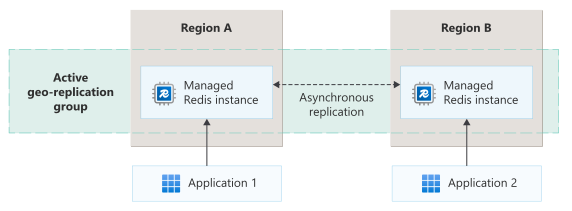
When you use active geo-replication, applications can read from and write to any cache instance in the group, with changes automatically synchronized across all regions. The service supports active-active replication patterns where each region can handle both read and write operations simultaneously. When conflicts occur due to concurrent writes in different regions, the service automatically resolves them using predetermined conflict resolution algorithms without requiring manual intervention. This approach provides resiliency to region failures while maintaining low-latency access for globally distributed applications.
The following diagram shows two cache instances in different regions within the same active geo-replication group, with client applications that connect to each cache instance:
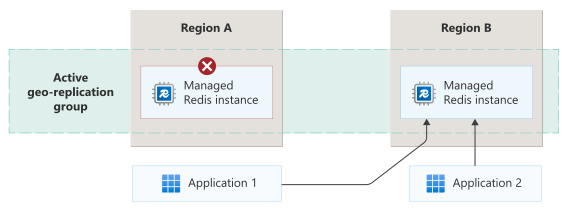
You're responsible for configuring your client applications so that, if any regional instance fails, they can redirect their requests to a healthy instance. The following diagram shows how an application can redirect their requests to a healthy cache instance when the instance they ordinarily use fails:
Requirements
Region support Azure Managed Redis active geo-replication can be configured between any Azure regions where the service is available.
Instance configuration: Active geo-replication requires Azure Managed Redis instances of the same tier and size across all participating regions. All cache instances in a replication group must be configured with identical settings including persistence options, modules, and clustering policies.
Other requirements: Your cache instances must meet other requirements, including the modules you use, and it affects how your cache instances can be scaled. For more information, see Active geo-replication prerequisites.
Considerations
Failover responsibility: When you use active geo-replication, you're responsible for failover between cache instances. You should prepare and configuring your application to handle failover. Failover involves preparation and might require you complete multiple steps. For more information, see Force-unlink if there's a region outage.
Eventual consistency: Applications should be designed to handle eventual consistency scenarios, because changes can take time to propagate across all regions depending on network conditions and geographic distance. During region outages, you may experience more data inconsistencies until connectivity is restored and synchronization completes.
Cost
When you enable active geo-replication, you are billed for each Azure Managed Redis instance in every region within the replication group. Additionally, you might incur data transfer charges for cross-region replication traffic between regions. For more information about pricing, see Azure Managed Redis pricing and Bandwidth pricing details.
Configure multi-region support
Create a new geo-replicated cache instance: Configure active geo-replication during cache provisioning by specifying a replication group and linking multiple instances. For more information, see Create or join an active geo-replication group.
Enable an existing cache instance for geo-replication: You can add an existing cache instance to an active geo-replication group.
However, when an existing instance is added to an active geo-replication group, the data in the instance needs to be flushed, and there is a small amount of downtime. If possible, plan to enable active geo-replication when you create cache instances.
For more information, see Add an existing instance to an active geo-replication group.
Disable geo-replication on a cache instance: Remove an instance from a geo-replication group by deleting the cache instance. The remaining instances automatically reconfigure themselves.
Capacity planning and management
During a region-down event, the other instances might be under higher pressure. If an instance is often already under resource pressure and you need to prepare for the increased capacity requirements during a region failure, consider overprovisioning the instance. To learn how to scale an instance, see Scale an Azure Managed Redis instance.
Behavior when all regions are healthy
This section describes what to expect when instances are configured to use active geo-replication and all regions are operational.
Traffic routing between regions: You're responsible for configuring your applications to connect to a specific cache instance. Applications can connect to any cache instance in the replication group and perform both read and write operations. Traffic routing is handled by the application, allowing you to direct clients to the nearest region for minimal latency. Azure Managed Redis doesn't provide automatic traffic routing between regions.
Data replication between regions: The service uses asynchronous replication between regions to maintain eventual consistency. Write operations are immediately committed in the local region and then propagated to other regions in the background. Conflict-free replicated data types (CRDTs) ensure that concurrent writes in different regions are automatically merged.
Behavior during a region failure
This section describes what to expect when instances are configured to use active geo-replication and there's an outage in one region:
Detection and response: You're responsible for detecting the failure of a cache instance, and deciding when to fail over. You can monitor the health of a geo-replicated cluster, which can help you to decide when to begin failover. For more information, see Geo-replication metric.
Failover requires that you perform multiple steps. For more detail, see Force-unlink if there's a region outage.
Notification: Microsoft doesn't automatically notify you when a region is down. However, you can use Azure Service Health to understand the overall health of the service, including any region failures, and you can set up Service Health alerts to notify you of problems.
You can also monitor the health of each instance.
To monitor the health of the geo-replication relationship, you can use the Geo-replication healthy metric. The metric always has a value of
1(healthy) or0(unhealthy). You can configure Azure Monitor alerts on this metric to understand when the instances might be out of sync.Active requests: Requests to the failed region are terminated and must be handled by your application's failover logic. Applications should implement retry policies that can redirect traffic to healthy caches.
Expected data loss: Due to asynchronous replication between regions, some recent writes to the failed region may be lost if they had not yet been replicated to other regions. The amount of potential data loss depends on the replication lag at the time of failure. For more information, see Active-Active geo-distributed Redis and Considerations about Consistency and Data Loss in a CRDB Regional Failure.
Expected downtime: Applications experience downtime only for the duration needed to detect the failure and redirect traffic to healthy regions. This typically ranges from seconds to a few minutes, depending on how you've configured your application's health check and failover configuration.
Traffic rerouting: You're responsible for implementing logic in your applications to detect region failures and route traffic to healthy regions. This can be accomplished through health checks, circuit breaker patterns, or external load balancing solutions.
Region recovery
When a failed region recovers, Azure Managed Redis automatically reintegrates instances in that region into the active geo-replication group without requiring your intervention. The service automatically synchronizes data from healthy instances. During this process, the recovered instance gradually catches up with changes that occurred during the outage. Once synchronization is complete, the recovered instances becomes fully active and can handle both read and write operations.
You're responsible for reconfiguring your application to route traffic back to the recovered region instance.
Test for region failures
You should regularly test your application's failover procedures. It's important that your application can fail over between instances, and that it stays within your business requirements for downtime while doing so. It's also important that you test your overall response processes, including any reconfiguration of firewalls and other infrastructure, and your recovery process.
Resilience to service maintenance
Azure Managed Redis performs regular service upgrades and other maintenance tasks.
When maintenance is underway, Azure Managed Redis automatically performs creates new nodes and performs failover automatically. Client applications might see connection interruptions and other transient faults. Applications should implement retry logic to handle these temporary interruptions.
To learn more about the maintenance processes for Azure Managed Redis, see Failover and patching for Azure Managed Redis.
Backup and restore
Azure Managed Redis provides both data persistence and backup capabilities to protect against data loss scenarios that other reliability features may not address. Backups can provide protection against scenarios such as data corruption, accidental deletion, or configuration errors.
Data persistence: By default, Azure Managed Redis stores all cache data in memory. It can optionally write snapshots of your data to disk by using data persistence. If there's a hardware failure that affects the node, Azure Managed Redis automatically restores the data. There are different types of data persistence you can select from, which provide different tradeoffs between snapshot frequency and the performance effects on your cache.
However, data files can't be restored to another instance, and you can't access the files. Data persistence doesn't protect you against data corruption or accidental deletion.
Import and export: Azure Managed Redis supports backup of your data by using the import and export functionality, which saves backup files to Azure Blob Storage. You can configure geo-redundant storage on your Azure Storage account, or you can copy or move the backup blobs to other locations for further protection.
Exported files can be restored to the same cache instance or a different cache instance.
There's no built-in import or export scheduler, but you can develop your own automation processes that use the Azure CLI or Azure PowerShell to initiate export operations.
Service-level agreement
The service-level agreement (SLA) for Azure services describes the expected availability of each service and the conditions that your solution must meet to achieve that availability expectation. For more information, see SLAs for online services.
The SLA for Azure Managed Redis covers connectivity to the cache endpoints. The SLA doesn't cover protection from data loss.
To be eligible for availability SLAs for Azure Managed Redis:
- You must enable high availability configuration.
- You must not initiate any product features or management actions that are documented to produce temporary unavailability.
Higher availability SLAs apply when your instance is zone-redundant. In some tiers, you can be eligible for a higher availability SLA when you have deployed zone-redundant instances into at least three regions using active geo-replication.