Note
Ang pag-access sa pahinang ito ay nangangailangan ng pahintulot. Maaari mong subukang mag-sign in o magpalit ng mga direktoryo.
Ang pag-access sa pahinang ito ay nangangailangan ng pahintulot. Maaari mong subukang baguhin ang mga direktoryo.
Container soft delete protects your containers from being accidentally deleted by maintaining the deleted containers in the storage account for a specified period of time. During the retention period, you can restore a soft-deleted container and its contents to the container's state at the time it was deleted. After the retention period expires, the container and its contents are permanently deleted.
Recommended data protection configuration
Container soft delete is part of a comprehensive data protection strategy. For optimal protection for your storage account, Microsoft recommends enabling the following data protection features:
Container soft delete, to restore a deleted container. To learn how to enable container soft delete, see Enable and manage soft delete for containers.
Blob soft delete, to restore a deleted blob, snapshot, or version. To learn how to enable blob soft delete, see Enable and manage soft delete for blobs.
Blob versioning, to automatically maintain previous versions of a blob. To learn how to enable blob versioning, see Enable and manage blob versioning. To learn more about Microsoft's recommendations for data protection, see Data protection overview.
How container soft delete works
When you enable container soft delete, you can specify a retention period for deleted containers that is between 1 and 365 days. The default retention period is seven days. We recommend a minimum of seven days and increasing the retention period as needed based on data volume and how long it may take to detect and respond to data‑loss events.
During the retention period, you can recover a deleted container by calling the Restore Container operation. When you restore a container, the container's blobs and any blob versions and snapshots are also restored.
Warning
Container soft delete can restore only whole containers and their contents at the time of deletion. To restore a deleted blob when its parent container hasn't been deleted, you must use blob soft delete or blob versioning. When you restore a container, you must restore it to its original name. If the original name is used to create a new container, then you cannot restore the soft-deleted container.
The following diagram shows how a deleted container can be restored when container soft delete is enabled:
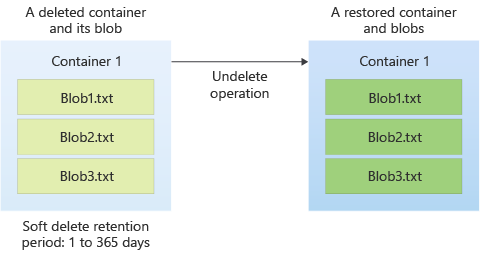
After the retention period expires, the container is permanently deleted from Azure Storage and cannot be recovered. The clock starts on the retention period at the point that the container is deleted. You can change the retention period at any time, but the new setting applies only to containers deleted after the update. Containers that were already deleted will be permanently removed based on the retention period that was in effect when they were originally deleted.
Turning off container soft delete doesn't cause existing soft‑deleted containers to be permanently deleted. They will be permanently deleted based on the retention period that applied at the time they were deleted.
Container soft delete is available for the following types of storage accounts:
- General-purpose v2 and v1 storage accounts
- Block blob storage accounts
- Blob storage accounts
Storage accounts with a hierarchical namespace enabled for use with Azure Data Lake Storage are also supported.
Version 2019-12-12 or higher of the Azure Storage REST API supports container soft delete.
Important
Container soft delete doesn't protect against the deletion of a storage account, but only against the deletion of containers in that account. To protect a storage account from deletion, configure a lock on the storage account resource. For more information about locking Azure Resource Manager resources, see Lock resources to prevent unexpected changes.
Feature support
Support for this feature might be impacted by enabling Data Lake Storage Gen2, Network File System (NFS) 3.0 protocol, or the SSH File Transfer Protocol (SFTP). If you've enabled any of these capabilities, see Blob Storage feature support in Azure Storage accounts to assess support for this feature.
Pricing and billing
There's no additional charge to enable container soft delete. Data in soft-deleted containers is billed at the same rate as active data.