Note
Kailangan ng pahintulot para ma-access ang page na ito. Maaari mong subukang mag-sign in o magpalit ng mga direktoryo.
Ang pag-access sa pahinang ito ay nangangailangan ng pahintulot. Maaari mong subukang baguhin ang mga direktoryo.
Your cluster security settings allow you to enable disk encryption on your cluster. Enabling encryption at rest on your cluster provides data protection for stored data. The disk encryption is implemented using either Azure Disk Encryption or encryption at host depending on the SKU of the cluster. The data is encrypted at rest using Microsoft-managed keys.
Note
- Enabling disk encryption can take up to 20 minutes during which the cluster will be unavailable.
- Legacy virtual machine (VM) sizes such as the Dv2 family are not supported. For more information, see Finding supported VM sizes.
In the Azure portal, go to your Azure Data Explorer cluster resource. Under Settings + networking, select Security.
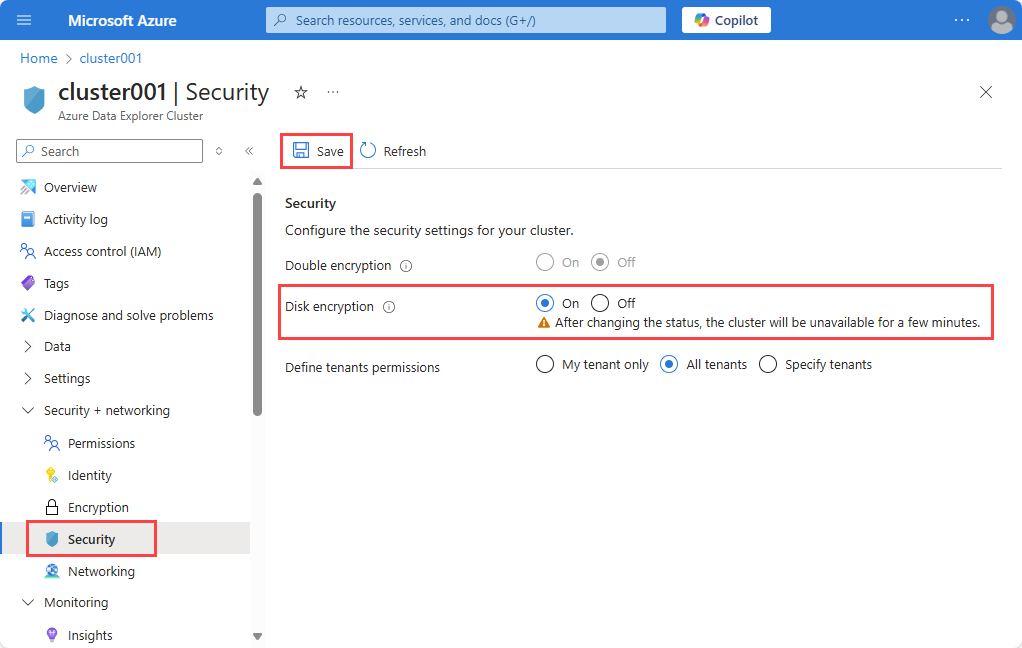
In the Security window, select On for the Disk encryption security setting.
Select Save.
Note
Select Off to disable the encryption after it has been enabled.
Considerations
The following consideration apply to encryption using Azure Disk Encryption:
- Performance impact of up to a single digit