Note
Ang pag-access sa pahinang ito ay nangangailangan ng pahintulot. Maaari mong subukang mag-sign in o magpalit ng mga direktoryo.
Ang pag-access sa pahinang ito ay nangangailangan ng pahintulot. Maaari mong subukang baguhin ang mga direktoryo.
You only need one capacity to drive all your Microsoft Fabric experiences, including Microsoft OneLake. This article provides a detailed example of how OneLake consumes storage and compute.
With OneLake, you pay for the data stored, similar to services like Azure Data Lake Storage (ADLS) Gen2 or Amazon S3. However, unlike other services, OneLake doesn't include a separate charge for transactions (for example, reads, writes) to your data. Instead, transactions consume from existing Fabric capacity that you also use to run your other Fabric experiences. For information about pricing, see Fabric pricing.
To illustrate, let's walk through an example.
You purchase an F2 SKU with 2 Capacity Units (CU) every second and name it Capacity1.
You then create a workspace, Workspace1, and upload a file to a lakehouse by using the Fabric portal. This action consumes both OneLake storage and OneLake transactions.
Now, let's dive into each of these dimensions.
OneLake storage
OneLake storage uses a pay-as-you-go model. Your bill shows a separate charge for "OneLake Storage" for the data stored.
If you're a capacity admin, you can view your storage consumption in the Fabric Capacity Metrics app. In the Fabric Capacity Metrics app, open the Storage tab and use the Experience drop-down menu to select lake to see the cost of OneLake storage. If you have multiple workspaces in the capacity, you can see the storage per workspace.
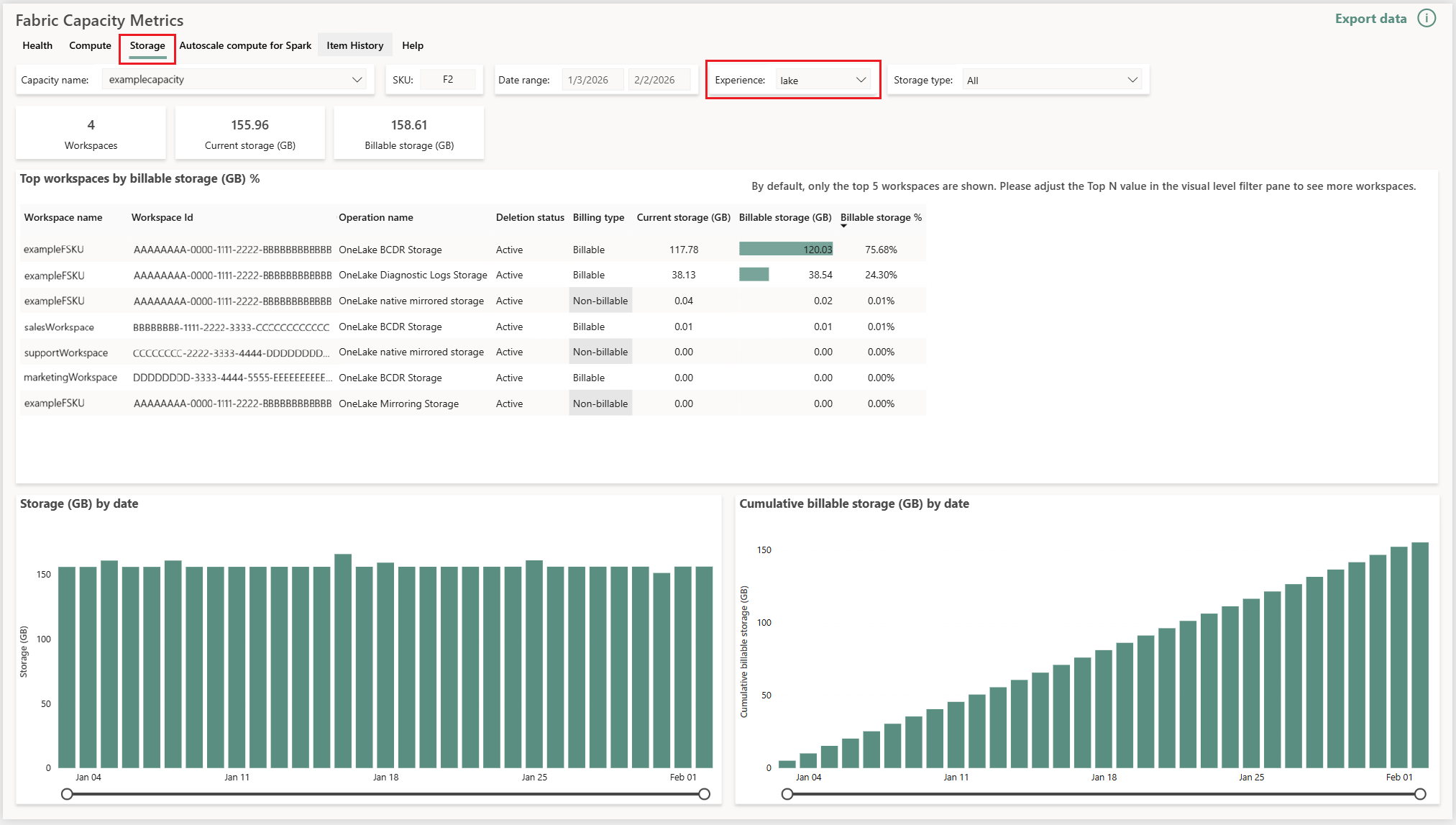
The workspace details table includes two columns: Current storage and Billable storage. Billable storage reflects cumulative data usage over the month. The total charge for data stored isn't taken on one day of the month, but on a pro-rated basis throughout the month. You can estimate the monthly price as the billable storage (GB) multiplied by the price per GB per month.
For example, storing 1 TB of data on day 1, adds to 33 GB daily billable storage. On day one it's 1 TB / 30 days = 33 GB and every day adds 33 GB until the month ends. OneLake soft delete protects individual files from accidental deletion by retaining files for seven days before permanent removal. Soft-deleted data is billed at the same rate as active data.

For more information, see Understand the metrics app storage page.
OneLake compute
Requests to OneLake (such as read, write, or list) consume Fabric capacity. OneLake maps APIs to operations like ADLS maps each REST operation to a price.
You can see capacity usage for each operation in the Fabric Capacity Metrics app. In the Fabric Capacity Metrics app, open the Compute tab. Hover over the item that you want to view operation details for.
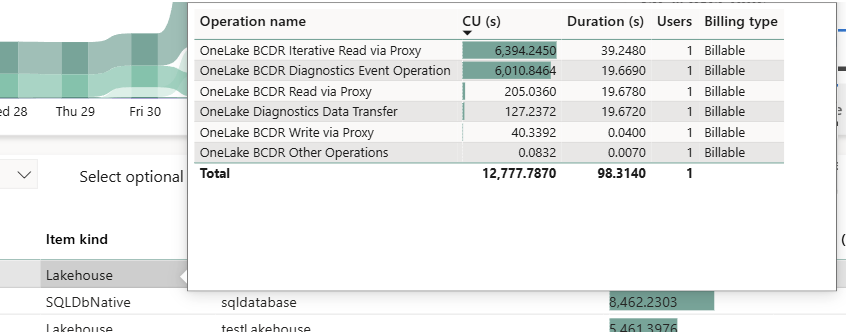
In the preceding example, the file upload results in a write transaction that consumes CU seconds. The Compute tab of the Fabric Capacity Metrics app reports this consumption as OneLake Write via Proxy under the operation name column.
However, if you read this data by using a notebook, you consume CU seconds of read transactions. The metrics app reports this consumption as OneLake Read via Redirect. To learn how each type of operation consumes capacity units, see OneLake consumption page.
To understand more about the various terminologies on the metrics app, see Understand the metrics app compute page - Microsoft Fabric.
Shortcuts capacity usage
In the preceding example, both storage and compute are billed to Capacity1. Now, suppose you have a second capacity Capacity2 that contains Workspace2. You create a lakehouse and create a shortcut to the parquet file in Workspace1. You create a notebook to query the parquet file. As Capacity2 accesses the data, the compute or transaction cost for this read operation consumes CU from Capacity2. The storage continues to be billed to Capacity1.
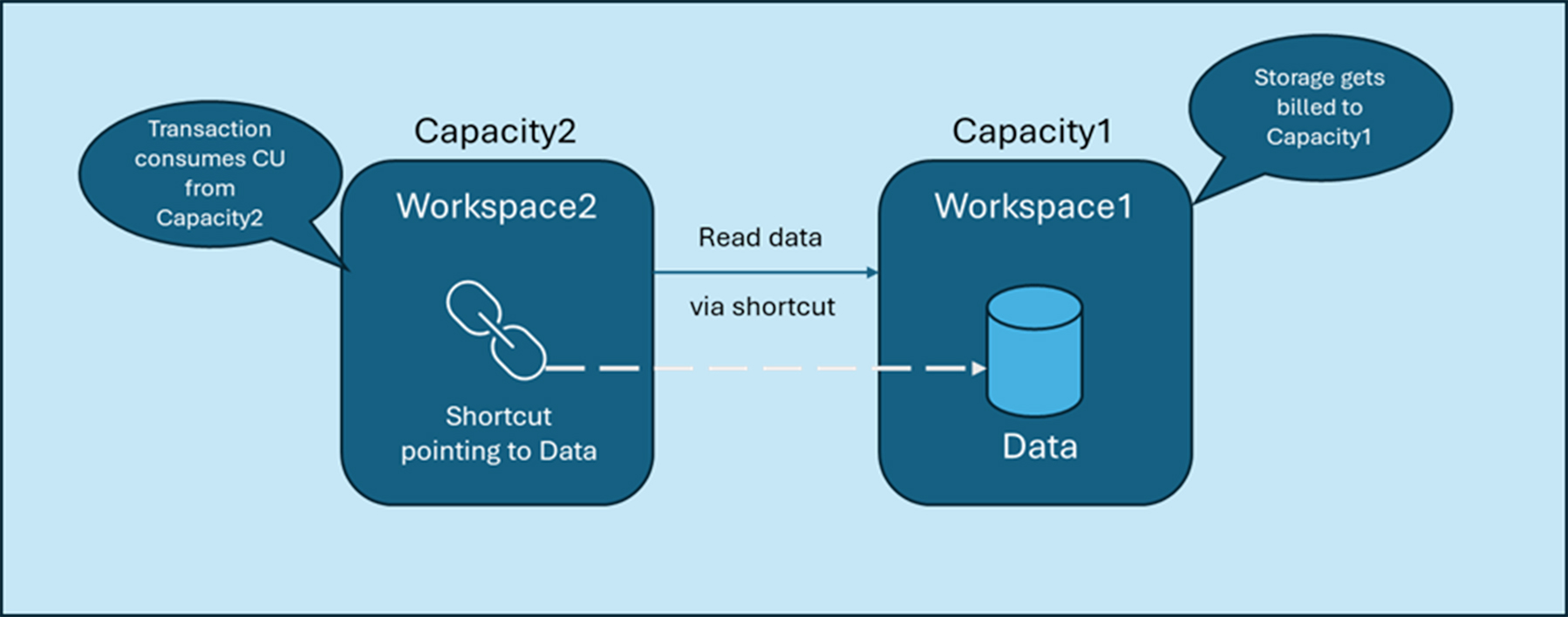
If Capacity2 is paused but Capacity1 is active, you can't read the data via the shortcut in Workspace2 (Capacity2) but can access the data directly in Workspace1 (Capacity1).
If Capacity1 is paused and Capacity2 is active, you can't read the data in Workspace1 (Capacity1) but you can still use the data by using the shortcut in Workspace2. In both cases, as the data is still stored in Capacity1, storage costs remain billed to Capacity1.
If your CU consumption exceeds the capacity limit, throttling might occur, which causes transactions to be delayed or rejected temporarily.
Start Fabric's 60-day free trial to explore OneLake and other features, and visit the Fabric forum for questions.