Note
Kailangan ng pahintulot para ma-access ang page na ito. Maaari mong subukang mag-sign in o magpalit ng mga direktoryo.
Ang pag-access sa pahinang ito ay nangangailangan ng pahintulot. Maaari mong subukang baguhin ang mga direktoryo.
Important
An upcoming change to Windows, included in the April 2026 Windows Server update, the default Kerberos encryption type is changing from RC4 to AES-SHA1.
File shares hosting FSLogix containers that aren't upgraded to AES-SHA1 might have access issues after this change is applied. To avoid disruption, complete the upgrade to AES-SHA1 before installing the update.
Customers who have already upgraded to AES-SHA1 aren't affected.
For more information, see the FSLogix blog: Action required: Windows Kerberos hardening (RC4) may affect FSLogix profiles on SMB storage.
You can use Windows Event Log to understand how often VHD Disk Compaction is being used, the space saved, and the time taken to run. Here are some sample PowerShell scripts and Azure Log Analytics queries you can use to help you interpret the events.
PowerShell
VHD Disk Compaction metrics script
This example uses PowerShell to get the VHD Disk Compaction events from the previous 30 days, formatted into a grid. From an elevated PowerShell prompt, run the following code block:
# Set startTime to number of days to search the event logs
$startTime = (Get-Date).AddDays(-30)

# Query Event Log using Get-WinEvent filtered to the VHD Disk Compaction metric events
$diskCompactionEvents = Get-WinEvent -FilterHashtable @{
    StartTime       = $startTime
    ProviderName    = 'Microsoft-FSLogix-Apps'
    ID         = 57
}

# Format event properties
$compactionMetrics = $diskCompactionEvents | Select-Object `
    @{l="Timestamp";e={$_.TimeCreated}},`
    @{l="ComputerName";e={$_.MachineName}},`
    @{l="Path";e={$_.Properties[0].Value}},`
    @{l="WasCompacted";e={$_.Properties[1].Value}},`
    @{l="TimeSpent(sec)";e={[math]::round($_.Properties[7].Value / 1000,2)}},`
    @{l="MaxSize(GB)";e={[math]::round($_.Properties[2].Value / 1024,2)}},`
    @{l="MinSize(GB)";e={[math]::round($_.Properties[3].Value / 1024,2)}},`
    @{l="InitialSize(GB)";e={[math]::round($_.Properties[4].Value / 1024,2)}},`
    @{l="FinalSize(GB)";e={[math]::round($_.Properties[5].Value / 1024,2)}},`
    @{l="SavedSpace(GB)";e={[math]::round($_.Properties[6].Value / 1024,2)}}

# Display metrics in Out-GridView
$compactionMetrics | Out-GridView
Azure Log Analytics Queries
Important
In order to use the below query, you first must configure your virtual machines to send their event logs to a Log Analytics workspace. For more information, see Collect Windows event log data sources with Log Analytics agent. The logs which are used for VHD Disk Compaction are:
- Microsoft-FSLogix-Apps/Operational
- Microsoft-FSLogix-Apps/Admin
VHD Disk Compaction metrics query
Time spent during VHD Disk Compact operation
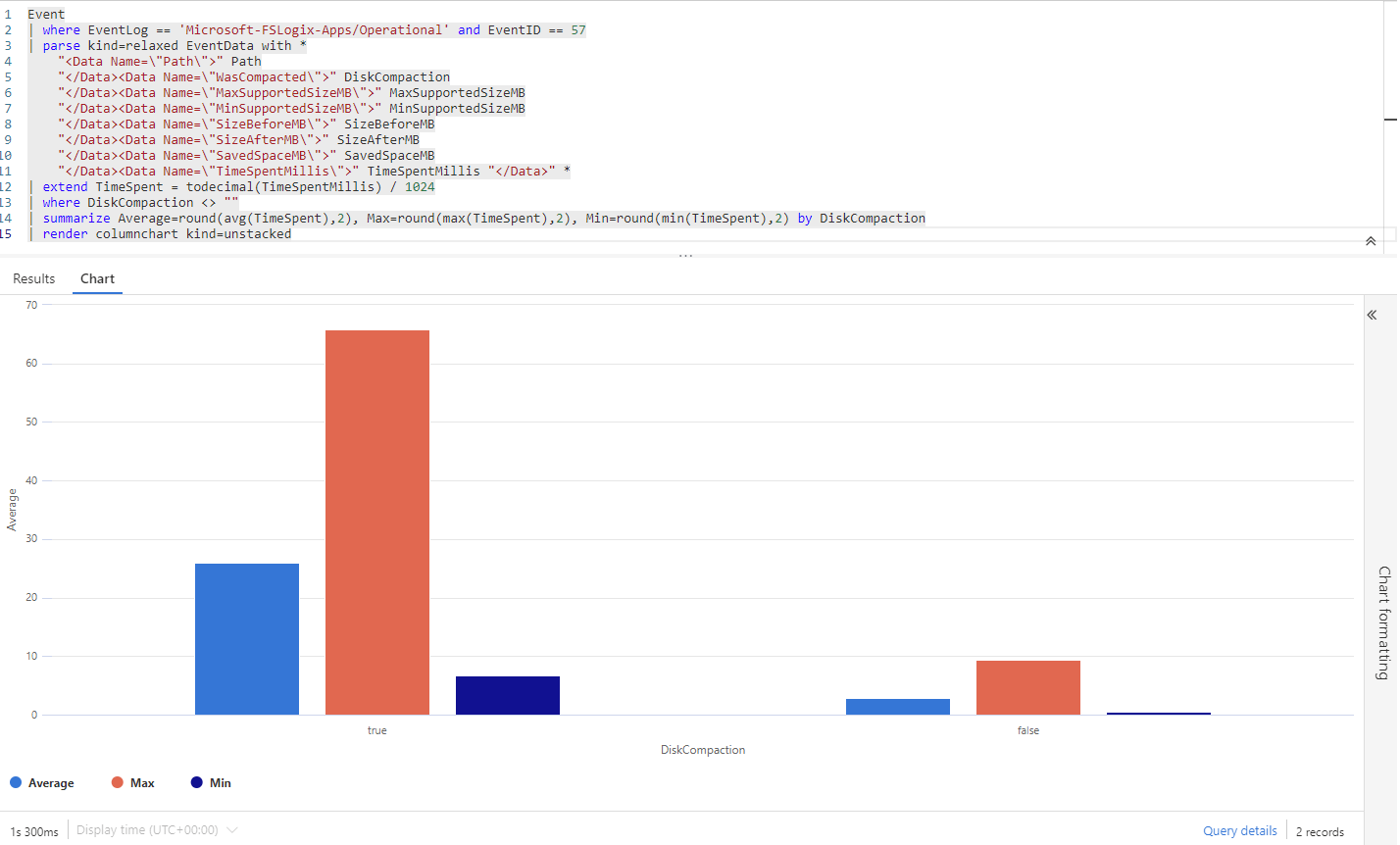
Displays the average, minimum, and maximum time spent during the compact operation. The data is summarized based on if the disk was able to be compacted.
Event
| where EventLog == 'Microsoft-FSLogix-Apps/Operational' and EventID == 57
| parse kind=relaxed EventData with *
    "<Data Name=\"Path\">" Path
    "</Data><Data Name=\"WasCompacted\">" DiskCompaction
    "</Data><Data Name=\"MaxSupportedSizeMB\">" MaxSupportedSizeMB
    "</Data><Data Name=\"MinSupportedSizeMB\">" MinSupportedSizeMB
    "</Data><Data Name=\"SizeBeforeMB\">" SizeBeforeMB
    "</Data><Data Name=\"SizeAfterMB\">" SizeAfterMB
    "</Data><Data Name=\"SavedSpaceMB\">" SavedSpaceMB
    "</Data><Data Name=\"TimeSpentMillis\">" TimeSpentMillis "</Data>" *
| extend TimeSpent = todecimal(TimeSpentMillis) / 1024
| where DiskCompaction <> ""
| summarize Average=round(avg(TimeSpent),2), Max=round(max(TimeSpent),2), Min=round(min(TimeSpent),2) by DiskCompaction
Here's an example of the output:
Number of container VHD(x) files compacted
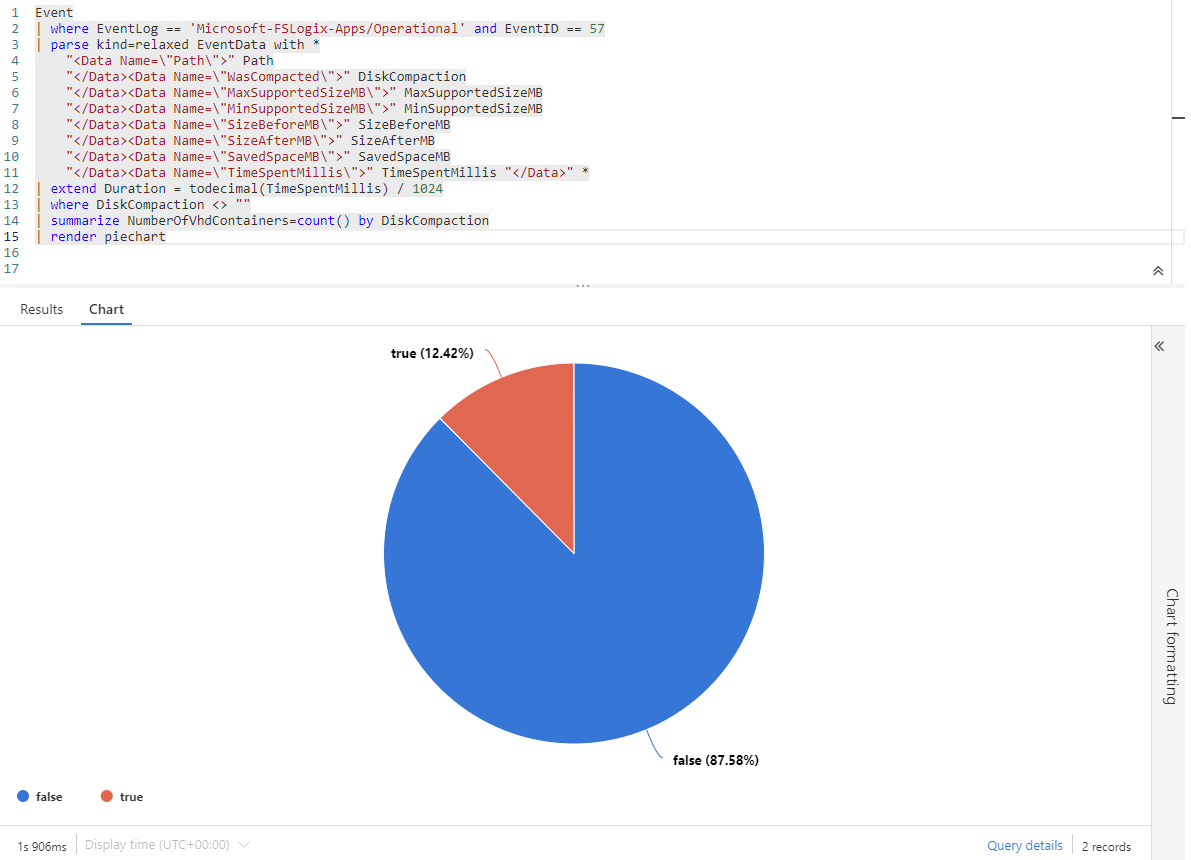
Displays how many container VHD(x) files were selected for compaction based on the threshold values.
Event
| where EventLog == 'Microsoft-FSLogix-Apps/Operational' and EventID == 57
| parse kind=relaxed EventData with *
    "<Data Name=\"Path\">" Path
    "</Data><Data Name=\"WasCompacted\">" DiskCompaction
    "</Data><Data Name=\"MaxSupportedSizeMB\">" MaxSupportedSizeMB
    "</Data><Data Name=\"MinSupportedSizeMB\">" MinSupportedSizeMB
    "</Data><Data Name=\"SizeBeforeMB\">" SizeBeforeMB
    "</Data><Data Name=\"SizeAfterMB\">" SizeAfterMB
    "</Data><Data Name=\"SavedSpaceMB\">" SavedSpaceMB
    "</Data><Data Name=\"TimeSpentMillis\">" TimeSpentMillis "</Data>" *
| where DiskCompaction <> ""
| summarize NumberOfVhdContainers=count() by DiskCompaction
Here's an example of the output:
Total storage space saved
Displays the amount of storage in GB reclaimed during the VHD Disk Compaction operation.
Event
| where EventLog == 'Microsoft-FSLogix-Apps/Operational' and EventID == 57
| parse kind=relaxed EventData with *
    "<Data Name=\"Path\">" Path
    "</Data><Data Name=\"WasCompacted\">" DiskCompaction
    "</Data><Data Name=\"MaxSupportedSizeMB\">" MaxSupportedSizeMB
    "</Data><Data Name=\"MinSupportedSizeMB\">" MinSupportedSizeMB
    "</Data><Data Name=\"SizeBeforeMB\">" SizeBeforeMB
    "</Data><Data Name=\"SizeAfterMB\">" SizeAfterMB
    "</Data><Data Name=\"SavedSpaceMB\">" SavedSpaceMB
    "</Data><Data Name=\"TimeSpentMillis\">" TimeSpentMillis "</Data>" *
| extend Storage = todecimal(SavedSpaceMB)
| summarize StorageSavings = (format_bytes(sum(Storage * 1024 * 1024),2,"GB"))
Winlogon (sign out) delay warnings
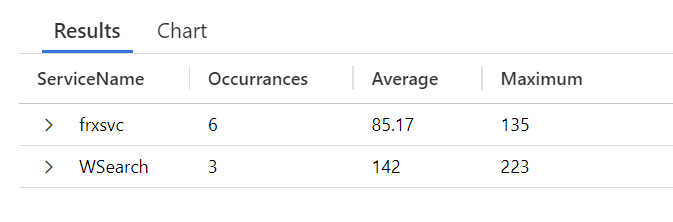
Displays any service that caused Winlogon to exceed the 60-second threshold. Shows the number of occurrences along with the average and maximum time spent.
Event
| where Source == 'Microsoft-Windows-Winlogon' and EventID == 6006
| parse kind=relaxed ParameterXml with "<Param>" ServiceName "</Param><Param>" Duration "</Param><Param>" EventType "</Param><Param>-</Param>"
| extend TimeInSeconds = todecimal(Duration)
| where EventType == "Logoff"
| summarize Occurrences=count(),Average=round(avg(TimeInSeconds),2), Minimum=round(min(TimeInSeconds),2), Maximum=round(max(TimeInSeconds),2) by ServiceName
Here's an example of the output: