Note
Kailangan ng pahintulot para ma-access ang page na ito. Maaari mong subukang mag-sign in o magpalit ng mga direktoryo.
Ang pag-access sa pahinang ito ay nangangailangan ng pahintulot. Maaari mong subukang baguhin ang mga direktoryo.
Note
Features in this article are powered by the standard harness, which uses the billing options described in Licensing for agents powered by the standard harness. Learn how to access standard features in Access standard agents and agent flows.
Instead of relying on voice responses, dual-tone multi-frequency (DTMF) support lets you ask your agent users to use their phone keypad to select options or provide information.
Note
DTMF menu flows are best suited to classic (deterministic) orchestration. Learn more in Choose how to control the conversation and Choose how to handle speech.
Set up a global command to be triggered during the conversation when the agent's user presses a specific single-digit key. Within individual topics, add DTMF input recognition for the responses provided in a Question node.
Set up the key that needs to be pressed for each option and how long the agent should wait before parsing the user's input.
If the user enters a key that doesn't match any of the node's options, the agent repeats the question or message and prompts the user to try again.
If the user inputs a key that isn't mapped to the DTMF global triggers, the agent triggers the Unknown dial pad press system topic. You can customize it for your business logic.
Important
When you turn on DTMF and interact with the voice-enabled agent in the Test your agent panel, how you enter numbers affects the response. If you enter a numeric key, such as 1, it matches the numerical order of the menu options in the Question node. To simulate a DTMF keypad entry, you have to enter a DTMF keypad entry, such as /DTMFKey 1, to match the assigned DTMF keys in the Question node.
Enable DTMF support in a topic's node
Open the topic you want to use as the global DTMF response for editing, and select the Trigger node.
Hover over the box of the Trigger node and select the Change trigger icon.
Select DTMF global command received.
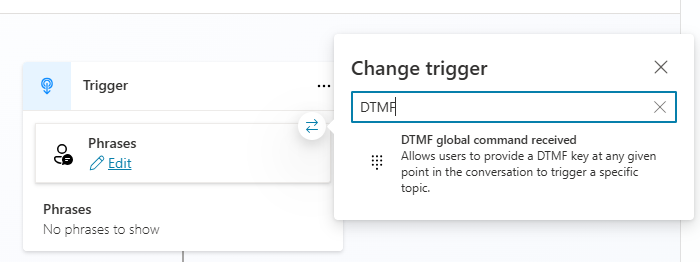
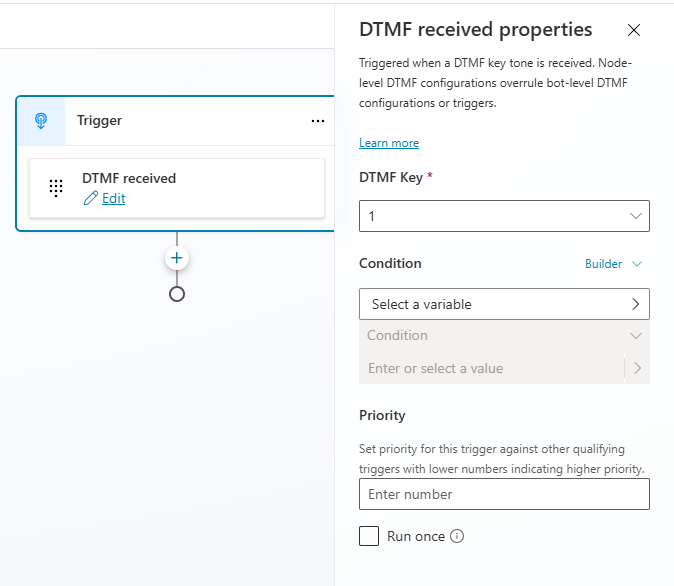
Select Edit and in DTMF received properties, specify the type of recognized DTMF input, along with any conditions for the trigger, and its priority.
Add a Question node, in Identify, select the entity you want. Different entity types have distinct characteristics for supporting DTMF tones:
Entity DTMF support Multiple choice options Manually assign a DTMF key to each option Options from a list variable Automatically assign DTMF keys for each option User's entire response Can accept multi-digit DTMF input Age Can accept multi-digit DTMF input Boolean Automatically assign DTMF keys for each option City DTMF not supported Color DTMF not supported Continent DTMF not supported Country or region DTMF not supported Date Can accept multi-digit DTMF input Date and time DTMF not supported Data and time without timezone DTMF not supported Duration DTMF not supported Email DTMF not supported Event DTMF not supported Language DTMF not supported Money Can accept multi-digit DTMF input Number Can accept multi-digit DTMF input Ordinal Can accept multi-digit DTMF input Organization DTMF not supported Percentage Can accept multi-digit DTMF input Person name DTMF not supported Phone number Can accept multi-digit DTMF input Point of interest DTMF not supported Speed Can accept multi-digit DTMF input State DTMF not supported Street address DTMF not supported Temperature Can accept multi-digit DTMF input URL DTMF not supported Weight Can accept multi-digit DTMF input Zip code Can accept multi-digit DTMF input
Assign DTMF keys
For some entity types, specify if the options that the agent provides to the user are mapped to a DTMF key:
For the Multiple choice options entity, manually assign DTMF keys to each option by selecting the Assign DTMF keys to options checkbox. When you select this checkbox, you see an icon representing a phone's keypad next to the Options for user heading.
For each option you add, select the - icon and specify the DTMF signal that the option should be mapped to.
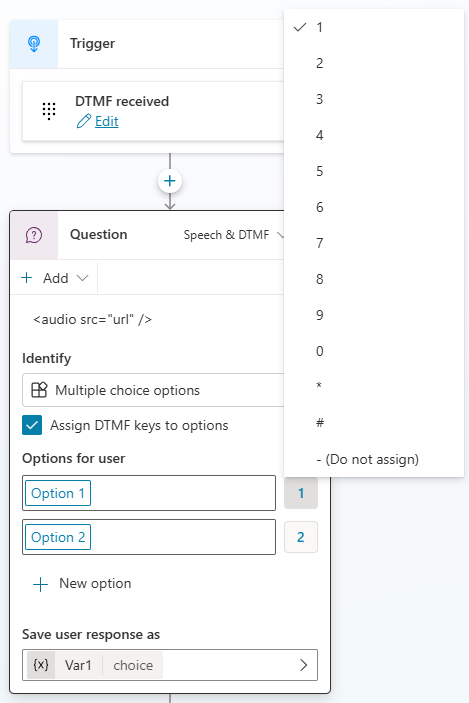
For Options from a list variable and Boolean entity types, the agent automatically assigns the DTMF keys to each option.
The agent assigns keys in the order that the options are in, from 0 to 9.
To have the agent automatically read the mapped options:
Select the three dots (…) of the Question node you want to configure, and then select Properties. The Question properties panel appears.
Select Entity recognition, and then select whether the agent should read the options to the agent user.
Multi-digit DTMF input
For entities that support multi-digit DTMF input, specify if there's a minimum or maximum number of digits in the agent user's valid response. These multi-digit DTMF input entities include most entity types that extract a number from the agent user's input. You can specify a range for the number of digits that are valid (such as "2-5"), or a fixed length (such as "5").
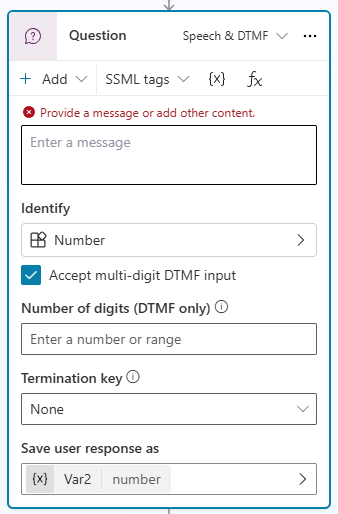
If the agent user enters a response with fewer or more digits than specified, the agent repeats the question.
If you don't specify the number of digits, the agent accepts any length of digits and continues the topic's flow.
You can also specify if the agent should wait for a specific "termination" key to be pressed to indicate the agent user finished entering their response. You can select no key, the asterisk key (*), or the hash key (#). The termination character is optional and isn't included when counting the length of the input.
Agent-level DTMF recognition
Set up the key that needs to be pressed for each option and how long the agent should wait before parsing the user's input.
Important
The DTMF received trigger only accepts single DTMF keys. The trigger isn't called if the agent user enters the key when responding to:
- A Question node that accepts multi-digit DTMF
- A Question node that accepts single-digit DTMF where one of the allowed options maps to the same key
Open the topic you want to use as the global DTMF response for editing, and select the Trigger node.
Hover over or long-select the side of the Trigger node (where it shows the current type of trigger) to see the Change trigger icon.
Select the icon and then choose DTMF global command received.
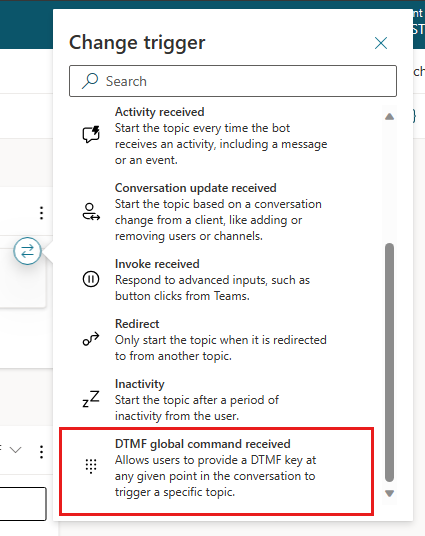
In the DTMF received properties panel that opens, enter the DTMF input that the bot should recognize, along with any conditions for the trigger and its priority.
DTMF caching
DTMF caching enables an agent user to input keys without waiting for each question or prompt from the agent. For example, caching is useful for agent users who are familiar with the agent's usual conversation path and want to go straight to a specified menu.
With DTMF caching, each key press is cached in series and automatically input for each consecutive prompt.
For a single-digit DTMF node, the system caches all keys after the first one for the next turn.
For mult-digit DTMF nodes, the agent follows a set of rules that determine how and what to cache based on these settings:
| Scenario | Digit length | Condition | User input | Outcome |
|---|---|---|---|---|
| Agent author didn't set a termination character so the timeout is ignored. When the user hits the max length, the key after max length (the last digit) is cached for the next turn. | 3 | Term time is 0 or Term key is none | 1, 2, 3, 1, ... | The first three digits are returned immediately, while the fourth digit is cached for the next turn. |
| Agent author set the termination character. The key input after timeout is cached for the next turn. | 3 | Term key is # | 1, 2, 3, 1 | The first three digits wait for the termination timeout before being returned. The fourth digit is cached for the next turn. |
| When the user hits the max length, the termination timeout runs. | 3 | Term key is # | 1, 2, 3, then during the timeout window, 1 | The first four digits are returned; however as this question only accepts three digits, the entire input sequence is considered to be invalid, and the agent reprompts the question. |
| User doesn't hit the max length (valid length). The key input after the interdigit timer is cached for the next turn. | 2-5 | Doesn't matter if a term key is defined | 1, 2, 3, then after the timeout, 1 | The first two digits wait for the interdigit timer before being returned, and the third and fourth digits are cached for the next turn. |
The system handles DTMF caching in the following ways:
- If the next turn doesn't allow barge-in, the system drops the cached key.
- If the next turn allows barge-in, the system handles the key according to its flow:
- If the flow consists of multiple message nodes but is followed by a mult-digit DTMF question node, the system caches keys for this mult-digit DTMF question only. The global DTMF topic isn't triggered.
- If the flow consists of multiple message nodes but is followed by a single-digit DTMF question node, the system caches the key for a single-digit DTMF key. Also, the system caches the DTMF global topic. However, if they overlap, the single-digit DTMF question node wins.
- If the flow consists of multiple message nodes without any question, the system caches the key for the DTMF global topic.
Tip
To avoid accidental caching, take the following steps:
- Place the node with the barge-in disabled message right after the question node.
- Use a mult-digit DTMF question node with a longer term timer (notice this choice increases the latency to the user in the absence of a termination key).