Note
Kailangan ng pahintulot para ma-access ang page na ito. Maaari mong subukang mag-sign in o magpalit ng mga direktoryo.
Ang pag-access sa pahinang ito ay nangangailangan ng pahintulot. Maaari mong subukang baguhin ang mga direktoryo.
The Sync button helps users install and set up the new OneDrive sync app. If you want to manage the rollout of the sync app to your organization, you can hide the Sync button on the OneDrive website to prevent your users from downloading the sync app themselves.
To prevent users from downloading the OneDrive sync app
Go to Settings in the new SharePoint admin center, and sign in with an account that has admin permissions for your organization.
Note
If you have Office 365 operated by 21Vianet (China), sign in to the Microsoft 365 admin center, then browse to the SharePoint admin center and open the Sharing page.
Select Sync.
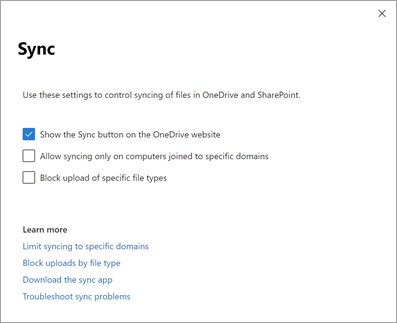
Clear the Show the Sync button on the OneDrive website check box.
Select Save.