Note
Ang pag-access sa pahinang ito ay nangangailangan ng pahintulot. Maaari mong subukang mag-sign in o magpalit ng mga direktoryo.
Ang pag-access sa pahinang ito ay nangangailangan ng pahintulot. Maaari mong subukang baguhin ang mga direktoryo.
In Windows 7 and later, cascading menu implementation is supported through registry settings. Prior to Windows 7, the creation of cascading menus was possible only through the implementation of the IContextMenu interface. In Windows 7 and later, you should resort to Component Object Model (COM) code-based solutions only when the static methods are insufficient.
The following screen shot provides an example of a cascading menu.
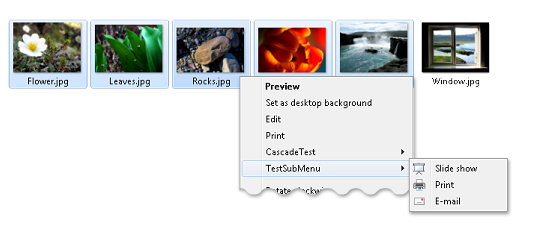
In Windows 7 and later, there are three ways to create cascading menus, which are described in the following sections.
- How to Create Cascading Menus with the SubCommands Registry Entry
- How to Create Cascading Menus with the ExtendedSubCommandsKey Registry Entry
- How to Create Cascading Menus with the IExplorerCommand Interface