BackgroundWorker Classe
Définition
Important
Certaines informations portent sur la préversion du produit qui est susceptible d’être en grande partie modifiée avant sa publication. Microsoft exclut toute garantie, expresse ou implicite, concernant les informations fournies ici.
Exécute une opération sur un thread distinct.
public ref class BackgroundWorker : IDisposablepublic ref class BackgroundWorker : System::ComponentModel::Componentpublic class BackgroundWorker : IDisposablepublic class BackgroundWorker : System.ComponentModel.Componenttype BackgroundWorker = class
interface IDisposabletype BackgroundWorker = class
inherit ComponentPublic Class BackgroundWorker
Implements IDisposablePublic Class BackgroundWorker
Inherits Component- Héritage
-
BackgroundWorker
- Héritage
- Implémente
Exemples
L’exemple de code suivant illustre les principes de base de la BackgroundWorker classe pour l’exécution asynchrone d’une opération fastidieuse. L’illustration suivante montre un exemple de sortie.
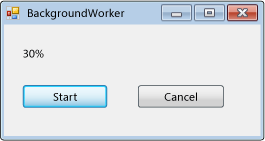
Pour essayer ce code, créez une application Windows Forms. Ajoutez un Label contrôle nommé resultLabel et ajoutez deux Button contrôles nommés startAsyncButton et cancelAsyncButton. Créez Click des gestionnaires d’événements pour les deux boutons. Sous l’onglet Composants de la boîte à outils, ajoutez un BackgroundWorker composant nommé backgroundWorker1. Créez DoWork, ProgressChangedet RunWorkerCompleted des gestionnaires d’événements pour le BackgroundWorker. Dans le code du formulaire, remplacez le code existant par le code suivant.
using System;
using System.ComponentModel;
using System.Windows.Forms;

namespace BackgroundWorkerSimple;

public partial class Form1 : Form
{
    public Form1()
    {
        InitializeComponent();
        backgroundWorker1.WorkerReportsProgress = true;
        backgroundWorker1.WorkerSupportsCancellation = true;
    }

    void startAsyncButton_Click(object sender, EventArgs e)
    {
        if (!backgroundWorker1.IsBusy)
        {
            // Start the asynchronous operation.
            backgroundWorker1.RunWorkerAsync();
        }
    }

    void cancelAsyncButton_Click(object sender, EventArgs e)
    {
        if (backgroundWorker1.WorkerSupportsCancellation)
        {
            // Cancel the asynchronous operation.
            backgroundWorker1.CancelAsync();
        }
    }

    // This event handler is where the time-consuming work is done.
    void backgroundWorker1_DoWork(object sender, DoWorkEventArgs e)
    {
        BackgroundWorker worker = sender as BackgroundWorker;

        for (int i = 1; i <= 10; i++)
        {
            if (worker.CancellationPending)
            {
                e.Cancel = true;
                break;
            }
            else
            {
                // Perform a time consuming operation and report progress.
                System.Threading.Thread.Sleep(500);
                worker.ReportProgress(i * 10);
            }
        }
    }

    // This event handler updates the progress.
    void backgroundWorker1_ProgressChanged(object sender, ProgressChangedEventArgs e) =>
        resultLabel.Text = e.ProgressPercentage.ToString() + "%";

    // This event handler deals with the results of the background operation.
    void backgroundWorker1_RunWorkerCompleted(object sender, RunWorkerCompletedEventArgs e) =>
        resultLabel.Text = e.Cancelled ?
        "Canceled!"
        : e.Error != null ? "Error: " + e.Error.Message : "Done!";
}
Imports System.ComponentModel

Public Class Form1

    Public Sub New()
        InitializeComponent()
        backgroundWorker1.WorkerReportsProgress = True
        backgroundWorker1.WorkerSupportsCancellation = True
    End Sub

    Private Sub startAsyncButton_Click(ByVal sender As System.Object, _
    ByVal e As System.EventArgs) Handles startAsyncButton.Click
        If Not backgroundWorker1.IsBusy Then
            ' Start the asynchronous operation.
            backgroundWorker1.RunWorkerAsync()
        End If
    End Sub

    Private Sub cancelAsyncButton_Click(ByVal sender As System.Object, _
    ByVal e As System.EventArgs) Handles cancelAsyncButton.Click
        If backgroundWorker1.WorkerSupportsCancellation Then
            ' Cancel the asynchronous operation.
            backgroundWorker1.CancelAsync()
        End If
    End Sub

    ' This event handler is where the time-consuming work is done.
    Private Sub backgroundWorker1_DoWork(ByVal sender As System.Object, _
    ByVal e As DoWorkEventArgs) Handles backgroundWorker1.DoWork
        Dim worker As BackgroundWorker = CType(sender, BackgroundWorker)
        Dim i As Integer

        For i = 1 To 10
            If (worker.CancellationPending) Then
                e.Cancel = True
                Exit For
            Else
                ' Perform a time consuming operation and report progress.
                System.Threading.Thread.Sleep(500)
                worker.ReportProgress(i * 10)
            End If
        Next
    End Sub

    ' This event handler updates the progress.
    Private Sub backgroundWorker1_ProgressChanged(ByVal sender As System.Object, _
    ByVal e As ProgressChangedEventArgs) Handles backgroundWorker1.ProgressChanged
        resultLabel.Text = (e.ProgressPercentage.ToString() + "%")
    End Sub

    ' This event handler deals with the results of the background operation.
    Private Sub backgroundWorker1_RunWorkerCompleted(ByVal sender As System.Object, _
    ByVal e As RunWorkerCompletedEventArgs) Handles backgroundWorker1.RunWorkerCompleted
        If e.Cancelled Then
            resultLabel.Text = "Canceled!"
        ElseIf e.Error IsNot Nothing Then
            resultLabel.Text = "Error: " & e.Error.Message
        Else
            resultLabel.Text = "Done!"
        End If
    End Sub
End Class
L’exemple de code suivant illustre l’utilisation de la BackgroundWorker classe pour l’exécution asynchrone d’une opération fastidieuse. L’illustration suivante montre un exemple de sortie.
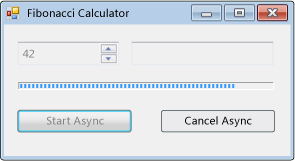
L’opération calcule le nombre Fibonacci sélectionné, signale les mises à jour de progression à mesure que le calcul se poursuit et autorise l’annulation d’un calcul en attente.
#using <System.Drawing.dll>
#using <System.dll>
#using <System.Windows.Forms.dll>

using namespace System;
using namespace System::Collections;
using namespace System::ComponentModel;
using namespace System::Drawing;
using namespace System::Threading;
using namespace System::Windows::Forms;

public ref class FibonacciForm: public System::Windows::Forms::Form
{
private:

   int numberToCompute;
   int highestPercentageReached;

   System::Windows::Forms::NumericUpDown^ numericUpDown1;
   System::Windows::Forms::Button^ startAsyncButton;
   System::Windows::Forms::Button^ cancelAsyncButton;
   System::Windows::Forms::ProgressBar^ progressBar1;
   System::Windows::Forms::Label ^ resultLabel;
   System::ComponentModel::BackgroundWorker^ backgroundWorker1;

public:
   FibonacciForm()
   {
      InitializeComponent();
      numberToCompute = highestPercentageReached = 0;
      InitializeBackgoundWorker();
   }


private:

   // Set up the BackgroundWorker object by
   // attaching event handlers.
   void InitializeBackgoundWorker()
   {
      backgroundWorker1->DoWork += gcnew DoWorkEventHandler( this, &FibonacciForm::backgroundWorker1_DoWork );
      backgroundWorker1->RunWorkerCompleted += gcnew RunWorkerCompletedEventHandler( this, &FibonacciForm::backgroundWorker1_RunWorkerCompleted );
      backgroundWorker1->ProgressChanged += gcnew ProgressChangedEventHandler( this, &FibonacciForm::backgroundWorker1_ProgressChanged );
   }

   void startAsyncButton_Click( System::Object^ /*sender*/, System::EventArgs^ /*e*/ )
   {

      // Reset the text in the result label.
      resultLabel->Text = String::Empty;

      // Disable the UpDown control until
      // the asynchronous operation is done.
      this->numericUpDown1->Enabled = false;

      // Disable the Start button until
      // the asynchronous operation is done.
      this->startAsyncButton->Enabled = false;

      // Enable the Cancel button while
      // the asynchronous operation runs.
      this->cancelAsyncButton->Enabled = true;

      // Get the value from the UpDown control.
      numberToCompute = (int)numericUpDown1->Value;

      // Reset the variable for percentage tracking.
      highestPercentageReached = 0;

      // Start the asynchronous operation.
      backgroundWorker1->RunWorkerAsync( numberToCompute );
   }

   void cancelAsyncButton_Click( System::Object^ /*sender*/, System::EventArgs^ /*e*/ )
   {
      // Cancel the asynchronous operation.
      this->backgroundWorker1->CancelAsync();

      // Disable the Cancel button.
      cancelAsyncButton->Enabled = false;
   }

   // This event handler is where the actual,
   // potentially time-consuming work is done.
   void backgroundWorker1_DoWork( Object^ sender, DoWorkEventArgs^ e )
   {
      // Get the BackgroundWorker that raised this event.
      BackgroundWorker^ worker = dynamic_cast<BackgroundWorker^>(sender);

      // Assign the result of the computation
      // to the Result property of the DoWorkEventArgs
      // object. This is will be available to the
      // RunWorkerCompleted eventhandler.
      e->Result = ComputeFibonacci( safe_cast<Int32>(e->Argument), worker, e );
   }

   // This event handler deals with the results of the
   // background operation.
   void backgroundWorker1_RunWorkerCompleted( Object^ /*sender*/, RunWorkerCompletedEventArgs^ e )
   {
      // First, handle the case where an exception was thrown.
      if ( e->Error != nullptr )
      {
         MessageBox::Show( e->Error->Message );
      }
      else
      if ( e->Cancelled )
      {
         // Next, handle the case where the user cancelled
         // the operation.
         // Note that due to a race condition in
         // the DoWork event handler, the Cancelled
         // flag may not have been set, even though
         // CancelAsync was called.
         resultLabel->Text = "Cancelled";
      }
      else
      {
         // Finally, handle the case where the operation
         // succeeded.
         resultLabel->Text = e->Result->ToString();
      }

      // Enable the UpDown control.
      this->numericUpDown1->Enabled = true;

      // Enable the Start button.
      startAsyncButton->Enabled = true;

      // Disable the Cancel button.
      cancelAsyncButton->Enabled = false;
   }

   // This event handler updates the progress bar.
   void backgroundWorker1_ProgressChanged( Object^ /*sender*/, ProgressChangedEventArgs^ e )
   {
      this->progressBar1->Value = e->ProgressPercentage;
   }

   // This is the method that does the actual work. For this
   // example, it computes a Fibonacci number and
   // reports progress as it does its work.
   long ComputeFibonacci( int n, BackgroundWorker^ worker, DoWorkEventArgs ^ e )
   {
      // The parameter n must be >= 0 and <= 91.
      // Fib(n), with n > 91, overflows a long.
      if ( (n < 0) || (n > 91) )
      {
         throw gcnew ArgumentException( "value must be >= 0 and <= 91","n" );
      }

      long result = 0;

      // Abort the operation if the user has cancelled.
      // Note that a call to CancelAsync may have set
      // CancellationPending to true just after the
      // last invocation of this method exits, so this
      // code will not have the opportunity to set the
      // DoWorkEventArgs.Cancel flag to true. This means
      // that RunWorkerCompletedEventArgs.Cancelled will
      // not be set to true in your RunWorkerCompleted
      // event handler. This is a race condition.
      if ( worker->CancellationPending )
      {
         e->Cancel = true;
      }
      else
      {
         if ( n < 2 )
         {
            result = 1;
         }
         else
         {
            result = ComputeFibonacci( n - 1, worker, e ) + ComputeFibonacci( n - 2, worker, e );
         }

         // Report progress as a percentage of the total task.
         int percentComplete = (int)((float)n / (float)numberToCompute * 100);
         if ( percentComplete > highestPercentageReached )
         {
            highestPercentageReached = percentComplete;
            worker->ReportProgress( percentComplete );
         }
      }

      return result;
   }

   void InitializeComponent()
   {
      this->numericUpDown1 = gcnew System::Windows::Forms::NumericUpDown;
      this->startAsyncButton = gcnew System::Windows::Forms::Button;
      this->cancelAsyncButton = gcnew System::Windows::Forms::Button;
      this->resultLabel = gcnew System::Windows::Forms::Label;
      this->progressBar1 = gcnew System::Windows::Forms::ProgressBar;
      this->backgroundWorker1 = gcnew System::ComponentModel::BackgroundWorker;
      (dynamic_cast<System::ComponentModel::ISupportInitialize^>(this->numericUpDown1))->BeginInit();
      this->SuspendLayout();

      //
      // numericUpDown1
      //
      this->numericUpDown1->Location = System::Drawing::Point( 16, 16 );
      array<Int32>^temp0 = {91,0,0,0};
      this->numericUpDown1->Maximum = System::Decimal( temp0 );
      array<Int32>^temp1 = {1,0,0,0};
      this->numericUpDown1->Minimum = System::Decimal( temp1 );
      this->numericUpDown1->Name = "numericUpDown1";
      this->numericUpDown1->Size = System::Drawing::Size( 80, 20 );
      this->numericUpDown1->TabIndex = 0;
      array<Int32>^temp2 = {1,0,0,0};
      this->numericUpDown1->Value = System::Decimal( temp2 );

      //
      // startAsyncButton
      //
      this->startAsyncButton->Location = System::Drawing::Point( 16, 72 );
      this->startAsyncButton->Name = "startAsyncButton";
      this->startAsyncButton->Size = System::Drawing::Size( 120, 23 );
      this->startAsyncButton->TabIndex = 1;
      this->startAsyncButton->Text = "Start Async";
      this->startAsyncButton->Click += gcnew System::EventHandler( this, &FibonacciForm::startAsyncButton_Click );

      //
      // cancelAsyncButton
      //
      this->cancelAsyncButton->Enabled = false;
      this->cancelAsyncButton->Location = System::Drawing::Point( 153, 72 );
      this->cancelAsyncButton->Name = "cancelAsyncButton";
      this->cancelAsyncButton->Size = System::Drawing::Size( 119, 23 );
      this->cancelAsyncButton->TabIndex = 2;
      this->cancelAsyncButton->Text = "Cancel Async";
      this->cancelAsyncButton->Click += gcnew System::EventHandler( this, &FibonacciForm::cancelAsyncButton_Click );

      //
      // resultLabel
      //
      this->resultLabel->BorderStyle = System::Windows::Forms::BorderStyle::Fixed3D;
      this->resultLabel->Location = System::Drawing::Point( 112, 16 );
      this->resultLabel->Name = "resultLabel";
      this->resultLabel->Size = System::Drawing::Size( 160, 23 );
      this->resultLabel->TabIndex = 3;
      this->resultLabel->Text = "(no result)";
      this->resultLabel->TextAlign = System::Drawing::ContentAlignment::MiddleCenter;

      //
      // progressBar1
      //
      this->progressBar1->Location = System::Drawing::Point( 18, 48 );
      this->progressBar1->Name = "progressBar1";
      this->progressBar1->Size = System::Drawing::Size( 256, 8 );
      this->progressBar1->Step = 2;
      this->progressBar1->TabIndex = 4;

      //
      // backgroundWorker1
      //
      this->backgroundWorker1->WorkerReportsProgress = true;
      this->backgroundWorker1->WorkerSupportsCancellation = true;

      //
      // FibonacciForm
      //
      this->ClientSize = System::Drawing::Size( 292, 118 );
      this->Controls->Add( this->progressBar1 );
      this->Controls->Add( this->resultLabel );
      this->Controls->Add( this->cancelAsyncButton );
      this->Controls->Add( this->startAsyncButton );
      this->Controls->Add( this->numericUpDown1 );
      this->Name = "FibonacciForm";
      this->Text = "Fibonacci Calculator";
      (dynamic_cast<System::ComponentModel::ISupportInitialize^>(this->numericUpDown1))->EndInit();
      this->ResumeLayout( false );
   }
};

[STAThread]
int main()
{
   Application::Run( gcnew FibonacciForm );
}
using System;
using System.ComponentModel;
using System.Drawing;
using System.Windows.Forms;

namespace BackgroundWorkerExample;

public class FibonacciForm : Form
{
    int numberToCompute;
    int highestPercentageReached;

    NumericUpDown numericUpDown1;
    Button startAsyncButton;
    Button cancelAsyncButton;
    ProgressBar progressBar1;
    Label resultLabel;
    BackgroundWorker backgroundWorker1;

    public FibonacciForm()
    {
        InitializeComponent();

        InitializeBackgroundWorker();
    }

    // Set up the BackgroundWorker object by
    // attaching event handlers.
    void InitializeBackgroundWorker()
    {
        backgroundWorker1.DoWork +=
             backgroundWorker1_DoWork;
        backgroundWorker1.RunWorkerCompleted +=

        backgroundWorker1_RunWorkerCompleted;
        backgroundWorker1.ProgressChanged +=

        backgroundWorker1_ProgressChanged;
    }

    void startAsyncButton_Click(object sender,
        EventArgs e)
    {
        // Reset the text in the result label.
        resultLabel.Text = string.Empty;

        // Disable the UpDown control until
        // the asynchronous operation is done.
        numericUpDown1.Enabled = false;

        // Disable the Start button until
        // the asynchronous operation is done.
        startAsyncButton.Enabled = false;

        // Enable the Cancel button while
        // the asynchronous operation runs.
        cancelAsyncButton.Enabled = true;

        // Get the value from the UpDown control.
        numberToCompute = (int)numericUpDown1.Value;

        // Reset the variable for percentage tracking.
        highestPercentageReached = 0;

        // Start the asynchronous operation.
        backgroundWorker1.RunWorkerAsync(numberToCompute);
    }

    void cancelAsyncButton_Click(object sender,
        EventArgs e)
    {
        // Cancel the asynchronous operation.
        backgroundWorker1.CancelAsync();

        // Disable the Cancel button.
        cancelAsyncButton.Enabled = false;
    }

    // This event handler is where the actual,
    // potentially time-consuming work is done.
    void backgroundWorker1_DoWork(object sender,
        DoWorkEventArgs e)
    {
        // Get the BackgroundWorker that raised this event.
        BackgroundWorker worker = sender as BackgroundWorker;

        // Assign the result of the computation
        // to the Result property of the DoWorkEventArgs
        // object. This is will be available to the
        // RunWorkerCompleted eventhandler.
        e.Result = ComputeFibonacci((int)e.Argument, worker, e);
    }

    // This event handler deals with the results of the
    // background operation.
    void backgroundWorker1_RunWorkerCompleted(
        object sender, RunWorkerCompletedEventArgs e)
    {
        // First, handle the case where an exception was thrown.
        if (e.Error != null)
        {
            _ = MessageBox.Show(e.Error.Message);
        }
        else if (e.Cancelled)
        {
            // Next, handle the case where the user canceled
            // the operation.
            // Note that due to a race condition in
            // the DoWork event handler, the Cancelled
            // flag may not have been set, even though
            // CancelAsync was called.
            resultLabel.Text = "Canceled";
        }
        else
        {
            // Finally, handle the case where the operation
            // succeeded.
            resultLabel.Text = e.Result.ToString();
        }

        // Enable the UpDown control.
        numericUpDown1.Enabled = true;

        // Enable the Start button.
        startAsyncButton.Enabled = true;

        // Disable the Cancel button.
        cancelAsyncButton.Enabled = false;
    }

    // This event handler updates the progress bar.
    void backgroundWorker1_ProgressChanged(object sender,
        ProgressChangedEventArgs e) => progressBar1.Value = e.ProgressPercentage;

    // This is the method that does the actual work. For this
    // example, it computes a Fibonacci number and
    // reports progress as it does its work.
    long ComputeFibonacci(int n, BackgroundWorker worker, DoWorkEventArgs e)
    {
        // The parameter n must be >= 0 and <= 91.
        // Fib(n), with n > 91, overflows a long.
        if (n is < 0 or > 91)
        {
            throw new ArgumentException(
                "value must be >= 0 and <= 91", nameof(n));
        }

        long result = 0;

        // Abort the operation if the user has canceled.
        // Note that a call to CancelAsync may have set
        // CancellationPending to true just after the
        // last invocation of this method exits, so this
        // code will not have the opportunity to set the
        // DoWorkEventArgs.Cancel flag to true. This means
        // that RunWorkerCompletedEventArgs.Cancelled will
        // not be set to true in your RunWorkerCompleted
        // event handler. This is a race condition.

        if (worker.CancellationPending)
        {
            e.Cancel = true;
        }
        else
        {
            result = n < 2
                ? 1
                : ComputeFibonacci(n - 1, worker, e) +
                         ComputeFibonacci(n - 2, worker, e);

            // Report progress as a percentage of the total task.
            int percentComplete =
                (int)(n / (float)numberToCompute * 100);
            if (percentComplete > highestPercentageReached)
            {
                highestPercentageReached = percentComplete;
                worker.ReportProgress(percentComplete);
            }
        }

        return result;
    }

    #region Windows Form Designer generated code

    void InitializeComponent()
    {
        numericUpDown1 = new NumericUpDown();
        startAsyncButton = new Button();
        cancelAsyncButton = new Button();
        resultLabel = new Label();
        progressBar1 = new ProgressBar();
        backgroundWorker1 = new BackgroundWorker();
        ((ISupportInitialize)numericUpDown1).BeginInit();
        SuspendLayout();
        //
        // numericUpDown1
        //
        numericUpDown1.Location = new Point(16, 16);
        numericUpDown1.Maximum = new decimal(new int[] {
            91,
            0,
            0,
            0});
        numericUpDown1.Minimum = new decimal(new int[] {
            1,
            0,
            0,
            0});
        numericUpDown1.Name = "numericUpDown1";
        numericUpDown1.Size = new Size(80, 20);
        numericUpDown1.TabIndex = 0;
        numericUpDown1.Value = new decimal(new int[] {
            1,
            0,
            0,
            0});
        //
        // startAsyncButton
        //
        startAsyncButton.Location = new Point(16, 72);
        startAsyncButton.Name = "startAsyncButton";
        startAsyncButton.Size = new Size(120, 23);
        startAsyncButton.TabIndex = 1;
        startAsyncButton.Text = "Start Async";
        startAsyncButton.Click += startAsyncButton_Click;
        //
        // cancelAsyncButton
        //
        cancelAsyncButton.Enabled = false;
        cancelAsyncButton.Location = new Point(153, 72);
        cancelAsyncButton.Name = "cancelAsyncButton";
        cancelAsyncButton.Size = new Size(119, 23);
        cancelAsyncButton.TabIndex = 2;
        cancelAsyncButton.Text = "Cancel Async";
        cancelAsyncButton.Click += cancelAsyncButton_Click;
        //
        // resultLabel
        //
        resultLabel.BorderStyle = BorderStyle.Fixed3D;
        resultLabel.Location = new Point(112, 16);
        resultLabel.Name = "resultLabel";
        resultLabel.Size = new Size(160, 23);
        resultLabel.TabIndex = 3;
        resultLabel.Text = "(no result)";
        resultLabel.TextAlign = ContentAlignment.MiddleCenter;
        //
        // progressBar1
        //
        progressBar1.Location = new Point(18, 48);
        progressBar1.Name = "progressBar1";
        progressBar1.Size = new Size(256, 8);
        progressBar1.Step = 2;
        progressBar1.TabIndex = 4;
        //
        // backgroundWorker1
        //
        backgroundWorker1.WorkerReportsProgress = true;
        backgroundWorker1.WorkerSupportsCancellation = true;
        //
        // FibonacciForm
        //
        ClientSize = new Size(1794, 927);
        Controls.Add(progressBar1);
        Controls.Add(resultLabel);
        Controls.Add(cancelAsyncButton);
        Controls.Add(startAsyncButton);
        Controls.Add(numericUpDown1);
        Name = "FibonacciForm";
        Text = "Fibonacci Calculator";
        ((ISupportInitialize)numericUpDown1).EndInit();
        ResumeLayout(false);
    }
    #endregion

    [STAThread]
    static void Main() => Application.Run(new FibonacciForm());
}
Imports System.ComponentModel
Imports System.Windows.Forms

Public Class FibonacciForm
    Inherits Form

    Private numberToCompute As Integer = 0
    Private highestPercentageReached As Integer = 0

    Private numericUpDown1 As NumericUpDown
    Private WithEvents startAsyncButton As Button
    Private WithEvents cancelAsyncButton As Button
    Private progressBar1 As ProgressBar
    Private resultLabel As Label
    Private WithEvents backgroundWorker1 As System.ComponentModel.BackgroundWorker


    Public Sub New()
        InitializeComponent()
    End Sub

    Private Sub startAsyncButton_Click(ByVal sender As System.Object,
    ByVal e As System.EventArgs) _
    Handles startAsyncButton.Click

        ' Reset the text in the result label.
        resultLabel.Text = [String].Empty

        ' Disable the UpDown control until
        ' the asynchronous operation is done.
        numericUpDown1.Enabled = False

        ' Disable the Start button until
        ' the asynchronous operation is done.
        startAsyncButton.Enabled = False

        ' Enable the Cancel button while
        ' the asynchronous operation runs.
        cancelAsyncButton.Enabled = True

        ' Get the value from the UpDown control.
        numberToCompute = CInt(numericUpDown1.Value)

        ' Reset the variable for percentage tracking.
        highestPercentageReached = 0


        ' Start the asynchronous operation.
        backgroundWorker1.RunWorkerAsync(numberToCompute)
    End Sub

    Private Sub cancelAsyncButton_Click(
    ByVal sender As System.Object,
    ByVal e As System.EventArgs) _
    Handles cancelAsyncButton.Click

        ' Cancel the asynchronous operation.
        backgroundWorker1.CancelAsync()

        ' Disable the Cancel button.
        cancelAsyncButton.Enabled = False

    End Sub

    ' This event handler is where the actual work is done.
    Private Sub backgroundWorker1_DoWork(
    ByVal sender As Object,
    ByVal e As DoWorkEventArgs) _
    Handles backgroundWorker1.DoWork

        ' Get the BackgroundWorker object that raised this event.
        Dim worker As BackgroundWorker =
            CType(sender, BackgroundWorker)

        ' Assign the result of the computation
        ' to the Result property of the DoWorkEventArgs
        ' object. This is will be available to the
        ' RunWorkerCompleted eventhandler.
        e.Result = ComputeFibonacci(e.Argument, worker, e)
    End Sub

    ' This event handler deals with the results of the
    ' background operation.
    Private Sub backgroundWorker1_RunWorkerCompleted(
    ByVal sender As Object, ByVal e As RunWorkerCompletedEventArgs) _
    Handles backgroundWorker1.RunWorkerCompleted

        ' First, handle the case where an exception was thrown.
        If (e.Error IsNot Nothing) Then
            MessageBox.Show(e.Error.Message)
        ElseIf e.Cancelled Then
            ' Next, handle the case where the user canceled the
            ' operation.
            ' Note that due to a race condition in
            ' the DoWork event handler, the Cancelled
            ' flag may not have been set, even though
            ' CancelAsync was called.
            resultLabel.Text = "Canceled"
        Else
            ' Finally, handle the case where the operation succeeded.
            resultLabel.Text = e.Result.ToString()
        End If

        ' Enable the UpDown control.
        numericUpDown1.Enabled = True

        ' Enable the Start button.
        startAsyncButton.Enabled = True

        ' Disable the Cancel button.
        cancelAsyncButton.Enabled = False
    End Sub

    ' This event handler updates the progress bar.
    Private Sub backgroundWorker1_ProgressChanged(
    ByVal sender As Object, ByVal e As ProgressChangedEventArgs) _
    Handles backgroundWorker1.ProgressChanged

        progressBar1.Value = e.ProgressPercentage

    End Sub

    ' This is the method that does the actual work. For this
    ' example, it computes a Fibonacci number and
    ' reports progress as it does its work.
    Function ComputeFibonacci(
        ByVal n As Integer,
        ByVal worker As BackgroundWorker,
        ByVal e As DoWorkEventArgs) As Long

        ' The parameter n must be >= 0 and <= 91.
        ' Fib(n), with n > 91, overflows a long.
        If n < 0 OrElse n > 91 Then
            Throw New ArgumentException(
                "value must be >= 0 and <= 91", "n")
        End If

        Dim result As Long = 0

        ' Abort the operation if the user has canceled.
        ' Note that a call to CancelAsync may have set
        ' CancellationPending to true just after the
        ' last invocation of this method exits, so this
        ' code will not have the opportunity to set the
        ' DoWorkEventArgs.Cancel flag to true. This means
        ' that RunWorkerCompletedEventArgs.Cancelled will
        ' not be set to true in your RunWorkerCompleted
        ' event handler. This is a race condition.
        If worker.CancellationPending Then
            e.Cancel = True
        Else
            If n < 2 Then
                result = 1
            Else
                result = ComputeFibonacci(n - 1, worker, e) +
                         ComputeFibonacci(n - 2, worker, e)
            End If

            ' Report progress as a percentage of the total task.
            Dim percentComplete As Integer =
                CSng(n) / CSng(numberToCompute) * 100
            If percentComplete > highestPercentageReached Then
                highestPercentageReached = percentComplete
                worker.ReportProgress(percentComplete)
            End If

        End If

        Return result

    End Function


    Private Sub InitializeComponent()
        numericUpDown1 = New NumericUpDown
        startAsyncButton = New Button
        cancelAsyncButton = New Button
        resultLabel = New Label
        progressBar1 = New ProgressBar
        backgroundWorker1 = New System.ComponentModel.BackgroundWorker
        CType(numericUpDown1, System.ComponentModel.ISupportInitialize).BeginInit()
        SuspendLayout()
        '
        'numericUpDown1
        '
        numericUpDown1.Location = New System.Drawing.Point(16, 16)
        numericUpDown1.Maximum = New Decimal(New Integer() {91, 0, 0, 0})
        numericUpDown1.Minimum = New Decimal(New Integer() {1, 0, 0, 0})
        numericUpDown1.Name = "numericUpDown1"
        numericUpDown1.Size = New System.Drawing.Size(80, 20)
        numericUpDown1.TabIndex = 0
        numericUpDown1.Value = New Decimal(New Integer() {1, 0, 0, 0})
        '
        'startAsyncButton
        '
        startAsyncButton.Location = New System.Drawing.Point(16, 72)
        startAsyncButton.Name = "startAsyncButton"
        startAsyncButton.Size = New System.Drawing.Size(120, 23)
        startAsyncButton.TabIndex = 1
        startAsyncButton.Text = "Start Async"
        '
        'cancelAsyncButton
        '
        cancelAsyncButton.Enabled = False
        cancelAsyncButton.Location = New System.Drawing.Point(153, 72)
        cancelAsyncButton.Name = "cancelAsyncButton"
        cancelAsyncButton.Size = New System.Drawing.Size(119, 23)
        cancelAsyncButton.TabIndex = 2
        cancelAsyncButton.Text = "Cancel Async"
        '
        'resultLabel
        '
        resultLabel.BorderStyle = BorderStyle.Fixed3D
        resultLabel.Location = New System.Drawing.Point(112, 16)
        resultLabel.Name = "resultLabel"
        resultLabel.Size = New System.Drawing.Size(160, 23)
        resultLabel.TabIndex = 3
        resultLabel.Text = "(no result)"
        resultLabel.TextAlign = System.Drawing.ContentAlignment.MiddleCenter
        '
        'progressBar1
        '
        progressBar1.Location = New System.Drawing.Point(18, 48)
        progressBar1.Name = "progressBar1"
        progressBar1.Size = New System.Drawing.Size(256, 8)
        progressBar1.TabIndex = 4
        '
        'backgroundWorker1
        '
        backgroundWorker1.WorkerReportsProgress = True
        backgroundWorker1.WorkerSupportsCancellation = True
        '
        'FibonacciForm
        '
        ClientSize = New System.Drawing.Size(292, 118)
        Controls.Add(progressBar1)
        Controls.Add(resultLabel)
        Controls.Add(cancelAsyncButton)
        Controls.Add(startAsyncButton)
        Controls.Add(numericUpDown1)
        Name = "FibonacciForm"
        Text = "Fibonacci Calculator"
        CType(numericUpDown1, System.ComponentModel.ISupportInitialize).EndInit()
        ResumeLayout(False)

    End Sub

    <STAThread()> _
    Shared Sub Main()
        Application.Run(New FibonacciForm)
    End Sub
End Class
Remarques
La BackgroundWorker classe vous permet d’exécuter une opération sur un thread dédié distinct. Les opérations fastidieuses telles que les téléchargements et les transactions de base de données peuvent entraîner l’affichage de votre interface utilisateur comme si elle a cessé de répondre pendant qu’elles sont en cours d’exécution. Lorsque vous souhaitez une interface utilisateur réactive et que vous êtes confronté à de longs retards associés à ces opérations, la BackgroundWorker classe fournit une solution pratique.
Pour exécuter une opération fastidieuse en arrière-plan, créez un BackgroundWorker événement et écoutez les événements qui signalent la progression de votre opération et signalent quand votre opération est terminée. Vous pouvez créer le BackgroundWorker fichier par programmation ou le faire glisser sur votre formulaire à partir de l’onglet Composants de la boîte à outils. Si vous créez le BackgroundWorker concepteur Windows Forms, il apparaît dans la barre d’état du composant et ses propriétés sont affichées dans la fenêtre Propriétés.
Pour configurer une opération en arrière-plan, ajoutez un gestionnaire d’événements pour l’événement DoWork . Appelez votre opération fastidieuse dans ce gestionnaire d’événements. Pour démarrer l’opération, appelez RunWorkerAsync. Pour recevoir des notifications de mises à jour de progression, gérez l’événement ProgressChanged . Pour recevoir une notification lorsque l’opération est terminée, gérez l’événement RunWorkerCompleted .
Note
Vous devez être prudent de ne pas manipuler d’objets d’interface utilisateur dans votre DoWork gestionnaire d’événements. Au lieu de cela, communiquez avec l’interface utilisateur via les événements et ProgressChanged les RunWorkerCompleted événements.
BackgroundWorker les événements ne sont pas marshalés au-delà AppDomain des limites. N’utilisez pas de BackgroundWorker composant pour effectuer des opérations multithread dans plusieurs AppDomain.
Si votre opération en arrière-plan nécessite un paramètre, appelez-le RunWorkerAsync avec votre paramètre. Dans le DoWork gestionnaire d’événements, vous pouvez extraire le paramètre de la DoWorkEventArgs.Argument propriété.
Pour plus d’informations sur BackgroundWorker, consultez Guide pratique pour exécuter une opération en arrière-plan.
Constructeurs
| Nom | Description |
|---|---|
| BackgroundWorker() |
Initialise une nouvelle instance de la classe BackgroundWorker. |
Propriétés
| Nom | Description |
|---|---|
| CancellationPending |
Obtient une valeur indiquant si l’application a demandé l’annulation d’une opération en arrière-plan. |
| CanRaiseEvents |
Obtient une valeur indiquant si le composant peut déclencher un événement. (Hérité de Component) |
| Container |
Obtient le IContainer fichier qui contient le Component. (Hérité de Component) |
| DesignMode |
Obtient une valeur qui indique si la Component valeur est actuellement en mode création. (Hérité de Component) |
| Events |
Obtient la liste des gestionnaires d’événements qui sont attachés à ce Component. (Hérité de Component) |
| IsBusy |
Obtient une valeur indiquant si l’exécution BackgroundWorker d’une opération asynchrone est effectuée. |
| Site |
Obtient ou définit le ISite de Component. (Hérité de Component) |
| WorkerReportsProgress |
Obtient ou définit une valeur indiquant si le BackgroundWorker fichier peut signaler les mises à jour de progression. |
| WorkerSupportsCancellation |
Obtient ou définit une valeur indiquant si la prise en charge de l’annulation BackgroundWorker asynchrone. |
Méthodes
| Nom | Description |
|---|---|
| CancelAsync() |
Demande l’annulation d’une opération en arrière-plan en attente. |
| CreateObjRef(Type) |
Crée un objet qui contient toutes les informations pertinentes requises pour générer un proxy utilisé pour communiquer avec un objet distant. (Hérité de MarshalByRefObject) |
| Dispose() |
Effectue des tâches définies par l’application associées à la libération, à la libération ou à la réinitialisation des ressources non managées. |
| Dispose() |
Libère toutes les ressources utilisées par le Component. (Hérité de Component) |
| Dispose(Boolean) |
Cette méthode ne fait rien. |
| Dispose(Boolean) |
Libère les ressources non managées utilisées par les Component ressources gérées et libère éventuellement les ressources managées. (Hérité de Component) |
| Equals(Object) |
Détermine si l’objet spécifié est égal à l’objet actuel. (Hérité de Object) |
| GetHashCode() |
Sert de fonction de hachage par défaut. (Hérité de Object) |
| GetLifetimeService() |
Obsolète.
Récupère l’objet de service de durée de vie actuel qui contrôle la stratégie de durée de vie de cette instance. (Hérité de MarshalByRefObject) |
| GetService(Type) |
Retourne un objet qui représente un service fourni par le Component ou par son Container. (Hérité de Component) |
| GetType() |
Obtient la Type de l’instance actuelle. (Hérité de Object) |
| InitializeLifetimeService() |
Obsolète.
Obtient un objet de service de durée de vie pour contrôler la stratégie de durée de vie de cette instance. (Hérité de MarshalByRefObject) |
| MemberwiseClone() |
Crée une copie superficielle du Objectactuel. (Hérité de Object) |
| MemberwiseClone(Boolean) |
Crée une copie superficielle de l’objet actuel MarshalByRefObject . (Hérité de MarshalByRefObject) |
| OnDoWork(DoWorkEventArgs) |
Déclenche l’événement DoWork. |
| OnProgressChanged(ProgressChangedEventArgs) |
Déclenche l’événement ProgressChanged. |
| OnRunWorkerCompleted(RunWorkerCompletedEventArgs) |
Déclenche l’événement RunWorkerCompleted. |
| ReportProgress(Int32, Object) |
Déclenche l’événement ProgressChanged. |
| ReportProgress(Int32) |
Déclenche l’événement ProgressChanged. |
| RunWorkerAsync() |
Démarre l’exécution d’une opération en arrière-plan. |
| RunWorkerAsync(Object) |
Démarre l’exécution d’une opération en arrière-plan. |
| ToString() |
Retourne une chaîne qui représente l’objet actuel. (Hérité de Object) |
| ToString() |
Retourne un String nom contenant le nom du Component, le cas échéant. Cette méthode ne doit pas être remplacée. (Hérité de Component) |
Événements
| Nom | Description |
|---|---|
| Disposed |
Se produit lorsque le composant est supprimé par un appel à la Dispose() méthode. (Hérité de Component) |
| DoWork |
Se produit lorsqu’il RunWorkerAsync() est appelé. |
| ProgressChanged |
Se produit lorsqu’il ReportProgress(Int32) est appelé. |
| RunWorkerCompleted |
Se produit lorsque l’opération en arrière-plan est terminée, a été annulée ou a déclenché une exception. |
