ScrollBar.PageRightCommand Champ
Définition
Important
Certaines informations portent sur la préversion du produit qui est susceptible d’être en grande partie modifiée avant sa publication. Microsoft exclut toute garantie, expresse ou implicite, concernant les informations fournies ici.
public: static initonly System::Windows::Input::RoutedCommand ^ PageRightCommand;public static readonly System.Windows.Input.RoutedCommand PageRightCommand; staticval mutable PageRightCommand : System.Windows.Input.RoutedCommandPublic Shared ReadOnly PageRightCommand As RoutedCommand Valeur de champ
Exemples
L’exemple suivant montre comment spécifier le PageRightCommand modèle de style personnalisé ScrollBar .
<Style x:Key="ScrollBar_RightTrack"
       BasedOn="{StaticResource ScrollBar_TrackRepeater}"
       TargetType="{x:Type RepeatButton}">
  <Setter Property="Command" Value="ScrollBar.PageRightCommand" />
</Style>
Remarques
Cette commande augmente la Value valeur de Track la propriété dans la ScrollBar valeur de la LargeChange propriété.
Cette commande se produit lorsque l’utilisateur appuie sur le bouton de page situé à droite du Thumb. L’illustration suivante montre les boutons de page d’un ScrollBar.
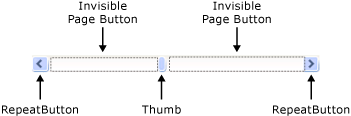
Lorsque vous implémentez un ScrollBar élément dans le cadre d’un ScrollViewer contrôle, la ScrollViewer commande exécute cette commande.
Utilisation du texte XAML
<
propriété="objectScrollBar.PageRightCommand"/>
