Remarque
L’accès à cette page nécessite une autorisation. Vous pouvez essayer de vous connecter ou de modifier des répertoires.
L’accès à cette page nécessite une autorisation. Vous pouvez essayer de modifier des répertoires.
L’orchestration de transfert permet aux agents de transférer le contrôle entre eux en fonction du contexte ou de la demande de l’utilisateur. Chaque agent peut « remettre » la conversation à un autre agent avec l’expertise appropriée, ce qui garantit que l’agent approprié gère chaque partie de la tâche. Cela est particulièrement utile dans le support client, les systèmes experts ou tout scénario nécessitant une délégation dynamique.
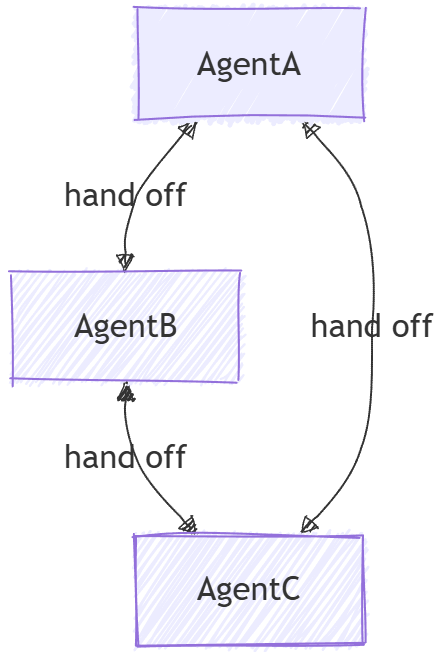
Différences entre le passage de main et les agents en tant qu’outils
Bien que l'agent en tant qu'outil soit généralement considéré comme un modèle multi-agent et qu'il puisse sembler similaire à la remise de prime abord, il existe des différences fondamentales entre les deux :
- Flux de contrôle : dans l’orchestration de transfert, le contrôle est transmis explicitement entre les agents en fonction de règles définies. Chaque agent peut décider de remettre toute la tâche à un autre agent. Il n’existe aucune autorité centrale qui gère le flux de travail. En revanche, agent-as-tools implique un agent principal qui délègue des sous-tâches à d’autres agents et une fois que l’agent a terminé la sous-tâche, le contrôle revient à l’agent principal.
- Propriété de la tâche : dans le transfert, l’agent recevant le transfert prend entièrement possession de la tâche. Dans le modèle agent-comme-outils, l’agent principal conserve la responsabilité globale de la tâche, tandis que d’autres agents sont traités comme des outils pour aider dans des sous-tâches spécifiques.
- Gestion du contexte : dans l’orchestration de la passation, la conversation est remise à un autre agent à part entière. L’agent de réception a un contexte complet de ce qui a été fait jusqu’à présent. Dans un système où les agents agissent comme des outils, l'agent principal gère le contexte global et peut fournir uniquement les informations pertinentes aux agents-outils selon les besoins.
Ce que vous allez apprendre
- Comment créer des agents spécialisés pour différents domaines
- Comment configurer des règles de transfert entre les agents
- Comment créer des flux de travail interactifs avec le routage d’agent dynamique
- Comment gérer des conversations à plusieurs tours avec changement d’agent
- Comment implémenter l’approbation des outils pour les opérations sensibles (HITL)
- Comment utiliser des points de contrôle pour les workflows de transfert fiables
Dans l’orchestration de transfert, les agents peuvent transférer le contrôle les uns aux autres en fonction du contexte, ce qui permet un routage dynamique et une gestion spécialisée de l’expertise.
Configurer le client Azure OpenAI
using System;
using System.Collections.Generic;
using System.Threading.Tasks;
using Azure.AI.OpenAI;
using Azure.Identity;
using Microsoft.Agents.AI.Workflows;
using Microsoft.Extensions.AI;
using Microsoft.Agents.AI;

// 1) Set up the Azure OpenAI client
var endpoint = Environment.GetEnvironmentVariable("AZURE_OPENAI_ENDPOINT") ??
    throw new InvalidOperationException("AZURE_OPENAI_ENDPOINT is not set.");
var deploymentName = Environment.GetEnvironmentVariable("AZURE_OPENAI_DEPLOYMENT_NAME") ?? "gpt-4o-mini";
var client = new AzureOpenAIClient(new Uri(endpoint), new AzureCliCredential())
    .GetChatClient(deploymentName)
    .AsIChatClient();
Définir vos agents spécialisés
Créez des agents spécifiques au domaine et un agent de triage pour le routage :
// 2) Create specialized agents
ChatClientAgent historyTutor = new(client,
    "You provide assistance with historical queries. Explain important events and context clearly. Only respond about history.",
    "history_tutor",
    "Specialist agent for historical questions");

ChatClientAgent mathTutor = new(client,
    "You provide help with math problems. Explain your reasoning at each step and include examples. Only respond about math.",
    "math_tutor",
    "Specialist agent for math questions");

ChatClientAgent triageAgent = new(client,
    "You determine which agent to use based on the user's homework question. ALWAYS handoff to another agent.",
    "triage_agent",
    "Routes messages to the appropriate specialist agent");
Configurer les règles de Handoff
Définissez quels agents peuvent rediriger vers d'autres agents.
// 3) Build handoff workflow with routing rules
var workflow = AgentWorkflowBuilder.StartHandoffWith(triageAgent)
    .WithHandoffs(triageAgent, [mathTutor, historyTutor]) // Triage can route to either specialist
    .WithHandoff(mathTutor, triageAgent)                  // Math tutor can return to triage
    .WithHandoff(historyTutor, triageAgent)               // History tutor can return to triage
    .Build();
Lancer un flux de travail de remise interactive
Gérez les conversations à plusieurs tours avec le changement d’agent dynamique :
// 4) Process multi-turn conversations
List<ChatMessage> messages = new();

while (true)
{
    Console.Write("Q: ");
    string userInput = Console.ReadLine()!;
    messages.Add(new(ChatRole.User, userInput));

    // Execute workflow and process events
    StreamingRun run = await InProcessExecution.StreamAsync(workflow, messages);
    await run.TrySendMessageAsync(new TurnToken(emitEvents: true));

    List<ChatMessage> newMessages = new();
    await foreach (WorkflowEvent evt in run.WatchStreamAsync().ConfigureAwait(false))
    {
        if (evt is AgentRunUpdateEvent e)
        {
            Console.WriteLine($"{e.ExecutorId}: {e.Data}");
        }
        else if (evt is WorkflowOutputEvent outputEvt)
        {
            newMessages = (List<ChatMessage>)outputEvt.Data!;
            break;
        }
    }

    // Add new messages to conversation history
    messages.AddRange(newMessages.Skip(messages.Count));
}
Exemple d’interaction
Q: What is the derivative of x^2?
triage_agent: This is a math question. I'll hand this off to the math tutor.
math_tutor: The derivative of x^2 is 2x. Using the power rule, we bring down the exponent (2) and multiply it by the coefficient (1), then reduce the exponent by 1: d/dx(x^2) = 2x^(2-1) = 2x.

Q: Tell me about World War 2
triage_agent: This is a history question. I'll hand this off to the history tutor.
history_tutor: World War 2 was a global conflict from 1939 to 1945. It began when Germany invaded Poland and involved most of the world's nations. Key events included the Holocaust, Pearl Harbor attack, D-Day invasion, and ended with atomic bombs on Japan.

Q: Can you help me with calculus integration?
triage_agent: This is another math question. I'll route this to the math tutor.
math_tutor: I'd be happy to help with calculus integration! Integration is the reverse of differentiation. The basic power rule for integration is: ∫x^n dx = x^(n+1)/(n+1) + C, where C is the constant of integration.
Configurer le client de conversation
from agent_framework.azure import AzureOpenAIChatClient
from azure.identity import AzureCliCredential

# Initialize the Azure OpenAI chat client
chat_client = AzureOpenAIChatClient(credential=AzureCliCredential())
Définir vos agents spécialisés
Créez des agents spécifiques à un domaine avec un coordinateur pour le routage :
# Create triage/coordinator agent
triage_agent = chat_client.create_agent(
    instructions=(
        "You are frontline support triage. Read the latest user message and decide whether "
        "to hand off to refund_agent, order_agent, or support_agent. Provide a brief natural-language "
        "response for the user. When delegation is required, call the matching handoff tool "
        "(`handoff_to_refund_agent`, `handoff_to_order_agent`, or `handoff_to_support_agent`)."
    ),
    name="triage_agent",
)

# Create specialist agents
refund_agent = chat_client.create_agent(
    instructions=(
        "You handle refund workflows. Ask for any order identifiers you require and outline the refund steps."
    ),
    name="refund_agent",
)

order_agent = chat_client.create_agent(
    instructions=(
        "You resolve shipping and fulfillment issues. Clarify the delivery problem and describe the actions "
        "you will take to remedy it."
    ),
    name="order_agent",
)

support_agent = chat_client.create_agent(
    instructions=(
        "You are a general support agent. Offer empathetic troubleshooting and gather missing details if the "
        "issue does not match other specialists."
    ),
    name="support_agent",
)
Configurer les règles de Handoff
Créez le flux de travail de transfert en utilisant HandoffBuilder.
from agent_framework import HandoffBuilder

# Build the handoff workflow
workflow = (
    HandoffBuilder(
        name="customer_support_handoff",
        participants=[triage_agent, refund_agent, order_agent, support_agent],
    )
    .set_coordinator("triage_agent")
    .with_termination_condition(
        # Terminate after a certain number of user messages
        lambda conv: sum(1 for msg in conv if msg.role.value == "user") >= 10
    )
    .build()
)
Pour un routage plus avancé, vous pouvez configurer des remises spécialisées à spécialistes :
# Enable return-to-previous and add specialist-to-specialist handoffs
workflow = (
    HandoffBuilder(
        name="advanced_handoff",
        participants=[coordinator, technical, account, billing],
    )
    .set_coordinator(coordinator)
    .add_handoff(coordinator, [technical, account, billing])  # Coordinator routes to all specialists
    .add_handoff(technical, [billing, account])  # Technical can route to billing or account
    .add_handoff(account, [technical, billing])  # Account can route to technical or billing
    .add_handoff(billing, [technical, account])  # Billing can route to technical or account
    .enable_return_to_previous(True)  # User inputs route directly to current specialist
    .build()
)
Lancer un flux de travail de remise interactive
Gérez les conversations à plusieurs tours avec les requêtes d'entrée de l'utilisateur :
from agent_framework import RequestInfoEvent, HandoffUserInputRequest, WorkflowOutputEvent

# Start workflow with initial user message
events = [event async for event in workflow.run_stream("I need help with my order")]

# Process events and collect pending input requests
pending_requests = []
for event in events:
    if isinstance(event, RequestInfoEvent):
        pending_requests.append(event)
        request_data = event.data
        print(f"Agent {request_data.awaiting_agent_id} is awaiting your input")
        for msg in request_data.conversation[-3:]:
            print(f"{msg.author_name}: {msg.text}")

# Interactive loop: respond to requests
while pending_requests:
    user_input = input("You: ")

    # Send responses to all pending requests
    responses = {req.request_id: user_input for req in pending_requests}
    events = [event async for event in workflow.send_responses_streaming(responses)]

    # Process new events
    pending_requests = []
    for event in events:
        if isinstance(event, RequestInfoEvent):
            pending_requests.append(event)
        elif isinstance(event, WorkflowOutputEvent):
            print("Workflow completed!")
            conversation = event.data
            for msg in conversation:
                print(f"{msg.author_name}: {msg.text}")
Avancé : Approbation des outils dans les flux de travail de transfert
Les flux de travail de transmission peuvent inclure des agents avec des outils qui nécessitent une approbation humaine avant l’exécution. Cela est utile pour les opérations sensibles telles que le traitement des remboursements, l’achat ou l’exécution d’actions irréversibles.
Définir des outils avec approbation requises
from typing import Annotated
from agent_framework import ai_function

@ai_function(approval_mode="always_require")
def submit_refund(
    refund_description: Annotated[str, "Description of the refund reason"],
    amount: Annotated[str, "Refund amount"],
    order_id: Annotated[str, "Order ID for the refund"],
) -> str:
    """Submit a refund request for manual review before processing."""
    return f"Refund recorded for order {order_id} (amount: {amount}): {refund_description}"
Créer des agents avec des outils nécessitant une approbation
from agent_framework import ChatAgent
from agent_framework.azure import AzureOpenAIChatClient
from azure.identity import AzureCliCredential

client = AzureOpenAIChatClient(credential=AzureCliCredential())

triage_agent = client.create_agent(
    name="triage_agent",
    instructions=(
        "You are a customer service triage agent. Listen to customer issues and determine "
        "if they need refund help or order tracking. Use handoff_to_refund_agent or "
        "handoff_to_order_agent to transfer them."
    ),
)

refund_agent = client.create_agent(
    name="refund_agent",
    instructions=(
        "You are a refund specialist. Help customers with refund requests. "
        "When the user confirms they want a refund and supplies order details, "
        "call submit_refund to record the request."
    ),
    tools=[submit_refund],
)

order_agent = client.create_agent(
    name="order_agent",
    instructions="You are an order tracking specialist. Help customers track their orders.",
)
Gérer à la fois les entrées utilisateur et les demandes d’approbation d’outils
from agent_framework import (
    FunctionApprovalRequestContent,
    HandoffBuilder,
    HandoffUserInputRequest,
    RequestInfoEvent,
    WorkflowOutputEvent,
)

workflow = (
    HandoffBuilder(
        name="support_with_approvals",
        participants=[triage_agent, refund_agent, order_agent],
    )
    .set_coordinator("triage_agent")
    .build()
)

pending_requests: list[RequestInfoEvent] = []

# Start workflow
async for event in workflow.run_stream("My order 12345 arrived damaged. I need a refund."):
    if isinstance(event, RequestInfoEvent):
        pending_requests.append(event)

# Process pending requests - could be user input OR tool approval
while pending_requests:
    responses: dict[str, object] = {}

    for request in pending_requests:
        if isinstance(request.data, HandoffUserInputRequest):
            # Agent needs user input
            print(f"Agent {request.data.awaiting_agent_id} asks:")
            for msg in request.data.conversation[-2:]:
                print(f"  {msg.author_name}: {msg.text}")

            user_input = input("You: ")
            responses[request.request_id] = user_input

        elif isinstance(request.data, FunctionApprovalRequestContent):
            # Agent wants to call a tool that requires approval
            func_call = request.data.function_call
            args = func_call.parse_arguments() or {}

            print(f"\nTool approval requested: {func_call.name}")
            print(f"Arguments: {args}")

            approval = input("Approve? (y/n): ").strip().lower() == "y"
            responses[request.request_id] = request.data.create_response(approved=approval)

    # Send all responses and collect new requests
    pending_requests = []
    async for event in workflow.send_responses_streaming(responses):
        if isinstance(event, RequestInfoEvent):
            pending_requests.append(event)
        elif isinstance(event, WorkflowOutputEvent):
            print("\nWorkflow completed!")
Avec le point de contrôle pour les flux de travail durables
Pour les workflows de longue durée où les approbations d’outils peuvent se produire des heures ou des jours plus tard, utilisez le point de contrôle :
from agent_framework import FileCheckpointStorage

storage = FileCheckpointStorage(storage_path="./checkpoints")

workflow = (
    HandoffBuilder(
        name="durable_support",
        participants=[triage_agent, refund_agent, order_agent],
    )
    .set_coordinator("triage_agent")
    .with_checkpointing(storage)
    .build()
)

# Initial run - workflow pauses when approval is needed
pending_requests = []
async for event in workflow.run_stream("I need a refund for order 12345"):
    if isinstance(event, RequestInfoEvent):
        pending_requests.append(event)

# Process can exit here - checkpoint is saved automatically

# Later: Resume from checkpoint and provide approval
checkpoints = await storage.list_checkpoints()
latest = sorted(checkpoints, key=lambda c: c.timestamp, reverse=True)[0]

# Step 1: Restore checkpoint to reload pending requests
restored_requests = []
async for event in workflow.run_stream(checkpoint_id=latest.checkpoint_id):
    if isinstance(event, RequestInfoEvent):
        restored_requests.append(event)

# Step 2: Send responses
responses = {}
for req in restored_requests:
    if isinstance(req.data, FunctionApprovalRequestContent):
        responses[req.request_id] = req.data.create_response(approved=True)
    elif isinstance(req.data, HandoffUserInputRequest):
        responses[req.request_id] = "Yes, please process the refund."

async for event in workflow.send_responses_streaming(responses):
    if isinstance(event, WorkflowOutputEvent):
        print("Refund workflow completed!")
## Sample Interaction

```plaintext
User: I need help with my order

triage_agent: I'd be happy to help you with your order. Could you please provide more details about the issue?

User: My order 1234 arrived damaged

triage_agent: I'm sorry to hear that your order arrived damaged. I will connect you with a specialist.

support_agent: I'm sorry about the damaged order. To assist you better, could you please:
- Describe the damage
- Would you prefer a replacement or refund?

User: I'd like a refund

triage_agent: I'll connect you with the refund specialist.

refund_agent: I'll process your refund for order 1234. Here's what will happen next:
1. Verification of the damaged items
2. Refund request submission
3. Return instructions if needed
4. Refund processing within 5-10 business days

Could you provide photos of the damage to expedite the process?
Concepts clés
- Routage dynamique : les agents peuvent décider quel agent doit gérer l’interaction suivante en fonction du contexte
- AgentWorkflowBuilder.StartHandoffWith() : définit l’agent initial qui démarre le flux de travail
- WithHandoff() et WithHandoffs() : configure les règles de transfert entre des agents spécifiques
- Préservation du contexte : l'historique complet des conversations est maintenu à travers tous les transferts
- Prise en charge multi-échanges : prend en charge les conversations en cours avec changement d'agent sans interruption
- Expertise spécialisée : chaque agent se concentre sur son domaine tout en collaborant par le biais de transmissions
- Routage dynamique : les agents peuvent décider quel agent doit gérer l’interaction suivante en fonction du contexte
- HandoffBuilder : crée des flux de travail avec l’inscription automatique de l’outil de transfert
- set_coordinator() : définit l’agent qui reçoit d’abord l’entrée utilisateur
- add_handoff() : configure des relations de transfert spécifiques entre les agents
- enable_return_to_previous() : route les entrées utilisateur directement vers le spécialiste actuel, en ignorant la réévaluation du coordinateur
- Préservation du contexte : l'historique complet des conversations est maintenu à travers tous les transferts
- Cycle de demande/réponse : Les demandes de flux de travail demandent l’entrée utilisateur, traitent les réponses et continuent jusqu’à ce que la condition d’arrêt soit remplie
-
Approbation de l’outil : utilisation
@ai_function(approval_mode="always_require")pour les opérations sensibles nécessitant une approbation humaine -
FunctionApprovalRequestContent : émis lorsqu’un agent appelle un outil nécessitant une approbation ; utiliser
create_response(approved=...)pour répondre -
Point de contrôle : Utiliser
with_checkpointing()pour les flux de travail durables qui peuvent être suspendus et repris à travers les redémarrages de processus - Expertise spécialisée : chaque agent se concentre sur son domaine tout en collaborant par le biais de transmissions