Remarque
L’accès à cette page nécessite une autorisation. Vous pouvez essayer de vous connecter ou de modifier des répertoires.
L’accès à cette page nécessite une autorisation. Vous pouvez essayer de modifier des répertoires.
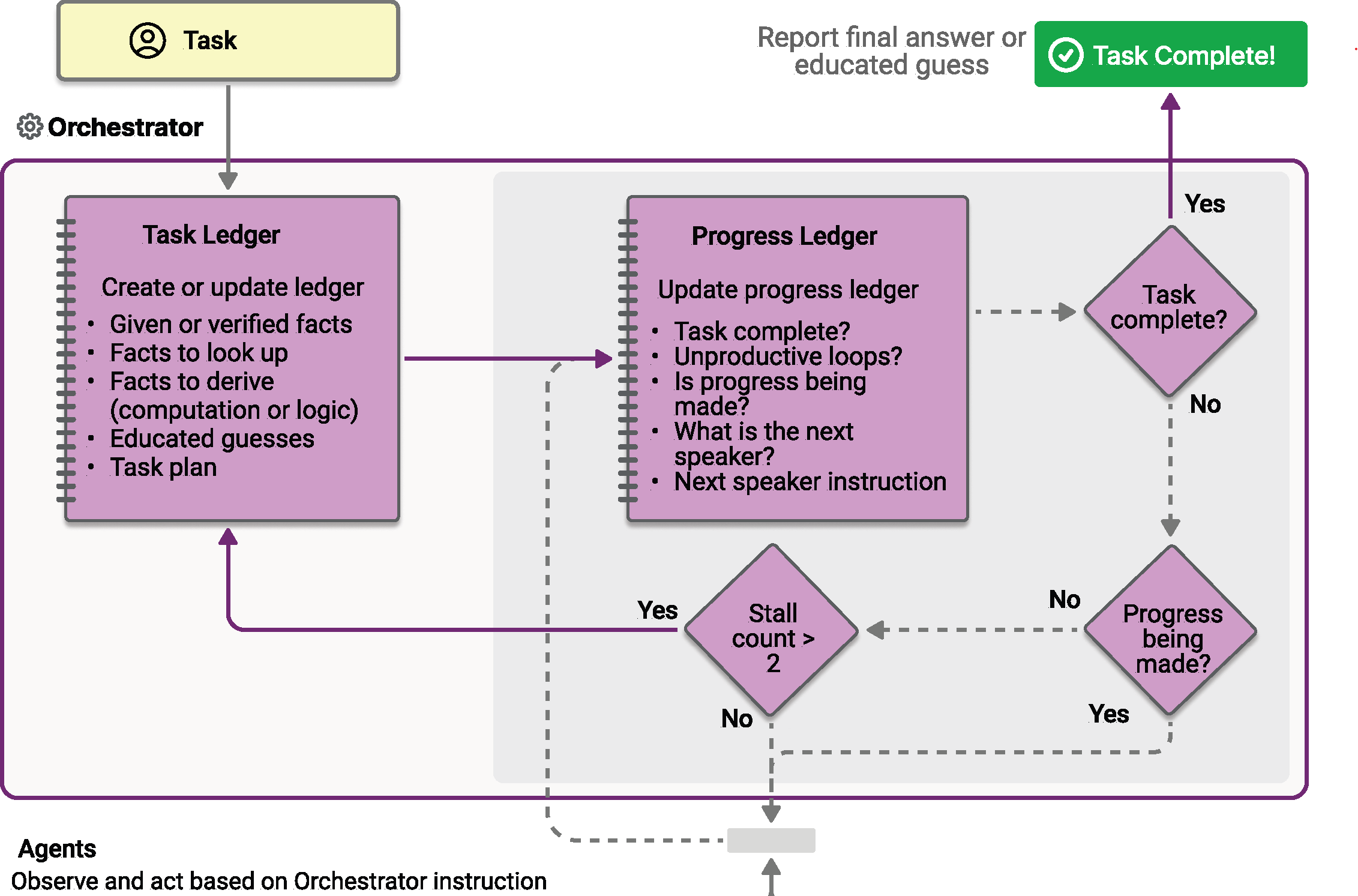
L’orchestration Magentic est conçue sur la base du système Magentic-One inventé par AutoGen. Il s’agit d’un modèle multi-agent à usage général flexible conçu pour les tâches complexes et ouvertes qui nécessitent une collaboration dynamique. Dans ce modèle, un responsable Magentic dédié coordonne une équipe d’agents spécialisés, en sélectionnant l’agent qui doit agir ensuite en fonction du contexte en évolution, de la progression des tâches et des fonctionnalités de l’agent.
Le gestionnaire Magentic gère un contexte partagé, suit la progression et adapte le flux de travail en temps réel. Cela permet au système de décomposer les problèmes complexes, de déléguer des tâches subordonnées et d’affiner de manière itérative des solutions via la collaboration de l’agent. L’orchestration est particulièrement adaptée aux scénarios où le chemin de la solution n’est pas connu à l’avance et peut nécessiter plusieurs séries de raisonnement, de recherche et de calcul.
Ce que vous allez apprendre
- Comment configurer un responsable Magentic pour coordonner plusieurs agents spécialisés
- Comment gérer les événements de diffusion en continu avec
AgentRunUpdateEvent - Comment implémenter la révision de plan avec intervention humaine, l’approbation des outils et l’intervention en cas de blocage
- Comment suivre la collaboration et la progression de l’agent via des tâches complexes
Définir vos agents spécialisés
À venir...
Dans l’orchestration Magentic, vous définissez des agents spécialisés que le gestionnaire peut sélectionner dynamiquement en fonction des exigences de tâche :
from agent_framework import ChatAgent, HostedCodeInterpreterTool
from agent_framework.openai import OpenAIChatClient, OpenAIResponsesClient

researcher_agent = ChatAgent(
    name="ResearcherAgent",
    description="Specialist in research and information gathering",
    instructions=(
        "You are a Researcher. You find information without additional computation or quantitative analysis."
    ),
    # This agent requires the gpt-4o-search-preview model to perform web searches
    chat_client=OpenAIChatClient(model_id="gpt-4o-search-preview"),
)

coder_agent = ChatAgent(
    name="CoderAgent",
    description="A helpful assistant that writes and executes code to process and analyze data.",
    instructions="You solve questions using code. Please provide detailed analysis and computation process.",
    chat_client=OpenAIResponsesClient(),
    tools=HostedCodeInterpreterTool(),
)

# Create a manager agent for orchestration
manager_agent = ChatAgent(
    name="MagenticManager",
    description="Orchestrator that coordinates the research and coding workflow",
    instructions="You coordinate a team to complete complex tasks efficiently.",
    chat_client=OpenAIChatClient(),
)
Générer le flux de travail Magentic
Permet MagenticBuilder de configurer le flux de travail avec un gestionnaire standard :
from agent_framework import MagenticBuilder

workflow = (
    MagenticBuilder()
    .participants(researcher=researcher_agent, coder=coder_agent)
    .with_standard_manager(
        agent=manager_agent,
        max_round_count=10,  # Maximum collaboration rounds
        max_stall_count=3,   # Maximum rounds without progress
        max_reset_count=2,   # Maximum plan resets allowed
    )
    .build()
)
Exécuter le flux de travail avec le streaming d’événements
Exécutez une tâche complexe et gérez les événements pour la sortie en continu et pour les mises à jour d’orchestration.
from typing import cast
from agent_framework import (
    MAGENTIC_EVENT_TYPE_AGENT_DELTA,
    MAGENTIC_EVENT_TYPE_ORCHESTRATOR,
    AgentRunUpdateEvent,
    ChatMessage,
    WorkflowOutputEvent,
)

task = (
    "I am preparing a report on the energy efficiency of different machine learning model architectures. "
    "Compare the estimated training and inference energy consumption of ResNet-50, BERT-base, and GPT-2 "
    "on standard datasets (e.g., ImageNet for ResNet, GLUE for BERT, WebText for GPT-2). "
    "Then, estimate the CO2 emissions associated with each, assuming training on an Azure Standard_NC6s_v3 "
    "VM for 24 hours. Provide tables for clarity, and recommend the most energy-efficient model "
    "per task type (image classification, text classification, and text generation)."
)

# State for streaming callback
last_stream_agent_id: str | None = None
stream_line_open: bool = False
output: str | None = None

async for event in workflow.run_stream(task):
    if isinstance(event, AgentRunUpdateEvent):
        props = event.data.additional_properties if event.data else None
        event_type = props.get("magentic_event_type") if props else None

        if event_type == MAGENTIC_EVENT_TYPE_ORCHESTRATOR:
            # Manager's planning and coordination messages
            kind = props.get("orchestrator_message_kind", "") if props else ""
            text = event.data.text if event.data else ""
            print(f"\n[ORCH:{kind}]\n\n{text}\n{'-' * 26}")

        elif event_type == MAGENTIC_EVENT_TYPE_AGENT_DELTA:
            # Streaming tokens from agents
            agent_id = props.get("agent_id", event.executor_id) if props else event.executor_id
            if last_stream_agent_id != agent_id or not stream_line_open:
                if stream_line_open:
                    print()
                print(f"\n[STREAM:{agent_id}]: ", end="", flush=True)
                last_stream_agent_id = agent_id
                stream_line_open = True
            if event.data and event.data.text:
                print(event.data.text, end="", flush=True)

        elif event.data and event.data.text:
            print(event.data.text, end="", flush=True)

    elif isinstance(event, WorkflowOutputEvent):
        output_messages = cast(list[ChatMessage], event.data)
        if output_messages:
            output = output_messages[-1].text

if stream_line_open:
    print()

if output is not None:
    print(f"Workflow completed with result:\n\n{output}")
Révision de plan avancée avec intervention humaine
Activez l’examen humain et l’approbation du plan du responsable avant l’exécution :
Configurer la révision du plan
from typing import cast
from agent_framework import (
    MAGENTIC_EVENT_TYPE_AGENT_DELTA,
    MAGENTIC_EVENT_TYPE_ORCHESTRATOR,
    AgentRunUpdateEvent,
    MagenticHumanInterventionDecision,
    MagenticHumanInterventionKind,
    MagenticHumanInterventionReply,
    MagenticHumanInterventionRequest,
    RequestInfoEvent,
    WorkflowOutputEvent,
)

workflow = (
    MagenticBuilder()
    .participants(researcher=researcher_agent, coder=coder_agent)
    .with_standard_manager(
        agent=manager_agent,
        max_round_count=10,
        max_stall_count=3,
        max_reset_count=2,
    )
    .with_plan_review()  # Enable plan review
    .build()
)
Gérer les demandes de révision de plan
pending_request: RequestInfoEvent | None = None
pending_responses: dict[str, MagenticHumanInterventionReply] | None = None
completed = False
workflow_output: str | None = None

while not completed:
    # Use streaming for both initial run and response sending
    if pending_responses is not None:
        stream = workflow.send_responses_streaming(pending_responses)
    else:
        stream = workflow.run_stream(task)

    async for event in stream:
        if isinstance(event, AgentRunUpdateEvent):
            # Handle streaming events as shown above
            pass
        elif isinstance(event, RequestInfoEvent) and event.request_type is MagenticHumanInterventionRequest:
            request = cast(MagenticHumanInterventionRequest, event.data)
            if request.kind == MagenticHumanInterventionKind.PLAN_REVIEW:
                pending_request = event
                if request.plan_text:
                    print(f"\n=== PLAN REVIEW REQUEST ===\n{request.plan_text}\n")
        elif isinstance(event, WorkflowOutputEvent):
            workflow_output = str(event.data) if event.data else None
            completed = True

    pending_responses = None

    # Handle pending plan review request
    if pending_request is not None:
        # Collect human decision (approve/reject/modify)
        # For demo, we auto-approve:
        reply = MagenticHumanInterventionReply(decision=MagenticHumanInterventionDecision.APPROVE)

        # Or approve with comments:
        # reply = MagenticHumanInterventionReply(
        #     decision=MagenticHumanInterventionDecision.APPROVE,
        #     comments="Looks good, but prioritize efficiency metrics."
        # )

        # Or request revision:
        # reply = MagenticHumanInterventionReply(
        #     decision=MagenticHumanInterventionDecision.REVISE,
        #     comments="Please include a comparison with newer models like LLaMA."
        # )

        pending_responses = {pending_request.request_id: reply}
        pending_request = None
Avancé : Clarification de l’agent via l’approbation de l’outil
Les agents peuvent poser des questions de clarification aux utilisateurs lors de l’exécution à l’aide de l’approbation de l’outil. Cela permet des interactions human-in-the-loop (HITL) où l’agent peut demander des informations supplémentaires avant de continuer.
Définir un outil avec approbation requise
from typing import Annotated
from agent_framework import ai_function

@ai_function(approval_mode="always_require")
def ask_user(question: Annotated[str, "The question to ask the user for clarification"]) -> str:
    """Ask the user a clarifying question to gather missing information.

    Use this tool when you need additional information from the user to complete
    your task effectively.
    """
    # This function body is a placeholder - the actual interaction happens via HITL.
    return f"User was asked: {question}"
Créer un agent avec l’outil
onboarding_agent = ChatAgent(
    name="OnboardingAgent",
    description="HR specialist who handles employee onboarding",
    instructions=(
        "You are an HR Onboarding Specialist. Your job is to onboard new employees.\n\n"
        "IMPORTANT: When given an onboarding request, you MUST gather the following "
        "information before proceeding:\n"
        "1. Department (e.g., Engineering, Sales, Marketing)\n"
        "2. Role/Title (e.g., Software Engineer, Account Executive)\n\n"
        "Use the ask_user tool to request ANY missing information."
    ),
    chat_client=OpenAIChatClient(model_id="gpt-4o"),
    tools=[ask_user],
)
Gérer les demandes d’approbation des outils
async for event in workflow.run_stream("Onboard Jessica Smith"):
    if isinstance(event, RequestInfoEvent) and event.request_type is MagenticHumanInterventionRequest:
        req = cast(MagenticHumanInterventionRequest, event.data)

        if req.kind == MagenticHumanInterventionKind.TOOL_APPROVAL:
            print(f"Agent: {req.agent_id}")
            print(f"Question: {req.prompt}")

            # Get user's answer
            answer = input("> ").strip()

            # Send the answer back - it will be fed to the agent as the function result
            reply = MagenticHumanInterventionReply(
                decision=MagenticHumanInterventionDecision.APPROVE,
                response_text=answer,
            )
            pending_responses = {event.request_id: reply}

            # Continue workflow with response
            async for ev in workflow.send_responses_streaming(pending_responses):
                # Handle continuation events
                pass
Avancé : Intervention humaine en cas de blocage
Activez l’intervention humaine lorsque le flux de travail détecte que les agents ne progressent pas :
Configurer l’intervention de décrochage
workflow = (
    MagenticBuilder()
    .participants(researcher=researcher_agent, analyst=analyst_agent)
    .with_standard_manager(
        agent=manager_agent,
        max_round_count=10,
        max_stall_count=1,  # Stall detection after 1 round without progress
        max_reset_count=2,
    )
    .with_human_input_on_stall()  # Request human input when stalled
    .build()
)
Gérer les demandes d'intervention en cas de ralentissement
async for event in workflow.run_stream(task):
    if isinstance(event, RequestInfoEvent) and event.request_type is MagenticHumanInterventionRequest:
        req = cast(MagenticHumanInterventionRequest, event.data)

        if req.kind == MagenticHumanInterventionKind.STALL:
            print(f"Workflow stalled after {req.stall_count} rounds")
            print(f"Reason: {req.stall_reason}")
            if req.plan_text:
                print(f"Current plan:\n{req.plan_text}")

            # Choose response: CONTINUE, REPLAN, or GUIDANCE
            reply = MagenticHumanInterventionReply(
                decision=MagenticHumanInterventionDecision.GUIDANCE,
                comments="Focus on completing the research step first before moving to analysis.",
            )
            pending_responses = {event.request_id: reply}
Concepts clés
- Coordination dynamique : le gestionnaire Magentic sélectionne dynamiquement l’agent qui doit agir en fonction du contexte en constante évolution
- Affinement itératif : le système peut décomposer des problèmes complexes et affiner de manière itérative des solutions par le biais de plusieurs arrondis
- Suivi de la progression : mécanismes intégrés pour détecter les blocages et réinitialiser le plan si nécessaire
- Collaboration flexible : les agents peuvent être appelés plusieurs fois dans n’importe quel ordre déterminé par le responsable
- Surveillance humaine : mécanismes facultatifs intégrant l'intervention humaine, y compris l’examen du plan, l’approbation des outils et l’intervention en cas de blocage
-
Système d’événements unifié : utilisation
AgentRunUpdateEventavecmagentic_event_typepour gérer les événements d’orchestrateur et de streaming d’agent
Flux d'exécution du processus de travail
L’orchestration Magentic suit ce modèle d’exécution :
- Phase de planification : le responsable analyse la tâche et crée un plan initial
- Révision facultative du plan : si elle est activée, les humains peuvent examiner et approuver/modifier le plan
- Sélection de l’agent : le responsable sélectionne l’agent le plus approprié pour chaque sous-tâche
- Exécution : l’agent sélectionné exécute sa partie de la tâche
- Évaluation de la progression : le responsable évalue la progression et met à jour le plan
- Détection de blocage : si la progression se bloque, replanification automatique ou solliciter une intervention humaine
- Itération : les étapes 3 à 6 se répètent jusqu’à ce que la tâche soit terminée ou que les limites soient atteintes
- Synthèse finale : le gestionnaire synthétise toutes les sorties de l’agent dans un résultat final
Exemple complet
Voici un exemple complet qui regroupe tous les concepts :
import asyncio
import logging
from typing import cast

from agent_framework import (
    MAGENTIC_EVENT_TYPE_AGENT_DELTA,
    MAGENTIC_EVENT_TYPE_ORCHESTRATOR,
    AgentRunUpdateEvent,
    ChatAgent,
    ChatMessage,
    HostedCodeInterpreterTool,
    MagenticBuilder,
    WorkflowOutputEvent,
)
from agent_framework.openai import OpenAIChatClient, OpenAIResponsesClient

logging.basicConfig(level=logging.WARNING)
logger = logging.getLogger(__name__)

async def main() -> None:
    # Define specialized agents
    researcher_agent = ChatAgent(
        name="ResearcherAgent",
        description="Specialist in research and information gathering",
        instructions=(
            "You are a Researcher. You find information without additional "
            "computation or quantitative analysis."
        ),
        chat_client=OpenAIChatClient(model_id="gpt-4o-search-preview"),
    )

    coder_agent = ChatAgent(
        name="CoderAgent",
        description="A helpful assistant that writes and executes code to process and analyze data.",
        instructions="You solve questions using code. Please provide detailed analysis and computation process.",
        chat_client=OpenAIResponsesClient(),
        tools=HostedCodeInterpreterTool(),
    )

    # Create a manager agent for orchestration
    manager_agent = ChatAgent(
        name="MagenticManager",
        description="Orchestrator that coordinates the research and coding workflow",
        instructions="You coordinate a team to complete complex tasks efficiently.",
        chat_client=OpenAIChatClient(),
    )

    # State for streaming output
    last_stream_agent_id: str | None = None
    stream_line_open: bool = False

    # Build the workflow
    print("\nBuilding Magentic Workflow...")

    workflow = (
        MagenticBuilder()
        .participants(researcher=researcher_agent, coder=coder_agent)
        .with_standard_manager(
            agent=manager_agent,
            max_round_count=10,
            max_stall_count=3,
            max_reset_count=2,
        )
        .build()
    )

    # Define the task
    task = (
        "I am preparing a report on the energy efficiency of different machine learning model architectures. "
        "Compare the estimated training and inference energy consumption of ResNet-50, BERT-base, and GPT-2 "
        "on standard datasets (e.g., ImageNet for ResNet, GLUE for BERT, WebText for GPT-2). "
        "Then, estimate the CO2 emissions associated with each, assuming training on an Azure Standard_NC6s_v3 "
        "VM for 24 hours. Provide tables for clarity, and recommend the most energy-efficient model "
        "per task type (image classification, text classification, and text generation)."
    )

    print(f"\nTask: {task}")
    print("\nStarting workflow execution...")

    # Run the workflow
    try:
        output: str | None = None
        async for event in workflow.run_stream(task):
            if isinstance(event, AgentRunUpdateEvent):
                props = event.data.additional_properties if event.data else None
                event_type = props.get("magentic_event_type") if props else None

                if event_type == MAGENTIC_EVENT_TYPE_ORCHESTRATOR:
                    kind = props.get("orchestrator_message_kind", "") if props else ""
                    text = event.data.text if event.data else ""
                    print(f"\n[ORCH:{kind}]\n\n{text}\n{'-' * 26}")
                elif event_type == MAGENTIC_EVENT_TYPE_AGENT_DELTA:
                    agent_id = props.get("agent_id", event.executor_id) if props else event.executor_id
                    if last_stream_agent_id != agent_id or not stream_line_open:
                        if stream_line_open:
                            print()
                        print(f"\n[STREAM:{agent_id}]: ", end="", flush=True)
                        last_stream_agent_id = agent_id
                        stream_line_open = True
                    if event.data and event.data.text:
                        print(event.data.text, end="", flush=True)
                elif event.data and event.data.text:
                    print(event.data.text, end="", flush=True)
            elif isinstance(event, WorkflowOutputEvent):
                output_messages = cast(list[ChatMessage], event.data)
                if output_messages:
                    output = output_messages[-1].text

        if stream_line_open:
            print()

        if output is not None:
            print(f"Workflow completed with result:\n\n{output}")

    except Exception as e:
        print(f"Workflow execution failed: {e}")
        logger.exception("Workflow exception", exc_info=e)

if __name__ == "__main__":
    asyncio.run(main())
Options de configuration
Paramètres du gestionnaire
-
max_round_count: nombre maximal de tours de collaboration (valeur par défaut : 10) -
max_stall_count: Nombre maximum de tours sans progression avant de déclencher la gestion des blocages (par défaut : 3) -
max_reset_count: nombre maximal de réinitialisations de plan autorisées (valeur par défaut : 2)
Types d’intervention humaine
-
PLAN_REVIEW: Examiner et approuver/réviser le plan initial -
TOOL_APPROVAL: Approuver un appel d’outil/fonction (utilisé pour la clarification de l’agent) -
STALL: Le flux de travail est bloqué et a besoin d'orientation
Décisions d’intervention humaine
-
APPROVE: Accepter le plan ou l'appel de l'outil tel quel -
REVISE: Demander une révision avec commentaires (révision du plan) -
REJECT: Rejeter/refuser (approbation de l’outil) -
CONTINUE: Continuer avec l’état actuel (blocage) -
REPLAN: Déclencher la replanification (blocage) -
GUIDANCE: Fournissez un texte d’aide (blocage, approbation de l’outil)
Types d’événements
Les événements sont émis via AgentRunUpdateEvent avec des métadonnées dans additional_properties:
-
magentic_event_type: soitMAGENTIC_EVENT_TYPE_ORCHESTRATORouMAGENTIC_EVENT_TYPE_AGENT_DELTA -
orchestrator_message_kind: Pour les événements d’orchestrateur, indique le type de message (par exemple, « instruction », « notice », « task_ledger ») -
agent_id: Pour les événements delta de l’agent, identifie l’agent de diffusion en continu
Exemple de sortie
À venir...