הערה
הגישה לדף זה מחייבת הרשאה. באפשרותך לנסות להיכנס או לשנות מדריכי כתובות.
הגישה לדף זה מחייבת הרשאה. באפשרותך לנסות לשנות מדריכי כתובות.
The ContextMenu class represents the element that exposes functionality by using a context-specific Menu. A ContextMenu is attached to a specific control and enables you to present users with a list of items that specify commands or options associated with a particular control, such as a Button.
Typically, users expose the ContextMenu in the user interface (UI) through the right mouse button. When users right-click the control, the menu appears. Clicking a MenuItem typically opens a submenu or causes an application to execute a command.
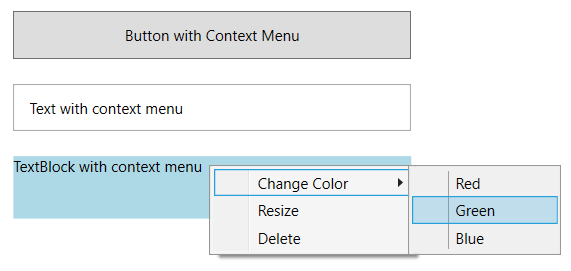
Creating a ContextMenu
You can create a ContextMenu either by declaring it in XAML or by building it programmatically in code.
The following example shows how to declare a context menu in XAML:
<Button Name="cmButton" Height="30" Width="200">
    Button with Context Menu
    <Button.ContextMenu>
        <ContextMenu Name="cm" Opened="Menu_OnOpened" Closed="Menu_OnClosed" StaysOpen="true">
            <MenuItem Header="File"/>
            <MenuItem Header="Save"/>
            <MenuItem Header="SaveAs"/>
            <MenuItem Header="Recent Files">
                <MenuItem Header="ReadMe.txt"/>
                <MenuItem Header="Schedule.xls"/>
            </MenuItem>
        </ContextMenu>
    </Button.ContextMenu>
</Button>
The next example demonstrates how to create a context menu programmatically in code:
private void CreateContextMenuProgrammatically()
{
    Button button = new() { Content = "Created with C#" };
    ContextMenu contextMenu = new();
    button.ContextMenu = contextMenu;

    MenuItem fileMenuItem = new() { Header = "File" };
    MenuItem newMenuItem = new() { Header = "New" };
    fileMenuItem.Items.Add(newMenuItem);

    MenuItem openMenuItem = new() { Header = "Open" };
    fileMenuItem.Items.Add(openMenuItem);

    MenuItem recentlyOpenedMenuItem = new() { Header = "Recently Opened" };
    openMenuItem.Items.Add(recentlyOpenedMenuItem);

    MenuItem textFileMenuItem = new() { Header = "Text.xaml" };
    recentlyOpenedMenuItem.Items.Add(textFileMenuItem);

    contextMenu.Items.Add(fileMenuItem);

    // Add the button to your container (implementation depends on your layout)
    // containerPanel.Children.Add(button);
}
Private Sub CreateContextMenuProgrammatically()
    Dim button As New Button() With {.Content = "Created with Visual Basic"}
    Dim contextMenu As New ContextMenu()
    button.ContextMenu = contextMenu

    Dim fileMenuItem As New MenuItem() With {.Header = "File"}
    Dim newMenuItem As New MenuItem() With {.Header = "New"}
    fileMenuItem.Items.Add(newMenuItem)

    Dim openMenuItem As New MenuItem() With {.Header = "Open"}
    fileMenuItem.Items.Add(openMenuItem)

    Dim recentlyOpenedMenuItem As New MenuItem() With {.Header = "Recently Opened"}
    openMenuItem.Items.Add(recentlyOpenedMenuItem)

    Dim textFileMenuItem As New MenuItem() With {.Header = "Text.xaml"}
    recentlyOpenedMenuItem.Items.Add(textFileMenuItem)

    contextMenu.Items.Add(fileMenuItem)

    ' Add the button to your container (implementation depends on your layout)
    ' containerPanel.Children.Add(button)
End Sub
Applying styles to a ContextMenu
By using a control Style, you can dramatically change the appearance and behavior of a ContextMenu without writing a custom control. You can set visual properties and apply styles to parts of a control. For example, you can change the behavior of parts of the control by using properties, or you can add parts to, or change the layout of, a ContextMenu. The following examples show several ways to add styles to ContextMenu controls.
The first example defines a style called SimpleSysResources, which shows how to use current system settings in your style. The example assigns MenuHighlightBrushKey as the Background color and MenuTextBrushKey as the Foreground color of the ContextMenu.
<Style x:Key="SimpleSysResources" TargetType="{x:Type MenuItem}">
  <Setter Property = "Background" Value=
    "{DynamicResource {x:Static SystemColors.MenuHighlightBrushKey}}"/>
  <Setter Property = "Foreground" Value=
    "{DynamicResource {x:Static SystemColors.MenuTextBrushKey}}"/>
</Style>
The following example uses the Trigger element to change the appearance of a Menu in response to events raised on the ContextMenu. When a user moves the mouse over the menu, the appearance of the ContextMenu items changes.
<Style x:Key="Triggers" TargetType="{x:Type MenuItem}">
  <Style.Triggers>
    <Trigger Property="MenuItem.IsMouseOver" Value="true">
      <Setter Property = "FontSize" Value="16"/>
      <Setter Property = "FontStyle" Value="Italic"/>
      <Setter Property = "Foreground" Value="Red"/>
    </Trigger>
  </Style.Triggers>
</Style>
Styles and templates
This section describes the styles and templates for the ContextMenu control. You can modify the default ControlTemplate to give the control a unique appearance. For more information, see Styles and templates and Create a template for a control.
Content property
The ContextMenu control uses the Items property as its content property, which contains the menu items displayed in the context menu.
Parts
The ContextMenu control doesn't define any named template parts.
When you create a ControlTemplate for a ContextMenu, your template might contain an ItemsPresenter within a ScrollViewer. The ItemsPresenter displays each item in the ContextMenu, and the ScrollViewer enables scrolling within the control. If the ItemsPresenter isn't the direct child of the ScrollViewer, you must give the ItemsPresenter the name ItemsPresenter.
Visual states
The following table lists the visual states for the ContextMenu control.
| Visual state name | Visual state group name | Description |
|---|---|---|
| Valid | ValidationStates | The control is valid and has no validation errors. |
| InvalidFocused | ValidationStates | The control has a validation error and has keyboard focus. |
| InvalidUnfocused | ValidationStates | The control has a validation error but doesn't have keyboard focus. |
See also
שתף איתנו פעולה ב- GitHub
ניתן למצוא את המקור לתוכן זה ב- GitHub, שם ניתן גם ליצור ולסקור בעיות ולמשוך בקשות. לקבלת מידע נוסף, עיין במדריך התורמים שלנו.

.NET Desktop feedback