הערה
הגישה לדף זה מחייבת הרשאה. באפשרותך לנסות להיכנס או לשנות מדריכי כתובות.
הגישה לדף זה מחייבת הרשאה. באפשרותך לנסות לשנות מדריכי כתובות.
מופע Custom הוא הייצוג של ספק Dynamics 365 Sales. בעת יצירת הערוץ, עליך לקבוע תצורה של שולח - לדוגמה, השולח של הודעת טקסט. כל מופע של ערוץ - לדוגמה, מופע ערוץ הישות - מייצג שולח יחיד.
עבור כל פתרון ערוץ, בצע את השלבים הבאים:
צור טבלה מותאמת אישית כדי לייצג את התצורה המורחבת של טבלת מופעי הערוץ (msdyn_channelinstance) המוגדרת בפתרון הבסיס.
הקצה את שם הטבלה לתכונה msdyn_channeldefinitionexternalentity בשלב הגדרת הערוץ.
צור וערוך קשרי גומלין בטבלה של אחד לרבים או רבים לאחד לטבלת מופע הערוץ הבסיסית בתכונה
msdyn_extendedentityid.תכונה זו היא בדיקת מידע פולימורבית. להלן דוגמה של קשר הגומלין ב- XML:
<EntityRelationship Name="msdyn_ChannelInstance_extendedentityid_cr65f_samplechannelinstance">
    <EntityRelationshipType>OneToMany</EntityRelationshipType>
    <IsCustomizable>0</IsCustomizable>
    <IntroducedVersion>1.0.0.0</IntroducedVersion>
    <IsHierarchical>0</IsHierarchical>
    <ReferencingEntityName>msdyn_ChannelInstance</ReferencingEntityName>
    <ReferencedEntityName>cr65f_samplechannelinstance</ReferencedEntityName>
    <CascadeAssign>NoCascade</CascadeAssign>
    <CascadeDelete>RemoveLink</CascadeDelete>
    <CascadeReparent>NoCascade</CascadeReparent>
    <CascadeShare>NoCascade</CascadeShare>
    <CascadeUnshare>NoCascade</CascadeUnshare>
    <CascadeRollupView>NoCascade</CascadeRollupView>
    <IsValidForAdvancedFind>1</IsValidForAdvancedFind>
    <ReferencingAttributeName>msdyn_extendedentityId</ReferencingAttributeName>
    <RelationshipDescription>
      <Descriptions>
        <Description description="" languagecode="1033" />
      </Descriptions>
    </RelationshipDescription>
    <EntityRelationshipRoles>
      <EntityRelationshipRole>
        <NavPaneDisplayOption>UseCollectionName</NavPaneDisplayOption>
        <NavPaneArea>Details</NavPaneArea>
        <NavPaneOrder>10000</NavPaneOrder>
        <NavigationPropertyName>msdyn_extendedentityid_cr65f_samplechannelinstance</NavigationPropertyName>
        <RelationshipRoleType>1</RelationshipRoleType>
      </EntityRelationshipRole>
      <EntityRelationshipRole>
        <NavigationPropertyName>msdyn_ChannelInstance_extendedentityid_cr65f_samplechannelinstance</NavigationPropertyName>
        <RelationshipRoleType>0</RelationshipRoleType>
      </EntityRelationshipRole>
    </EntityRelationshipRoles>
  </EntityRelationship>
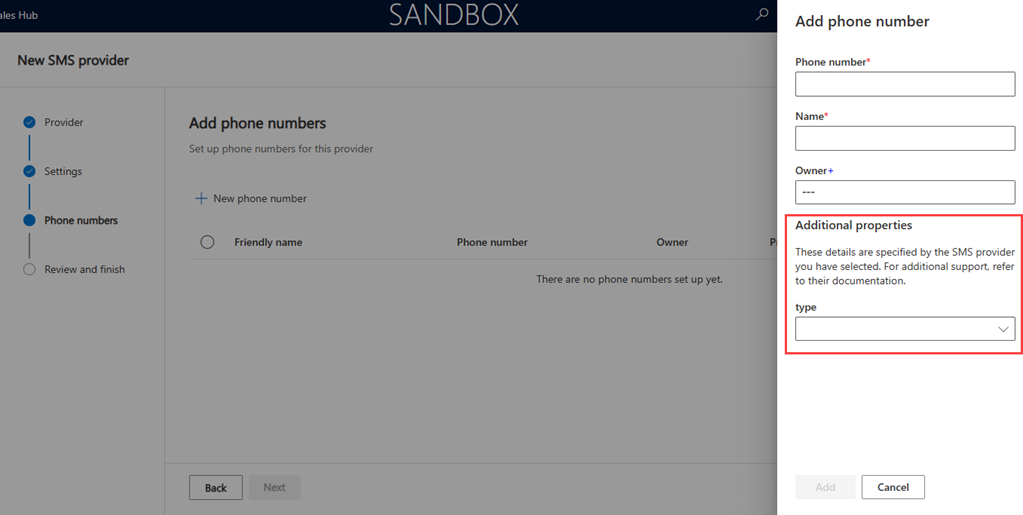
צור טופס כדי לחשוף את שדות התצורה.
אשף הגדרת המכירות טוען את הטופס. הקצה את מזהה הטופס לתכונה msdyn_channeldefinitionexternalformid בשלב הגדרת הערוץ.