הערה
הגישה לדף זה מחייבת הרשאה. באפשרותך לנסות להיכנס או לשנות מדריכי כתובות.
הגישה לדף זה מחייבת הרשאה. באפשרותך לנסות לשנות מדריכי כתובות.
Note
Before reading this article, read Overview of query evaluation and query folding in Power Query to better understand how folding works in Power Query.
Query folding indicators help you understand which steps fold and which steps don't. A step folds when Power Query translates its transformations into a data source query and runs them at the data source.
When you use query folding indicators, it becomes clear when you make a change that breaks folding. This feature helps you resolve problems, avoid performance issues, and gain better insight into your queries. In most cases, steps either fold or don't fold. But many cases exist where the outcome isn't obvious. The Step diagnostics indicators section covers these cases (Might fold, Opaque, and Unknown).
Note
The query folding indicators feature is available only for Power Query Online.
Interpret query folding diagnostics
In Power Query Online, the query folding indicator next to a step shows whether the query as a whole, up to that point, folds. The diagnostic state isn't sequential. If an indicator shows that the query doesn't fold followed by an indicator that shows it does fold, the query up to that point does fold.
This interpretation works even with a simple query against a SQL source. For example, connect to the Production.Product table in the AdventureWorks sample database, and then load the data. Loading this sample through the Power Query navigator gives the following query:
let
  Source = Sql.Database("ServerName", "AdventureWorks"),
  Navigation = Source{[Schema = "Production", Item = "Product"]}[Data]
in
  Navigation
If you examine how this code shows up in query folding indicators, you note that the first step is inconclusive. But the second step does fold, which means that the query up to that point does fold.
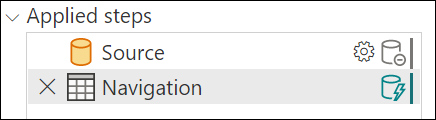
In this example, the initial steps can't be confirmed to fold (are inconclusive), but the final step generated when you load data initially does fold. How the first steps (Source, and sometimes other Navigation steps) are handled depends on the connector. With SQL, for example, the step is handled as a catalog table value, which doesn't fold. However, as soon as you select data for that connector, it folds.
Conversely, this indication can also mean that your query folds up to a point and then stops folding. A not-folding indicator doesn't mean that nothing folds. Instead, it means that not everything folds. Generally, everything up to the last folding indicator folds, with more operations happening after.
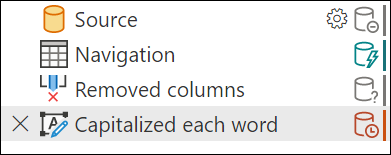
Modifying the previous example, you can give a transform that never folds—Capitalize Each Word.
let
  Source = Sql.Database("ServerName", "AdventureWorks"),
  Navigation = Source{[Schema = "Production", Item = "Product"]}[Data],
  #"Capitalized each word" = Table.TransformColumns(Navigation, {{"Name", each Text.Proper(_), type text}})
in
  #"Capitalized each word"
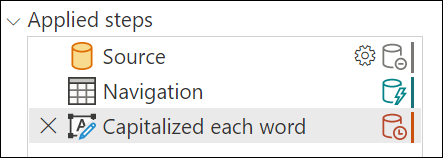
In the query folding indicators, you have the same indicators as previously, except the final step doesn't fold. Everything up to this final step is performed on the data source, while the final step is performed locally.
Step diagnostics indicators
Query folding indicators use an underlying query plan, and require it to report information about the query. Currently, the query plan only supports tables, so some cases (lists, records, primitives) don't report as folding or not. Similarly, constant tables report as opaque.
| Indicator | Icon | Description |
|---|---|---|
| Folding | 
|
The folding indicator tells you that the data source evaluates the query up to this step. |
| Not folding | 
|
The not-folding indicator tells you that some part of the query up to this step is evaluated outside the data source. You can compare it with the last folding indicator, if there's one, to see if you can rearrange your query to be more performant. |
| Might fold | 
|
Might fold indicators are uncommon. They mean that a query "might" fold. They indicate either that folding or not folding is determined at runtime, when pulling results from the query, and that the query plan is dynamic. These indicators likely only appear with ODBC or OData connections. |
| Opaque | 
|
Opaque indicators tell you that the resulting query plan is inconclusive for some reason. It generally indicates that there's a true "constant" table, or that the indicators and query plan tool doesn't support that transform or connector. |
| Unknown | 
|
Unknown indicators represent an absence of a query plan, either due to an error or attempting to run the query plan evaluation on something other than a table (such as a record, list, or primitive). |
Analyze query folding indicators
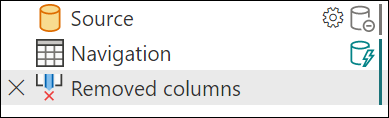
To analyze query folding indicators, connect to the Production.Product table in AdventureWorks (SQL). The initial load shows the Source step as inconclusive and the Navigation step as folding, as shown in the following image.
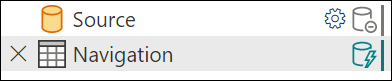
When you add more steps that fold, you extend the green line on the right. This extension occurs because this step also folds.
When you add a step that doesn't fold, you see a different indicator. For example, Capitalize each word never folds. The indicator changes, showing that as of this step, it stopped folding. As mentioned earlier, the previous steps still fold.
When you add more steps downstream that depend on Capitalize each word, they continue to not fold.
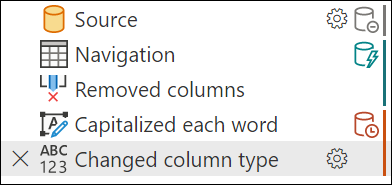
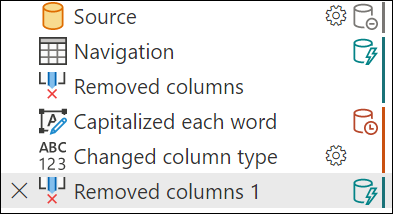
However, if you remove the column you applied the capitalization to, the optimized query plan can fold again. In this uncommon result, the final step folds even though an earlier step doesn't fold, as shown in the following image. This result illustrates how folding depends on both the order of steps and the transformations that apply.