नोट
इस पेज तक पहुँच के लिए प्रमाणन की आवश्यकता होती है. आप साइन इन करने या निर्देशिकाओं को बदलने का प्रयास कर सकते हैं.
इस पेज तक पहुँच के लिए प्रमाणन की आवश्यकता होती है. आप निर्देशिकाओं को बदलने का प्रयास कर सकते हैं.
Your agent captures institutional knowledge during conversations by uploading runbooks, troubleshooting guides, and documentation directly to the knowledge base. When your agent discovers a fix or resolves an incident, it generates structured documents and indexes them for semantic search, so every future investigation benefits from past resolutions.
Tip
Your agent creates and uploads runbooks during conversations without manual file management. Attach 31 file types in chat, including .kql, .bicep, .tf, .har, .py, and .xlsx, for immediate analysis context. Upload 28 file types to Knowledge settings for persistent, indexed storage across all future conversations. Incident resolutions become institutional knowledge automatically.
How your agent captures knowledge
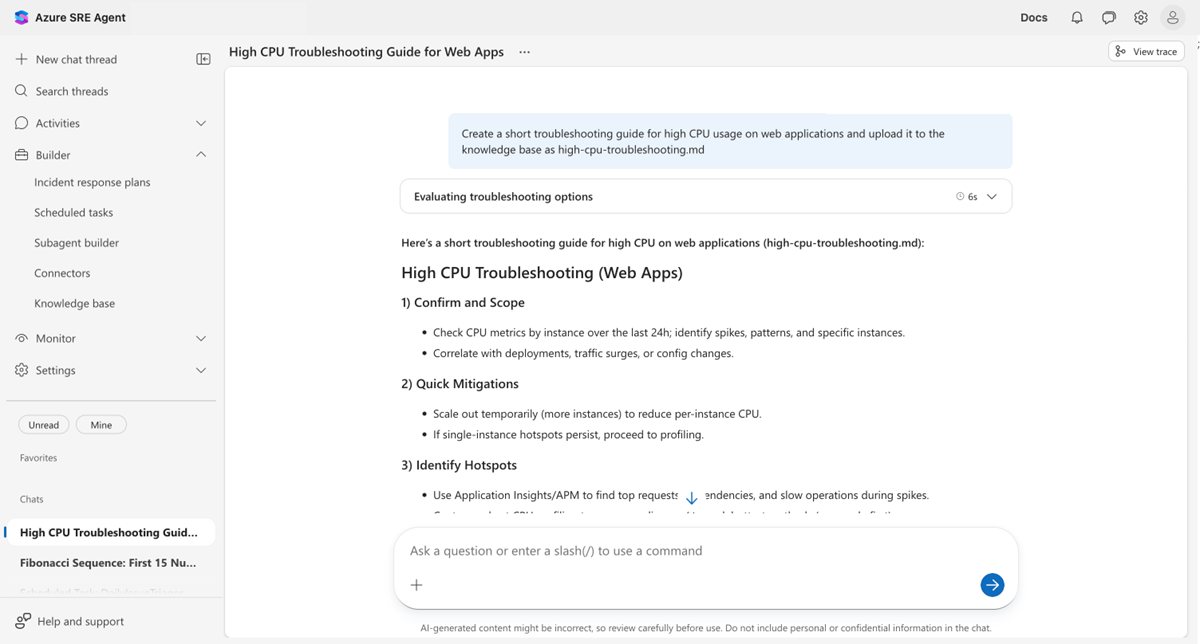
Your agent can upload documents to Knowledge settings during conversations by using the Upload Knowledge Document tool. When your agent discovers a fix, creates a troubleshooting guide, or synthesizes investigation findings, it stores that knowledge directly and makes it searchable for every future conversation.
Create a runbook from the steps we just followed to fix this database
connection pool exhaustion issue and save it to Knowledge settings.
Your agent generates a structured runbook and uploads it in seconds. The document is indexed automatically and becomes searchable for future investigations.
Before and after
The following table compares knowledge capture workflows before and after using the Upload Knowledge Document tool.
| Area | Before | After |
|---|---|---|
| Knowledge capture | Post-incident: engineer writes runbook (maybe) | Your agent captures the fix as it happens |
| Time to document | 30-60 minutes to write a runbook | Seconds: your agent generates and uploads inline |
| Knowledge freshness | Runbooks go stale within weeks | Knowledge settings grows with every resolution |
| Accessibility | Knowledge stuck in engineer's head or chat thread | Searchable by your agent across all future conversations |
| Format consistency | Varies by author | Structured, consistent documentation every time |
What makes this approach different
Unlike manual uploads, your agent proactively creates knowledge. You don't need to remember to document what you learned. Your agent does it as part of the conversation.
Unlike chat history, uploaded documents are indexed for semantic search. When a similar issue occurs months later, your agent finds the relevant runbook automatically through intelligent retrieval, not by scrolling through old threads.
Unlike wiki connectors, uploaded documents don't require external services. The knowledge lives directly in your agent's Knowledge settings, available instantly without syncing delays.
How it works
The Upload Knowledge Document tool accepts three parameters.
| Parameter | Required | Description |
|---|---|---|
| File name | Yes | Name with .md or .txt extension (for example, database-pool-runbook.md) |
| Content | Yes | Full document text in Markdown or plain text format |
| Trigger indexing | Optional (default: true) |
Whether to make the document searchable immediately |
When your agent uploads a document:
- The agent validates the filename and content (maximum 16 MB per file).
- The agent stores the document in your agent's Knowledge settings.
- The agent indexes the content for semantic search.
- The agent confirms the upload with a success message.
Note
If a document with the same filename already exists, the new content replaces it. Upload by using the same name to refresh the content.
Supported file formats
Your agent handles files through three methods, each supporting different formats.
Chat attachments
Drag files into any chat to give your agent immediate context for analysis, including troubleshooting scripts, configuration files, network traces, and more.
| Category | Extensions |
|---|---|
| Images | .png, .jpg, .jpeg, .gif, .webp, .svg |
| Documents | .txt, .md, .pdf, .docx, .pptx, .xlsx |
| Data and configuration | .json, .csv, .log, .yaml, .yml, .xml, .ini, .conf, .env |
| Web and network | .html, .har |
| Code and scripts | .ts, .js, .py, .sh, .sql, .kql |
| Infrastructure | .bicep, .tf |
Limits: 10 MB per file · 50 MB total per message · 5 files per message
Knowledge settings uploads
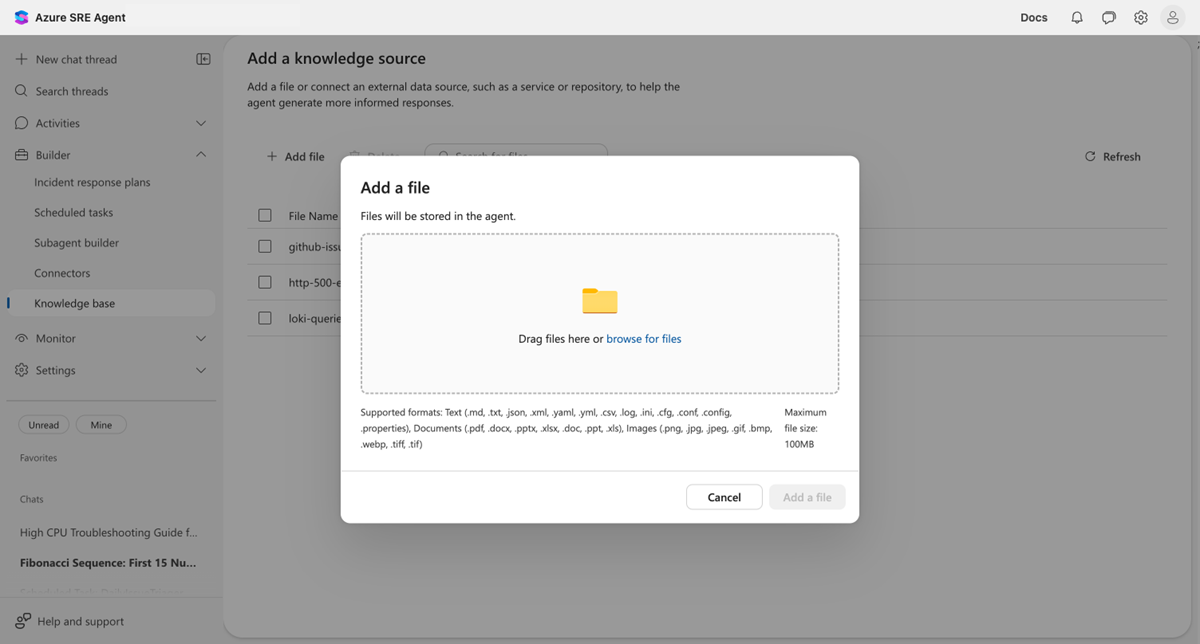
Upload files through Builder > Knowledge settings > Add file to persist documents for your agent to reference in future conversations. The system indexes uploaded files for semantic search.
| Category | Extensions |
|---|---|
| Images | .png, .jpg, .jpeg, .gif, .webp, .bmp, .tiff, .tif |
| Documents | .txt, .md, .pdf, .docx, .pptx, .xlsx, .doc, .ppt, .xls |
| Data and configuration | .json, .csv, .log, .yaml, .yml, .xml, .ini, .conf, .cfg, .config, .properties |
Limits: 16 MB per file · 100 MB per upload
Note
Knowledge settings uploads accept legacy Office formats (.doc, .ppt, .xls) and additional image formats (.bmp, .tiff, .tif) that chat attachments don't. Chat attachments support code, scripts, infrastructure, and web formats that the Knowledge settings doesn't support.
Agent-generated documents
When your agent creates documents during conversations (by using the Upload Knowledge Document tool), it generates .md or .txt files and saves them directly to Knowledge settings. This process happens when you ask your agent to "save this as a runbook."
Example: capture incident knowledge
During an incident investigation, ask your agent:
We just resolved the high CPU issue on web-app-prod. It was caused by a
memory leak in the connection pool. Create a troubleshooting guide from
what we learned and upload it to Knowledge settings.
Your agent generates a structured troubleshooting guide with:
- Scoping steps: How to identify the problem
- Quick mitigations: Immediate actions to reduce impact
- Root cause analysis: What to investigate
- Resolution steps: The fix that worked
- Prevention: How to avoid recurrence
The next time a similar CPU problem occurs, your agent automatically references this document during investigation, turning one engineer's experience into shared team knowledge.
Prerequisites
Before you use the Upload Knowledge Document tool, make sure you meet the following requirements.
| Requirement | Details |
|---|---|
| Agent version | 26.1.57.0 or later |
| Knowledge settings | Enabled on your agent |
| Write permissions | Your agent needs write access to Knowledge settings |
| Run mode | Review or Autonomous (write actions require approval in Review mode) |
Limits
The following limits apply to uploaded knowledge documents.
| Chat attachments | Knowledge settings uploads | Agent tool | |
|---|---|---|---|
| Maximum file size | 10 MB | 16 MB | 16 MB |
| Maximum total | 50 MB per message | 100 MB per upload | — |
| Maximum files | 5 per message | — | 1 per action |
| Supported extensions | 31 | 28 | 2 (.md, .txt) |
| Filename characters | — | Letters, numbers, hyphens, underscores, dots | Same |
| Maximum filename length | — | 1,024 characters | Same |
When to use something else
The following table describes scenarios where a different approach is more appropriate.
| Scenario | Better approach |
|---|---|
| Connecting live wiki content that stays in sync | Azure DevOps wiki knowledge |
| Uploading binary files (PDF, Word, images) | Upload through Builder > Knowledge settings > Add file |
| Bulk importing many documents at once | Use the srectl doc upload --file <path> CLI command |
| Keeping code repositories up to date automatically | Connect a GitHub or Azure DevOps connector |
Get started
| Resource | What you learn |
|---|---|
| Upload knowledge documents | Add runbooks and docs to your agent's Knowledge settings |
Related content
| Capability | What it adds |
|---|---|
| Azure DevOps wiki knowledge | Connect live wiki content that updates automatically |
| Root cause analysis | Investigate problems, then capture the findings |