नोट
इस पृष्ठ तक पहुंच के लिए प्राधिकरण की आवश्यकता होती है। आप साइन इन करने या निर्देशिकाएँ बदलने का प्रयास कर सकते हैं।
इस पृष्ठ तक पहुंच के लिए प्राधिकरण की आवश्यकता होती है। आप निर्देशिकाएँ बदलने का प्रयास कर सकते हैं।
| Property | Value |
|---|---|
| Rule ID | CA1831 |
| Title | Use AsSpan instead of Range-based indexers for string when appropriate |
| Category | Performance |
| Fix is breaking or non-breaking | Non-breaking |
| Enabled by default in .NET 10 | As warning |
Cause
A range-indexer is used on a string and the value is implicitly assigned to ReadOnlySpan<char>.
Rule description
This rule fires when you use a range-indexer on a string and assign it to a span type. The range indexer on a Span<T> is a non-copying Slice operation, but for the range indexer on a string, the method Substring will be used instead of Slice. This produces a copy of the requested portion of the string. This copy is usually unnecessary when it's implicitly used as a ReadOnlySpan<T> or ReadOnlyMemory<T> value. If a copy isn't intended, use the AsSpan method to avoid the unnecessary copy. If the copy is intended, either assign it to a local variable first or add an explicit cast. The analyzer only reports when an implicit cast is used on the result of the range indexer operation.
Detects
Implicit conversion:
ReadOnlySpan<char> slice = str[a..b];
Does not detect
Explicit conversion:
ReadOnlySpan<char> slice = (ReadOnlySpan<char>)str[a..b];
How to fix violations
To fix a violation of this rule, use AsSpan instead of the Range-based indexer on the string to avoid creating unnecessary data copies.
public void TestMethod(string str)
{
    // The violation occurs
    ReadOnlySpan<char> slice = str[1..3];
    ...
}
public void TestMethod(string str)
{
    // The violation fixed with AsSpan extension method
    ReadOnlySpan<char> slice = str.AsSpan()[1..3];
    ...
}
Tip
A code fix is available for this rule in Visual Studio. To use it, position the cursor on the violation and press Ctrl+. (period). Choose Use AsSpan instead of the Range-based indexer on a string from the list of options that's presented.
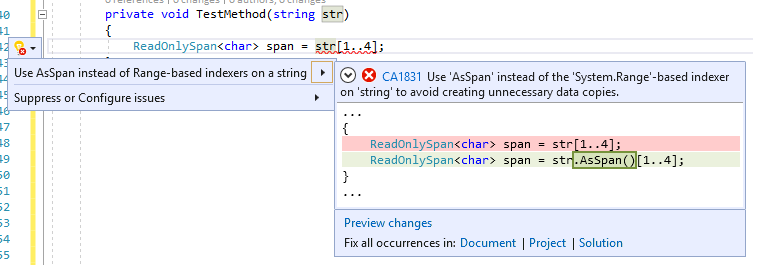
You can also add an explicit cast to avoid this warning.
public void TestMethod(string str)
{
    // The violation occurs.
    ReadOnlySpan<char> slice = str[1..3];
    ...
}
public void TestMethod(string str)
{
    // The violation avoided with explicit casting.
    ReadOnlySpan<char> slice = (ReadOnlySpan<char>)str[1..3];
    ...
}
When to suppress warnings
It's safe to suppress a violation of this rule if creating a copy is intended.
Suppress a warning
If you just want to suppress a single violation, add preprocessor directives to your source file to disable and then re-enable the rule.
#pragma warning disable CA1831
// The code that's violating the rule is on this line.
#pragma warning restore CA1831
To disable the rule for a file, folder, or project, set its severity to none in the configuration file.
[*.{cs,vb}]
dotnet_diagnostic.CA1831.severity = none
To disable this entire category of rules, set the severity for the category to none in the configuration file.
[*.{cs,vb}]
dotnet_analyzer_diagnostic.category-Performance.severity = none
For more information, see How to suppress code analysis warnings.
Related rules
- CA1832: Use AsSpan or AsMemory instead of Range-based indexers for getting ReadOnlySpan or ReadOnlyMemory portion of an array
- CA1833: Use AsSpan or AsMemory instead of Range-based indexers for getting Span or Memory portion of an array
See also
GitHub पर हमारे साथ सहयोग करें
इस सामग्री का स्रोत GitHub पर पाया जा सकता है, जहां आप मुद्दों को बना सकते हैं और उनकी समीक्षा भी कर सकते हैं और अनुरोध खींच सकते हैं। अधिक जानकारी के लिए, हमारी योगदानकर्ता मार्गदर्शिका देखें।
