नोट
इस पृष्ठ तक पहुंच के लिए प्राधिकरण की आवश्यकता होती है। आप साइन इन करने या निर्देशिकाएँ बदलने का प्रयास कर सकते हैं।
इस पृष्ठ तक पहुंच के लिए प्राधिकरण की आवश्यकता होती है। आप निर्देशिकाएँ बदलने का प्रयास कर सकते हैं।
This Android platform-specific is used to control the elevation, or Z-order, of visual elements on applications that target API 21 or greater. The elevation of a visual element determines its drawing order, with visual elements with higher Z values occluding visual elements with lower Z values. It's consumed in XAML by setting the VisualElement.Elevation attached property to a boolean value:
<ContentPage ...
             xmlns:android="clr-namespace:Xamarin.Forms.PlatformConfiguration.AndroidSpecific;assembly=Xamarin.Forms.Core"
             Title="Elevation">
    <StackLayout>
        <Grid>
            <Button Text="Button Beneath BoxView" />
            <BoxView Color="Red" Opacity="0.2" HeightRequest="50" />
        </Grid>
        <Grid Margin="0,20,0,0">
            <Button Text="Button Above BoxView - Click Me" android:VisualElement.Elevation="10"/>
            <BoxView Color="Red" Opacity="0.2" HeightRequest="50" />
        </Grid>
    </StackLayout>
</ContentPage>
Alternatively, it can be consumed from C# using the fluent API:
using Xamarin.Forms.PlatformConfiguration;
using Xamarin.Forms.PlatformConfiguration.AndroidSpecific;
...

public class AndroidElevationPageCS : ContentPage
{
    public AndroidElevationPageCS()
    {
        ...
        var aboveButton = new Button { Text = "Button Above BoxView - Click Me" };
        aboveButton.On<Android>().SetElevation(10);

        Content = new StackLayout
        {
            Children =
            {
                new Grid
                {
                    Children =
                    {
                        new Button { Text = "Button Beneath BoxView" },
                        new BoxView { Color = Color.Red, Opacity = 0.2, HeightRequest = 50 }
                    }
                },
                new Grid
                {
                    Margin = new Thickness(0,20,0,0),
                    Children =
                    {
                        aboveButton,
                        new BoxView { Color = Color.Red, Opacity = 0.2, HeightRequest = 50 }
                    }
                }
            }
        };
    }
}
The Button.On<Android> method specifies that this platform-specific will only run on Android. The VisualElement.SetElevation method, in the Xamarin.Forms.PlatformConfiguration.AndroidSpecific namespace, is used to set the elevation of the visual element to a nullable float. In addition, the VisualElement.GetElevation method can be used to retrieve the elevation value of a visual element.
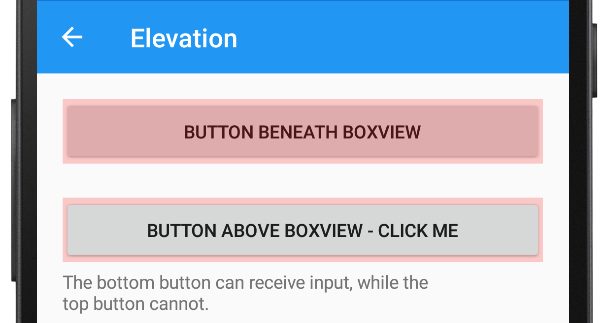
The result is that the elevation of visual elements can be controlled so that visual elements with higher Z values occlude visual elements with lower Z values. Therefore, in this example the second Button is rendered above the BoxView because it has a higher elevation value: