Napomena
Za pristup ovoj stranici potrebna je autorizacija. Možete se pokušati prijaviti ili promijeniti direktorije.
Za pristup ovoj stranici potrebna je autorizacija. Možete pokušati promijeniti direktorije.
View the CSS changes you made during your DevTools diagnostic session (from the Styles and Computed CSS editing panes). Similar to the conventions of other diffing tools, deleted lines appear in red and added lines are green.
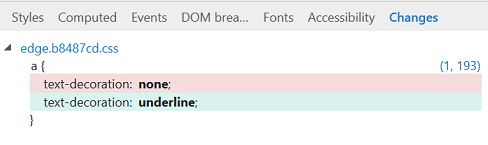
You can also (from the right-click context menu) copy your changes to the clipboard, revert your changes, or jump to their source location.