Megjegyzés
Az oldalhoz való hozzáféréshez engedély szükséges. Megpróbálhat bejelentkezni vagy módosítani a címtárat.
Az oldalhoz való hozzáféréshez engedély szükséges. Megpróbálhatja módosítani a címtárat.
Ez a példa bemutatja, hogyan használhatja a FlowDocumentoszlopelválasztó funkcióit.
példa
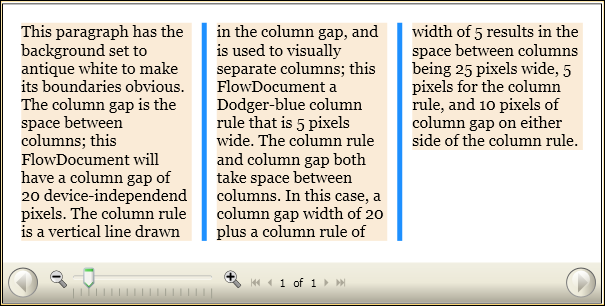
Az alábbi példa egy FlowDocumentdefiniál, és beállítja a ColumnGap, ColumnRuleBrushés ColumnRuleWidth attribútumokat. A FlowDocument egyetlen bekezdésnyi mintatartalmat tartalmaz.
<FlowDocumentReader>
  <FlowDocument
    ColumnGap="20.0"
    ColumnRuleBrush="DodgerBlue"
    ColumnRuleWidth="5.0"
    ColumnWidth="140.0"
>
    <Paragraph  Background="AntiqueWhite" TextAlignment="Left">
      This paragraph has the background set to antique white to make its
      boundaries obvious.

      The column gap is the space between columns; this FlowDocument will
      have a column gap of 20 device-independend pixels.  The column rule
      is a vertical line drawn in the column gap, and is used to visually
      separate columns; this FlowDocument a Dodger-blue column rule that
      is 5 pixels wide.

      The column rule and column gap both take space between columns.  In
      this case, a column gap width of 20 plus a column rule of width of 5
      results in the space between columns being 25 pixels wide, 5 pixels
      for the column rule, and 10 pixels of column gap on either side of the column rule.
    </Paragraph>
  </FlowDocument>
</FlowDocumentReader>
Az alábbi ábra a ColumnGap, ColumnRuleBrushés ColumnRuleWidth attribútumok hatását mutatja egy renderelt FlowDocument.
Dolgozzon együtt velünk a GitHubon
A tartalom forrása a GitHubon található, ahol létrehozhat és áttekinthet problémákat és lekéréses kérelmeket is. További információért tekintse meg a közreműködői útmutatónkat.

.NET Desktop feedback