Megjegyzés
Az oldalhoz való hozzáféréshez engedély szükséges. Megpróbálhat bejelentkezni vagy módosítani a címtárat.
Az oldalhoz való hozzáféréshez engedély szükséges. Megpróbálhatja módosítani a címtárat.
Ez a cikk bemutatja, hogyan hozhat létre adatfolyamblokkokból álló hálózatot, amely képfeldolgozást végez egy Windows Forms-alkalmazásban.
Ez a példa betölti a képfájlokat a megadott mappából, létrehoz egy összetett képet, és megjeleníti az eredményt. A példa az adatfolyam-modellel irányítja a képeket a hálózaton keresztül. Az adatfolyam-modellben a program független összetevői üzenetek küldésével kommunikálnak egymással. Amikor egy összetevő üzenetet kap, végrehajt egy műveletet, majd átadja az eredményt egy másik összetevőnek. Hasonlítsa össze ezt a vezérlőfolyamat-modellel, amelyben az alkalmazás vezérlőstruktúrákat, például feltételes utasításokat, hurkokat stb. használ a programok műveleteinek sorrendjének szabályozásához.
Előfeltételek
Az útmutató megkezdése előtt olvassa el az adatfolyamot .
Megjegyzés:
A TPL-adatfolyamtár (a System.Threading.Tasks.Dataflow névtér) a .NET 6-os és újabb verzióiban található. A .NET-keretrendszerhez és a .NET Standard projektekhez telepítenie kell a 📦 System.Threading.Tasks.Dataflow NuGet csomagot.
Szakaszok
Ez az útmutató a következő szakaszokat tartalmazza:
A Windows Forms alkalmazás létrehozása
Ez a szakasz bemutatja, hogyan hozhatja létre az alapszintű Windows Forms-alkalmazást, és hogyan adhat hozzá vezérlőket a főűrlaphoz.
A Windows Forms alkalmazás létrehozása
A Visual Studióban hozzon létre egy Visual C# vagy Visual Basic Windows Forms-alkalmazásprojektet . Ebben a dokumentumban a projekt neve
CompositeImages.A főűrlap űrlaptervezőjében a Form1.cs fájlban (Form1.vb Visual Basicnél) adjon hozzá egy ToolStrip vezérlőt.
Adjon hozzá egy vezérlőt ToolStripButton a ToolStrip vezérlőhöz. Állítsa be a DisplayStyle tulajdonságot Text értékre, a Text tulajdonságot pedig a Mappa kiválasztása értékre.
Adjon hozzá egy második ToolStripButton vezérlőt a ToolStrip vezérlőhöz. Állítsa be a DisplayStyle tulajdonságot Text értékre, a Text tulajdonságot Mégse értékre, és a Enabled tulajdonságot
Falseértékre.PictureBox Objektum hozzáadása a főűrlaphoz. Állítsa a Dock tulajdonságot Fillértékre.
Az adatfolyam-hálózat létrehozása
Ez a szakasz bemutatja, hogyan hozható létre a képfeldolgozást végző adatfolyam-hálózat.
Az adatfolyam-hálózat létrehozása
Adjon hozzá egy hivatkozást System.Threading.Tasks.Dataflow.dll a projekthez.
Győződjön meg arról, hogy a Form1.cs (a Visual Basic Form1.vb) a következő
using(UsingVisual Basic)-utasításokat tartalmazza:using System; using System.Collections.Generic; using System.Drawing; using System.Drawing.Imaging; using System.IO; using System.Linq; using System.Threading; using System.Threading.Tasks; using System.Threading.Tasks.Dataflow; using System.Windows.Forms;Adja hozzá a következő adattagokat az
Form1osztályhoz.// The head of the dataflow network. ITargetBlock<string> headBlock = null; // Enables the user interface to signal cancellation to the network. CancellationTokenSource cancellationTokenSource;Adja hozzá a következő metódust
CreateImageProcessingNetworkazForm1osztályhoz. Ez a módszer létrehozza a képfeldolgozó hálózatot.// Creates the image processing dataflow network and returns the // head node of the network. ITargetBlock<string> CreateImageProcessingNetwork() { // // Create the dataflow blocks that form the network. // // Create a dataflow block that takes a folder path as input // and returns a collection of Bitmap objects. var loadBitmaps = new TransformBlock<string, IEnumerable<Bitmap>>(path => { try { return LoadBitmaps(path); } catch (OperationCanceledException) { // Handle cancellation by passing the empty collection // to the next stage of the network. return Enumerable.Empty<Bitmap>(); } }); // Create a dataflow block that takes a collection of Bitmap objects // and returns a single composite bitmap. var createCompositeBitmap = new TransformBlock<IEnumerable<Bitmap>, Bitmap>(bitmaps => { try { return CreateCompositeBitmap(bitmaps); } catch (OperationCanceledException) { // Handle cancellation by passing null to the next stage // of the network. return null; } }); // Create a dataflow block that displays the provided bitmap on the form. var displayCompositeBitmap = new ActionBlock<Bitmap>(bitmap => { // Display the bitmap. pictureBox1.SizeMode = PictureBoxSizeMode.StretchImage; pictureBox1.Image = bitmap; // Enable the user to select another folder. toolStripButton1.Enabled = true; toolStripButton2.Enabled = false; Cursor = DefaultCursor; }, // Specify a task scheduler from the current synchronization context // so that the action runs on the UI thread. new ExecutionDataflowBlockOptions { TaskScheduler = TaskScheduler.FromCurrentSynchronizationContext() }); // Create a dataflow block that responds to a cancellation request by // displaying an image to indicate that the operation is cancelled and // enables the user to select another folder. var operationCancelled = new ActionBlock<object>(delegate { // Display the error image to indicate that the operation // was cancelled. pictureBox1.SizeMode = PictureBoxSizeMode.CenterImage; pictureBox1.Image = pictureBox1.ErrorImage; // Enable the user to select another folder. toolStripButton1.Enabled = true; toolStripButton2.Enabled = false; Cursor = DefaultCursor; }, // Specify a task scheduler from the current synchronization context // so that the action runs on the UI thread. new ExecutionDataflowBlockOptions { TaskScheduler = TaskScheduler.FromCurrentSynchronizationContext() }); // // Connect the network. // // Link loadBitmaps to createCompositeBitmap. // The provided predicate ensures that createCompositeBitmap accepts the // collection of bitmaps only if that collection has at least one member. loadBitmaps.LinkTo(createCompositeBitmap, bitmaps => bitmaps.Count() > 0); // Also link loadBitmaps to operationCancelled. // When createCompositeBitmap rejects the message, loadBitmaps // offers the message to operationCancelled. // operationCancelled accepts all messages because we do not provide a // predicate. loadBitmaps.LinkTo(operationCancelled); // Link createCompositeBitmap to displayCompositeBitmap. // The provided predicate ensures that displayCompositeBitmap accepts the // bitmap only if it is non-null. createCompositeBitmap.LinkTo(displayCompositeBitmap, bitmap => bitmap != null); // Also link createCompositeBitmap to operationCancelled. // When displayCompositeBitmap rejects the message, createCompositeBitmap // offers the message to operationCancelled. // operationCancelled accepts all messages because we do not provide a // predicate. createCompositeBitmap.LinkTo(operationCancelled); // Return the head of the network. return loadBitmaps; }Implementálja a
LoadBitmapsmetódust.// Loads all bitmap files that exist at the provided path. IEnumerable<Bitmap> LoadBitmaps(string path) { List<Bitmap> bitmaps = new List<Bitmap>(); // Load a variety of image types. foreach (string bitmapType in new string[] { "*.bmp", "*.gif", "*.jpg", "*.png", "*.tif" }) { // Load each bitmap for the current extension. foreach (string fileName in Directory.GetFiles(path, bitmapType)) { // Throw OperationCanceledException if cancellation is requested. cancellationTokenSource.Token.ThrowIfCancellationRequested(); try { // Add the Bitmap object to the collection. bitmaps.Add(new Bitmap(fileName)); } catch (Exception) { // TODO: A complete application might handle the error. } } } return bitmaps; }Implementálja a
CreateCompositeBitmapmetódust.// Creates a composite bitmap from the provided collection of Bitmap objects. // This method computes the average color of each pixel among all bitmaps // to create the composite image. Bitmap CreateCompositeBitmap(IEnumerable<Bitmap> bitmaps) { Bitmap[] bitmapArray = bitmaps.ToArray(); // Compute the maximum width and height components of all // bitmaps in the collection. Rectangle largest = new Rectangle(); foreach (var bitmap in bitmapArray) { if (bitmap.Width > largest.Width) largest.Width = bitmap.Width; if (bitmap.Height > largest.Height) largest.Height = bitmap.Height; } // Create a 32-bit Bitmap object with the greatest dimensions. Bitmap result = new Bitmap(largest.Width, largest.Height, PixelFormat.Format32bppArgb); // Lock the result Bitmap. var resultBitmapData = result.LockBits( new Rectangle(new Point(), result.Size), ImageLockMode.WriteOnly, result.PixelFormat); // Lock each source bitmap to create a parallel list of BitmapData objects. var bitmapDataList = (from bitmap in bitmapArray select bitmap.LockBits( new Rectangle(new Point(), bitmap.Size), ImageLockMode.ReadOnly, PixelFormat.Format32bppArgb)) .ToList(); // Compute each column in parallel. Parallel.For(0, largest.Width, new ParallelOptions { CancellationToken = cancellationTokenSource.Token }, i => { // Compute each row. for (int j = 0; j < largest.Height; j++) { // Counts the number of bitmaps whose dimensions // contain the current location. int count = 0; // The sum of all alpha, red, green, and blue components. int a = 0, r = 0, g = 0, b = 0; // For each bitmap, compute the sum of all color components. foreach (var bitmapData in bitmapDataList) { // Ensure that we stay within the bounds of the image. if (bitmapData.Width > i && bitmapData.Height > j) { unsafe { byte* row = (byte*)(bitmapData.Scan0 + (j * bitmapData.Stride)); byte* pix = (byte*)(row + (4 * i)); a += *pix; pix++; r += *pix; pix++; g += *pix; pix++; b += *pix; } count++; } } //prevent divide by zero in bottom right pixelless corner if (count == 0) break; unsafe { // Compute the average of each color component. a /= count; r /= count; g /= count; b /= count; // Set the result pixel. byte* row = (byte*)(resultBitmapData.Scan0 + (j * resultBitmapData.Stride)); byte* pix = (byte*)(row + (4 * i)); *pix = (byte)a; pix++; *pix = (byte)r; pix++; *pix = (byte)g; pix++; *pix = (byte)b; } } }); // Unlock the source bitmaps. for (int i = 0; i < bitmapArray.Length; i++) { bitmapArray[i].UnlockBits(bitmapDataList[i]); } // Unlock the result bitmap. result.UnlockBits(resultBitmapData); // Return the result. return result; }Megjegyzés:
A metódus C#-
CreateCompositeBitmapverziója mutatókkal teszi lehetővé az objektumok hatékony feldolgozását System.Drawing.Bitmap . Ezért a nem biztonságos kulcsszó használatához engedélyeznie kell a nem biztonságos kód engedélyezése beállítást a projektben. A nem biztonságos kód Visual C#-projektekben való engedélyezéséről további információt a Build Page, Project Designer (C#) című témakörben talál.
Az alábbi táblázat a hálózat tagjait ismerteti.
| Member | Típus | Description |
|---|---|---|
loadBitmaps |
TransformBlock<TInput,TOutput> | Bemenetként egy mappa elérési útját használja, és kimenetként létrehoz egy objektumgyűjteményt Bitmap . |
createCompositeBitmap |
TransformBlock<TInput,TOutput> | Bemenetként egy objektumgyűjteményt Bitmap hoz létre, és kimenetként összetett bitképet hoz létre. |
displayCompositeBitmap |
ActionBlock<TInput> | Megjeleníti az összetett bitképet az űrlapon. |
operationCancelled |
ActionBlock<TInput> | Megjelenít egy képet, amely jelzi, hogy a művelet megszakadt, és lehetővé teszi a felhasználó számára egy másik mappa kiválasztását. |
Az adatfolyamblokkok hálózat létrehozásához való csatlakoztatásához ez a példa a metódust LinkTo használja. A LinkTo metódus egy túlterhelt verziót tartalmaz, amely egy Predicate<T> objektumot használ, amely meghatározza, hogy a célblokk elfogad-e vagy elutasít egy üzenetet. Ez a szűrési mechanizmus lehetővé teszi, hogy az üzenetblokkok csak bizonyos értékeket kapjanak. Ebben a példában a hálózat kétféleképpen ágazhat el. A fő ág betölti a lemezképeket, létrehozza az összetett képet, és megjeleníti a képet az űrlapon. A másodlagos ág megszakítja az aktuális műveletet. Az Predicate<T> objektumok lehetővé teszik, hogy az adatfolyam-blokkok a fő ág mentén válthassanak az alternatív ágra bizonyos üzenetek elutasításával. Ha például a felhasználó megszakítja a műveletet, az adatfolyamblokk createCompositeBitmap kimenetként (nulla Visual Basicben) hozza létre Nothing . Az adatfolyamblokk displayCompositeBitmap elutasítja a null bemeneti értékeket, ezért a rendszer felajánlja az üzenetet.operationCancelled Az adatfolyam-blokk operationCancelled minden üzenetet elfogad, ezért megjelenít egy képet, amely jelzi a művelet megszakítását.
Az alábbi ábrán a képfeldolgozó hálózat látható:
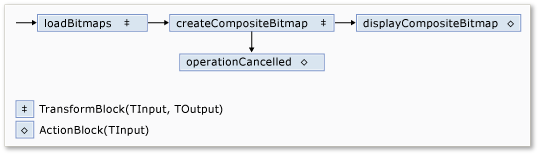
Mivel az displayCompositeBitmapoperationCancelled adatfolyam-blokkok a felhasználói felületen működnek, fontos, hogy ezek a műveletek a felhasználói felület szálán történjenek. Ennek érdekében az építés során ezek az objektumok egy ExecutionDataflowBlockOptions objektumot biztosítanak, amelynek TaskScheduler tulajdonsága a TaskScheduler.FromCurrentSynchronizationContext értékre van beállítva. A TaskScheduler.FromCurrentSynchronizationContext metódus létrehoz egy TaskScheduler objektumot, amely az aktuális szinkronizálási környezetben végez munkát. Mivel a metódus a CreateImageProcessingNetwork felhasználói felületi szálon futó Mappa kiválasztása gomb kezelőjétől van meghívva, az displayCompositeBitmap adatfolyam-blokkok műveletei operationCancelled a felhasználói felület szálán is futnak.
Ez a példa megosztott lemondási jogkivonatot használ a CancellationToken tulajdonság beállítása helyett, mert a tulajdonság véglegesen megszakítja az CancellationToken adatfolyamblokkok végrehajtását. A lemondási tokenek lehetővé teszik, hogy a példa többször is újra felhasználja ugyanazt az adatfolyam-hálózatot, még akkor is, ha a felhasználó megszakít egy vagy több műveletet. Egy adatfolyam-blokk végrehajtásának végleges megszakítására szolgáló CancellationToken példa : Útmutató: Adatfolyamblokk megszakítása.
Az adatfolyam-hálózat csatlakoztatása a felhasználói felülethez
Ez a szakasz azt ismerteti, hogyan csatlakoztathatja az adatfolyam-hálózatot a felhasználói felülethez. Az összetett kép létrehozása és a művelet megszakítása a Mappa kiválasztása és a Mégse gombok segítségével történik. Ha a felhasználó a gombok bármelyikét választja, a megfelelő művelet aszinkron módon indul el.
Az adatfolyam-hálózat csatlakoztatása a felhasználói felülethez
A főűrlap űrlaptervezőjében hozzon létre egy eseménykezelőt az Click eseményhez a Mappa kiválasztása gombhoz.
Implementálja a ClickMappa kiválasztása gomb eseményét.
// Event handler for the Choose Folder button. private void toolStripButton1_Click(object sender, EventArgs e) { // Create a FolderBrowserDialog object to enable the user to // select a folder. FolderBrowserDialog dlg = new FolderBrowserDialog { ShowNewFolderButton = false }; // Set the selected path to the common Sample Pictures folder // if it exists. string initialDirectory = Path.Combine( Environment.GetFolderPath(Environment.SpecialFolder.CommonPictures), "Sample Pictures"); if (Directory.Exists(initialDirectory)) { dlg.SelectedPath = initialDirectory; } // Show the dialog and process the dataflow network. if (dlg.ShowDialog() == DialogResult.OK) { // Create a new CancellationTokenSource object to enable // cancellation. cancellationTokenSource = new CancellationTokenSource(); // Create the image processing network if needed. headBlock ??= CreateImageProcessingNetwork(); // Post the selected path to the network. headBlock.Post(dlg.SelectedPath); // Enable the Cancel button and disable the Choose Folder button. toolStripButton1.Enabled = false; toolStripButton2.Enabled = true; // Show a wait cursor. Cursor = Cursors.WaitCursor; } }A főűrlap űrlaptervezőjében hozzon létre egy eseménykezelőt az Click eseményhez a Mégse gombhoz.
Implementálja a Click eseményt a(z) Mégse gombhoz.
// Event handler for the Cancel button. private void toolStripButton2_Click(object sender, EventArgs e) { // Signal the request for cancellation. The current component of // the dataflow network will respond to the cancellation request. cancellationTokenSource.Cancel(); }
A teljes példa
Az alábbi példa az útmutató teljes kódját mutatja be.
using System;
using System.Collections.Generic;
using System.Drawing;
using System.Drawing.Imaging;
using System.IO;
using System.Linq;
using System.Threading;
using System.Threading.Tasks;
using System.Threading.Tasks.Dataflow;
using System.Windows.Forms;
namespace CompositeImages
{
public partial class Form1 : Form
{
// The head of the dataflow network.
ITargetBlock<string> headBlock = null;

// Enables the user interface to signal cancellation to the network.
CancellationTokenSource cancellationTokenSource;
public Form1()
{
InitializeComponent();
}
// Creates the image processing dataflow network and returns the
// head node of the network.
ITargetBlock<string> CreateImageProcessingNetwork()
{
   //
   // Create the dataflow blocks that form the network.
   //

   // Create a dataflow block that takes a folder path as input
   // and returns a collection of Bitmap objects.
   var loadBitmaps = new TransformBlock<string, IEnumerable<Bitmap>>(path =>
      {
         try
         {
            return LoadBitmaps(path);
         }
         catch (OperationCanceledException)
         {
            // Handle cancellation by passing the empty collection
            // to the next stage of the network.
            return Enumerable.Empty<Bitmap>();
         }
      });

   // Create a dataflow block that takes a collection of Bitmap objects
   // and returns a single composite bitmap.
   var createCompositeBitmap = new TransformBlock<IEnumerable<Bitmap>, Bitmap>(bitmaps =>
      {
         try
         {
            return CreateCompositeBitmap(bitmaps);
         }
         catch (OperationCanceledException)
         {
            // Handle cancellation by passing null to the next stage
            // of the network.
            return null;
         }
      });

   // Create a dataflow block that displays the provided bitmap on the form.
   var displayCompositeBitmap = new ActionBlock<Bitmap>(bitmap =>
      {
         // Display the bitmap.
         pictureBox1.SizeMode = PictureBoxSizeMode.StretchImage;
         pictureBox1.Image = bitmap;

         // Enable the user to select another folder.
         toolStripButton1.Enabled = true;
         toolStripButton2.Enabled = false;
         Cursor = DefaultCursor;
      },
      // Specify a task scheduler from the current synchronization context
      // so that the action runs on the UI thread.
      new ExecutionDataflowBlockOptions
      {
          TaskScheduler = TaskScheduler.FromCurrentSynchronizationContext()
      });

   // Create a dataflow block that responds to a cancellation request by
   // displaying an image to indicate that the operation is cancelled and
   // enables the user to select another folder.
   var operationCancelled = new ActionBlock<object>(delegate
      {
         // Display the error image to indicate that the operation
         // was cancelled.
         pictureBox1.SizeMode = PictureBoxSizeMode.CenterImage;
         pictureBox1.Image = pictureBox1.ErrorImage;

         // Enable the user to select another folder.
         toolStripButton1.Enabled = true;
         toolStripButton2.Enabled = false;
         Cursor = DefaultCursor;
      },
      // Specify a task scheduler from the current synchronization context
      // so that the action runs on the UI thread.
      new ExecutionDataflowBlockOptions
      {
         TaskScheduler = TaskScheduler.FromCurrentSynchronizationContext()
      });

   //
   // Connect the network.
   //

   // Link loadBitmaps to createCompositeBitmap.
   // The provided predicate ensures that createCompositeBitmap accepts the
   // collection of bitmaps only if that collection has at least one member.
   loadBitmaps.LinkTo(createCompositeBitmap, bitmaps => bitmaps.Count() > 0);

   // Also link loadBitmaps to operationCancelled.
   // When createCompositeBitmap rejects the message, loadBitmaps
   // offers the message to operationCancelled.
   // operationCancelled accepts all messages because we do not provide a
   // predicate.
   loadBitmaps.LinkTo(operationCancelled);

   // Link createCompositeBitmap to displayCompositeBitmap.
   // The provided predicate ensures that displayCompositeBitmap accepts the
   // bitmap only if it is non-null.
   createCompositeBitmap.LinkTo(displayCompositeBitmap, bitmap => bitmap != null);

   // Also link createCompositeBitmap to operationCancelled.
   // When displayCompositeBitmap rejects the message, createCompositeBitmap
   // offers the message to operationCancelled.
   // operationCancelled accepts all messages because we do not provide a
   // predicate.
   createCompositeBitmap.LinkTo(operationCancelled);

   // Return the head of the network.
   return loadBitmaps;
}
// Loads all bitmap files that exist at the provided path.
IEnumerable<Bitmap> LoadBitmaps(string path)
{
   List<Bitmap> bitmaps = new List<Bitmap>();

   // Load a variety of image types.
   foreach (string bitmapType in
      new string[] { "*.bmp", "*.gif", "*.jpg", "*.png", "*.tif" })
   {
      // Load each bitmap for the current extension.
      foreach (string fileName in Directory.GetFiles(path, bitmapType))
      {
         // Throw OperationCanceledException if cancellation is requested.
         cancellationTokenSource.Token.ThrowIfCancellationRequested();

         try
         {
            // Add the Bitmap object to the collection.
            bitmaps.Add(new Bitmap(fileName));
         }
         catch (Exception)
         {
            // TODO: A complete application might handle the error.
         }
      }
   }
   return bitmaps;
}
// Creates a composite bitmap from the provided collection of Bitmap objects.
// This method computes the average color of each pixel among all bitmaps
// to create the composite image.
Bitmap CreateCompositeBitmap(IEnumerable<Bitmap> bitmaps)
{
   Bitmap[] bitmapArray = bitmaps.ToArray();

   // Compute the maximum width and height components of all
   // bitmaps in the collection.
   Rectangle largest = new Rectangle();
   foreach (var bitmap in bitmapArray)
   {
      if (bitmap.Width > largest.Width)
         largest.Width = bitmap.Width;
      if (bitmap.Height > largest.Height)
         largest.Height = bitmap.Height;
   }

   // Create a 32-bit Bitmap object with the greatest dimensions.
   Bitmap result = new Bitmap(largest.Width, largest.Height,
      PixelFormat.Format32bppArgb);

   // Lock the result Bitmap.
   var resultBitmapData = result.LockBits(
      new Rectangle(new Point(), result.Size), ImageLockMode.WriteOnly,
      result.PixelFormat);

   // Lock each source bitmap to create a parallel list of BitmapData objects.
   var bitmapDataList = (from bitmap in bitmapArray
                         select bitmap.LockBits(
                           new Rectangle(new Point(), bitmap.Size),
                           ImageLockMode.ReadOnly, PixelFormat.Format32bppArgb))
                        .ToList();

   // Compute each column in parallel.
   Parallel.For(0, largest.Width, new ParallelOptions
   {
      CancellationToken = cancellationTokenSource.Token
   },
   i =>
   {
      // Compute each row.
      for (int j = 0; j < largest.Height; j++)
      {
         // Counts the number of bitmaps whose dimensions
         // contain the current location.
         int count = 0;

         // The sum of all alpha, red, green, and blue components.
         int a = 0, r = 0, g = 0, b = 0;

         // For each bitmap, compute the sum of all color components.
         foreach (var bitmapData in bitmapDataList)
         {
            // Ensure that we stay within the bounds of the image.
            if (bitmapData.Width > i && bitmapData.Height > j)
            {
               unsafe
               {
                  byte* row = (byte*)(bitmapData.Scan0 + (j * bitmapData.Stride));
                  byte* pix = (byte*)(row + (4 * i));
                  a += *pix; pix++;
                  r += *pix; pix++;
                  g += *pix; pix++;
                  b += *pix;
               }
               count++;
            }
         }

         //prevent divide by zero in bottom right pixelless corner
         if (count == 0)
             break;

         unsafe
         {
            // Compute the average of each color component.
            a /= count;
            r /= count;
            g /= count;
            b /= count;

            // Set the result pixel.
            byte* row = (byte*)(resultBitmapData.Scan0 + (j * resultBitmapData.Stride));
            byte* pix = (byte*)(row + (4 * i));
            *pix = (byte)a; pix++;
            *pix = (byte)r; pix++;
            *pix = (byte)g; pix++;
            *pix = (byte)b;
         }
      }
   });

   // Unlock the source bitmaps.
   for (int i = 0; i < bitmapArray.Length; i++)
   {
      bitmapArray[i].UnlockBits(bitmapDataList[i]);
   }

   // Unlock the result bitmap.
   result.UnlockBits(resultBitmapData);

   // Return the result.
   return result;
}
// Event handler for the Choose Folder button.
private void toolStripButton1_Click(object sender, EventArgs e)
{
   // Create a FolderBrowserDialog object to enable the user to
   // select a folder.
   FolderBrowserDialog dlg = new FolderBrowserDialog
   {
      ShowNewFolderButton = false
   };

   // Set the selected path to the common Sample Pictures folder
   // if it exists.
   string initialDirectory = Path.Combine(
      Environment.GetFolderPath(Environment.SpecialFolder.CommonPictures),
      "Sample Pictures");
   if (Directory.Exists(initialDirectory))
   {
      dlg.SelectedPath = initialDirectory;
   }

   // Show the dialog and process the dataflow network.
   if (dlg.ShowDialog() == DialogResult.OK)
   {
      // Create a new CancellationTokenSource object to enable
      // cancellation.
      cancellationTokenSource = new CancellationTokenSource();

      // Create the image processing network if needed.
      headBlock ??= CreateImageProcessingNetwork();

      // Post the selected path to the network.
      headBlock.Post(dlg.SelectedPath);

      // Enable the Cancel button and disable the Choose Folder button.
      toolStripButton1.Enabled = false;
      toolStripButton2.Enabled = true;

      // Show a wait cursor.
      Cursor = Cursors.WaitCursor;
   }
}
// Event handler for the Cancel button.
private void toolStripButton2_Click(object sender, EventArgs e)
{
   // Signal the request for cancellation. The current component of
   // the dataflow network will respond to the cancellation request.
   cancellationTokenSource.Cancel();
}
~Form1()
{
cancellationTokenSource.Dispose();
}
}
}
Az alábbi ábrán a gyakori \Mintaképek\ mappa jellemző kimenete látható.

Lásd még
Dolgozzon együtt velünk a GitHubon
A tartalom forrása a GitHubon található, ahol létrehozhat és áttekinthet problémákat és lekéréses kérelmeket is. További információért tekintse meg a közreműködői útmutatónkat.
