Megjegyzés
Az oldalhoz való hozzáféréshez engedély szükséges. Megpróbálhat bejelentkezni vagy módosítani a címtárat.
Az oldalhoz való hozzáféréshez engedély szükséges. Megpróbálhatja módosítani a címtárat.
The execution context defines the event context in which your code runs. The system passes the execution context when an event occurs on a form or grid. Use it in your event handler to perform various tasks such as determining the formContext or gridContext, or managing the save event.
You can pass the execution context in the following ways:
Defining event handlers using the UI: The execution context is an optional parameter that you can pass to a JavaScript library function through an event handler. Use the Pass execution context as first parameter option in the Handler Properties dialog while specifying the name of the function to pass the event execution context. The execution context is the first parameter passed to a function.
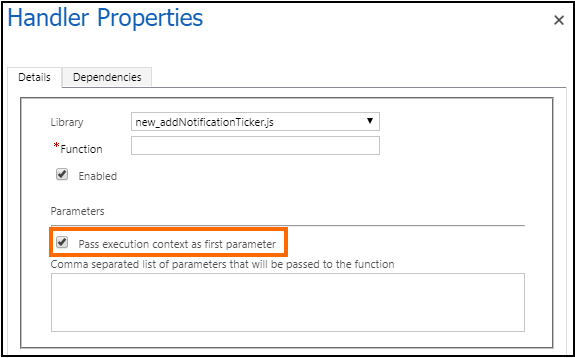
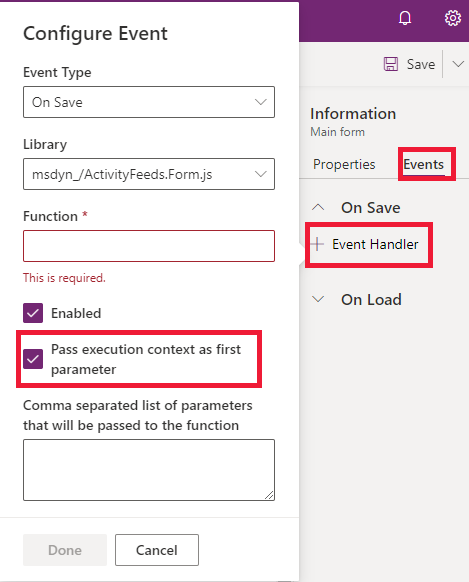
- Defining event handlers using code: The system automatically passes the execution context as the first parameter to functions set by using code. For a list of methods that you can use to define event handlers in code, see Add or remove functions to events using code.
The execution context object provides methods to work with the context. For more information, see Client API execution context methods reference.
Using context objects asynchronously
The context that the system passes to an event is only guaranteed to perform as expected during the event. When you keep a reference to a context after the event ends, actions might occur that cause context methods to behave in an unexpected fashion.
For example, if your event handler dispatches an async action that takes an extended amount of time while you're holding on to a reference to the execution context, the end user might navigate away from the current page by the time the promise resolves and you invoke the context method. This situation might cause methods like formContext.getAttribute(<name>).getValue() to return null, even though at the time the original event handler executed, the attribute had a value.
The following examples show where you should add more checks and take caution because the event handler function uses the execution context after the event completes.
Accessing context in a promise
The context might change in unexpected ways after a promise resolves.
function onLoad(executionContext) {
    var formContext = executionContext.getFormContext();
    fetch("https://www.contoso.com/").then(
        function (result) {
            // Using formContext or executionContext here may not work as expected
            // because onLoad has already completed when the promise is resolved.
            formContext.getAttribute("name").setValue(result);
        }
    );
}
Accessing context after an await statement
The context might change in unexpected ways after using await within an async function.
async function onLoad(executionContext) {
    var formContext = executionContext.getFormContext();
    var result = await fetch("https://www.contoso.com/");
    // Using formContext or executionContext here might not work as expected
    // because the synchronous part of onLoad has already completed.
    formContext.getAttribute("name").setValue(result);
}
Accessing context in a timeout function
The context might change in unexpected ways after using setTimeout or setInterval to defer executing some code.
function onLoad(executionContext) {
    var formContext = executionContext.getFormContext();
    if (notReady) {
        setTimeout(function () {
            // Using formContext or executionContext here may not work as expected
            // because onLoad has already completed when this delayed function executes.
            var name = formContext.getAttribute("name").getValue();
        }, 100);
    } else {
        formContext.getAttribute("name").setValue("abc");
    }
}
Related articles
Client API form context
Client API grid context
Form and grid context in ribbon actions