Megjegyzés
Az oldalhoz való hozzáféréshez engedély szükséges. Megpróbálhat bejelentkezni vagy módosítani a címtárat.
Az oldalhoz való hozzáféréshez engedély szükséges. Megpróbálhatja módosítani a címtárat.
Ez a szakasz olyan elemsablonokat tartalmaz, amelyeket a GridView vezérlővel használhat. Ezekkel a sablonokkal áttekintheti a gyakori alkalmazástípusok megjelenését.
Az adatkötés bemutatásához ezek a sablonok a GridViewItems-et az adatkötés áttekintéséből származó Felvétel osztályhoz kötik.
Megjegyzés:
Jelenleg, ha a DataTemplate több vezérlőt (például több, mint egyetlen TextBlock) tartalmaz, a képernyőolvasók alapértelmezett akadálymentes neve a következőből származik: . ToString() az elemen. Kényelmesen beállíthatja a AutomationProperties.Name a DataTemplate gyökérelemén. Az akadálymentességről további információt az Akadálymentesség áttekintése című témakörben talál.
Ikon és szöveg
Ezekkel a sablonokkal megjeleníthet egy alkalmazásgyűjteményt egy rácson ikonnal és szöveggel.

<GridView ItemsSource="{x:Bind ViewModel.Recordings}">
    <GridView.ItemTemplate>
        <DataTemplate x:Name="IconTextTemplate" x:DataType="local:Recording">
            <StackPanel Width="264" Height="48" Padding="12" Orientation="Horizontal" AutomationProperties.Name="{x:Bind CompositionName}">
                <SymbolIcon Symbol="Audio" VerticalAlignment="Top"/>
                <TextBlock Margin="12,0,0,0" Width="204" Text="{x:Bind CompositionName}"/>
            </StackPanel>
        </DataTemplate>
    </GridView.ItemTemplate>
    <GridView.ItemsPanel>
        <ItemsPanelTemplate>
            <ItemsWrapGrid MaximumRowsOrColumns="4" Orientation="Horizontal" HorizontalAlignment="Center"/>
        </ItemsPanelTemplate>
    </GridView.ItemsPanel>
</GridView>

<GridView ItemsSource="{x:Bind ViewModel.Recordings}">
<GridView.ItemTemplate>
<DataTemplate x:Name="IconTextTemplate2" x:DataType="local:Recording">
<StackPanel Width="264" Height="120" Padding="12" Orientation="Horizontal" AutomationProperties.Name="{x:Bind CompositionName}">
<FontIcon Margin="0,6,0,0" FontSize="48" FontFamily="Segoe MDL2 Assets" FontWeight="Bold" Glyph="" VerticalAlignment="Top"/>
<StackPanel Margin="16,1,0,0">
<TextBlock Width="176" Margin="0,0,0,2" TextWrapping="WrapWholeWords" TextTrimming="Clip" Text="{x:Bind CompositionName}"/>
<TextBlock Width="176" Height="48" Style="{ThemeResource CaptionTextBlockStyle}" Foreground="{ThemeResource SystemControlPageTextBaseMediumBrush}" TextWrapping="WrapWholeWords" TextTrimming="Clip" Text="{x:Bind ArtistName}" />
</StackPanel>
</StackPanel>
</DataTemplate>
</GridView.ItemTemplate>
<GridView.ItemsPanel>
<ItemsPanelTemplate>
<ItemsWrapGrid MaximumRowsOrColumns="4" Orientation="Horizontal" HorizontalAlignment="Center" Margin="40,0"/>
</ItemsPanelTemplate>
</GridView.ItemsPanel>
</GridView>
Képgaléria
Ezzel a sablonnal képek gyűjteményét jelenítheti meg egy rácson, többválasztós módban.

<GridView SelectionMode="Multiple">
    <GridView.ItemTemplate>
        <DataTemplate x:Name="ImageGalleryDataTemplate">
            <Image Source="Placeholder.png" Height="180" Width="180" Stretch="UniformToFill"/>
        </DataTemplate>
    </GridView.ItemTemplate>
    <GridView.ItemsPanel>
        <ItemsPanelTemplate>
            <ItemsWrapGrid MaximumRowsOrColumns="3" Orientation="Horizontal"/>
        </ItemsPanelTemplate>
    </GridView.ItemsPanel>
</GridView>
Kép és szöveg
Ezekkel a sablonokkal megjeleníthet egy médiagyűjteményt, alatta szöveggel.
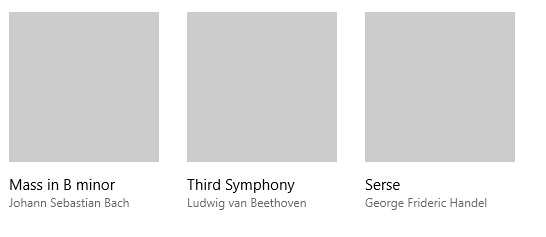
<GridView ItemsSource="{x:Bind ViewModel.Recordings}">
    <GridView.ItemTemplate>
        <DataTemplate x:Name="ImageTextDataTemplate" x:DataType="local:Recording">
            <StackPanel Height="280" Width="180" Margin="12" AutomationProperties.Name="{x:Bind CompositionName}">
                <Image Source="Placeholder.png" Height="180" Width="180" Stretch="UniformToFill"/>
                <StackPanel Margin="0,12">
                    <TextBlock Text="{x:Bind CompositionName}"/>
                    <TextBlock Text="{x:Bind ArtistName}" Style="{ThemeResource CaptionTextBlockStyle}" Foreground="{ThemeResource SystemControlPageTextBaseMediumBrush}"/>
                </StackPanel>
            </StackPanel>
        </DataTemplate>
    </GridView.ItemTemplate>
    <GridView.ItemsPanel>
        <ItemsPanelTemplate>
            <ItemsWrapGrid MaximumRowsOrColumns="10" Orientation="Horizontal"/>
        </ItemsPanelTemplate>
    </GridView.ItemsPanel>
</GridView>
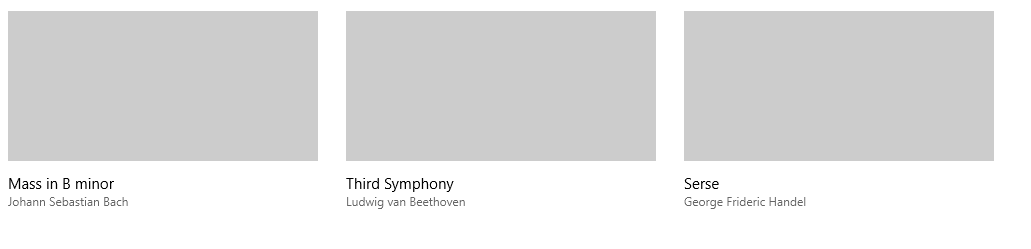
<GridView ItemsSource="{x:Bind ViewModel.Recordings}">
    <GridView.ItemTemplate>
        <DataTemplate x:Name="ImageTextDataTemplate2" x:DataType="local:Recording">
            <StackPanel Height="280" Width="320" Margin="12" AutomationProperties.Name="{x:Bind CompositionName}">
                <Image Source="Placeholder.png" Height="180" Width="320" Stretch="UniformToFill"/>
                <StackPanel Margin="0,12">
                    <TextBlock Text="{x:Bind CompositionName}"/>
                    <TextBlock Text="{x:Bind ArtistName}" Style="{ThemeResource CaptionTextBlockStyle}" Foreground="{ThemeResource SystemControlPageTextBaseMediumBrush}"/>
                </StackPanel>
            </StackPanel>
        </DataTemplate>
    </GridView.ItemTemplate>
    <GridView.ItemsPanel>
        <ItemsPanelTemplate>
            <ItemsWrapGrid MaximumRowsOrColumns="4" Orientation="Horizontal"/>
        </ItemsPanelTemplate>
    </GridView.ItemsPanel>
</GridView>
Kép átfedő szöveggel
Ezzel a sablonnal megjeleníthet egy médiagyűjteményt szövegátfedéssel.

<GridView ItemsSource="{x:Bind ViewModel.Recordings}">
    <GridView.ItemTemplate>
        <DataTemplate x:Name="ImageOverlayDataTemplate" x:DataType="local:Recording">
            <Grid Height="180" Width="320" AutomationProperties.Name="{x:Bind CompositionName}">
                <Image Source="Placeholder.png" Stretch="UniformToFill"/>
                <StackPanel Orientation="Vertical" Height="60" VerticalAlignment="Bottom" Background="{ThemeResource SystemBaseLowColor}" Padding="12">
                    <TextBlock Text="{x:Bind CompositionName}"/>
                    <TextBlock Text="{x:Bind ArtistName}" Style="{ThemeResource CaptionTextBlockStyle}" Foreground="{ThemeResource SystemControlPageTextBaseMediumBrush}"/>
                </StackPanel>
            </Grid>
        </DataTemplate>
    </GridView.ItemTemplate>
    <GridView.ItemsPanel>
        <ItemsPanelTemplate>
            <ItemsWrapGrid MaximumRowsOrColumns="4" Orientation="Horizontal"/>
        </ItemsPanelTemplate>
    </GridView.ItemsPanel>
</GridView>
Kapcsolódó cikkek
Dolgozzon együtt velünk a GitHubon
A tartalom forrása a GitHubon található, ahol létrehozhat és áttekinthet problémákat és lekéréses kérelmeket is. További információért tekintse meg a közreműködői útmutatónkat.

Windows developer