Megjegyzés
Az oldalhoz való hozzáféréshez engedély szükséges. Megpróbálhat bejelentkezni vagy módosítani a címtárat.
Az oldalhoz való hozzáféréshez engedély szükséges. Megpróbálhatja módosítani a címtárat.
A HP Motion vezérlők teljesen új típusú Windows Mixed Reality vezérlők: ugyanaz a nyomkövetési technológia, amely némileg eltérő bemenetekkel rendelkezik:
- Az érintőpárnát két gomb váltotta fel: A és B a jobb oldali vezérlőhöz, valamint X és Y a bal oldali vezérlőhöz.
- A Grasp mostantól egy olyan eseményindító, amely egy 0,0 és 1,0 közötti értékáramot tesz közzé a Gomb és a Nincs lenyomva állapotú gomb helyett.
Mivel az új bemenetek nem érhetők el a meglévő Windows- és Unity API-kon keresztül, a dedikált Microsoft.MixedReality.Input UPM-csomagra van szüksége.
Fontos
A csomag osztályai nem helyettesítik a meglévő Windows- és Unity API-kat, hanem kiegészítik őket. A klasszikus Windows Mixed Reality vezérlők és a HP Motion Controllerek számára egyaránt elérhető funkciók ugyanazon a kódútvonalon érhetők el a meglévő API-k használatával. Csak az új bemenetek használatához szükséges a további Microsoft.MixedReality.Input csomag.
HP Motion Controller – áttekintés
A Microsoft.MixedReality.Input.MotionController egy mozgásvezérlőt jelöl. Minden MotionController-példány rendelkezik XR-sel. WSA. Input.InteractionSource társ, amely a kezűség, a szállító azonosítója, a termékazonosító és a verzió alapján korrelálható.
A MotionController-példányokat úgy ragadhatja meg, hogy létrehoz egy MotionControllerWatchert , és feliratkozik az eseményeire, hasonlóan ahhoz, ahogyan az InteractionManager-eseményeket használja az új InteractionSource-példányok felderítéséhez. A MotionController metódusai és tulajdonságai a vezérlő által támogatott bemeneteket írják le, beleértve a gombokat, az eseményindítókat, a 2D tengelyt és a hüvelykujjat. A MotionController osztály a Bemeneti állapotok elérésére szolgáló módszereket is elérhetővé teszi a MotionControllerReading osztályon keresztül. A MotionControllerReading osztály egy pillanatképet jelöl a vezérlő állapotáról egy adott időpontban.
A Microsoft.MixedReality.Input telepítése a Mixed Reality funkció eszközzel
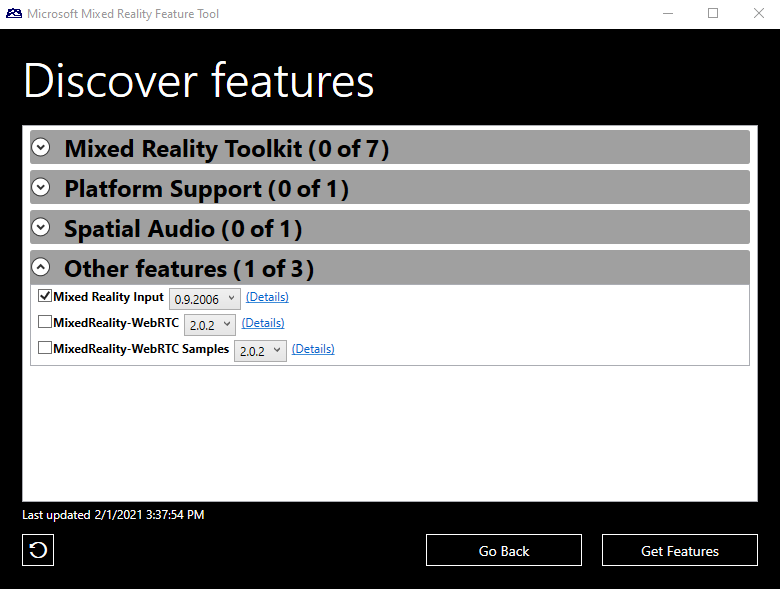
Telepítse a Microsoft.MixedReality.Input beépülő modult az új Mixed Reality Feature Tool alkalmazással. Kövesse a telepítési és használati utasításokat, és válassza ki a Mixed Reality Input csomagot a Mixed Reality Toolkit kategóriában:
A Microsoft.MixedReality.Input használata
Bemeneti értékek
A MotionController kétféle bemenetet tehet közzé:
- A gombok és az eseményindítók állapotát egy 0,0 és 1,0 közötti egyedi lebegőpontos érték fejezi ki, amely azt jelzi, hogy mennyit nyomnak le.
- Egy gomb csak 0,0-t (ha nincs lenyomva) vagy 1,0-t (megnyomva) tud visszaadni, míg az eseményindítók 0,0 (teljesen kioldva) és 1,0 (teljesen lenyomás) közötti folyamatos értékeket adhatnak vissza.
- A hüvelykujj állapotát egy vektor2 fejezi ki, amelynek X és Y összetevői -1,0 és 1,0 között vannak.
A MotionController.GetPressableInputs() metódussal visszaadhatja a lenyomott értéket (gombokat és triggereket) visszaállító bemenetek listáját vagy a MotionController.GetXYInputs() metódust a kéttengelyes értéket visszavivő bemenetek listájának visszaadásához.
A MotionControllerReading-példány a vezérlő adott időpontban történő állapotát jelöli:
- A GetPressedValue() lekéri egy gomb vagy eseményindító állapotát.
- A GetXYValue() lekéri a hüvelykujj állapotát.
Gyorsítótár létrehozása a MotionController-példányok és állapotuk gyűjteményének fenntartásához
Először példányosítson egy MotionControllerWatchert, és regisztrálja a kezelőket a MotionControllerAdded és a MotionControllerRemoved eseményeihez, hogy megőrizze a rendelkezésre álló MotionController-példányok gyorsítótárát. Ennek a gyorsítótárnak egy GameObjecthez csatolt MonoBehavior-nak kell lennie, ahogy az a következő kódban is látható:
public class MotionControllerStateCache : MonoBehaviour
{
    /// <summary>
    /// Internal helper class which associates a Motion Controller
    /// and its known state
    /// </summary>
    private class MotionControllerState
    {
        /// <summary>
        /// Construction
        /// </summary>
        /// <param name="mc">motion controller</param>`
        public MotionControllerState(MotionController mc)
        {
            this.MotionController = mc;
        }

        /// <summary>
        /// Motion Controller that the state represents
        /// </summary>
        public MotionController MotionController { get; private set; }
        …
    }

    private MotionControllerWatcher _watcher;
    private Dictionary<Handedness, MotionControllerState>
        _controllers = new Dictionary<Handedness, MotionControllerState>();

    /// <summary>
    /// Starts monitoring controller's connections and disconnections
    /// </summary>
    public void Start()
    {
        _watcher = new MotionControllerWatcher();
        _watcher.MotionControllerAdded += _watcher_MotionControllerAdded;
        _watcher.MotionControllerRemoved += _watcher_MotionControllerRemoved;
        var nowait = _watcher.StartAsync();
    }

    /// <summary>
    /// Stops monitoring controller's connections and disconnections
    /// </summary>
    public void Stop()
    {
        if (_watcher != null)
        {
            _watcher.MotionControllerAdded -= _watcher_MotionControllerAdded;
            _watcher.MotionControllerRemoved -= _watcher_MotionControllerRemoved;
            _watcher.Stop();
        }
    }

    /// <summary>
    /// called when a motion controller has been removed from the system:
    /// Remove a motion controller from the cache
    /// </summary>
    /// <param name="sender">motion controller watcher</param>
    /// <param name="e">motion controller </param>
    private void _watcher_MotionControllerRemoved(object sender, MotionController e)
    {
        lock (_controllers)
        {
            _controllers.Remove(e.Handedness);
        }
    }

    /// <summary>
    /// called when a motion controller has been added to the system:
    /// Remove a motion controller from the cache
    /// </summary>
    /// <param name="sender">motion controller watcher</param>
    /// <param name="e">motion controller </param>
    private void _watcher_MotionControllerAdded(object sender, MotionController e)
    {
        lock (_controllers)
        {
            _controllers[e.Handedness] = new MotionControllerState(e);
        }
    }
}
Új bemenetek olvasása lekérdezéssel
Az egyes ismert vezérlők aktuális állapotát a MotionController.TryGetReadingAtTime segítségével olvashatja el a MonoBehavior osztály Update metódusa során. Át szeretné adni a DateTime.Now paramétert időbélyegzőként, hogy a vezérlő legújabb állapota be legyen olvasva.
public class MotionControllerStateCache : MonoBehaviour
{
    …

    private class MotionControllerState
    {
        …

        /// <summary>
        /// Update the current state of the motion controller
        /// </summary>
        /// <param name="when">time of the reading</param>
        public void Update(DateTime when)
        {
            this.CurrentReading = this.MotionController.TryGetReadingAtTime(when);
        }

        /// <summary>
        /// Last reading from the controller
        /// </summary>
        public MotionControllerReading CurrentReading { get; private set; }
    }

    /// <summary>
    /// Updates the input states of the known motion controllers
    /// </summary>
    public void Update()
    {
        var now = DateTime.Now;

        lock (_controllers)
        {
            foreach (var controller in _controllers)
            {
                controller.Value.Update(now);
            }
        }
    }
}
A vezérlők aktuális bemeneti értékét a vezérlőKezesség beállításával kaphatja meg:
public class MotionControllerStateCache : MonoBehaviour
{
    …
    /// <summary>
    /// Returns the current value of a controller input such as button or trigger
    /// </summary>
    /// <param name="handedness">Handedness of the controller</param>
    /// <param name="input">Button or Trigger to query</param>
    /// <returns>float value between 0.0 (not pressed) and 1.0
    /// (fully pressed)</returns>
    public float GetValue(Handedness handedness, ControllerInput input)
    {
        MotionControllerReading currentReading = null;

        lock (_controllers)
        {
            if (_controllers.TryGetValue(handedness, out MotionControllerState mc))
            {
                currentReading = mc.CurrentReading;
            }
        }

        return (currentReading == null) ? 0.0f : currentReading.GetPressedValue(input);
    }

    /// <summary>
    /// Returns the current value of a controller input such as button or trigger
    /// </summary>
    /// <param name="handedness">Handedness of the controller</param>
    /// <param name="input">Button or Trigger to query</param>
    /// <returns>float value between 0.0 (not pressed) and 1.0
    /// (fully pressed)</returns>
    public float GetValue(UnityEngine.XR.WSA.Input.InteractionSourceHandedness handedness, ControllerInput input)
    {
        return GetValue(Convert(handedness), input);
    }

    /// <summary>
    /// Returns a boolean indicating whether a controller input such as button or trigger is pressed
    /// </summary>
    /// <param name="handedness">Handedness of the controller</param>
    /// <param name="input">Button or Trigger to query</param>
    /// <returns>true if pressed, false if not pressed</returns>
    public bool IsPressed(Handedness handedness, ControllerInput input)
    {
        return GetValue(handedness, input) >= PressedThreshold;
    }
}
Például egy InteractionSource analóg fogóértékének olvasásához:
/// Read the analog grasp value of all connected interaction sources
void Update()
{
    …
    var stateCache = gameObject.GetComponent<MotionControllerStateCache>();
    foreach (var sourceState in InteractionManager.GetCurrentReading())
    {
        float graspValue = stateCache.GetValue(sourceState.source.handedness,
            Microsoft.MixedReality.Input.ControllerInput.Grasp);
        …
    }
}
Események létrehozása az új bemenetekből
A vezérlők állapotának lekérdezése helyett lehetőség van arra, hogy eseményként kezelje az összes állapotváltozást, így még a keretnél rövidebb ideig tartó leggyorsabb műveleteket is kezelheti. Ahhoz, hogy ez a megközelítés működjön, a mozgásvezérlők gyorsítótárának fel kell dolgoznia a vezérlő által az utolsó keret óta közzétett összes állapotot, amelyet a MotionControllerből lekért utolsó MotionControllerReading időbélyegének tárolásával és a MotionController.TryGetReadingAfterTime() hívásával tehet meg:
private class MotionControllerState
{
    …
    /// <summary>
    /// Returns an array representng buttons which are pressed
    /// </summary>
    /// <param name="reading">motion controller reading</param>
    /// <returns>array of booleans</returns>
    private bool[] GetPressed(MotionControllerReading reading)
    {
        if (reading == null)
        {
            return null;
        }
        else
        {
            bool[] ret = new bool[this.pressableInputs.Length];
            for (int i = 0; i < pressableInputs.Length; ++i)
            {
                ret[i] = reading.GetPressedValue(pressableInputs[i]) >= PressedThreshold;
            }

            return ret;
        }
    }

    /// <summary>
    /// Get the next available state of the motion controller
    /// </summary>
    /// <param name="lastReading">previous reading</param>
    /// <param name="newReading">new reading</param>
    /// <returns>true is a new reading was available</returns>
    private bool GetNextReading(MotionControllerReading lastReading, out MotionControllerReading newReading)
    {
        if (lastReading == null)
        {
            // Get the first state published by the controller
            newReading = this.MotionController.TryGetReadingAfterSystemRelativeTime(TimeSpan.FromSeconds(0.0));
        }
        else
        {
            // Get the next state published by the controller
            newReading = this.MotionController.TryGetReadingAfterTime(lastReading.InputTime);
        }

        return newReading != null;
    }

    /// <summary>
    /// Processes all the new states published by the controller since the last call
    /// </summary>
    public IEnumerable<MotionControllerEventArgs> GetNextEvents()
    {
        MotionControllerReading lastReading = this.CurrentReading;
        bool[] lastPressed = GetPressed(lastReading);
        MotionControllerReading newReading;
        bool[] newPressed;

        while (GetNextReading(lastReading, out newReading))
        {
            newPressed = GetPressed(newReading);

            // If we have two readings, compare and generate events
            if (lastPressed != null)
            {
                for (int i = 0; i < pressableInputs.Length; ++i)
                {
                    if (newPressed[i] != lastPressed[i])
                    {
                        yield return new MotionControllerEventArgs(this.MotionController.Handedness, newPressed[i], this.pressableInputs[i], newReading.InputTime);
                    }
                }
            }

            lastPressed = newPressed;
            lastReading = newReading;
        }

        // No more reading
        this.CurrentReading = lastReading;
    }
}
Most, hogy frissítette a gyorsítótár belső osztályait, a MonoBehavior osztály két eseményt tehet elérhetővé ( Megnyomva és Felszabadítva ), és az Update() metódusból emelheti ki őket:
/// <summary>
/// Event argument class for InputPressed and InputReleased events
/// </summary>
public class MotionControllerEventArgs : EventArgs
{
    public MotionControllerEventArgs(Handedness handedness, bool isPressed, rollerInput input, DateTime inputTime)
    {
        this.Handedness = handedness;
        this.Input = input;
        this.InputTime = inputTime;
        this.IsPressed = isPressed;
    }

    /// <summary>
    /// Handedness of the controller raising the event
    /// </summary>
    public Handedness Handedness { get; private set; }

    /// <summary>
    /// Button pressed or released
    /// </summary>
    public ControllerInput Input { get; private set; }

    /// <summary>
    /// Time of the event
    /// </summary>
    public DateTime InputTime { get; private set; }

    /// <summary>
    /// true if button is pressed, false otherwise
    /// </summary>
    public bool IsPressed { get; private set; }
}

/// <summary>
/// Event raised when a button is pressed
/// </summary>
public event EventHandler<MotionControllerEventArgs> InputPressed;

/// <summary>
/// Event raised when a button is released
/// </summary>
public event EventHandler<MotionControllerEventArgs> InputReleased;

/// <summary>
/// Updates the input states of the known motion controllers
/// </summary>
public void Update()
{
    // If some event handler has been registered, we need to process all states
    // since the last update, to avoid missing a quick press / release
    if ((InputPressed != null) || (InputReleased != null))
    {
        List<MotionControllerEventArgs> events = new <MotionControllerEventArgs>();

        lock (_controllers)
        {
            foreach (var controller in _controllers)
            {
                events.AddRange(controller.Value.GetNextEvents());
            }
        }

        // Sort the events by time
        events.Sort((e1, e2) => DateTime.Compare(e1.InputTime, e2.InputTime));

        foreach (MotionControllerEventArgs evt in events)
        {
            if (evt.IsPressed && (InputPressed != null))
            {
                InputPressed(this, evt);
            }
            else if (!evt.IsPressed && (InputReleased != null))
            {
                InputReleased(this, evt);
            }
        }
    }
    else
    {
        // As we do not predict button presses and the timestamp of the next e is in the future
        // DateTime.Now is correct in this context as it will return the latest e of controllers
        // which is the best we have at the moment for the frame.
        var now = DateTime.Now;
        lock (_controllers)
        {
            foreach (var controller in _controllers)
            {
                controller.Value.Update(now);
            }
        }
    }
}
A fenti példakódok struktúrája sokkal olvashatóbbá teszi az események regisztrálását:
public InteractionSourceHandedness handedness;
public Microsoft.MixedReality.Input.ControllerInput redButton;

// Start of the Mono Behavior: register handlers for events from cache
void Start()
{
    var stateCache = gameObject.GetComponent<MotionControllerStateCache>();
    stateCache.InputPressed += stateCache_InputPressed;
    stateCache.InputReleased += stateCache_InputReleased;
    …
}

// Called when a button is released
private void stateCache_InputReleased(object sender, MotionControllerStateCache.MotionControllerEventArgs e)
{
    if ((e.SourceHandedness == handedness) && (e.Input == redButton))
    {
        …
    }
}

// Called when a button is pressed
private void stateCache_InputPressed(object sender, MotionControllerStateCache.MotionControllerEventArgs e)
{
    if ((e.SourceHandedness == handedness) && (e.Input == redButton))
    {
        …
    }
}