Catatan
Akses ke halaman ini memerlukan otorisasi. Anda dapat mencoba masuk atau mengubah direktori.
Akses ke halaman ini memerlukan otorisasi. Anda dapat mencoba mengubah direktori.
View the CSS changes you made during your DevTools diagnostic session (from the Styles and Computed CSS editing panes). Similar to the conventions of other diffing tools, deleted lines appear in red and added lines are green.
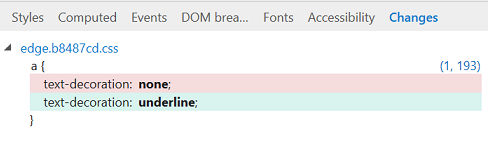
You can also (from the right-click context menu) copy your changes to the clipboard, revert your changes, or jump to their source location.